
1. Introducció
This manual provides detailed instructions for the installation, operation, and maintenance of your NINETOM 12.3-inch Ultra-Narrow Touchscreen Wireless CarPlay Android Auto Receiver. This device is designed to upgrade your vehicle's infotainment system while retaining original functionalities.
2. Informació de compatibilitat
This touchscreen receiver is specifically compatible with the following vehicle models and system types:
- Vehicle Series: BMW X3 X4 Series F25 / F26
- Anys de model: 2011–2012
- Original System: CIC System only. This unit is no compatible with NBT, EVO, or CCC systems.
It is crucial to verify your car's original system type before installation. Refer to the images below for visual identification of compatible and incompatible systems.

Image 2.1: Compatibility chart for BMW X3/X4 Series F25/F26 with CIC System. This image illustrates how to identify your car's original system by checking the main menu display. A green checkmark indicates compatibility with the CIC system, while red crosses indicate incompatibility with NBT, EVO, and CCC systems.
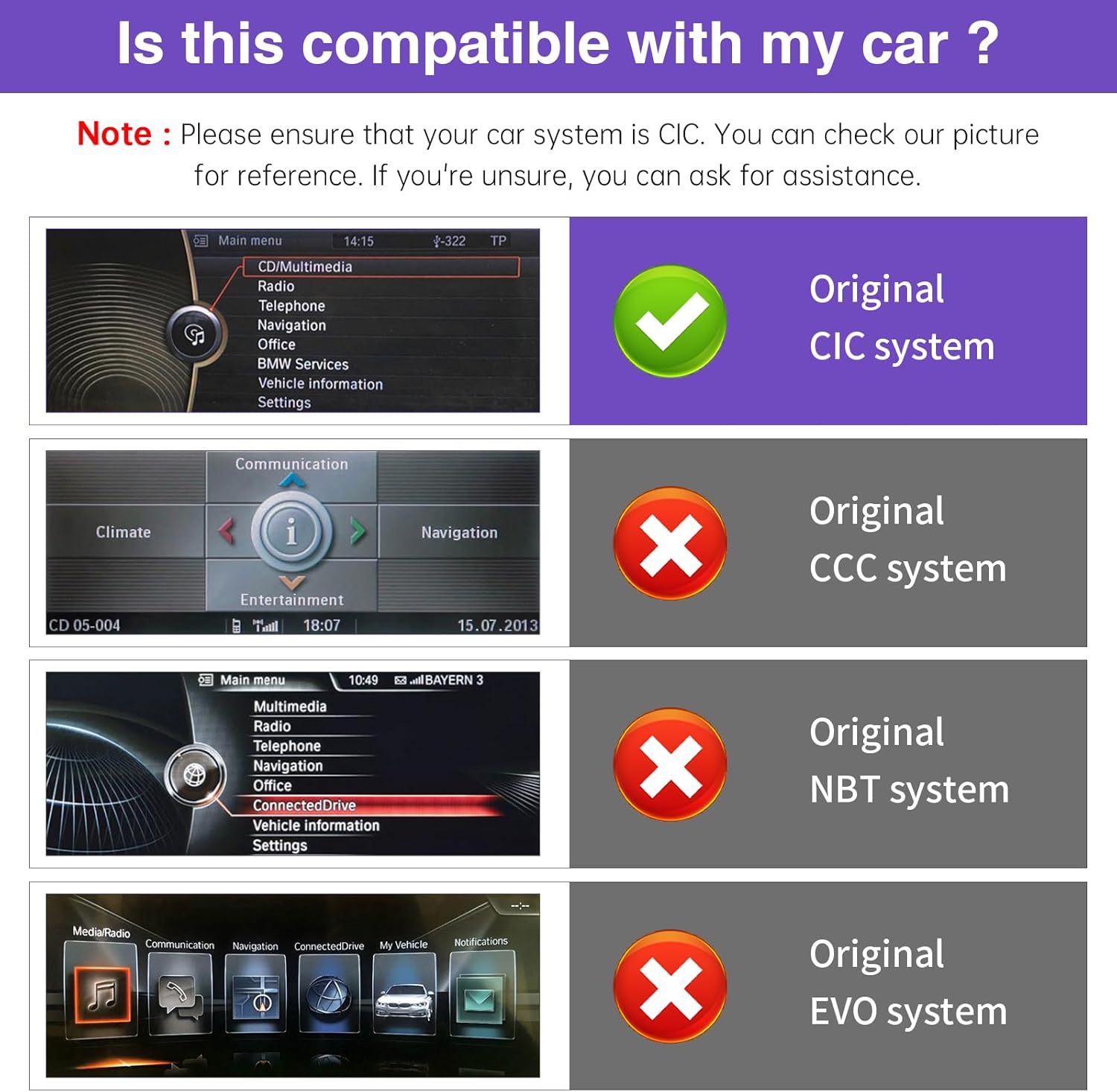
Image 2.2: Detailed compatibility check for original car systems. This image provides a clearer view of the main menu interfaces for CIC, CCC, NBT, and EVO systems, helping users confirm their vehicle's system type.
3. Característiques clau
- Pantalla tàctil HD d'12.3 polzades: Features a 1920×720 IPS display with ultra-narrow bezels and a premium aluminum body. IN-CELL full lamination technology reduces glare by up to 75%.
- Wireless & Wired CarPlay/Android Auto: Seamless integration with your smartphone for navigation, calls, messages, and music via Siri or Google Assistant. Supports mirror projection.
- Dual System Switching: Effortlessly switch between the Linux interface and your vehicle’s original system with a single button press.
- Retains Original Car Functions: Preserves factory radio, amplifier, joystick controls, steering wheel controls, original reversing camera, and other vehicle software functions.
- Linux System: Provides stable performance without freezing or lag.
- Day and Night Mode: Automatic light sensitivity adjusts display brightness based on your car's original headlights.

Image 3.1: The NINETOM 12.3-inch touchscreen displaying the CarPlay interface, shown both as a standalone unit and integrated into a BMW dashboard. This highlights the modern display and its integration.

Image 3.2: Comparison illustrating the design improvements of the new generation screen, featuring a narrow bezel and in-cell technology for better clarity and reduced glare compared to previous designs.

Image 3.3: Resolution comparison demonstrating the visual difference between 720x480P, 1280x480P, and the NINETOM unit's 1920x720P display, emphasizing enhanced image quality.
4. Configuració i instal·lació
Installation of this unit requires removing parts of the dashboard to connect the necessary wiring. While the installation does not damage original wiring or affect factory warranty, professional installation is highly recommended if you are not confident in performing the procedure yourself.
4.1. Comprovació prèvia a la instal·lació
- Confirm your vehicle's compatibility (BMW X3/X4 F25/F26, 2011-2012, CIC system).
- Ensure all components listed in the package contents are present.
4.2. Contingut del paquet
The package includes the 12.3-inch touchscreen unit and the following accessories:

Image 4.1: Product size and accessories list. This image displays the dimensions of the 12.3-inch screen and the included components: power cable, USB cable, AUX cable, and mounting bracket.
- Cable d'alimentació
- cable USB
- Cable AUX
- Suport de muntatge
4.3. Passos d'instal·lació (orientació general)
- Carefully remove the necessary dashboard trim pieces to access the original head unit.
- Disconnect the original head unit's cables.
- Connect the provided power cable, USB cable, and AUX cable to the new NINETOM unit and the vehicle's wiring harness as per the wiring diagram (refer to the detailed installation guide provided separately or contact support).
- Mount the new screen using the provided bracket.
- Before reassembling the dashboard, test all functions of the new unit, including audio, touchscreen response, CarPlay/Android Auto connectivity, and system switching.
- Once all functions are verified, carefully reassemble the dashboard.

Image 4.2: Before and after installation comparison. This image visually demonstrates the transformation of the car's interior, showing the original smaller screen replaced by the larger, modern 12.3-inch NINETOM display.
5. Instruccions de funcionament
5.1. Dual System Switching
To switch between the NINETOM Linux interface and your vehicle's original CIC system, simply long-press the "OEM Car Info" button on the unit or your car's controls. This allows seamless transition without modifying your car's original software.

Image 5.1: Quick System Switch. This diagram illustrates the process of switching between the new NINETOM interface and the original car interface by holding the "OEM Car Info" button.
5.2. CarPlay i Android Auto
The unit supports both wireless and wired CarPlay and Android Auto. Once connected, you can access navigation, communication, and entertainment apps directly on the touchscreen. Use voice assistants like Siri or Google Assistant for hands-free operation.
- Connexió sense fil: Follow the pairing instructions on the screen to connect your smartphone via Bluetooth and Wi-Fi.
- Connexió per cable: Connect your smartphone using a USB cable to the designated USB port.
- Mirror Projection: Sync your smartphone screen to the unit for displaying videos, maps, and other content.
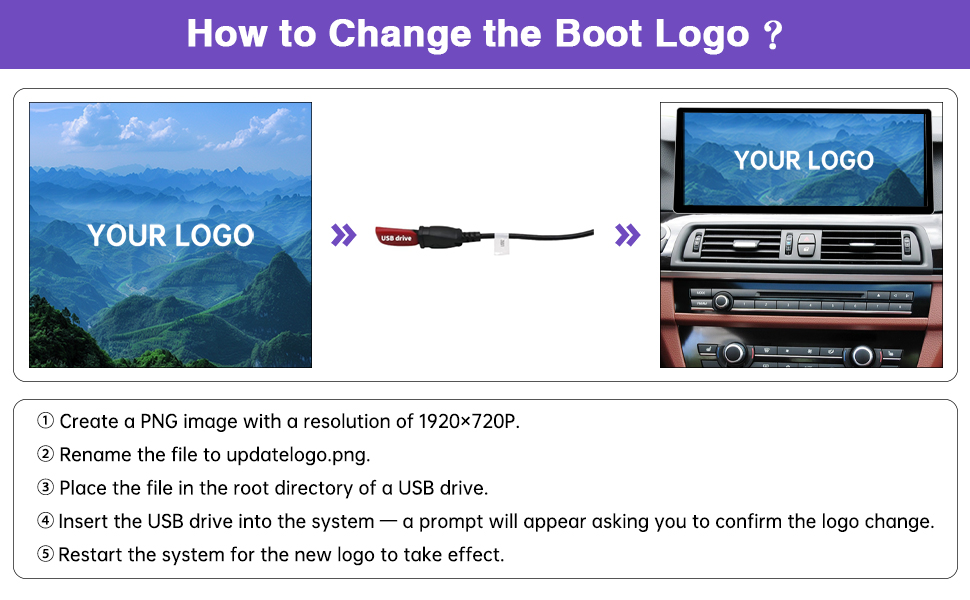
Image 5.2: Support for Wireless/Wired CarPlay & Android Auto. This image demonstrates the unit's capability to connect smartphones for integrated navigation, music, and hands-free calls, along with screen mirroring.
5.3. Mode dia i nit
The unit automatically adjusts its display brightness and color scheme between day and night modes based on your car's original headlight status. This ensures optimal visibility in varying light conditions.

Image 5.3: Day and Night Mode. This image illustrates the automatic adjustment of the screen's display mode (day or night) based on the car's headlight activation, enhancing visibility.
5.4. Customizing Boot Logo
You can personalize the boot-up screen with a custom logo:
- Create a PNG image with a resolution of 1920×720 pixels.
- Canvia el nom de file a updatelogo.png.
- Col·loca això file al directori arrel d'una unitat USB.
- Insert the USB drive into the unit's USB port. A prompt will appear asking you to confirm the logo change.
- Confirm the change and restart the system for the new logo to take effect.
6. Manteniment
To ensure the longevity and optimal performance of your NINETOM touchscreen receiver, follow these maintenance guidelines:
- Neteja de la pantalla: Feu servir un drap suau i sense borrissol dissenyat específicament per a pantalles d'electrònica. Dampen the cloth slightly with water or a screen-cleaning solution if necessary. Avoid harsh chemicals, abrasive materials, or excessive moisture.
- Actualitzacions de programari: Reviseu periòdicament el fabricant website or contact support for any available software updates to ensure the system runs efficiently and securely.
- Eviteu temperatures extremes: No exposeu la unitat a calor o fred extrems durant períodes prolongats, ja que això pot afectar el seu rendiment i la seva vida útil.
7. Solució De Problemes
If you encounter issues with your NINETOM touchscreen receiver, consider the following common solutions:
- No Power/Screen Not Turning On:
- Check all power cable connections to ensure they are securely seated.
- Verify the vehicle's fuse for the infotainment system.
- Sense àudio:
- Ensure the AUX cable is correctly connected.
- Check the volume levels on both the NINETOM unit and your car's original audio system.
- Confirm that the correct audio input source is selected on the NINETOM unit.
- CarPlay/Android Auto no es connecta:
- For wireless connection, ensure Bluetooth and Wi-Fi are enabled on your smartphone and correctly paired.
- For wired connection, try a different USB cable or USB port.
- Restart both your smartphone and the NINETOM unit.
- Retard/Bloqueig del sistema:
- Reinicieu la unitat.
- Ensure no excessive applications are running in the background (if applicable to the Linux system).
- Funcions originals del cotxe no funcionen:
- Verify that the dual system switching is functioning correctly and you are in the original car system mode when expecting original functions.
- Recheck all wiring connections, as incorrect connections are a common cause.
For persistent issues, please contact NINETOM customer support. Many issues can be resolved through remote assistance.
8. Especificacions
| Mida de la pantalla | 12.3 polzades |
| Resolució | IPS de 1920 × 720 |
| Sistema operatiu | Linux |
| Connectivitat | Wireless/Wired CarPlay, Wireless/Wired Android Auto, Mirror Projection |
| Compatibilitat | BMW X3 X4 Series F25/F26 (2011–2012) with CIC System |
| Dimensions (paquet) | 13.43 x 7.95 x 6.34 polzades |
| Pes de l'article | 4.51 lliures (2.05 quilograms) |
| Característica especial | Pantalla de visualització digital |
9. Garantia i Suport
9.1. Informació de la garantia
The NINETOM 12.3-inch Ultra-Narrow Touchscreen Receiver comes with a 1 anys de garantia des de la data de compra. Aquesta garantia cobreix els defectes de fabricació i garanteix que el producte funcioni tal com està previst en condicions d'ús normal. Si us plau, conserveu el comprovant de compra per a reclamacions de garantia.
9.2. Installation Assistance and Customer Support
NINETOM offers comprehensive installation assistance and customer support. If you encounter any difficulties during installation or operation, or if you have questions, please do not hesitate to contact our support team. Our team is experienced in resolving common issues related to cable connections and settings.
Per obtenir ajuda, visiteu el NINETOM Store on Amazon o consulteu la informació de contacte que s'inclou amb l'embalatge del producte.
