
1. Introducció
This manual provides instructions for the setup, operation, and maintenance of your HISTTON H4-T Mini PC. The H4-T is a compact, fanless industrial mini PC designed for various applications, featuring an Intel Core i7-10710U processor, Windows 11 Pro, and extensive connectivity options including triple 4K display support.
2. Què hi ha a la caixa
Verifiqueu que tots els elements que s'enumeren a continuació s'inclouen al vostre paquet. Si falta algun element o hi ha algun malmès, poseu-vos en contacte amb l'atenció al client.
- 1 x HISTTON H4-T Mini PC
- 1 x adaptador de corrent
- 1 x Manual d'usuari
- 1 x cable HDMI
- 1 x Muntatge VESA
- 6 x cargols
- 4 x antenes WiFi
- 2 cables SATA

Image: Package contents of the HISTTON H4-T Mini PC.
3. Producte acabatview
3.1 Característiques clau
- Processador: Intel Core i7-10710U (10th Gen), 6 Cores, 12 Threads, up to 4.70 GHz, 12MB Smart Cache.
- Gràfics: Intel UHD Graphics for 10th Gen Processors, supporting 4K resolution.
- Memòria: 2 x DDR4 SO-DIMM slots, expandable up to 64GB.
- Emmagatzematge: 1 x M.2 2280 NVMe PCIe 3.0x4 / SATA 3 SSD slot, 1 x 2.5-inch SATA HDD/SSD bay.
- Sortida de visualització: HD, DisplayPort (DP), and Type-C for triple 4K display support.
- Xarxa: 2 x RJ45 Intel I210/211 Gigabit LAN ports, Dual-band WiFi (2.4G+5.0G), Bluetooth 4.2.
- Ports: 4 x USB 3.0, 4 x USB 2.0, 6 x DB9 COM ports (configurable for RS232/RS422/RS485), 2 x 6-pin GPIO, 1 x SIM card slot, 1 x SPK, 1 x MIC.
- Refrigeració: Fanless design for silent operation and enhanced durability.
- Sistema operatiu: Pre-installed Windows 11 Pro 64-bit (activated), supports Ubuntu.
3.2 Component Layout

Imatge: Més deview of the Intel Core i7-10710U processor specifications.

Image: Internal component layout, showing memory and storage expansion slots.

Imatge: Detallada view of the multiple interfaces available on the Mini PC.
4. Instruccions de configuració
4.1 Connexió de perifèrics
- Connecta la pantalla: Use an HDMI, DisplayPort, or Type-C cable to connect your monitor(s) to the corresponding ports on the Mini PC.
- Connectar dispositius USB: Plug in your USB keyboard, mouse, and any other USB peripherals into the available USB 2.0 or USB 3.0 ports.
- Connectar la xarxa: For a wired connection, connect an Ethernet cable from your router or modem to one of the RJ45 LAN ports. For wireless, ensure the WiFi antennas are securely attached.
- Connecta l'àudio: If using external speakers or headphones, connect them to the SPK (speaker) port. A microphone can be connected to the MIC port.
4.2 Encès
- Connect the power adapter to the DC 19V 5A input port on the Mini PC.
- Connecteu l'adaptador de corrent a una presa de corrent.
- Press the power button located on the front or side of the Mini PC. The power indicator light will illuminate.
4.3 Initial Operating System Setup
The Mini PC comes with Windows 11 Pro pre-installed and activated. Upon first boot, you may be guided through the standard Windows setup process to configure language, region, network, and user accounts. Follow the on-screen prompts to complete the setup.
5. Instruccions de funcionament
5.1 Triple Display Configuration
The HISTTON H4-T supports up to three independent 4K displays simultaneously using the HD, DisplayPort (DP), and Type-C outputs. To configure multiple displays:
- Connect your monitors to the available HD, DP, and Type-C ports.
- Once Windows 11 Pro has loaded, right-click on the desktop and select "Display settings."
- In the Display settings, you can detect, identify, and arrange your displays. Choose your preferred display mode (e.g., Extend these displays, Duplicate these displays).

Image: Triple 4K display setup with the Mini PC.
5.2 Network and Wireless Connectivity
El Mini PC ofereix opcions de xarxa amb cable i sense fil.
- LAN per cable: Connect an Ethernet cable to either of the two RJ45 ports for a stable Gigabit network connection.
- WiFi: Ensure the WiFi antennas are connected. In Windows, click the network icon in the taskbar, select your desired WiFi network, enter the password, and connect. The Mini PC supports dual-band WiFi (2.4G and 5.0G).
- Bluetooth: Bluetooth 4.2 is integrated. To pair devices, go to Windows Settings > Bluetooth & devices, turn on Bluetooth, and select "Add device."
- Ranura per a targeta SIM: A SIM card slot is provided for an optional 4G/5G module (not included by default). If a module is installed, insert a compatible SIM card for mobile data connectivity.

Image: High-speed network connectivity options.
5.3 Expansió d'emmagatzematge
The Mini PC supports additional storage devices:
- SSD M.2: An M.2 2280 NVMe PCIe 3.0x4 / SATA 3 SSD can be installed in the dedicated M.2 slot.
- 2.5-inch SATA Drive: A 2.5-inch SATA HDD or SSD can be installed in the internal drive bay using the provided SATA cables and screws.
Nota: Installation of internal components requires opening the chassis. If you are unsure, seek professional assistance.
6. Manteniment
6.1 Fanless Design Benefits
The HISTTON H4-T Mini PC features a fanless design, which offers several advantages:
- Funcionament silenciós: No moving parts for cooling means completely silent operation, ideal for quiet environments.
- Resistència a la pols: Without a fan, dust and debris are less likely to enter the chassis, reducing maintenance needs and improving longevity.
- Durabilitat millorada: Fewer moving parts reduce the risk of mechanical failure.
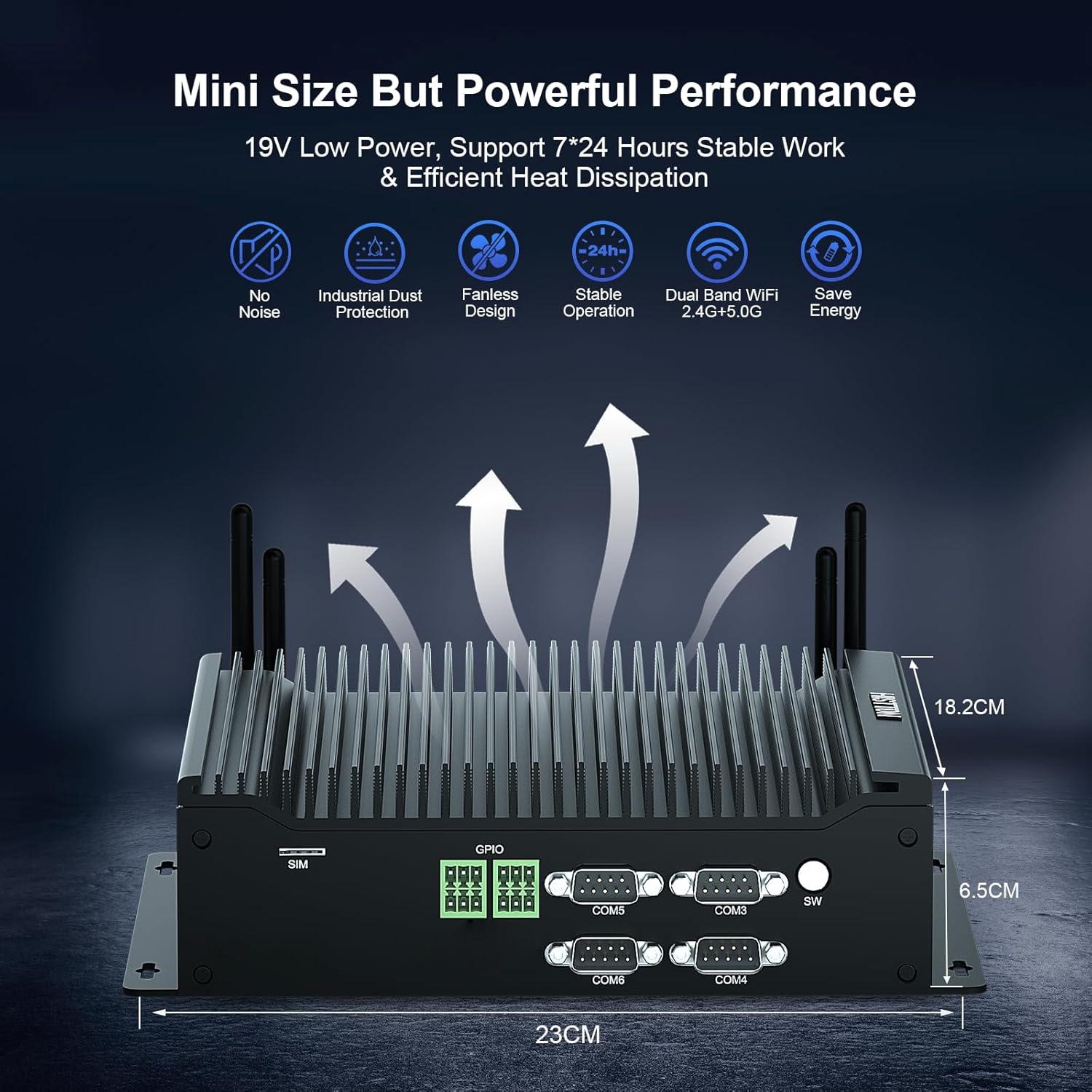
Image: Fanless cooling design and performance benefits.
6.2 Neteja general
Per mantenir un rendiment i un aspecte òptims:
- Wipe the exterior of the Mini PC with a soft, dry cloth.
- Eviteu utilitzar netejadors líquids o materials abrasius.
- Assegureu-vos que el dispositiu estigui apagat i desconnectat abans de netejar-lo.
6.3 Actualitzacions de programari
Regularly update your Windows 11 Pro operating system and drivers to ensure security, stability, and optimal performance. You can check for updates via Windows Settings > Windows Update.
7. Solució De Problemes
If you encounter issues with your HISTTON H4-T Mini PC, refer to the following common troubleshooting steps:
7.1 Sense poder
- Assegureu-vos que l'adaptador de corrent estigui connectat correctament tant al Mini PC com a una presa de corrent que funcioni.
- Verifiqueu que la presa de corrent funciona connectant-hi un altre dispositiu.
- Comproveu si l'adaptador de corrent presenta algun dany visible.
7.2 Sense sortida de pantalla
- Confirm that the monitor is powered on and set to the correct input source (HDMI, DP, or Type-C).
- Ensure display cables are securely connected to both the Mini PC and the monitor.
- Prova de connectar-te a un port de pantalla diferent o utilitzar un cable diferent.
- If using multiple displays, try connecting only one display at a time to isolate the issue.
7.3 Problemes de connectivitat de xarxa
- Amb cable: Check the Ethernet cable connection and ensure your router/modem is working correctly.
- Sense fil: Ensure WiFi antennas are properly attached. Verify that WiFi is enabled in Windows settings and you are connected to the correct network with the correct password. Restart your router/modem.
7.4 Problemes de rendiment del sistema
- Tanca les aplicacions innecessàries que s'executen en segon pla.
- Assegureu-vos que Windows i els controladors estiguin actualitzats.
- Comproveu si hi ha programari maliciós o virus amb un programari antivirus de bona reputació.
- Monitor system resource usage (CPU, RAM, Disk) in Task Manager to identify bottlenecks.
8. Especificacions
| Característica | Especificació |
|---|---|
| Marca | HISTTON |
| Número de model | H4-T |
| Processador | Intel Core i7-10710U (4.7 GHz max turbo frequency) |
| Nuclis/Fils de processador | 6 nuclis / 12 fils |
| Mida de la memòria cau | 12 MB |
| Coprocessador gràfic | Gràfics Intel UHD per a processadors Intel de 10a generació |
| RAM | 16 GB DDR4 SDRAM (2 SO-DIMM slots, up to 64GB) |
| Disc dur | 1 TB Solid State (M.2 NVMe/SATA, plus 2.5-inch SATA bay) |
| Sistema operatiu | Windows 11 Pro |
| Sortida de visualització | HD, DisplayPort, Type-C (Triple 4K Display) |
| Xarxa | 2 x RJ45 Gigabit LAN, Dual-band WiFi (2.4G+5.0G), Bluetooth 4.2 |
| Ports USB | 4x USB 3.0, 4x USB 2.0 |
| Ports COM | 6 x DB9 (supports RS232, RS422, RS485) |
| Altres ports | 2 x 6-pin GPIO, 1 x SIM card slot, 1 x SPK, 1 x MIC |
| Dimensions (LxWxH) | 9.06 x 7.17 x 2.56 polzades (23 x 18.2 x 6.5 cm) |
| Pes de l'article | 6.38 lliures |
| Font d'alimentació | DC 19V 5A |
| Consum d'energia | 15W-20W |
9. Garantia i Suport
HISTTON provides a standard warranty for its products. For specific warranty terms and conditions, please refer to the warranty card included in your package or contact HISTTON customer support directly. If you require technical assistance or have questions not covered in this manual, please reach out to the seller or HISTTON support team for prompt service.
Informació de contacte: Refer to the product packaging or the official HISTTON weblloc web per obtenir les dades de contacte d'assistència més actualitzades.