
1. Acabatview
The Roku Select Series HD TV provides a streamlined entertainment experience. This 32-inch 720p HD television integrates the Roku operating system for easy access to streaming content, live TV, and various applications. It features a voice remote for convenient control and includes technologies like Bluetooth Headphone Mode and Dolby Audio for enhanced sound.
Característiques clau
- Seamless Streaming: Fast Wi-Fi and quick app launches for immediate entertainment access.
- Contingut extens: Access to thousands of streaming apps, free movies, shows, and live TV channels.
- Customizable Home Screen: Organize apps and content for personalized viewing.
- Actualitzacions automàtiques de programari: Ensures access to the latest features and applications.
- Integració de la llar intel·ligent: Compatible with Roku Voice, Siri, Alexa, and Google Assistant for voice control. Supports Apple AirPlay for content sharing.
- Clear HD Picture: 720p HD resolution with Roku Smart Picture technology for optimized visuals.
- Comandament de veu: Search, play, and control streaming with voice commands.
- Àudio millorat: Designed for clear speech and louder sound with Dolby Audio technology.
- Bluetooth Headphone Mode: Private listening with wireless headphones.
Image: Roku 32-inch Select Series HD Smart TV with included remote control.
2. Què hi ha a la caixa
Verifiqueu que tots els components siguin presents abans de continuar amb la configuració.
- Roku Select Series 32" HD TV
- Stands and screws
- Roku Voice Remote with batteries (2 AAA)
- Cable d'alimentació
- Manual d'usuari (aquest document)

Image: Contents of the Roku Select Series TV packaging.
3. Configuració
3.1 Desembalatge
Traieu amb cura el televisor i tots els accessoris de l'embalatge. Conserveu l'embalatge per a futures necessitats de transport o manteniment.
3.2 Col·locació del suport
- Col·loqueu la pantalla del televisor amb la pantalla cap avall sobre una superfície suau i neta per evitar ratllades.
- Alineeu els suports del televisor amb els forats dels cargols de la part inferior del televisor.
- Fixeu els suports amb els cargols proporcionats. Assegureu-vos que estiguin ben ajustats.
3.3 Connexió de perifèrics
Connecteu els vostres dispositius als ports corresponents de la part posterior del televisor.
- HDMI: Connect up to three HDMI devices (e.g., cable box, gaming console, Blu-ray player) to the HDMI ports.
- USB: Use the USB port for media playback or connecting compatible accessories.
- Òptic (S/PDIF): Per connectar a un sistema d'àudio extern.
- Cable de corrent: Connecteu el cable d'alimentació al televisor i després a una presa de corrent.
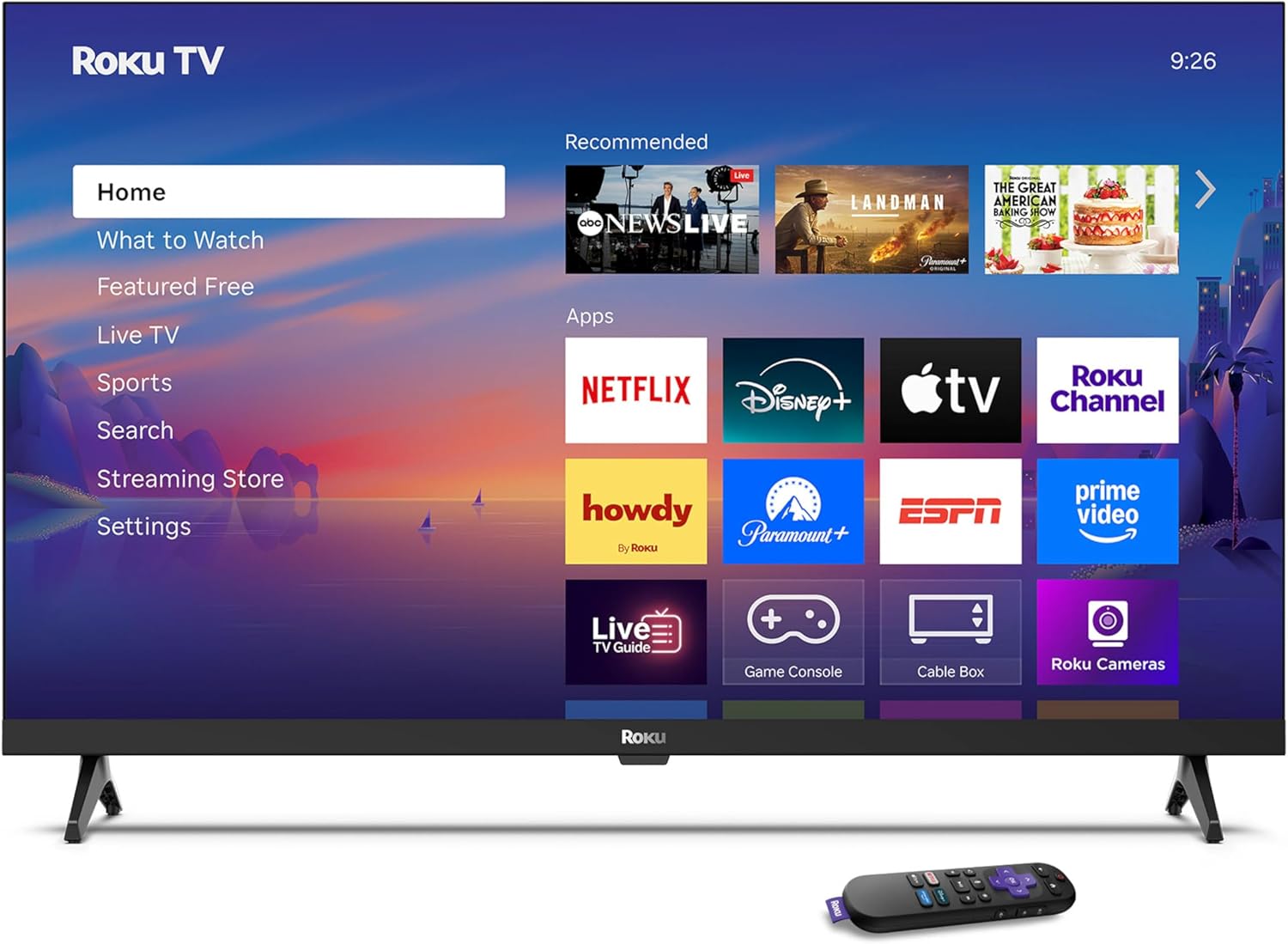
Image: Rear panel connections including HDMI, USB, and optical ports.
3.4 Engegada inicial i connexió de xarxa
- Plug in the TV and press the power button on the remote or TV.
- Follow the on-screen instructions to select your language and connect to your Wi-Fi network.
- Activate your Roku account or create a new one.
Vídeo: Un overview of the Roku TV operating system, demonstrating its user interface and features. This video is provided by Roku, Inc.
4. Instruccions de funcionament
4.1 Using the Voice Remote
The Roku Voice Remote allows for intuitive control of your TV and streaming content.
- Cerca per veu: Press and hold the voice button and speak your command to search for content, launch apps, or control playback.
- Navegació: Feu servir el botó direccional per moure's pels menús i seleccionar elements.
- Dreceres d'aplicacions: Dedicated buttons provide quick access to popular streaming services.

Image: Features of the Roku Voice Remote, highlighting voice control and shortcut buttons.
4.2 Navigating the Home Screen
The Roku Home Screen provides access to all your installed apps, inputs, and settings.
- Inici: Et retorna a la pantalla d'inici principal.
- Què veure: Discover recommended content.
- TV en directe: Access free live television channels.
- Botiga de reproducció en temps real: Browse and add new streaming channels.
- Configuració: Adjust TV and system preferences.

Image: The Roku TV home screen interface.
4.3 Adjusting Picture and Sound Settings
Personalitza el teu viewing and listening experience through the settings menu.
- Mode d'imatge: Select from predefined modes like Standard, Vivid, Sports, or Movie. Roku Smart Picture automatically optimizes settings.
- Mode de so: Tria Sound Profiles or enable features like Night Mode for reduced volume fluctuations.
- Bluetooth Headphone Mode: Pair your wireless headphones for private audio.

Image: Picture mode settings on the Roku TV.

Image: Bluetooth Headphone Mode in use.

Image: Dolby Audio technology for clear sound.
5. Manteniment
5.1 Neteja de la pantalla
To clean the TV screen, gently wipe it with a soft, dry, lint-free cloth. For stubborn marks, lightly dampNetegeu el drap amb aigua o una solució de neteja segura per a pantalles. Eviteu utilitzar productes químics agressius o materials abrasius.
5.2 Actualitzacions de programari
Your Roku TV automatically receives software updates when connected to the internet. These updates provide new features, performance improvements, and bug fixes. Ensure your TV remains connected to the internet for optimal performance.
6. Solució De Problemes
If you encounter issues with your Roku TV, refer to the following common solutions:
- Sense energia: Assegureu-vos que el cable d'alimentació estigui ben connectat tant al televisor com a una presa de corrent que funcioni. Proveu una altra presa de corrent.
- Sense imatge/so: Verify that the correct input source is selected. Check all cable connections (HDMI, audio). Restart the TV by unplugging it for 30 seconds and plugging it back in.
- El comandament a distància no funciona: Replace the AAA batteries in the remote. Ensure there are no obstructions between the remote and the TV. For voice remote issues, re-pair the remote if necessary (refer to Roku support for specific steps).
- Problemes de connexió de xarxa: Restart your Wi-Fi router and modem. Go to the TV's settings menu, then Network, and try reconnecting to your Wi-Fi network.
- App Not Loading/Crashing: Try restarting the app. If the issue persists, remove the app from the home screen, restart the TV, and then re-add the app from the Streaming Store.
7. Especificacions
| Característica | Detall |
|---|---|
| Mida de la pantalla | 32 polzades |
| Tecnologia de visualització | LED |
| Resolució | 720p |
| Freqüència d'actualització | 60 Hz |
| Característiques especials | Bluetooth Headphone Mode, Dolby Audio, Voice Remote |
| Tecnologia de connectivitat | Bluetooth, WiFi |
| Ports HDMI totals | 3 |
| Ports USB totals | 1 |
| Entrada d'àudio | HDMI |
| Sistema operatiu | Roku OS |
| Tipus de muntatge | Suport de taula, suport de paret |
| Estàndard de muntatge VESA | 200 x 200 mm |
| Dimensions del producte (P x A x A) | 7 "P x 28.3" W x 18.3" H |
| Pes de l'article | 7.5 lliures |
| Número de model | 32R2D5 |
| UPC | 829610008974 |
8. Informació de la garantia
8.1 Garantia limitada
Roku warrants the hardware against defects in materials and workmanship under normal use for a period of one (1) year from the date of purchase ("Warranty Period"). If Roku determines that the device’s hardware is defective during the Warranty Period, Roku’s sole obligation, and your exclusive remedy, will be to either repair or replace the unit with either a new or rebuilt device, at its option. This warranty applies if the product is used in accordance with the provided documentation.
8.2 Política de devolucions
You may return a device for any reason:
- Within thirty (30) days from the date of purchase from Roku.
- Within the applicable return period if purchased from an authorized reseller or distributor.
Additional details regarding product returns can be found on the Roku support site.
9. Suport
For further assistance, troubleshooting guides, and frequently asked questions, please visit the official Roku support weblloc: