
Introducció
This manual provides essential instructions for the safe and efficient use of your G-TiDE Smartwatch S6 PRO. Please read this manual thoroughly before using the device to ensure proper operation and to understand its features and functions. Keep this manual for future reference.
Producte acabatview
The G-TiDE Smartwatch S6 PRO is designed to integrate seamlessly into your daily life, offering advanced features for communication, health monitoring, and personal assistance. It features a vibrant AMOLED display and a durable design.
Contingut del paquet
- G-TiDE Smartwatch S6 PRO
- Cable de càrrega magnètica
- Interchangeable Silicone Strap (22mm)
- Additional Interchangeable Straps (Total of three straps included)
- Manual d'usuari (aquest document)
Components del dispositiu
Familiarize yourself with the main components of your smartwatch:

Imatge: Frontal view of the G-TiDE Smartwatch S6 PRO, displaying the AMOLED screen with a digital watch face showing time, date, weather, heart rate, and other metrics. The watch has a silver-colored casing and a green strap.
- AMOLED Touchscreen Display: 1.95-inch, 466 x 466 pixel resolution for clear visuals and interactive control.
- Botons funcionals: Two physical buttons on the side for navigation and quick access to features.
- Sensor de freqüència cardíaca: Located on the back for continuous heart rate monitoring.
- Contactes de càrrega: Contactes magnètics a la part posterior per a la càrrega.
- Altaveu i micròfon: For calls and voice functions.
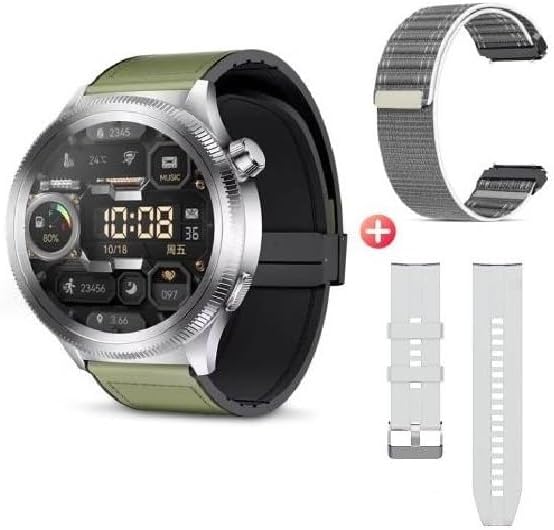
Image: The G-TiDE Smartwatch S6 PRO shown alongside two additional interchangeable straps. The watch itself has a green strap, and a grey fabric strap and a white silicone strap are displayed separately, highlighting the customization options.
Configuració
1. Càrrega del rellotge intel·ligent
Abans del primer ús, carrega completament el teu rellotge intel·ligent. Connecta el cable de càrrega magnètic als contactes de càrrega de la part posterior del rellotge i connecta l'extrem USB a un adaptador de corrent (no inclòs) o al port USB d'un ordinador.
- Una càrrega completa sol trigar aproximadament 2 hores.
- La pantalla del rellotge indicarà l'estat de càrrega.
- Important: Do not charge the watch if it is wet. Ensure the charging contacts are dry before connecting the charger.
2. App Installation (Wearfit Pro)
To unlock the full functionality of your G-TiDE Smartwatch S6 PRO, you need to install the Wearfit Pro application on your smartphone.
- Scan the QR code provided in the watch's packaging or search for "Wearfit Pro" in your smartphone's app store (Google Play Store for Android, Apple App Store for iOS).
- Baixeu i instal·leu l'aplicació.
- Ensure your smartphone meets the compatibility requirements: iOS 9.0 or higher, or Android 4.4 or higher.
3. Emparellament amb el telèfon intel·ligent
After installing the Wearfit Pro app, follow these steps to pair your smartwatch:
- Activa el Bluetooth al teu telèfon intel·ligent.
- Open the Wearfit Pro app and create an account or log in.
- Follow the in-app instructions to add a new device. The app will search for available smartwatches.
- Select "S6 PRO" or the corresponding device name from the list.
- Confirma la sol·licitud d'emparellament tant al teu telèfon intel·ligent com al rellotge intel·ligent.
- Un cop emparellat, l'aplicació sincronitzarà les dades amb el rellotge.
Instruccions de funcionament
Navegació bàsica
- Pantalla tàctil: Llisca cap a l'esquerra, la dreta, amunt o avall per navegar pels menús i les funcions. Toca per seleccionar un element.
- Botons funcionals: Use the physical buttons for specific actions, such as returning to the home screen or accessing the app menu.
- Activa la pantalla: Lift your hand to automatically turn on the screen (motion sensor feature).
- Estils de menú: The watch supports 6 fluid menu styles; customize this in settings.
Trucades i notificacions
- Fer/respondre trucades: Once paired, you can make and answer calls directly from your smartwatch. Ensure Bluetooth calling is enabled in the Wearfit Pro app.
- Sincronització de contactes: Synchronize contacts from your smartphone to the watch via the Wearfit Pro app.
- Notificacions a les xarxes socials: Receive notifications from apps like Facebook, WhatsApp, and Instagram directly on your watch. Enable specific app notifications in the Wearfit Pro app settings.
Vigilància de la salut
The G-TiDE Smartwatch S6 PRO offers comprehensive health tracking features:
- Monitorització de la freqüència cardíaca (FC): Continuous 24/7 tracking of your heart rate. View real-time data on the watch or detailed history in the Wearfit Pro app.
- Monitorització d'oxigen en sang (SpO2): Mesura els teus nivells d'oxigen a la sang.
- Exercicis de respiració: Guided breathing exercises to help manage stress and improve relaxation.
- Seguiment del son: Supervisa els teus patrons de son, incloent-hi el son profund, el son lleuger i les hores de despertar.
Modes esportius
Select from various sport modes to track your workouts accurately:
- Available modes include Walking, Running, Cycling, Mountaineering, Basketball, Football, and more.
- During a workout, the watch tracks metrics such as distance, steps, heart rate, and calories burned.
AI Features (Wearfit Pro App Dependent)
- Real-time Translator: Translate words and sentences directly from your watch.
- AI Chat (Wearfit GPT): Interact with an advanced AI assistant.
- AI Watch Face Generation: Describe your desired watch face, and the AI can generate it.
Altres característiques
- Music Storage & Control: Store your favorite songs on the watch and control music playback from your smartphone.
- E-book Storage: Carry electronic books on your smartwatch for convenient access.
- Gravadora de veu: Record audio directly from your watch.
- Comandament a distància de la càmera: Controla la càmera del teu telèfon intel·ligent de forma remota.
- Timer & Chronograph: Built-in timing functions.
- Calculadora: Realitzar càlculs bàsics.
- Alarma: Estableix les alarmes directament al rellotge.
- Cerca el telèfon: Locate your smartphone by triggering an alarm from your watch.
- Jocs: Includes two pre-installed games.
Manteniment
Neteja
- Netegeu la pantalla i la carcassa del rellotge amb un drap suau i sense borrissol.
- Per a taques persistents, lleugerament dampRenta el drap amb aigua. Evita productes químics agressius o materials abrasius.
- Clean the charging contacts regularly to ensure proper connection.
Resistència a l'aigua (IP67)
The G-TiDE Smartwatch S6 PRO has an IP67 water resistance rating. This means it is protected against dust ingress and can withstand immersion in water up to 1 meter for 30 minutes.
- It is suitable for daily use and can withstand splashes, rain, and brief immersion.
- Important: It is not recommended for swimming, showering with hot water, or prolonged immersion. Do not expose to salt water or chlorinated water.
- Assegureu-vos que el rellotge estigui completament sec abans de carregar-lo.
Cura de la bateria
- Eviteu descarregar completament la bateria amb freqüència.
- Charge the watch using the provided magnetic cable.
- Guardeu el rellotge en un lloc fresc i sec quan no l'utilitzeu durant períodes prolongats.
Resolució de problemes
El rellotge no s'encén
- Assegura't que el rellotge estigui completament carregat. Connecta'l al carregador durant almenys 30 minuts.
- Manteniu premut el botó d'engegada durant uns segons.
Cannot Pair with Smartphone
- Assegureu-vos que el Bluetooth estigui habilitat al vostre telèfon intel·ligent.
- Make sure the Wearfit Pro app is open and searching for devices.
- Bring the watch and smartphone closer together.
- Reinicieu tant el rellotge com el vostre telèfon intel·ligent.
- Comprova si el rellotge ja està emparellat amb un altre dispositiu. Desconnecta'l si cal.
No apareixen notificacions
- Verifiqueu que el rellotge s'hagi emparellat correctament amb el vostre telèfon intel·ligent.
- Check notification settings within the Wearfit Pro app and your smartphone's system settings to ensure permissions are granted.
- Ensure the Wearfit Pro app is running in the background.
Dades de salut inexactes
- Assegureu-vos de portar el rellotge ben ajustat al canell, ni massa ajustat ni massa fluix.
- Netegeu el sensor de la part posterior del rellotge.
- Environmental factors and individual physiology can affect sensor accuracy.
Especificacions
| Model | S6 PRO |
| Mostra | 1.95-inch AMOLED Touchscreen |
| Resolució | 466 x 466 píxels |
| Capacitat d'emmagatzematge | 128 MB |
| Capacitat de la bateria | 300 mAh |
| Durada mitjana de la bateria | Fins a 4.5 dies (ús típic) |
| Connectivitat | Bluetooth |
| Resistència a l'aigua | IP67 |
| Compatibilitat | Android 4.4+/iOS 9.0+ |
Garantia i Suport
For warranty information and customer support, please refer to the warranty card included with your product or visit the official G-TiDE website. You can also contact G-TiDE customer service through the Wearfit Pro app or the contact details provided on the brand's official channels.
Assistència en línia: Visit the G-TiDE Store on Amazon