
Introducció
This manual provides essential information for setting up, operating, and maintaining your NIMO 15.6" FHD Laptop Computer (Model NIMO N157). Please read this manual thoroughly before using your device to ensure optimal performance and longevity.
Què hi ha a la caixa
- 1 x Portàtil NIMO N157
- 1 x Carregador ràpid tipus C 65 W PD
- 1 x Manual d'usuari (aquest document)
- Windows 11 Home (pre-installed)
- 2 Years Warranty, 90 Days Return information
Guia de configuració
1. Engegada i càrrega inicials
Before first use, ensure your NIMO laptop is fully charged. Connect the provided Type-C 65W PD Fast Charger to the laptop's Type-C charging port and a power outlet. The charge LED indicator will illuminate. A full charge is recommended for optimal battery calibration.

Image: NIMO laptop connected to its Type-C 65W GaN II PD charger. This charger provides fast charging capabilities.
2. Operating System Setup (Windows 11 Home)
Upon first power-on, the laptop will guide you through the Windows 11 Home setup process. Follow the on-screen instructions to configure language, region, network settings, and create a user account. An internet connection (Wi-Fi 6 supported) is recommended for the initial setup to download necessary updates.

Image: The NIMO laptop screen showing the Windows 11 desktop interface.
3. Configuració del lector d'empremtes dactilars
For enhanced security and quick login, set up the integrated fingerprint reader. Navigate to Windows Settings > Accounts > Sign-in options and follow the prompts to register your fingerprint. This allows for secure one-touch login.

Imatge: Un primer pla view of the fingerprint reader on the NIMO laptop, illustrating its use for secure login.
Instruccions de funcionament
1. Keyboard and Backlight
The NIMO laptop features a full-size keyboard with a numeric keypad and a backlit function. To activate or adjust the keyboard backlight, use the dedicated function keys (Fn + Fx, refer to your keyboard layout for specific key). This feature allows for comfortable typing in low-light environments.
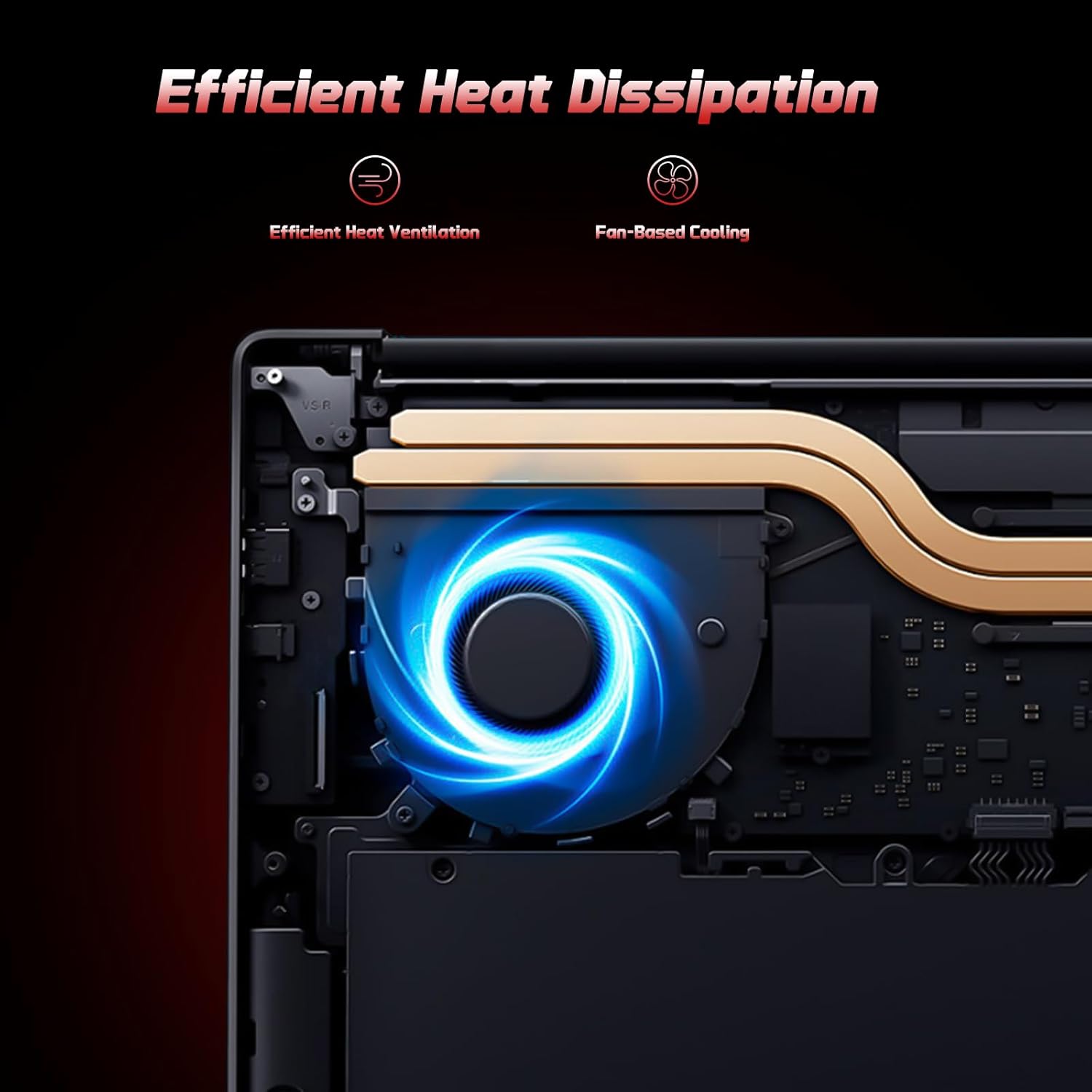
Image: A user typing on the NIMO laptop's backlit keyboard in a dim environment.
2. Connexió de perifèrics
The laptop is equipped with multiple ports for various peripherals:
- Ports USB: Connect USB devices such as external drives, mice, or keyboards.
- Port HDMI: Connecteu-lo a un monitor o televisor extern per a una visualització ampliada.
- Type-C Ports: One port supports 65W PD fast charging, and another is a multifunction port for data transfer and display output.
- Ranura Micro SD: Insert a Micro SD card for expandable storage.
- Auriculars Jack: Connecteu auriculars o altaveus externs.
- Ranura de bloqueig Kensington: Per a la seguretat física.
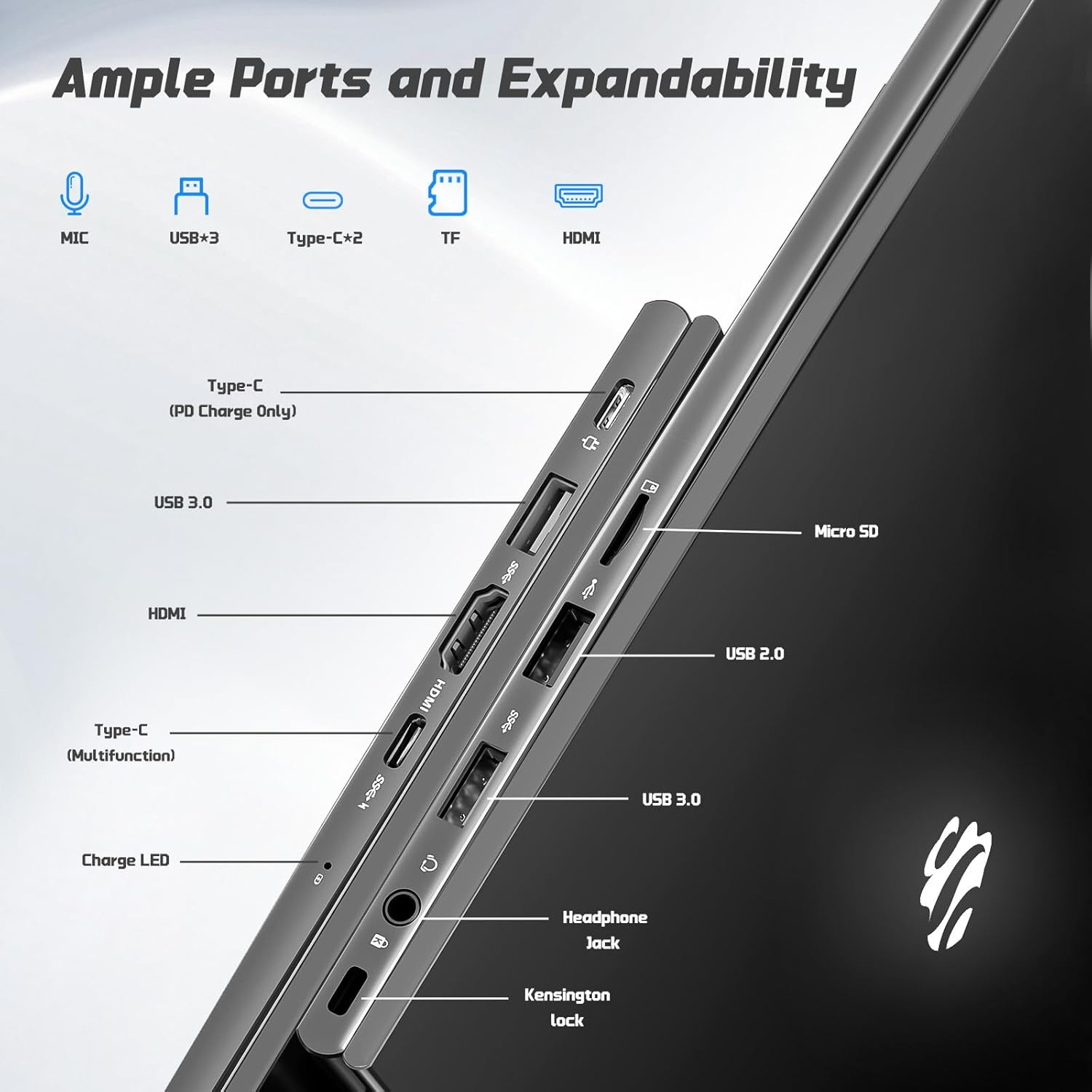
Imatge: Lateral view of the NIMO laptop highlighting the available ports including USB, HDMI, Type-C, Micro SD, and headphone jack.
3. Webcàmera i privacitat
La càmera integrada de 2 MP webcam is suitable for video calls and online meetings. For privacy, ensure the camera is covered or disabled when not in use, if a physical privacy shutter is present (refer to product images for confirmation).
Video: This video demonstrates the NIMO laptop's features, including the webcam and various ports. It shows the laptop being used for work, school, and play, highlighting the backlit keyboard and fingerprint unlock feature.
Video: This video showcases the NIMO laptop's versatility for different users, including students and professionals. It highlights the 15.6" FHD display, backlit keyboard, and multiple connectivity options.
Video: A comprehensive introduction to the NIMO 15.6" laptop, detailing its design, performance, and user experience for various tasks.
Video: This video emphasizes the efficiency and convenience of the NIMO laptop, showcasing its features that contribute to productivity and ease of use.
Video: This video highlights the NIMO 15.6" FHD laptop's suitability for students, home use, and work, demonstrating its performance in various daily scenarios.
Manteniment
1. Neteja del portàtil
To clean the screen, use a soft, lint-free cloth specifically designed for electronics. For the keyboard and chassis, a slightly damp cloth with mild cleaning solution can be used. Avoid excessive moisture and abrasive materials. Ensure the laptop is powered off before cleaning.
2. Cura de la bateria
The NIMO laptop features a 53.58 Watt Hours Lithium Polymer battery. To prolong battery life, avoid fully discharging the battery frequently. It is recommended to keep the battery charge between 20% and 80% when possible. Store the laptop in a cool, dry place when not in use for extended periods.
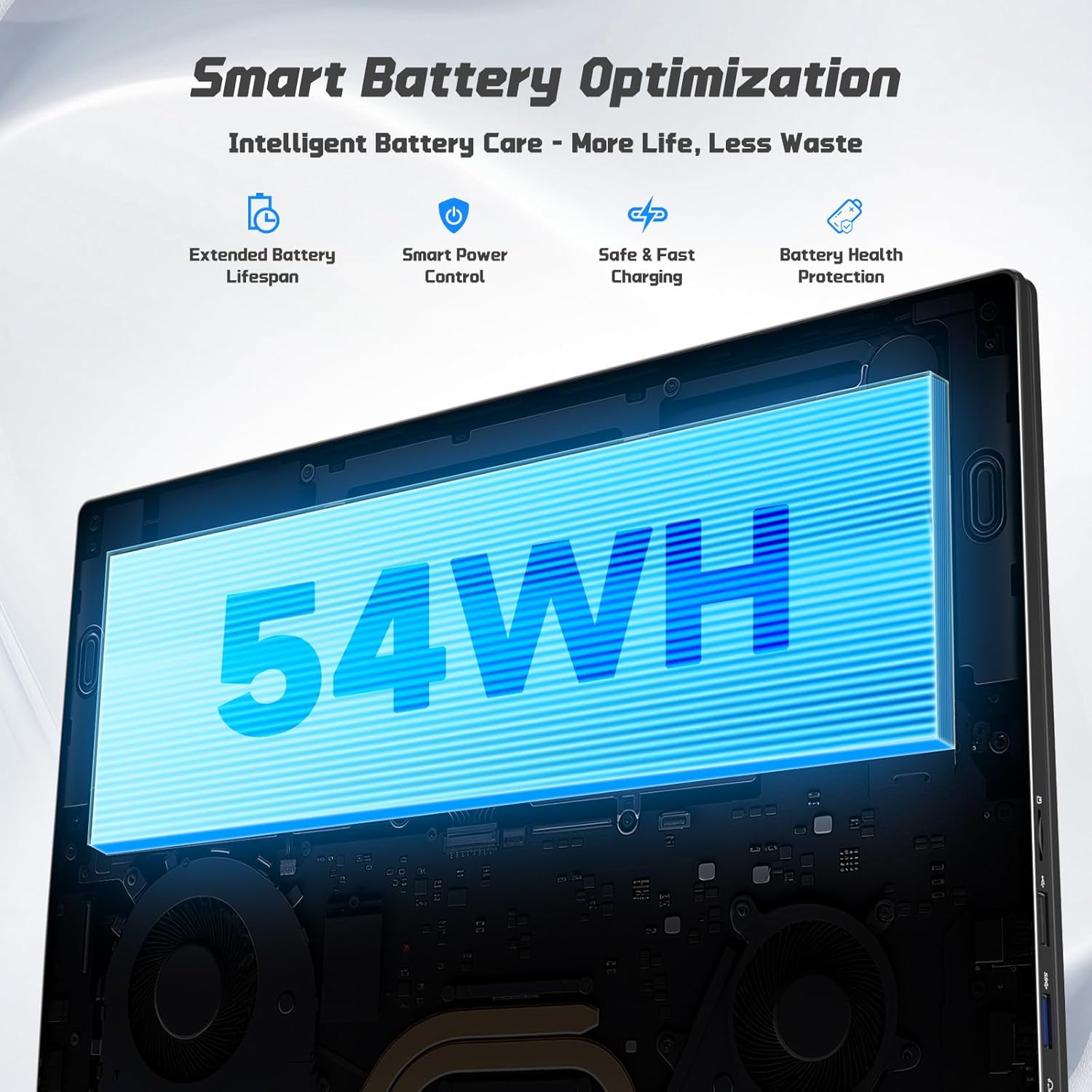
Image: Diagram illustrating the NIMO laptop's smart battery optimization features, including extended lifespan, smart power control, safe and fast charging, and battery health protection.
3. Actualitzacions de programari
Regularly check for and install Windows updates to ensure your system has the latest security patches and performance improvements. Go to Settings > Windows Update to manage updates.
4. Dissipació de calor
The laptop is designed with efficient heat ventilation and fan-based cooling. To prevent overheating, ensure that the ventilation openings are not blocked during use. Avoid placing the laptop on soft surfaces like beds or couches that can obstruct airflow.
Imatge: Una imatge interna view of the NIMO laptop showing its efficient heat dissipation system with fan-based cooling.
Resolució de problemes
1. El portàtil no s'encén
- Assegureu-vos que el carregador estigui connectat correctament tant al portàtil com a una presa de corrent que funcioni.
- Check the charge LED indicator. If it's not lit, try a different outlet or charger.
- Premeu i manteniu premut el botó d'engegada durant 10-15 segons per realitzar un restabliment complet.
2. Problemes de pantalla (no hi ha pantalla, parpelleig)
- Connect an external monitor via the HDMI port to check if the issue is with the laptop's display or graphics output.
- Reinicieu l'ordinador portàtil.
- Ensure display drivers are up to date via Windows Update or NIMO's support weblloc.
3. Rendiment lent
- Tanca les aplicacions innecessàries que s'executen en segon pla.
- Comproveu i instal·leu les actualitzacions pendents de Windows.
- Ensure sufficient free space on the 128GB SSD. Consider expanding storage using the Micro SD slot or upgrading the SSD if needed.
- Executeu una anàlisi de virus.
4. Wi-Fi or Bluetooth Connectivity Issues
- Ensure Wi-Fi and Bluetooth are enabled in Windows Settings.
- Reinicieu el vostre encaminador/mòdem per solucionar problemes de Wi-Fi.
- Update network drivers via Windows Update or NIMO's support weblloc.
Especificacions
| Característica | Detall |
|---|---|
| Marca | NIMO |
| Nom del model | NIMO N157G |
| Mida de la pantalla | 15.6 polzades |
| Resolució de visualització | 1920 x 1080 píxels (FHD) |
| Tipus de visualització | IPS LCD, Anti-glare |
| Processador | Intel Pentium N150 (4-Core, up to 3.6 GHz) |
| RAM | 4 GB de DDR4 (ampliable fins a 16 GB) |
| Emmagatzematge | 128 GB SSD (Expandable via Micro SD) |
| Sistema operatiu | Windows 11 Home |
| Gràfics | Gràfics Intel integrats |
| Weblleva | Càmera frontal de 2 MP |
| Connectivitat | Wi-Fi 6, Bluetooth 5.3 |
| Ports | 2x USB 3.0, 1x USB 2.0, 2x Type-C (1x PD Charge Only, 1x Multifunction), 1x HDMI, 1x Micro SD Slot, 1x Headphone Jack, 1x Kensington Lock |
| Bateria | 53.58 Wh Lithium Polymer (Up to 12.75 hours life) |
| Carregador | 65W Type-C PD Fast Charger |
| Característiques especials | Teclat retroil·luminat, lector d'empremtes dactilars, àudio HD, teclat numèric |
| Dimensions | 8.98 cm de llargada x 14.07 cm d'amplada x 0.76 cm de gruix |
| Pes | 3.75 lliures |
Garantia i suport
Your NIMO laptop comes with a 2 anys de garantia from NIMO Direct Inc. Additionally, a 90-Day Hassle-Free Return Policy is provided. For any product-related questions, technical assistance, or warranty claims, please contact NIMO customer support.
Informació de contacte:
- Correu electrònic: service@nimopc.com
- Assistència en línia: Refer to the official NIMO website for further support resources.
Please have your model number (NIMO N157) and purchase details ready when contacting support.