
1. Introducció
The Qubo X232 is a 4G mobile phone designed for simplicity and reliability, particularly suitable for seniors or users who prefer a straightforward device for calls, messages, and daily use without complications. It features a large display, big buttons, and an emergency SOS function for enhanced safety and ease of communication.
2. Producte acabatview
The Qubo X232 offers a user-friendly design with essential features for clear communication.
2.1 Característiques clau
- Large 2.3-inch Display: Provides clear visibility with larger text and icons for easy reading.
- Big Buttons & Backlit Keypad: Physical keys are large for comfortable dialing, and the backlit keypad aids use in low-light conditions. Voice announcement of keys pressed is also included.
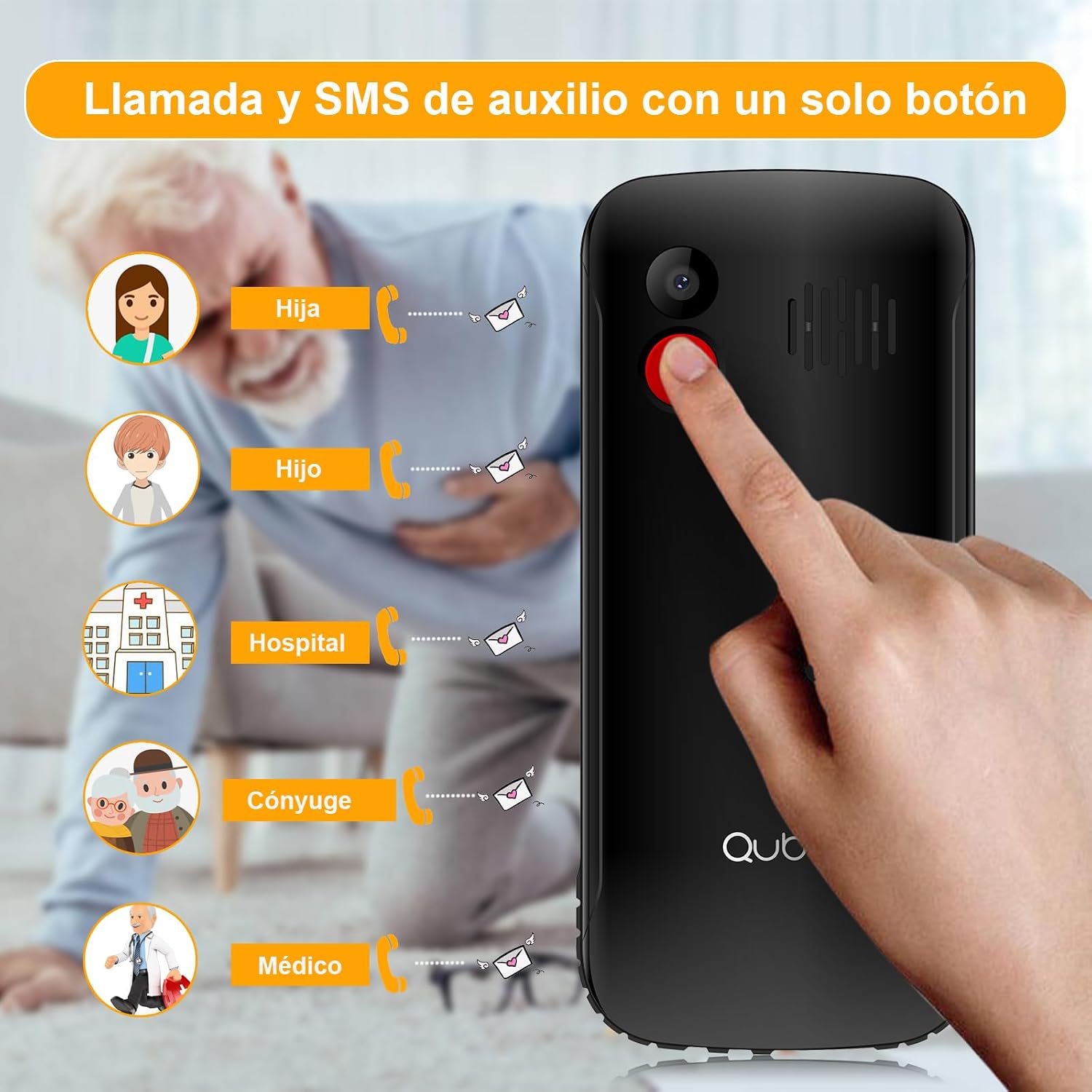
- Botó d'emergència SOS: A dedicated button for emergencies, allowing automatic calls and SMS to up to 5 pre-set contacts.
- Àudio fort: High volume for calls and ringtones, beneficial for users with hearing difficulties or in noisy environments.
- Bateria de llarga durada de 1700 mAh: Offers extended standby time, reducing the frequency of charging.
- Unlocked & Wide Compatibility: Compatible with various network operators (Telcel, AT&T, Movistar, BAIT, CFE, Altan) and supports 4G/3G/2G networks.
- Convenient USB Type-C Charging: Modern and reversible charging port for easy connection.
- Llanterna integrada: Quick access to a powerful flashlight for convenience and emergencies.
- Funcions addicionals: Includes FM radio, camera, music/video player, alarm, calendar, Bluetooth, microSD slot, and 3.5mm headphone jack.
2.2 Components del telèfon




3. Configuració
3.1 Instal·lació de la targeta SIM i la bateria
- Treure la contraportada: Traieu suaument la tapa posterior del telèfon.
- Inseriu la targeta(es) SIM: Locate the SIM card slot(s). The Qubo X232 supports Dual SIM. Insert your SIM card(s) into the designated slots, ensuring proper orientation as indicated on the phone.
- Inseriu la targeta MicroSD (opcional): If you wish to expand storage, insert a microSD card into its dedicated slot.
- Insereix la bateria: Place the 1700mAh battery into the battery compartment, aligning the contacts correctly.
- Substituïu la coberta posterior: Securely reattach the back cover.
3.2 Càrrega del telèfon
Connect the provided USB Type-C cable to the phone's charging port and the other end to a power adapter. Plug the adapter into a wall outlet. The battery indicator on the screen will show charging status. Ensure the phone is fully charged before first use.
3.3 Encès/Apagat
To power on, press and hold the Power button (usually red) until the screen lights up. To power off, press and hold the Power button, then select 'Power Off' from the options.
4. Operacions bàsiques
4.1 Fer trucades
- Marcació: Introduïu el número de telèfon amb el teclat.
- Initiate Call: Press the green Call button to make the call.
- Finalitzar la trucada: Press the red End Call button to hang up.
4.2 Rebre trucades
When a call comes in, press the green Call button to answer. Press the red End Call button to reject or end the call.
4.3 Sending Messages (SMS)
- Navegueu fins al menú "Missatges".
- Select 'New Message' or 'Create SMS'.
- Introduïu el número de telèfon del destinatari o seleccioneu-lo dels contactes.
- Escriviu el vostre missatge amb el teclat.
- Premeu "Envia".
4.4 Gestió de contactes
Access the 'Contacts' menu to add, edit, or delete contacts. You can assign speed dial numbers (M1, M2, M3) for quick access to important contacts. The phone also supports contacts with photos for easier identification.
5. Característiques especials
Botó d'emergència SOS 5.1
The dedicated SOS button on the back of the phone is for emergencies. When pressed and held, it will automatically call up to 5 pre-set emergency contacts and send an emergency SMS message to them simultaneously. Ensure emergency contacts are properly configured in the phone settings.
5.2 Llanterna
The Qubo X232 includes a powerful flashlight. To activate or deactivate it, use the dedicated side button or navigate through the phone's menu options.
5.3 Ràdio FM
The phone features a built-in FM radio. Access it through the multimedia menu. No headphones are required to listen to the radio.
5.4 Control de volum
Adjust call and ringtone volume using the dedicated side buttons. The phone is designed to provide loud and clear audio.
6. Especificacions
| Característica | Especificació |
|---|---|
| Marca | Qubo |
| Nom del model | Qubo-X232 |
| Sistema operatiu | Nucleus OS |
| Mida de la pantalla | 2.3 polzades |
| Capacitat de la bateria | 1700 mAh |
| Tecnologia cel·lular | 4G (compatible with 5G SIMs at 4G speed) |
| Compatibilitat amb operadors sense fil | All carriers (Telcel, AT&T, Movistar, BAIT, CFE, Altan) |
| SIM Card Count | Doble SIM |
| RAM | 48 MB |
| Model de CPU | 6 X 86 |
| Velocitat de la CPU | 2 GHz |
| Port de càrrega | USB tipus C |
| Conector d'auriculars | 3.5 mm |
| Dimensions | 132.1 x 58.2 x 14.1 mm |
| Pes | Aprox. 110 g |
| Color | Negre |
7. Solució De Problemes
- Phone does not turn on: Assegureu-vos que la bateria estigui correctament inserida i carregada. Connecteu el carregador i torneu-ho a provar.
- Sense senyal: Check if the SIM card is properly inserted. Ensure you are in an area with network coverage.
- No puc fer/rebre trucades: Verify SIM card activation with your carrier. Check if the number is blocked or if call barring is active.
- Problemes de càrrega: Ensure the USB Type-C cable and adapter are securely connected and undamaged. Try a different power outlet.
- SOS button not working: Confirm that emergency contacts are correctly set up in the SOS settings menu.
8. Informació de seguretat
Read all safety information before using your phone to ensure safe and proper use. Keep the phone away from water and extreme temperatures. Use only approved accessories. Do not attempt to disassemble or repair the phone yourself.
9. Garantia i Suport
The manufacturer offers a 30-day warranty for this product. For any issues or support inquiries beyond this period, please contact your retailer or the seller directly. Keep your purchase receipt as proof of purchase.