
Kuizil T70
Kuizil Smart Watch User Manual
Model: T70
Introducció
Thank you for choosing the Kuizil Smart Watch. This device is designed to enhance your daily life by combining advanced fitness tracking, health monitoring, and smart communication features. With its 1.91-inch HD color screen and robust IP68 waterproof rating, it is suitable for various activities and lifestyles. This manual provides detailed instructions to help you set up, operate, and maintain your new smartwatch.
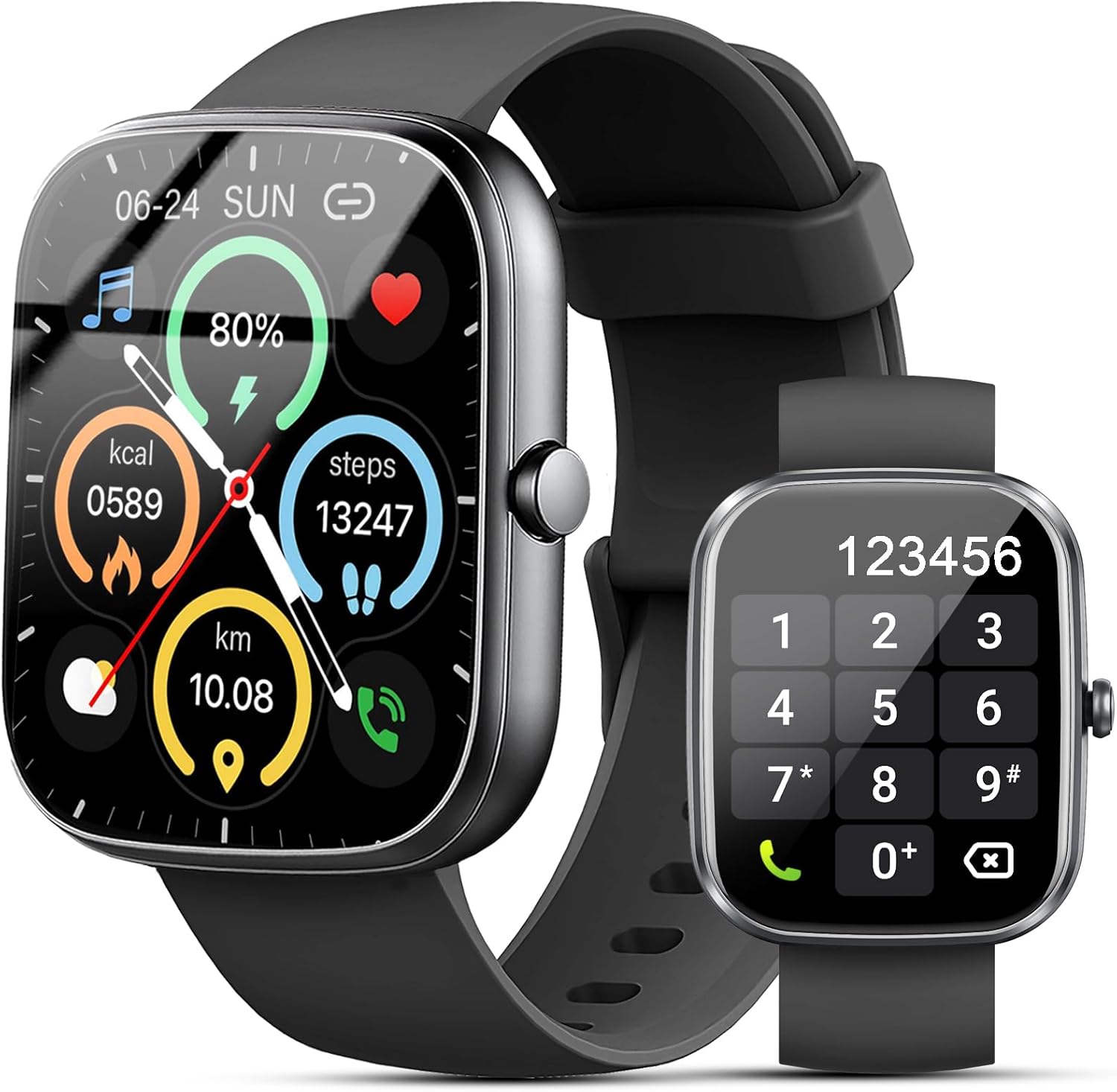
Figure 1: Kuizil Smart Watch with fitness data and call interface.
Què hi ha a la caixa
Si us plau, verifiqueu que tots els elements siguin presents al vostre paquet:
- Rellotge intel·ligent (1 unitat)
- Watch Band (1 unit)
- Cable de càrrega magnètic (1 unitat)
- Manual d'usuari (1 unitat)

Figure 2: Package contents of the Kuizil Smart Watch.
Guia de configuració
1. Càrrega del rellotge intel·ligent
Before first use, fully charge your smartwatch. Connect the magnetic charging cable to the charging points on the back of the watch and plug the USB end into a standard USB power adapter (not included). A full charge typically takes 2 hours.
- Ensure the charging pins are clean and properly aligned with the watch's charging contacts.
- La pantalla del rellotge indicarà l'estat de càrrega.
2. Descàrrega i emparellament de l'aplicació
To unlock the full functionality of your Kuizil Smart Watch, you need to download and connect it to the companion app, "Gloryfit".
- Descarrega l'aplicació: Cerca "Gloryfit" a l'Apple App Store (per a dispositius iOS) o a la Google Play Store (per a dispositius Android) i instal·leu-lo.
- Activa el Bluetooth: On your smartphone, go to Settings and ensure Bluetooth is turned on.
- Obre l'aplicació Gloryfit: Launch the "Gloryfit" app and follow the on-screen instructions to create an account or log in.
- Afegeix un dispositiu: Within the app, navigate to the "Device" or "Add Device" section. The app will search for nearby smartwatches. Select "T70" from the list of found devices to initiate pairing.
- Confirmeu l'aparellament: És possible que aparegui una sol·licitud d'emparellament tant al telèfon com al rellotge. Confirma l'emparellament en tots dos dispositius.

Figure 3: Bluetooth call and notification features.
3. Bluetooth Call Function Setup
For the call answering/making function, an additional Bluetooth connection is required:
- After successfully pairing the watch with the "Gloryfit" app, go to your smartphone's Bluetooth settings.
- Look for a device named "T70-Audio" or similar in the list of available devices.
- Tap on "T70-Audio" to connect. Once connected, you will be able to make and receive calls directly from your smartwatch.
Instruccions de funcionament
Navegació
The Kuizil Smart Watch features a full touch screen and a side button for navigation:
- Llisca cap amunt/avall: Desplaça't pels menús i les notificacions.
- Llisca cap a l'esquerra/dreta: Access quick functions or different data screens (e.g., heart rate, weather, activity summary).
- Toca: Selecciona un element o confirma una acció.
- Botó lateral: Premeu per tornar a la pantalla d'inici o activar el dispositiu. Premeu llargament per veure les opcions d'engegada.

Figure 4: The 1.91" HD color screen.
Bluetooth Call and Message Notifications
Once connected via Bluetooth, your smartwatch can handle calls and display messages:
- Contestar/Fer trucades: Use the built-in HD speaker and microphone to answer incoming calls or dial numbers directly from the watch. You can also view call history and store contacts.
- Notificacions de missatges: Receive vibrating alerts for social media messages (Facebook, WhatsApp, Instagram, Twitter, etc.) and SMS. You can read message previews directly on the watch screen.
Vigilància de la salut
El rellotge intel·ligent està equipat amb sensors avançats per a un seguiment complet de la salut:
- Monitorització de la freqüència cardíaca: Monitoritza contínuament la teva freqüència cardíaca en temps real.
- Monitorització d'oxigen en sang (SpO2): Mesura els nivells de saturació d'oxigen a la sang.
- Monitorització del son: Automatically tracks your sleep patterns (deep sleep, light sleep, wakeful sleep) and provides detailed analysis in the "Gloryfit" app to help improve sleep habits.

Figure 5: Health monitoring features including heart rate, SpO2, and sleep tracking.
Modes esportius i seguiment d'activitats
The watch supports over 100 sport modes to accurately record your exercise data:
- Seguiment de l'activitat: Records daily steps, calories burned, distance, and active minutes.
- Modes esportius: Select from various activities like running, cycling, walking, basketball, yoga, football, and more. The watch will track relevant metrics for each mode.

Figure 6: Over 100 sport modes supported by the smartwatch.
Other Practical Functions
Your Kuizil Smart Watch includes a variety of useful features:
- Temporitzador i cronòmetre: For precise timing.
- Despertador: Configura diverses alarmes.
- Troba el teu telèfon: Localitza el teu telèfon intel·ligent emparellat.
- Recordatori sedentari: Et demana que et moguis després de períodes d'inactivitat.
- Control de música: Controla la reproducció de música al teu telèfon intel·ligent.
- Pronòstic del temps: Rep actualitzacions meteorològiques en temps real.
- Control fotogràfic: Activa la càmera del telèfon de manera remota.
- Seguiment del cicle femení: Monitoritzar els cicles menstruals.
- Mode No Molestis: Silence notifications.
- Ajust de brillantor: Customize screen brightness.

Figura 7: Mésview of additional practical functions.
Manteniment
Neteja del rellotge intel·ligent
To ensure optimal performance and hygiene, regularly clean your smartwatch:
- Netegeu la pantalla i la carcassa del rellotge amb un drap suau i sense borrissol.
- Per a taques persistents, lleugerament dampRenta el drap amb aigua. Evita utilitzar productes químics agressius o materials abrasius.
- Netegeu els contactes de càrrega periòdicament per garantir una càrrega eficient.
Resistència a l'aigua (IP68)
The Kuizil Smart Watch has an IP68 waterproof rating, meaning it is resistant to dust and can withstand immersion in water up to 1.5 meters for 30 minutes. This makes it suitable for daily activities like hand washing, face washing, and sweating during exercise.
Nota important:
- Do not use the watch in hot water, saunas, or steam rooms, as steam can penetrate the seals and cause damage.
- Avoid using the watch in seawater, as salt can corrode the device.
- The water resistance is not permanent and may decrease over time with normal wear and tear.
Cura de la bateria
Per maximitzar la durada i la longevitat de la bateria:
- Charge the watch fully before its first use.
- Eviteu esgotar completament la bateria amb freqüència.
- Guardeu el rellotge en un lloc fresc i sec quan no l'utilitzeu durant períodes prolongats.

Figure 8: Battery capacity and typical usage times.
Resolució de problemes
If you encounter issues with your Kuizil Smart Watch, please refer to the following common solutions:
- El rellotge no s'encén: Assegura't que el rellotge estigui completament carregat. Connecta'l al cable de càrrega i a una font d'alimentació durant almenys 30 minuts.
- No es pot emparellar amb el telèfon:
- Assegura't que el Bluetooth estigui activat al telèfon i que el rellotge estigui dins del seu abast.
- Reinicia tant el telèfon com el rellotge.
- Make sure you are using the "Gloryfit" app and not trying to pair directly through your phone's Bluetooth settings for the main connection.
- For call function, ensure "T70-Audio" is connected in your phone's Bluetooth settings.
- Dades de salut inexactes:
- Assegureu-vos de portar el rellotge ben ajustat al canell, aproximadament un dit per sobre de l'os del canell.
- Mantingueu neta la zona del sensor a la part posterior del rellotge.
- Eviteu moviments excessius durant les mesures.
- Notificacions no rebudes:
- Comprova els permisos de notificacions de l'aplicació al teu telèfon.
- Ensure the watch is connected to the "Gloryfit" app.
- Verify that "Do Not Disturb" mode is not active on the watch.
- Autonomia curta de la bateria:
- Redueix la brillantor de la pantalla.
- Limiteu el control continu de la freqüència cardíaca o l'ús freqüent de funcions que consumeixen molta energia.
- Assegureu-vos que el rellotge estigui completament carregat cada vegada.
For further assistance, please refer to the "Help" or "FAQ" section within the "Gloryfit" app or contact Kuizil customer support.
Especificacions
| Característica | Detall |
|---|---|
| Número de model | T70 |
| Mida de la pantalla | Pantalla en color HD d'1.91 polzades |
| Resolució de visualització | 320*380 píxels |
| Connectivitat | Bluetooth |
| Classificació impermeable | IP68 |
| Durada de la bateria (ús normal) | 5-7 dies |
| Durada de la bateria (mode d'espera) | Aprox. 30 dies |
| Temps de càrrega | Aprox. 2 hores |
| Sistema operatiu compatible | iOS 9.0 i posteriors, Android 6.0 i posteriors |
| Vigilància de la salut | Heart Rate, SpO2, Sleep Tracking |
| Modes esportius | 100+ |
| Pes de l'article | 3.2 unces |
| Dimensions del paquet | 6.81 x 3.74 x 0.75 polzades |
Garantia i Suport
Your Kuizil Smart Watch is covered by a standard manufacturer's warranty. For specific warranty terms and conditions, please refer to the documentation included with your purchase or contact Kuizil customer support.
If you require technical assistance, have questions about your device, or need to report an issue, please contact Kuizil customer support through the contact information provided on the official Kuizil website or within the "Gloryfit" app.
For the latest updates, FAQs, and additional resources, please visit the official Kuizil brand store on Amazon: Kuizil Store.