
1. Introducció
This manual provides essential instructions for the safe and efficient operation of your Jesverty SPS-6020H DC Power Supply. This device is a switching DC regulated bench power supply designed for various applications requiring a stable and adjustable power source, offering a voltage range of 0-60V and a current range of 0-20A with a maximum output of 1200W. Key features include an encoder adjustment knob for precise settings, an output ON/OFF switch, and integrated Over-VoltagProtecció de sobrecorrent (OVP) i protecció contra sobrecorrent (OCP).
2. Instruccions de seguretat
- Always connect the power supply to a grounded AC outlet.
- No utilitzeu el dispositiu en mullat o damp condicions.
- Ensure proper ventilation to prevent overheating. Do not block the cooling fan vents.
- Before connecting or disconnecting loads, ensure the output is turned OFF.
- No intenteu obrir ni modificar la font d'alimentació. Envieu totes les tasques de manteniment a personal qualificat.
- Verifiqueu el voltage and current settings before applying power to a circuit to avoid damage to connected devices.
3. Producte acabatview
3.1 Panells frontal i posterior
The Jesverty SPS-6020H features a clear 4-digit LED display and intuitive controls. Below are diagrams illustrating the main components and their functions.
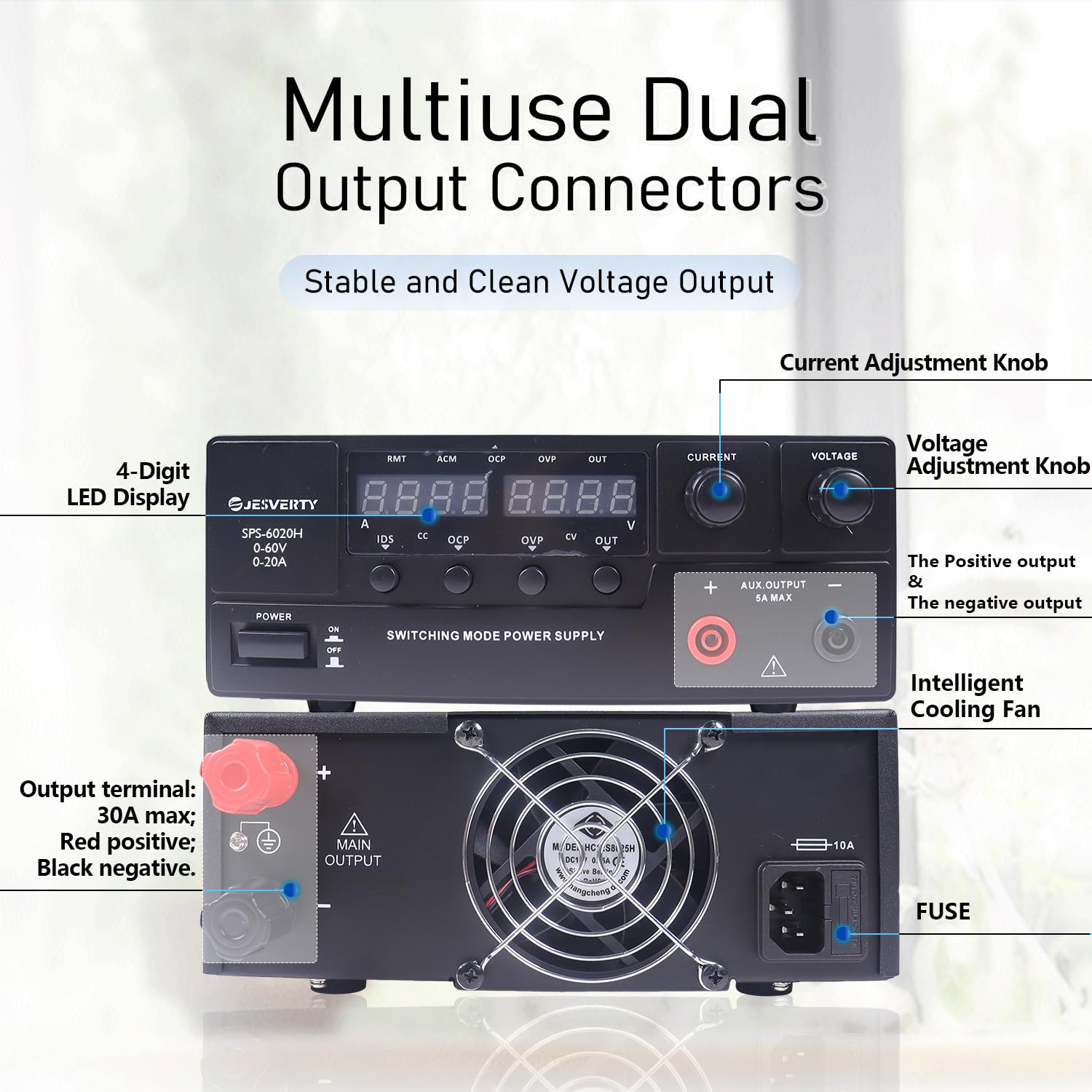
Figura 1: Front and Rear Panel Layout. This image displays the front panel with the 4-digit LED display, encoder knobs for current and voltage, output ON/OFF switch, and auxiliary output terminals. The rear panel shows the main output terminals, intelligent cooling fan, and fuse holder.
- Pantalla LED de 4 dígits: Mostra el volum en temps realtage i sortida de corrent.
- Botó d'ajust de corrent: Used to set the output current limit.
- Voltage Botó d'ajust: Used to set the output voltage.
- Output ON/OFF Switch: Toggles the power output to the terminals.
- Aux Output Terminal: Provides an additional output connection point.
- Main Output Terminal: Primary connection points for load (Red: Positive, Black: Negative).
- Ventilador de refrigeració intel·ligent: Activates automatically to maintain optimal operating temperature.
- Fusible: Overcurrent protection for the AC input.
4. Configuració
4.1 Desembalatge i inspecció
Upon receiving your Jesverty SPS-6020H, carefully unpack all components. Verify that the package contains the power supply unit, a power cord, and this instruction manual. Inspect the unit for any signs of physical damage incurred during shipping. If any damage is found, contact customer service immediately.
4.2 Connexió d'alimentació
Connect the provided power cord to the AC input socket on the rear panel of the power supply and then to a suitable grounded AC power outlet. Ensure the voltage of your AC supply matches the requirements specified on the power supply's label.
4.3 Encès inicial
Before connecting any load, switch the power supply ON using the main power switch. The LED display will illuminate, showing the default or previously set voltage and current values. Ensure the output ON/OFF switch is in the OFF position during initial power-up to prevent accidental power delivery.
5. Funcionament
5.1 Configuració Voltage i Actual
The SPS-6020H utilizes encoder knobs for precise adjustment of voltage and current. This allows for fine-tuning of settings with a resolution of 0.01V and 0.01A.
Figura 2: Encoder Knob Operation. This image illustrates how to use the encoder knobs to adjust voltage and current settings by pressing to select a digit and rotating to change its value.
- To set Voltage: Premeu el botó Voltage adjustment knob momentarily. A digit on the voltage display will blink. Rotate the knob to change the value of the blinking digit. Press the knob again to move to the next digit. Repeat until the desired voltage is set. The setting will be confirmed after a few seconds of inactivity.
- To set Current: Follow the same procedure as for voltage, using the Current adjustment knob. This sets the maximum current limit (Constant Current mode).
5.2 Output ON/OFF Function
The dedicated Output ON/OFF button allows you to enable or disable the power output without changing the set voltage and current values. This is useful for adjusting settings or connecting/disconnecting loads safely without powering down the entire unit.
5.3 Sobrevoltage Protecció (OVP)
The OVP feature protects connected loads from excessive voltage. Si el voltage exceeds a preset limit, the power supply will automatically cut off the output to prevent damage. The OVP indicator on the display will illuminate.
5.4 Protecció contra sobrecorrent (OCP)
The OCP feature protects both the power supply and the connected load from excessive current draw. If the current exceeds the set limit, the power supply will either limit the current (Constant Current mode) or cut off the output, depending on the specific OCP setting. The OCP indicator will illuminate.

Figura 3: Overcurrent Detection Alarm. This image highlights the OCP feature, indicating its role in detecting and responding to short circuits or overcurrent conditions to protect the load.
5.5 Constant Voltage (CV) and Constant Current (CC) Modes
The SPS-6020H operates in two primary modes:
- Vol. Constanttage (CV) Mode: When the load current is below the set current limit, the power supply maintains a constant output voltage as set by the user.
- Constant Current (CC) Mode: When the load current attempts to exceed the set current limit, the power supply automatically reduces the output voltage to maintain the current at the set limit.
5.6 Connecting a Load
Connect your load to the output terminals (Red for positive, Black for negative). Ensure the output is OFF before connecting. Once connected, you can switch the output ON. The display will show the actual voltage and current being delivered to the load.
5.7 Funció de càrrega de la bateria
The power supply can be used for charging various battery types. Ensure you set the correct voltage and current limits appropriate for the battery chemistry and capacity to prevent overcharging or damage.

Figura 4: Battery Charging Setup. This image demonstrates connecting the power supply to a battery for charging, emphasizing the importance of setting correct voltage i corrent.
6. Manteniment
- Neteja: Desconnecteu l'alimentació de la presa de corrent abans de netejar-lo. Feu servir un drap suau i sec per netejar l'exterior. No utilitzeu productes de neteja abrasius ni dissolvents.
- Ventilació: Regularly check that the cooling fan vents are clear of dust and debris to ensure proper airflow.
- Emmagatzematge: When not in use for extended periods, store the power supply in a cool, dry environment, away from direct sunlight and extreme temperatures.
7. Solució De Problemes
- Sense energia: Check the power cord connection and the AC outlet. Verify the main power switch is ON. Check the fuse on the rear panel and replace if blown (ensure correct fuse rating).
- Sense sortida: Ensure the Output ON/OFF switch is in the ON position. Check for OVP or OCP indicators; if illuminated, address the over-voltage or over-current condition.
- Lectures incorrectes: Verify external measurement tools are calibrated. Ensure proper connection to the load.
- Soroll del ventilador: The intelligent cooling fan adjusts its speed based on internal temperature. Increased fan noise during high load operation is normal. If the fan runs excessively loud at low loads or continuously, ensure vents are clear.
8. Especificacions
The following table details the technical specifications of the Jesverty SPS-6020H DC Power Supply.

Figura 5: Dimensions and Weight. This image provides a visual representation of the physical dimensions and weight of the power supply unit.
| Especificació | Valor |
|---|---|
| Nom del model | SPS-6020H |
| Vol. De sortidatage Rang | 0-60V |
| Interval de corrent de sortida | 0-20A |
| Potència de sortidatage | 1200 watts |
| Mostra | LED de 4 dígits |
| Ajust | Botó del codificador (resolució de 0.01 V/0.01 A) |
| Característiques de protecció | OVP (Over-Voltagprotecció electrònica), OCP (protecció contra sobrecorrent) |
| Mètode de refrigeració | Aire (ventilador amb temperatura regulada) |
| Dimensions (aprox.) | 13.2(D) x 8.4(W) x 6.5(H) inches (290 x 210 x 80 mm) |
| Pes (aprox.) | 6.6 lliures (3.0 kg) |
| Data de primera disponibilitat | 23 de maig de 2025 |
9. Garantia i Suport
Jesverty provides professional technical support for its products. If you encounter any problems or have questions regarding your SPS-6020H DC Power Supply, please contact Jesverty Customer Service. Contact information can typically be found on the product packaging or through the retailer's support channels.