
1. Introducció
This manual provides detailed instructions for the installation, operation, and maintenance of your Lumary Smart Water Timer and Smart WiFi 2 in 1 Soil Meter. This system is designed to automate garden watering based on soil moisture and temperature, promoting efficient water usage and plant health. Please read this manual thoroughly before use to ensure proper functionality and safety.
2. Informació de seguretat
- Exposició a l'aigua: The water timer is designed for outdoor use and is water-resistant, but should not be submerged in water. The soil meter is designed for soil insertion.
- Font d'alimentació: Ensure the power source for the timer (if applicable, typically batteries) is correctly installed and of the specified type.
- Requisits de xarxa: The smart features require a stable 2.4GHz Wi-Fi network. Ensure your network meets this requirement for optimal performance.
- Nens i animals de companyia: Keep the device out of reach of children and pets to prevent accidental damage or injury.
- Límits de temperatura: Do not expose the devices to extreme temperatures outside their operating range (typically 0°C to 50°C / 32°F to 122°F).
- Desmuntatge: No intenteu desmuntar o reparar el dispositiu vosaltres mateixos. Contacteu amb l'assistència al client per obtenir assistència.
3. Contingut del paquet
Verifiqueu que tots els elements siguin presents al paquet:
- Lumary Smart Water Timer
- Lumary Smart WiFi 2 in 1 Soil Meter
- Manual d'usuari (aquest document)
- Required Batteries (if included, check packaging)
- Guia d'inici ràpid
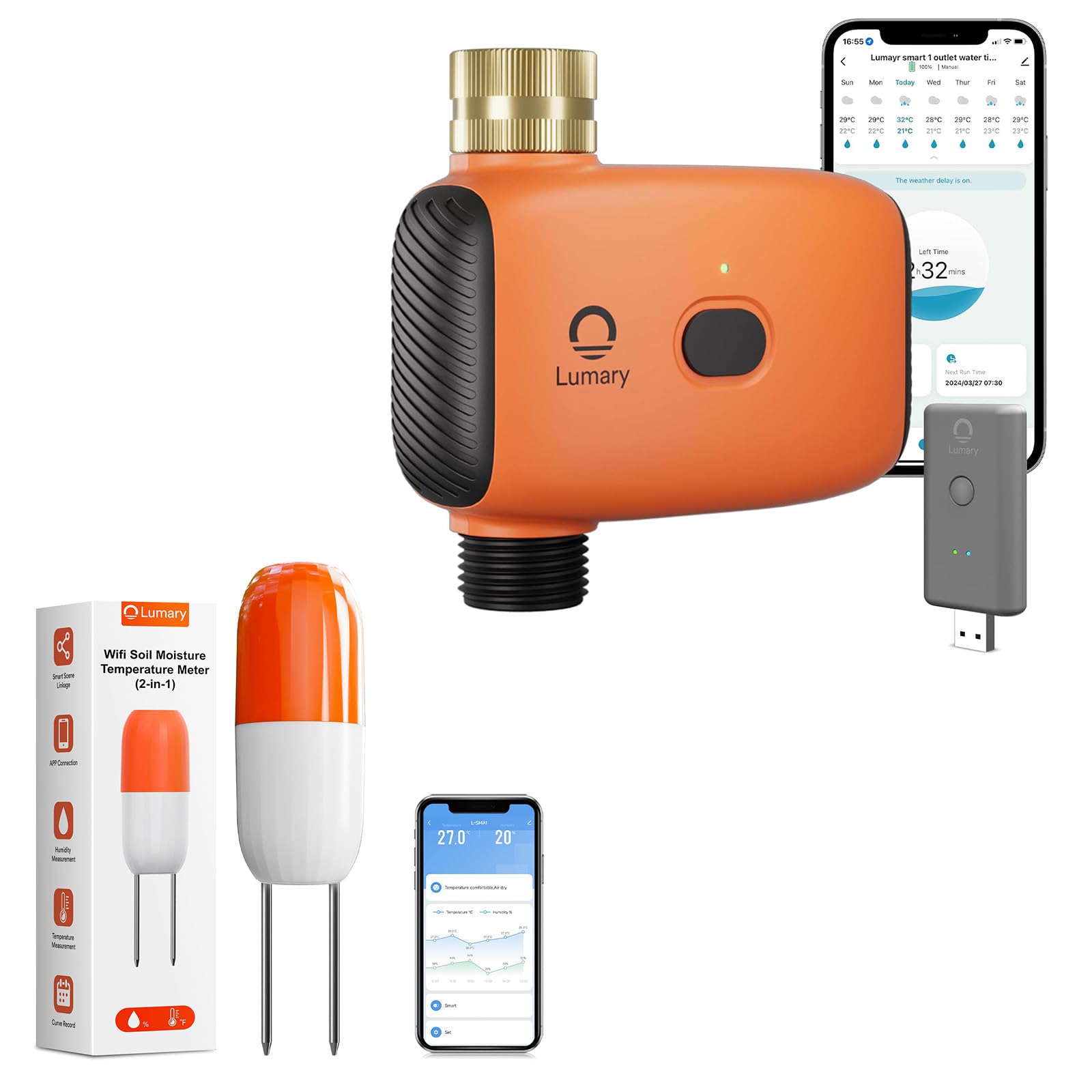
Image 1: Lumary Smart Water Timer and Smart WiFi 2 in 1 Soil Meter. This image displays the main components of the smart watering system, including the water timer unit and the soil meter probe.
4. Configuració
4.1. Install Batteries (if applicable)
If your devices require batteries, open the battery compartment on both the Smart Water Timer and the Smart WiFi 2 in 1 Soil Meter. Insert the specified battery type (e.g., AA or AAA) according to the polarity markings. Close the compartment securely.
4.2. Install Smart Water Timer
- Connecta't a l'aixeta: Screw the Smart Water Timer onto your outdoor garden faucet (spigot). Ensure a tight, leak-free connection. Hand-tighten only; do not overtighten.
- Connecteu la mànega: Attach your garden hose to the outlet of the Smart Water Timer.
- Subministrament d'aigua: Turn on the faucet to allow water to flow to the timer. The timer will control the water flow to the hose.
4.3. Install Smart WiFi 2 in 1 Soil Meter
- Col·locació: Insert the probe of the soil meter into the soil near the plants you wish to monitor. Ensure the probe is fully inserted into the root zone for accurate readings.
- Eviteu les obstruccions: Do not place the meter directly in standing water or in an area that will be frequently disturbed.
4.4. App Download and Device Pairing
- Descarregar l'aplicació: Download the Lumary Smart app from your device's app store (iOS App Store or Google Play Store).
- Crea un compte: Obre l'aplicació i crea un compte d'usuari nou o inicia la sessió si ja en tens un.
- Afegeix un dispositiu: Follow the in-app instructions to add a new device. Select "Smart Water Timer" and "Smart WiFi Soil Meter" from the device list.
- Connexió Wi-Fi: Ensure your smartphone is connected to a 2.4GHz Wi-Fi network. The devices will connect to this network. Follow the app's prompts to connect each device to your home Wi-Fi. This typically involves putting the device into pairing mode (refer to device-specific instructions in the app or quick start guide).
- Nom del dispositiu: Assign a descriptive name to each device (e.g., "Front Yard Timer," "Rose Bush Soil Meter").
5. Instruccions de funcionament
5.1. Reg manual
To initiate watering manually:
- Open the Lumary Smart app.
- Select your Smart Water Timer.
- Tap the "Manual On/Off" or similar button.
- Set the desired watering duration and confirm. The timer will begin watering immediately and stop after the set time.
5.2. Scheduling Automatic Watering
To set up a time-based watering schedule:
- In the Lumary Smart app, select your Smart Water Timer.
- Navigate to the "Schedule" or "Program" section.
- Add a new schedule. Set the start time, duration, and days of the week for watering.
- Save the schedule. The timer will activate automatically according to your settings.
5.3. Smart Soil Sensor Sync (Automated Watering)
This feature allows the water timer to respond to real-time soil conditions reported by the soil meter.
- Ensure both the Smart Water Timer and the Smart WiFi 2 in 1 Soil Meter are paired and online in the Lumary Smart app.
- In the app, navigate to the "Smart Scene," "Automation," or "Linkage" section.
- Create a new automation rule.
- Condició: Select the Smart WiFi 2 in 1 Soil Meter. Set the condition, for example, "When soil moisture drops below 30%."
- Acció: Select the Smart Water Timer. Set the action, for example, "Turn on Valve 1 for 5 minutes."
- Save the automation. The system will now automatically water when the soil moisture level falls below your specified threshold.
5.4. Monitoring Soil Data
The Lumary Smart app provides real-time and historical data from your Smart WiFi 2 in 1 Soil Meter.
- Open the app and select your Smart WiFi 2 in 1 Soil Meter.
- View current soil moisture percentaglectures d'e i temperatura.
- Access historical data and trends to understand your plant's watering needs over time.
6. Manteniment
- Neteja: Periodically wipe down the exterior of the water timer and the probe of the soil meter with a damp cloth. Do not use abrasive cleaners or submerge the electronic components.
- Substitució de la bateria: If the devices use batteries, replace them when the app indicates low battery or when the device stops responding. Use only the specified battery type.
- Hivernització: Before freezing temperatures, disconnect the water timer from the faucet and drain any remaining water. Store both devices indoors in a dry, protected area to prevent damage from frost.
- Soil Meter Probe: Gently clean the soil meter probe if soil buildup affects readings. Avoid bending or damaging the probe.
7. Solució De Problemes
7.1. El dispositiu no es connecta a la Wi-Fi
- Assegureu-vos que la vostra xarxa Wi-Fi sigui de 2.4 GHz. Les xarxes de 5 GHz no són compatibles.
- Check that the Wi-Fi signal strength is adequate at the device's location.
- Verifiqueu que la contrasenya del Wi-Fi estigui introduïda correctament a l'aplicació.
- Reinicieu el vostre encaminador Wi-Fi i torneu a intentar l'emparellament.
- Ensure the device is in pairing mode as per app instructions.
7.2. Water Timer Not Watering
- Comproveu si l'aixeta està completament oberta.
- Verify that the water timer has sufficient battery power (if applicable).
- Ensure there are no blockages in the hose or timer.
- Check the app for any active schedules or manual commands.
- If using smart automation, verify the soil moisture condition is met.
7.3. Inaccurate Soil Meter Readings
- Ensure the probe is fully inserted into the soil and making good contact.
- Clean the probe if there is significant soil buildup.
- Avoid placing the probe in extremely dry, sandy, or rocky soil, which can affect accuracy.
- Verify the soil meter is connected to Wi-Fi and transmitting data.
7.4. App Not Responding / Device Offline
- Comproveu la vostra connexió a Internet.
- Restart the Lumary Smart app.
- Comproveu el nivell de bateria del dispositiu.
- If the device is offline, try re-pairing it with the app.
8. Especificacions
| Nom del producte | Lumary Smart Water Timer + Smart WiFi 2 in 1 Soil Meter |
| Número de model | B0F9QF3S2C (ASIN) |
| Marca | Llum |
| Connectivitat | Wi-Fi 2.4 GHz (IEEE 802.11 b/g/n) |
| Water Timer Inlet/Outlet | Standard Garden Hose Thread (e.g., GHT 3/4") |
| Interval de pressió d'aigua | 0.05 MPa - 0.8 MPa (7.25 psi - 116 psi) (Inferred typical range) |
| Soil Meter Functions | Measures Soil Moisture and Temperature |
| Temperatura de funcionament | De 0 °C a 50 °C (32 °F a 122 °F) (Inferred typical range) |
| Font d'alimentació | Battery Operated (Type and quantity may vary, check product packaging) |
9. Garantia i Suport
Lumary products come with a limited warranty. Please refer to the warranty card included in your package or visit the official Lumary website for detailed warranty terms and conditions. For technical support, troubleshooting assistance, or to inquire about replacement parts, please contact Lumary customer service through the following channels:
- Weblloc: Visit the Lumary Store on Amazon (per a informació general i gamma de productes)
- Correu electrònic: Refer to your product packaging or the Lumary weblloc web per obtenir l'adreça electrònica d'assistència més actualitzada.
- Telèfon: Refer to your product packaging or the Lumary website for the most current support phone number.
When contacting support, please have your product model number (B0F9QF3S2C) and purchase date available.