
Gloryfit T10
Manual d'usuari del rellotge intel·ligent Gloryfit T10
Model: T10 | Brand: Gloryfit
Introducció
The Gloryfit T10 Smart Watch is a versatile and robust wearable device designed for both men and women, offering advanced fitness tracking, communication features, and exceptional durability. Equipped with a vibrant 1.43-inch AMOLED display, it provides clear visuals and an intuitive user experience. This manual will guide you through the features and functions of your new smartwatch.

Figure 1: Gloryfit T10 Smart Watch (Silver)
El principal view of the Gloryfit T10 Smart Watch, showcasinla seva pantalla rodona i el seu disseny robust.
Què hi ha a la caixa
Upon unboxing your Gloryfit T10 Smart Watch, please ensure all the following items are present:
- Smart Watch T10 (1 unit)
- Black Silicone Strap (1 unit)
- Cable de carregador (1 unitat)
- Manual d'usuari (1 unitat)

Figura 2: Contingut del paquet
Un acabatview of the items included in the Gloryfit T10 Smart Watch package: the smartwatch, silicone strap, charging cable, and user manual.
Guia de configuració
Follow these steps to set up your Gloryfit T10 Smart Watch for the first time:
- Charge the Smart Watch: Before initial use, fully charge your smartwatch using the provided magnetic charger cable. Connect the USB end to a power adapter (not included) and align the magnetic pins with the charging points on the back of the watch.
- Encès: Press and hold the 'Power' button (top right button) for approximately 2 seconds until the screen illuminates.
- Download the GloryFitPro App: Scan the QR code displayed on the watch screen or in the included user manual, or search for "GloryFitPro" in your smartphone's app store (Google Play Store for Android, Apple App Store for iOS).
Descarrega l'aplicació GloryFitPro - Emparella amb el teu telèfon intel·ligent:
- Open the GloryFitPro app and register/log in.
- Navigate to the "Device" section and select "Add a new device".
- The app will search for nearby devices. Select "T10" from the list to initiate pairing.
- Confirma la sol·licitud d'emparellament tant al teu telèfon intel·ligent com al rellotge intel·ligent.
- Concedir permisos: Allow the app to access necessary permissions (e.g., notifications, location, contacts) for full functionality.

Figure 3: How to Connect Smart Watch
A visual guide illustrating the steps to connect the Gloryfit T10 Smart Watch to your smartphone via the GloryFitPro app.
Funcionament del rellotge intel·ligent
The Gloryfit T10 features an intuitive touchscreen and physical buttons for easy navigation.
Navegació bàsica
- Pantalla tàctil: Llisca esquerra/dreta, amunt/avall per navegar pels menús i les funcions. Toca per seleccionar.
- Power Button (Top Right): Press to wake/sleep the screen, or long-press to power on/off.
- Back Button (Middle Right): Press to return to the previous screen or watch face.
- Sport Button (Bottom Right): Premeu per accedir ràpidament als modes d'entrenament.
Personalització de la pantalla
Personalize your watch face to match your style and mood:
- Canvia la cara del rellotge: On the main watch face, long-press the screen. Swipe left/right to browse pre-installed watch faces and tap to select.
- Custom Dials via App: Open the GloryFitPro app, go to the device settings, and access the "Dial Management" section. You can choose from a wide range of online watch faces or upload your own photos to create custom dials.

Figure 4: Customized Dials
A visual representation of the various customized dial options available for the Gloryfit T10 Smart Watch, allowing for personalized aesthetics.
Notifications & Calls
Estigues connectat directament des del teu canell:
- Notificacions de missatges: Receive SMS, social media alerts (Facebook, WhatsApp, Instagram, Twitter, etc.) directly on your watch. Swipe up from the main screen to view notificacions.
- Trucades Bluetooth: Answer or make calls directly from your watch using the built-in microphone and speaker. Access contacts or dial numbers from the call menu.

Figure 5: Your Communication Companion On The Wrist
This image highlights the communication capabilities of the Gloryfit T10 Smart Watch, including message notifications and the ability to answer/dial calls directly from the wrist.
Característiques clau
Seguiment de la salut
Monitor your well-being with comprehensive health tracking features:
- Monitorització de la freqüència cardíaca: Seguiment continu de la freqüència cardíaca durant tot el dia.
- Monitorització de la SpO2: Mesura els teus nivells d'oxigen a la sang.
- Monitorització del son: Track sleep quality, including deep sleep, light sleep, and daytime naps.
- Monitorització de l'estrès: Proporciona informació sobre els teus nivells d'estrès.

Figure 6: Comprehensive Health Tracking
This image demonstrates the comprehensive health tracking capabilities of the Gloryfit T10 Smart Watch, including detailed sleep analysis and daytime nap tracking.
Modes de fitness
The T10 Smart Watch supports over 110 sports modes and features AI automatic recognition for 5 types of sports, helping you track your workouts effectively.

Figura 7: Més de 110 modes esportius
A visual display of the extensive range of over 110 sports modes available on the Gloryfit T10 Smart Watch, including automatic recognition for common activities like running, fitness, and cycling.
Durability & Waterproofing
Built to withstand harsh environments, the T10 Smart Watch boasts military-grade durability and 5ATM waterproofing.
- Vidre Corning Gorilla: The 1.43-inch AMOLED display is protected by Corning Gorilla Glass III, offering excellent scratch and impact resistance.
- Zinc Alloy Unibody: The tightly sealed zinc alloy unibody ensures true waterproof, dustproof, and shockproof performance.
- 5ATM & IP68 Waterproof: Suitable for swimming in shallow water and can withstand depths of up to 50 meters. It operates normally in temperatures ranging from -20℃ to 50℃.
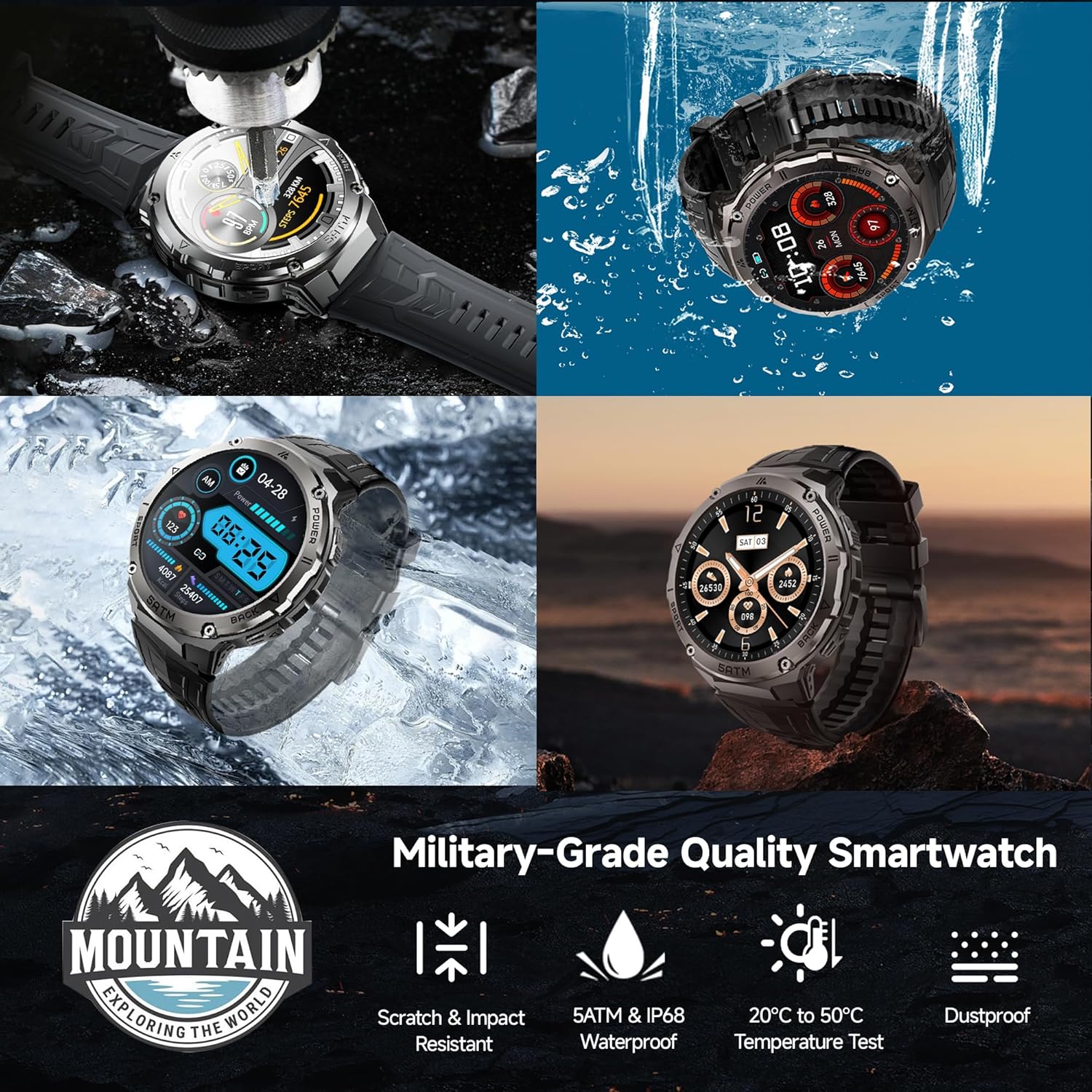
Figure 8: Military-Grade & 5ATM Waterproof
A collage demonstrating the robust features of the Gloryfit T10 Smart Watch, including its scratch and impact resistance, 5ATM & IP68 waterproofing, and temperature test resilience.
Llarga vida útil de la bateria
With a 480mAh large battery, the T10 Smart Watch offers impressive battery performance:
- Temps d'espera: Fins a 50 dies.
- Ús típic: Fins a 15 dies.
- Temps de càrrega: Aproximadament 2 hores.

Figure 9: 480mAh Superb Battery
This image illustrates the extended battery life of the Gloryfit T10 Smart Watch, highlighting its 50-day standby time and 15-day typical usage on a single charge.
Funcions addicionals
The T10 Smart Watch includes a variety of convenient features:
- Assistent de veu AI
- Música i control de càmera
- Calculadora
- Rellotge despertador i temporitzador
- Previsió meteorològica
- Flashlight (screen-based)
- Recordatori sedentari
Manteniment
Proper maintenance ensures the longevity and optimal performance of your Gloryfit T10 Smart Watch.
Carregant
Use only the provided magnetic charging cable. Ensure the charging pins are clean and dry before connecting to prevent corrosion or damage.
Neteja
Regularly clean your watch and strap. Wipe the screen and watch body with a soft, lint-free cloth. For the silicone strap, you can use mild soap and water, then rinse thoroughly and dry completely.
Substitució de corretja
The silicone strap can be easily removed and replaced. Locate the quick-release pins on the underside of the strap where it connects to the watch body. Slide the pin to detach the strap. To reattach, align the new strap and slide the pin into place until it clicks securely.
Resolució de problemes
If you encounter any issues with your Gloryfit T10 Smart Watch, try the following solutions:
- El rellotge no s'encén: Ensure the watch is fully charged. Connect it to the charger for at least 10-15 minutes before attempting to power on again.
- Problemes de connectivitat (Bluetooth):
- Assegureu-vos que el Bluetooth estigui activat al telèfon intel·ligent i al rellotge.
- Assegureu-vos que el rellotge estigui dins de l'abast del Bluetooth del telèfon.
- Reinicieu tant el telèfon intel·ligent com el rellotge intel·ligent.
- Forget the device in your phone's Bluetooth settings and re-pair through the GloryFitPro app.
- La pantalla no respon: Try restarting the watch by holding the 'Power' button for approximately 12 seconds until it reboots.
- Dades de salut inexactes: Assegureu-vos que el rellotge estigui ben ajustat al canell, ni massa ajustat ni massa fluix. Mantingueu neta la zona del sensor.
- Notificacions que no apareixen: Check app permissions in your smartphone settings and ensure notification access is granted to the GloryFitPro app. Also, verify notification settings within the GloryFitPro app itself.
For more detailed troubleshooting or persistent issues, please refer to the GloryFitPro app's help section or contact Gloryfit customer support.
Especificacions
| Característica | Detall |
|---|---|
| Número de model | T10 |
| Mida de la pantalla | AMOLED d'1.43 polzades |
| Resolució de visualització | 466*466 píxels |
| Capacitat de la bateria | 480 mAh |
| Durada de la bateria (ús típic) | Fins a 15 dies |
| Durada de la bateria (mode d'espera) | Fins a 50 dies |
| Classificació impermeable | 5ATM & IP68 |
| Sistema operatiu | iOS 9.0+, Android 4.4+ |
| Connectivitat | Bluetooth |
| Pes de l'article | 6.4 unces |
| Fabricant | Gloryfit |
Garantia i Suport
For information regarding product warranty, returns, or technical support, please refer to the official Gloryfit website or contact their customer service directly. Details can typically be found on the product packaging or within the GloryFitPro app's 'About' or 'Help' sections.
Ask a question about this manual
Ask about setup, troubleshooting, compatibility, parts, safety, or missing instructions. Manuals+ will review the question and use this page’s manual context to help answer it.