
Introducció
The ATTACK SHARK X11SE is a lightweight, tri-mode wireless gaming mouse designed for high-performance gaming and office use. It features a PixArt PAW3311 gaming sensor, offering up to 22,000 DPI, and supports 2.4G wireless, Bluetooth, and USB-C wired connectivity. Its ultra-light 59g design aims to reduce fatigue during extended use, while the efficient battery provides up to 65 hours of operation.

Image: The ATTACK SHARK X11SE mouse highlighting its 22,000 DPI, 1000Hz polling rate, and ultra-light design.
Configuració
1. Desembalatge i càrrega inicial
Upon unboxing, it is recommended to fully charge the mouse. Connect the provided USB-C cable to the mouse and to a USB power source. A full charge typically takes 2-3 hours.
2. Modes de connectivitat
The X11SE mouse supports three connectivity modes:
- Mode sense fil 2.4G: Per a una connexió estable i de baixa latència.
- Mode Bluetooth: For general use and compatibility with various devices.
- Mode amb cable USB-C: For direct connection and charging.

Image: The ATTACK SHARK X11SE mouse illustrating its three connectivity options: 2.4G Wireless, Wired Mode, and Bluetooth 5.2.
3. Canvi de modes
Locate the mode switch on the bottom of the mouse. Slide it to select your desired connection mode (2.4G, Bluetooth, or Wired). For 2.4G wireless, insert the USB receiver into your device. For Bluetooth, ensure your device's Bluetooth is enabled and pair with the mouse.
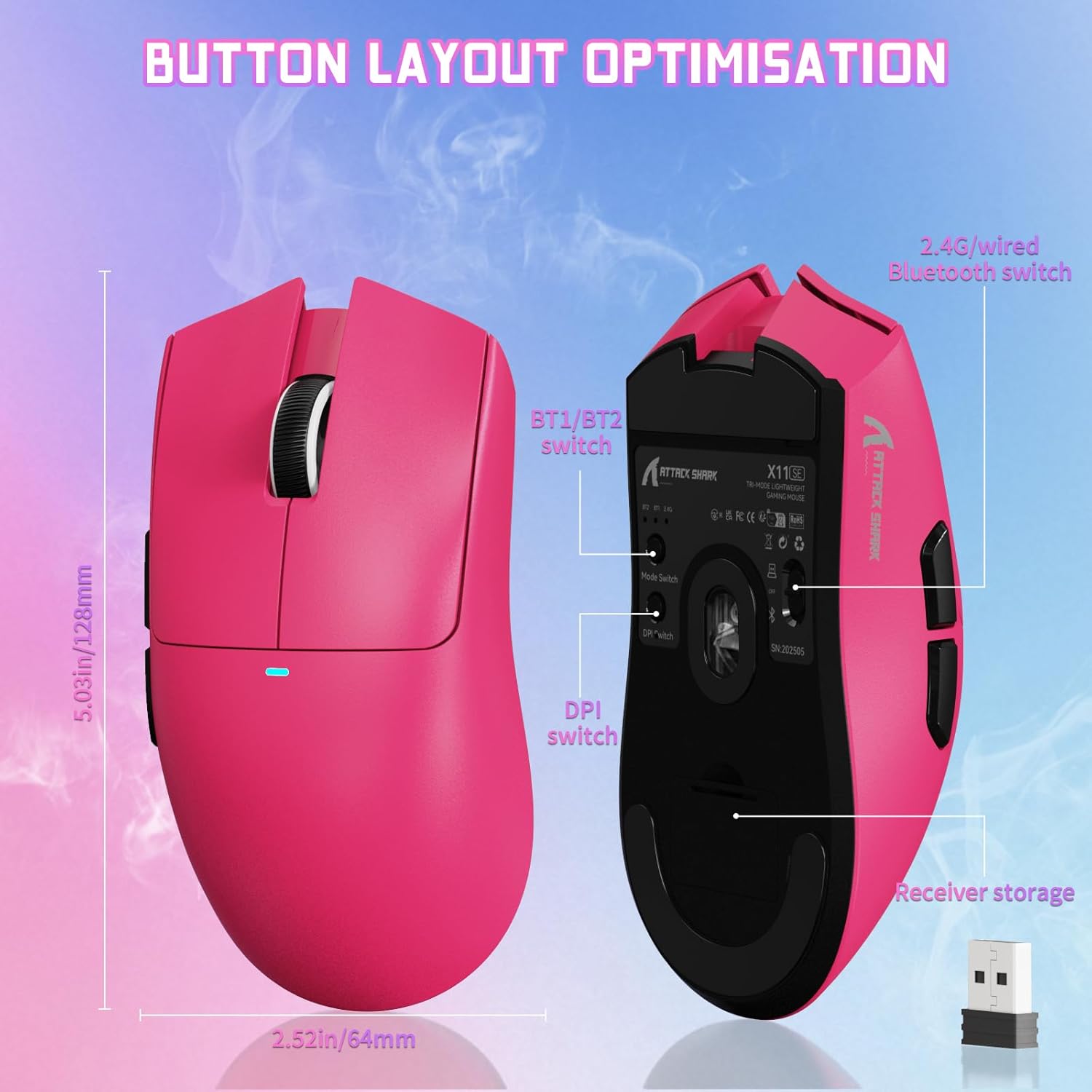
Imatge: Part inferior view of the ATTACK SHARK X11SE mouse, highlighting the mode switch, DPI switch, and receiver storage compartment.
4. Cloud Driver Software
The X11SE mouse utilizes a cloud-driven webpage for customization. Access the driver software via the provided link to configure buttons, DPI settings, polling rate, and macros. No installation is required, making it compatible with Windows, macOS, and Linux systems.
Cloud Driver Link: bit.ly/X11SEMOUSE

Image: A visual representation of the cloud driver interface, demonstrating options for mouse settings, DPI, parameters, and macro editing.
Instruccions de funcionament
1. Ajust de DPI
The mouse features a dedicated DPI switch, typically located on the bottom or top of the mouse, allowing you to cycle through preset DPI levels. Fine-tune DPI settings using the cloud driver software for precise control up to 22,000 DPI.
2. Funcions del botó
The X11SE mouse has 5 programmable buttons. Default functions include left click, right click, scroll wheel click, and two side buttons (forward/back). All buttons can be customized via the cloud driver software.
3. Taxa de votació
The mouse supports an adjustable polling rate of up to 1000 Hz, ensuring rapid response times. This can be configured through the cloud driver software.
4. Gestió de la bateria
The mouse is equipped with a 300mAh battery, providing up to 65 hours of use. When the battery is low, connect the USB-C cable to charge. The mouse can be used in wired mode while charging.

Imatge: Side profile of the ATTACK SHARK X11SE mouse, emphasizing its efficient battery management and long usage time.
Manteniment
1. Neteja
Per mantenir un rendiment òptim, netegeu el ratolí regularment. Feu servir un drap suau i sec per netejar la superfície. Per a la brutícia persistent, netegeu lleugerament.amp cloth with mild soap can be used, ensuring no liquid enters the mouse. Clean the optical sensor area with a cotton swab if tracking issues occur.
2. Emmagatzematge
When not in use for extended periods, store the mouse in a cool, dry place. Avoid extreme temperatures and direct sunlight. If storing for a long time, ensure the battery is partially charged (around 50%) to prolong its lifespan.
3. Cura de la bateria
Avoid completely draining the battery frequently. Charge the mouse when the low battery indicator appears. Overcharging or leaving the mouse plugged in constantly after it's fully charged is generally not recommended for long-term battery health, though modern batteries have protection circuits.
Resolució de problemes
1. El ratolí no respon
- Comproveu la bateria: Ensure the mouse is charged. Connect it via USB-C cable to check if it works in wired mode.
- Check Mode Switch: Verify the mode switch on the bottom of the mouse is set to the correct connectivity mode (2.4G, BT, or Wired).
- Sense fil 2.4G: Assegureu-vos que el receptor USB estigui ben connectat a un port USB que funcioni. Proveu-ho amb un altre port USB.
- Bluetooth: Ensure Bluetooth is enabled on your device and the mouse is paired. Re-pair if necessary.
- Mode per cable: Ensure the USB-C cable is properly connected to both the mouse and your computer.
2. Connexió intermitent o retard
- Interferència: Move the mouse closer to the 2.4G receiver or Bluetooth device. Avoid placing the receiver near other wireless devices or large metal objects.
- Nivell de bateria: Low battery can affect wireless performance. Charge the mouse.
- Problemes del controlador: Ensure your operating system drivers are up to date. Check the cloud driver for any firmware updates.
3. Problemes de seguiment
- Neteja el sensor: Netegeu el sensor òptic de la part inferior del ratolí.
- Superfície: Use the mouse on a clean, non-reflective mouse pad. Avoid glass or highly reflective surfaces.
- Configuració de DPI: Adjust DPI settings via the mouse's DPI switch or the cloud driver software.
Especificacions
| Marca | ATACA AL TAURON |
| Model | X11SE |
| Tecnologia de connectivitat | Sense fil 2.4G, Bluetooth, USB-C amb cable |
| Tecnologia de detecció de moviment | Optical (PixArt PAW3311) |
| DPI | Up to 22,000 (Programmable) |
| Taxa de votació | 1000 Hz (Adjustable) |
| Acceleració | 40G |
| Velocitat de seguiment | 400 IPS |
| Pes | 59 g |
| Durada de la bateria | Fins a 65 hores |
| Capacitat de la bateria | 300 mAh |
| Temps de càrrega | Aprox. 2-3 hores |
| Botons | 5 (programable) |
| Micro interruptor | HUANO (20 Million Clicks) |
| Codificador | Codificador de roda de desplaçament TTC |
| Sistemes operatius compatibles | Windows, macOS, Linux |
| Dispositius compatibles | Gaming Console, Personal Computer, Tablet |
Informació de la garantia
The ATTACK SHARK X11SE Wireless Gaming Mouse comes with a 1 anys de garantia from the date of purchase. This warranty covers manufacturing defects and malfunctions under normal use. It does not cover damage caused by misuse, accidents, unauthorized modifications, or normal wear and tear. Please retain your proof of purchase for warranty claims.
Suport
For further assistance, technical support, or warranty claims, please refer to the following resources:
- Programari de controladors al núvol: Access customization options and potential firmware updates at bit.ly/X11SEMOUSE
- ATTACK SHARK Store: Visit the official ATTACK SHARK store on Amazon for product information and contact options: ATTACK SHARK Amazon Store
- Suport al venedor: For direct support, you may contact the seller "YINDIAO" through your Amazon order details.
Vídeo del producte
Vídeo: Presentació oficial del producte en vídeoasing the ATTACK SHARK X11SE Ultra-Lightweight Wireless Gaming Mouse, demonstrating its features and design.