
1. Introducció
This manual provides detailed instructions for the installation, operation, and maintenance of your MekedeTech DUDUAUTO DUDU7 12.9-inch Android Car Stereo. Please read this manual thoroughly before using the product to ensure proper functionality and safety. The DUDU7 model features a 12.9-inch 1920x1200 high-resolution display, 12GB RAM, 256GB storage, and a powerful Unisoc UIS7870 chipset. It includes a built-in 360-degree backup camera chip and supports Wireless CarPlay and Android Auto.
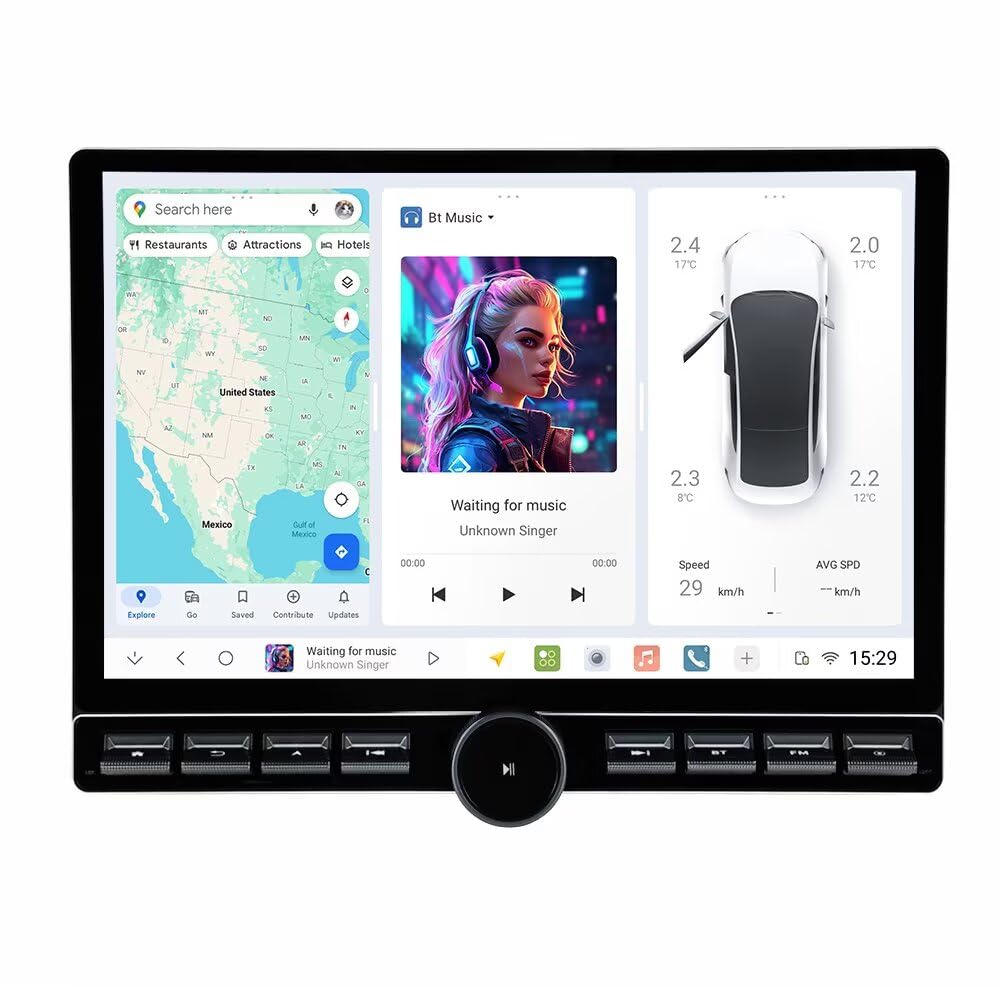
Figura 1.1: Frontal view of the MekedeTech DUDUAUTO DUDU7 car stereo with dimensions.
2. Configuració i instal·lació
Proper installation is crucial for the optimal performance of your car stereo. It is highly recommended that installation be performed by a qualified professional. For vehicle-specific installations, a compatible plate trim cover and CANBUS box may be required and are sold separately.
2.1. Llista de verificació prèvia a la instal·lació
- Ensure all components listed in the package contents are present.
- Verify compatibility with your vehicle's electrical system and dashboard opening.
- Disconnect the vehicle's battery before starting installation to prevent electrical damage.
2.2. Connexions de cablejat
Connect the provided power cable, RCA cables, USB cables, microphone, GPS antenna, and reversing camera input to the corresponding ports on the head unit and your vehicle's wiring harness. Refer to your vehicle's wiring diagram for specific connections.

Figure 2.1: Package contents, including various cables and accessories for installation.
2.3. Mounting the Head Unit
Secure the head unit into the dashboard opening using the provided metal brackets. Ensure a snug fit and proper alignment. If using a vehicle-specific frame, install it according to the frame manufacturer's instructions.

Figura 2.2: Example of installation frames for different display sizes.
2.4. Engegada inicial
After all connections are made and the unit is securely mounted, reconnect the vehicle's battery. Turn on the vehicle's ignition. The unit should power on automatically. Follow any on-screen prompts for initial setup, such as language selection and time zone.
3. Guia de funcionament
3.1. User Interface (DUDU OS)
The DUDU7 operates on DUDU OS, offering both simple and enthusiast modes for a streamlined user experience. Navigate through menus and applications using the 12.9-inch touchscreen display.

Figure 3.1: DUDU OS 3.5 user interface showcasing various modes.
The system also supports custom dynamic wallpapers and various display modes (daytime, light, dark, night) for personalized aesthetics.

Figure 3.2: DUDU OS 3.0 interface with dynamic wallpapers and display modes.
3.2. CarPlay sense fil i Android Auto
Connect your iPhone or Android smartphone wirelessly to access navigation, music, messages, and more directly on the car stereo display.
- Per a CarPlay sense fil: Ensure Bluetooth and Wi-Fi are enabled on your iPhone. On the DUDU7, open the CarPlay application and follow the on-screen instructions to pair your device.
- Per a Android Auto sense fil: Ensure Bluetooth and Wi-Fi are enabled on your Android phone. On the DUDU7, open the Android Auto application and follow the on-screen instructions to pair your device.
3.3. Connectivitat Bluetooth 5.0
The DUDU7 features a Qualcomm 3031 Bluetooth chip for superior wireless connectivity, offering ultra-low power consumption, fast data transmission, and stable signal connection.
- Maridatge: Go to the Bluetooth settings on the DUDU7. Enable Bluetooth on your mobile device and search for available devices. Select 'DUDU7' from the list and confirm the pairing code.
- Trucades mans lliures: Once paired, you can make and receive calls directly through the car stereo. The digital noise-canceling microphone ensures clear communication.
- Transmissió d'àudio: Stream music from your paired device to the car stereo.
3.4. Navegació GPS
Equipped with an advanced 6-mode positioning chip with L1+L5 dual-frequency technology, the DUDU7 provides fast satellite acquisition and lane-level navigation precision.
- Assegureu-vos que l'antena GPS estigui instal·lada correctament i que tingui una vista clara view del cel.
- Open your preferred navigation application on the DUDU7.
- Input your destination and follow the voice and visual prompts.
3.5. Funcions d'àudio
The DUDU7 incorporates AKM7739 DSP Velvet Audio Technology and a TDA7808 digital amplifier for enhanced sound quality. It supports optical and coaxial audio outputs, as well as RCA 5.1 channel outputs.

Figure 3.3: Audio components featuring AKM7739 DSP and TDA7808 ampmés viu.
3.6. 360 Camera Support
The DUDU7 comes with a built-in 360-degree panoramic chip, eliminating the need for an additional purchase for 360 camera functionality. Connect compatible 360 cameras to utilize this feature for enhanced parking and maneuvering.
4. Manteniment
Regular maintenance ensures the longevity and optimal performance of your DUDU7 car stereo.
- Neteja de pantalla: Utilitzeu un drap suau i sense pelusa lleugerament dampened with a screen cleaner or water to gently wipe the touchscreen. Avoid abrasive materials or harsh chemicals.
- Actualitzacions de programari: Periodically check for software updates through the system settings or the manufacturer's website. Keeping the software updated can improve performance and add new features.
- Atenció general: Avoid exposing the unit to extreme temperatures, direct sunlight for prolonged periods, or excessive moisture. Ensure proper ventilation around the unit.
5. Solució De Problemes
If you encounter issues with your DUDU7 car stereo, refer to the following troubleshooting tips:
| Problema | Causa possible | Solució |
|---|---|---|
| Sense poder | Connexió d'alimentació fluixa, fusible fundit, problema amb la bateria del vehicle. | Comproveu les connexions del cable d'alimentació. Inspeccioneu els fusibles del vehicle. Assegureu-vos que la bateria del vehicle estigui carregada. |
| Sense so | Cables d'altaveu desconnectats, volum massa baix, font d'àudio incorrecta. | Verify speaker wire connections. Increase volume. Select correct audio input source. |
| El GPS no funciona | GPS antenna obstructed or disconnected, outdated map data. | Ensure GPS antenna has clear view of sky and is connected. Update navigation software/maps. |
| Problemes d'aparellament de Bluetooth | Bluetooth no habilitat, dispositiu no en mode d'emparellament, interferències. | Ensure Bluetooth is enabled on both devices. Put device in pairing mode. Try pairing in a different location. |
| La pantalla tàctil no respon | Error de programari, danys a la pantalla. | Restart the unit. If issue persists, perform a factory reset (data will be lost). Contact support if screen is physically damaged. |
Si aquests passos no resolen el problema, poseu-vos en contacte amb l'atenció al client per obtenir més ajuda.
6. Especificacions
Below are the detailed technical specifications for the MekedeTech DUDUAUTO DUDU7 car stereo:
| Característica | Especificació |
|---|---|
| Número de model | DUDU7 |
| Mida de la pantalla | 12.9 polzades |
| Resolució de visualització | 2000 x 1200 |
| Sistema operatiu | Android 13 |
| CPU | 8 Core UIS7870 Customized version A76 2.7Ghz 6nm processor |
| Tipus de memòria | UFS 3.1 Read data 1700M+ |
| RAM/ROM (Current Model) | 12 GB de RAM / 256 GB de ROM |
| GPS | Dual Band 6 mode L1 L5 B1 B2a E1 E5a |
| Micròfon | Digital Noise Cancellation Microphone |
| Interfície USB | USB 3.2 GEN1*1 (TYPE-C), USB2.0*3 |
| Poder Ampmés viu | TDA7808 Digital AB type |
| DSP | AKM7739 Velvet Audio Technology |
| Xip Bluetooth | Qualcomm 3031 (Supports aptx HD protocol, BT5.0) |
| Sortida d'àudio | Optical + Coaxial, RCA 5.1 Channel Outputs |
| Tipus de Wi-Fi | 802.11a/b/g/n/ac Support 5G WIFI |
| Treball Voltage | 9 V ~ 16 V |
| CarPlay i Android Auto | Support Wired and Wireless CarPlay and Android Auto |
| 360 Panorama | Includes 360 panoramic chip by default |
| Potència de sortidatage | 50 watts |
| Mètode de control | Toca |
| Color | Negre |

Figure 6.1: Detailed specifications comparison across DUDU series models.

Figure 6.2: Unisoc UIS7870 CPU performance overview.
7. Contingut del paquet
The standard package for the DUDU7 model includes the following items:
- Head unit * 1
- Cable d'alimentació
- Metal Brackets * 2
- Eines de desmuntatge
- 9/10inch Frame (if applicable)
- MIC
- Cable RCA
- Càmera de marxa enrere
- USB Plug * 3
- Fakra 4G Antenna
- Fakra GPS Antenna
- Càmera de 360 graus
Figure 7.1: Visual representation of package contents.
8. Informació de la garantia
The MekedeTech DUDUAUTO DUDU7 car stereo comes with a 1 anys de garantia des de la data de compra. Aquesta garantia cobreix defectes de fabricació i avaries en condicions d'ús normal.
Hi ha plans de protecció opcionals disponibles per a una cobertura ampliada:
- Pla de protecció de 3 anys: Ofereix una cobertura ampliada de 36 mesos.
- NEW Complete Protect: Un pla mensual que cobreix les compres passades i futures elegibles.
Please retain your proof of purchase for warranty claims. The warranty does not cover damage caused by improper installation, misuse, accidents, unauthorized repairs, or normal wear and tear.
9. Atenció al client
For technical assistance, warranty claims, or any questions regarding your MekedeTech DUDUAUTO DUDU7 car stereo, please contact our customer support team.
- Assistència en línia: Visit the official MekedeTech store on Amazon for FAQs and contact information: MekedeTech Store
- Fabricant: Shenzhen Mekede Technology Co.,Ltd
When contacting support, please have your product model number (DUDU7) and purchase details ready.