
AXIL XCOR-SE
AXIL XCOR PRO SE Earbuds User Manual
Your guide to setting up, operating, and maintaining your AXIL XCOR PRO SE Earbuds.
1. Producte acabatview
The AXIL XCOR PRO SE Earbuds are advanced 4-in-1 Bluetooth digital ear protection devices designed for various environments. They offer hearing protection, hearing enhancement, Bluetooth 5.2 audio connectivity, and hands-free communication.

Image 1.1: The AXIL XCOR PRO SE Earbuds, showcasing el seu disseny compacte.
Característiques principals:
- 4-in-1 Bluetooth Digital Ear Protection
- Digital Hearing Control and Enhancement (up to 6X)
- Advanced Noise Isolation with 26dB SNR
- Bluetooth 5.2 Connectivity for audio and calls
- Easy On-Board Touch and Tap Controls
- Dynamic Audio Drivers for studio-quality sound
- Protective Case with USB-C charging
2. Què s'inclou
Your AXIL XCOR PRO SE Earbuds package contains the following items:
- AXIL XCOR PRO SE Earbuds (Left and Right)
- Estoig de càrrega
- Cable de càrrega USB-C
- Maleta de transport
- 6 Ear Tips (3 Foam, 3 Silicone)
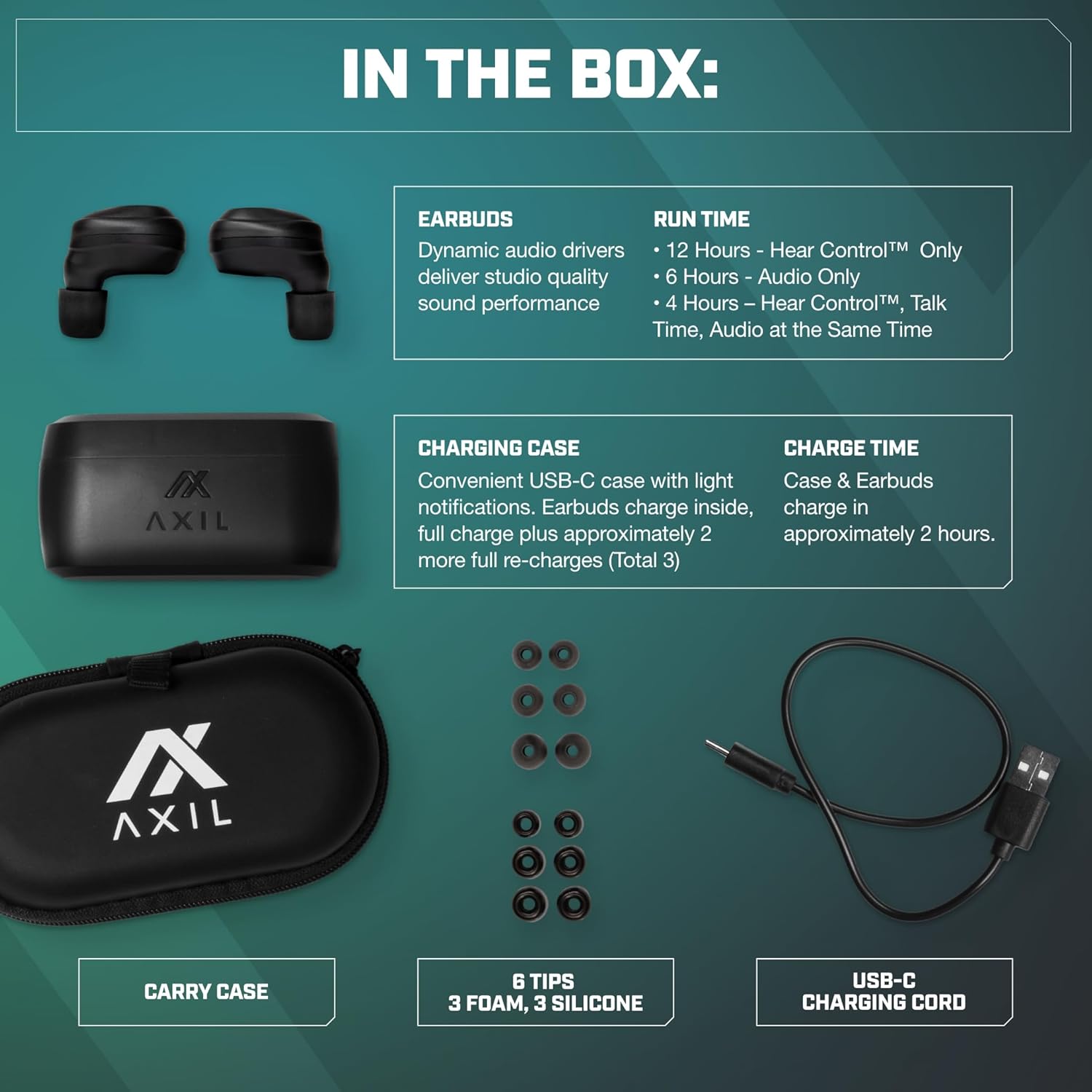
Image 2.1: All items included in the AXIL XCOR PRO SE Earbuds package.
3. Configuració
3.1. Càrrega dels auriculars i l'estoig
- Col·loca els auriculars a l'estoig de càrrega. Assegura't que estiguin ben col·locats.
- Connect the USB-C charging cord to the charging port on the case and plug the other end into a compatible USB power source.
- The charging case has light notifications to indicate charging status. A full charge for both the case and earbuds takes approximately 2 hours.
- The fully charged case provides approximately 2 additional full re-charges for the earbuds.
3.2. Selecció i instal·lació de les puntes per a les orelles
Choose the ear tips (foam or silicone) that provide the best seal and comfort for your ears. A proper seal is crucial for effective noise reduction and sound quality.
- Traieu suaument les puntes d'orella preinstal·lades.
- Select a pair of foam or silicone tips that fit snugly in your ear canal.
- Carefully push the new ear tips onto the earbud nozzle until securely attached.

Image 3.1: Illustration of the physical seal provided by the foam ear tip for noise reduction.
3.3. Emparellament Bluetooth
- Assegura't que els auriculars estiguin carregats i trets de l'estoig de càrrega. Entraran automàticament en mode d'emparellament.
- On your device (smartphone, laptop, tablet), navigate to the Bluetooth settings.
- Cerca available devices and select "AXIL XCOR" from the list.
- Un cop connectat, el dispositiu indicarà que l'emparellament s'ha realitzat correctament.

Imatge 3.2: Ex.ample of Bluetooth pairing on a smartphone, showing 'AXIL XCOR' as a connected device.
4. Instruccions de funcionament
4.1. Encendre/apagar
- Encès: Traieu els auriculars de l'estoig de càrrega. S'encendran automàticament.
- Apagar: Torna a col·locar els auriculars a l'estoig de càrrega. S'apagaran automàticament i començaran a carregar-se.
4.2. Hearing Protection and Enhancement
The XCOR PRO SE Earbuds feature both hearing protection and enhancement modes.

Imatge 4.1: Detallada view of the earbud's touch control area and volume button for hearing control.
- Activating/Deactivating Hearing Protection: Long press the Touch Control Area on either earbud to turn Hearing Protection ON or OFF. When ON, sounds above 85dB will be compressed by Advanced AutoBlocker™ technology.
- Adjusting Hearing Enhancement: Use the 'HEAR CONTROL™ & PROTECTION MODE' volume button on the earbud to adjust the level of hearing enhancement. The digital microphone provides up to 6X hearing enhancement.

Image 4.2: Visual representation of how the earbuds simultaneously provide hearing enhancement and protection.
4.3. Audio Playback and Calls
Once connected via Bluetooth, you can control audio playback and manage calls using the earbud's touch controls.
- Reproduir/pausa: Single tap the Touch Control Area on either earbud.
- Pista següent: Toca dues vegades l'auricular dret.
- Pista anterior: Toca dues vegades l'auricular esquerre.
- Respondre/Finalitzar la trucada: Single tap the Touch Control Area on either earbud.
- Rebutja la trucada: Long press the Touch Control Area on either earbud.
5. Manteniment
5.1. Neteja
Una neteja regular ajuda a mantenir el rendiment i la higiene.
- Netegeu suaument els auriculars i l'estoig de càrrega amb un drap suau, sec i sense borrissol.
- Traieu les puntes de les orelles i netegeu-les per separat amb aigua i sabó suau si cal. Assegureu-vos que estiguin completament seques abans de tornar-les a col·locar.
- No utilitzeu netejadors abrasius ni dissolvents.
- The earbuds are water-resistant, but avoid submerging them in water.

Image 5.1: The earbud demonstrating its water-resistant properties, suitable for various activities.
5.2. Emmagatzematge
Quan no els utilitzeu, guardeu els auriculars a la seva funda de càrrega per protegir-los i assegurar-vos que es mantinguin carregats.
6. Solució De Problemes
If you encounter issues with your AXIL XCOR PRO SE Earbuds, refer to the following common solutions:
| Problema | Solució |
|---|---|
| Els auriculars no s'encenen | Ensure earbuds are charged. Place them in the charging case for at least 30 minutes. |
| No es pot emparellar amb el dispositiu | Make sure Bluetooth is enabled on your device. Ensure earbuds are in pairing mode (out of case). Forget previous pairings on your device and try again. |
| No hi ha so o mala qualitat d'àudio | Check device volume. Ensure earbuds are properly seated in your ears with a good seal. Re-pair the earbuds with your device. |
| Hearing protection/enhancement not working | Ensure the feature is activated via the touch controls. Check earbud battery level. |
| Un auricular no funciona | Place both earbuds back in the charging case, close the lid, wait a few seconds, then remove them. Ensure both are charged. |
7. Especificacions
Detailed technical specifications for the AXIL XCOR PRO SE Earbuds:
| Característica | Detall |
|---|---|
| Nom del model | XCOR-SE |
| Tecnologia de connectivitat | Sense fil (Bluetooth) |
| Tecnologia de comunicació sense fils | Bluetooth 5.2 |
| Control de soroll | Electronic Protection (compresses sounds above 85dB) |
| Índex de reducció de soroll (SNR) | Up to 26 dB (with proper ear tips) |
| Tipus de controlador d'àudio | Conductor dinàmic |
| Interval de freqüència | 20 Hz - 20,000 Hz |
| Impedància | 30 ohms |
| Col·locació de l'orella | A l'orella |
| Pes de l'article | 6 Ounces (total package) |
| Earbud Run Time (Hear Control™ Only) | 12 hores |
| Earbud Run Time (Audio Only) | 6 hores |
| Earbud Run Time (Hear Control™, Talk Time, Audio) | 4 hores |
| Temps de càrrega de la funda i els auriculars | Aproximadament 2 hores |
| UPC | 734690473522 |
8. Garantia i Suport
For warranty information and customer support, please refer to the official AXIL weblloc web o contacteu directament amb el seu servei d'atenció al client. Conserveu el comprovant de compra per a qualsevol reclamació de garantia.
Fabricant: AXIL
Contacte: Si us plau, visiteu el AXIL Store on Amazon or the official AXIL weblloc de recursos de suport.
Ask a question about this manual
Ask about setup, troubleshooting, compatibility, parts, safety, or missing instructions. Manuals+ will review the question and use this page’s manual context to help answer it.