
1. Introducció
This manual provides detailed instructions for the assembly, operation, maintenance, and troubleshooting of your FLEXISPOT EB2 electric height-adjustable desk frame. Please read this manual thoroughly before installation and use to ensure proper function and safety.
The FLEXISPOT EB2 desk frame features dual motors for smooth and quiet height adjustments, a wide height adjustment range, and a smart control panel with memory functions. It is designed to support various desktop sizes, offering flexibility for your workspace.
2. Informació de seguretat
- Seguiu sempre atentament les instruccions de muntatge.
- Ensure the desk frame is securely mounted to the tabletop to prevent tipping.
- Do not exceed the maximum weight recommendation of 100 kg (dynamic load) or 125 kg (static load) to maintain stability and safety.
- Mantingueu els nens i les mascotes allunyats de l'escriptori durant el funcionament.
- Assegureu-vos que no hi hagi obstacles en el recorregut de l'escriptori durant els ajustaments d'alçada.
- Do not open the motor housing or attempt to repair the unit yourself. Contact customer support for assistance.
- Desconnecteu l'alimentació abans de netejar o realitzar qualsevol manteniment.
3. Contingut del paquet
Verifiqueu que tots els components siguin presents abans de començar el muntatge. El paquet normalment inclou:
- Desk Legs (2) with integrated motors
- Crossbar/Frame (adjustable width)
- Control Panel with digital display
- Adaptador d'alimentació i cable
- All necessary screws, bolts, and tools for assembly
- Cable management accessories (e.g., clips, hooks)
4. Muntatge i muntatge
Assembly is required for this product. Please follow the step-by-step instructions provided in the separate assembly guide included with your purchase. Ensure you have adequate space and assistance if needed.
Consideracions clau del muntatge:
- Compatibilitat d'escriptori: The frame is designed for tabletops with a width of 120 cm to 180 cm and a depth of 60 cm to 80 cm. The frame width is adjustable from 107 cm to 160 cm.
- Subjecció segura: Ensure all screws are tightened securely, especially those connecting the desktop to the frame.
- Gestió de cables: Utilize the provided cable management solutions to keep wires tidy and prevent interference with desk movement.
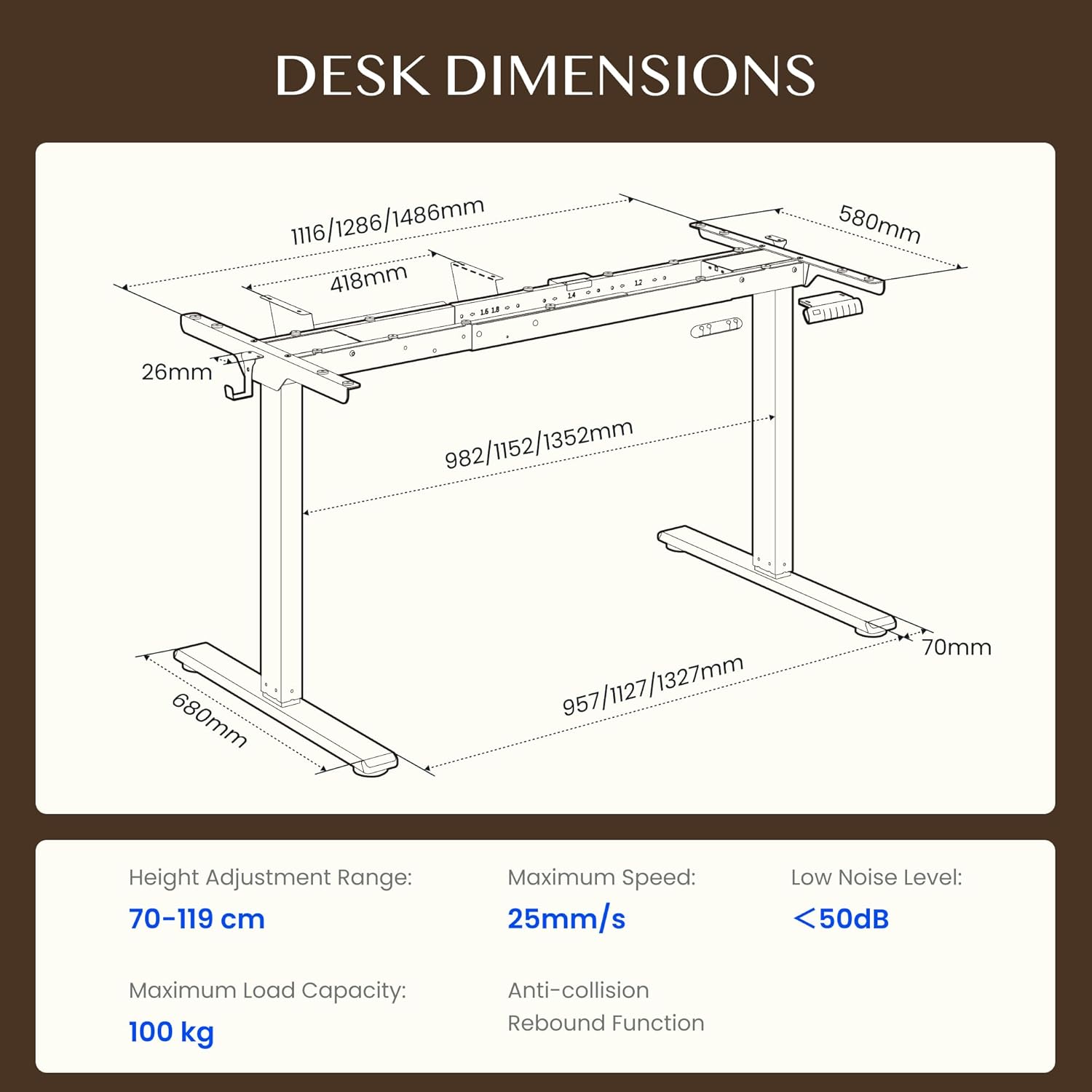
Figure 4.1: Detailed dimensions of the FLEXISPOT EB2 desk frame, showing adjustable width and height ranges, and overall structural measurements.

Figure 4.2: Illustration demonstrating the adaptable desktop size range for the FLEXISPOT EB2 frame, indicating minimum and maximum dimensions for compatible tabletops.
5. Instruccions de funcionament
5.1 Encès
Connect the power cable to the desk frame and then to a standard electrical outlet. The digital display on the control panel should illuminate.
5.2 Ajust de l'alçada
Utilitza el Up i Avall arrow buttons on the control panel to manually adjust the desk height. The height range is from 70 cm to 119 cm.

Figure 5.1: Visual representation of the desk's height adjustment range, illustrating the minimum and maximum heights achievable with the FLEXISPOT EB2 frame.
5.3 Preajustos de memòria
The control panel features 4 memory preset buttons (1, 2, 3, 4) to save and recall your preferred sitting and standing heights.
- Ajusteu l'escriptori a l'alçada desitjada amb els botons Amunt/Avall.
- Press and hold one of the memory buttons (1, 2, 3, or 4) until the display flashes or beeps, indicating the height has been saved.
- To recall a saved height, simply press the corresponding memory button. The desk will automatically move to that position.

Figura 5.2: Primer pla view of the smart control panel, highlighting the Up/Down buttons, 4 memory presets, and LED display for effortless height adjustment.
5.4 Sit/Stand Reminder
The control panel may include a sit/stand reminder button. Consult your specific control panel's instructions for activation and customization of reminder intervals.
5.5 Anti-Collision System
The desk frame is equipped with an anti-collision system. If the desk encounters an obstruction during height adjustment, it will automatically stop and reverse slightly to prevent damage.

Figure 5.3: Diagram illustrating the powerful dual motor system of the FLEXISPOT EB2, emphasizing stability, quiet operation, and efficiency.

Figura 5.4: Examples of simple desk helpers, including under-desk cable management, side hooks, and adhesive cable clips, designed to keep your workspace organized.
6. Manteniment
- Neteja: Netegeu l'estructura de l'escriptori amb un drap sec. Eviteu utilitzar netejadors abrasius o productes químics agressius que puguin danyar l'acabat.
- Inspecció: Reviseu periòdicament tots els cargols i connexions per assegurar-vos que romanen ajustats. Torneu a apretar-los si cal.
- Gestió de cables: Ensure cables are not pinched or tangled, which could impede desk movement or cause damage.
7. Solució De Problemes
If you encounter issues with your FLEXISPOT EB2 desk frame, refer to the following common troubleshooting steps:
- L'escriptori no es mou: Check if the power cable is securely connected to both the desk and the wall outlet. Ensure the outlet is functional.
- Uneven movement or strange noises: Ensure the desk is not overloaded. Check for any obstructions under or around the desk. Verify that all assembly screws are tight.
- Codis d'error que es mostren: Refer to the specific error code in your detailed assembly guide or contact customer support for assistance.
- Restabliment del sistema: Some issues can be resolved by performing a system reset. Consult your assembly guide for specific reset procedures, which often involve holding down certain buttons.
If the problem persists after attempting these steps, please contact FLEXISPOT customer support.
8. Especificacions
| Característica | Especificació |
|---|---|
| Marca | FLEXISPOT |
| Número de model | EB2B-EU |
| Interval d'ajust d'altura | 70 cm a 119 cm (27.56" a 46.85") |
| Frame Width (Adjustable) | 107 cm a 160 cm (42.13" a 62.99") |
| Amplada recomanada del taulell | 120 cm a 180 cm (47.24" a 70.87") |
| Recommended Tabletop Depth | 60 cm a 80 cm (23.62" a 31.50") |
| Capacitat de càrrega màxima | 100 kg (220 lbs) dynamic, 125 kg (275 lbs) static |
| Tipus de motor | Motors duals |
| Velocitat d'ajust | 2.5 cm/s (1 inch/s) |
| Nivell de soroll | <50 dB |
| Consum d'energia en espera | <0.5 W |
| Tauler de control | 7-button digital display with 4 memory presets |
| Material | Acer d'aliatge |
| Pes de l'article | 28 quilos (61.7 lliures) |
| Característiques especials | Anti-collision system, Sit/Stand reminder |
9. Garantia
The FLEXISPOT EB2 desk frame comes with a limited warranty. Please refer to the warranty card included with your product or visit the official FLEXISPOT weblloc web per obtenir termes i condicions detallats sobre la cobertura i la durada.
10. Atenció al client
For technical assistance, warranty claims, or any questions regarding your FLEXISPOT EB2 desk frame, please contact FLEXISPOT customer support through their official weblloc web o la informació de contacte que es proporciona a l'embalatge del producte.
Please have your model number (EB2B) and purchase information ready when contacting support.