
1. Introducció
The LAGENIO A11 is a modern smartphone designed for daily use, combining advanced features with a user-friendly experience. It operates on Android 15 and is powered by an Octa-Core Unisoc T7250 processor, ensuring smooth performance for various tasks. Key features include a vibrant 6.7-inch HD+ display with a 120Hz refresh rate, a long-lasting 5150mAh battery, and a versatile camera system.

Figure 1.1: LAGENIO A11 Smartphone highlighting its design and performance.
2. Configuració
2.1 Contingut del paquet
Abans de començar, assegureu-vos que tots els elements estiguin presents al paquet:
- Telèfon intel·ligent LAGENIO A11
- Cable USB
- Funda protectora
- Manual d'usuari
- Targeta informativa

Figure 2.1: Contents of the LAGENIO A11 retail package.
2.2 Instal·lació de la targeta SIM i la targeta TF
The LAGENIO A11 supports Dual SIM 4G and expandable storage up to 1TB via a TF card. To install your SIM and TF cards:
- Localitza la safata de la targeta SIM al lateral del dispositiu.
- Insert the SIM ejection tool (if provided) into the small hole next to the tray and press gently until the tray pops out.
- Place your Nano-SIM cards and/or TF card into the designated slots on the tray. Ensure they are correctly oriented.
- Empenyeu amb cura la safata cap al dispositiu fins que encaixi al seu lloc.

Figure 2.2: Proper insertion of SIM and TF cards into the tray.
2.3 Encès inicial
Press and hold the Power button on the side of the device until the LAGENIO logo appears. Follow the on-screen instructions to complete the initial setup, including language selection, Wi-Fi connection, and Google account setup.
3. Instruccions de funcionament
3.1 Característiques d'Android 15
The LAGENIO A11 runs on the latest Android 15, offering enhanced privacy controls, improved multitasking capabilities, and a more intuitive user interface. Enjoy instant app launches and efficient process management.

Figure 3.1: Android 15 operating system interface.
3.2 Ús de la pantalla
Experience fluid visuals on the 6.7-inch HD+ Incell display with a 120Hz refresh rate. This high refresh rate ensures smooth scrolling and an immersive viewing experience for videos and games.
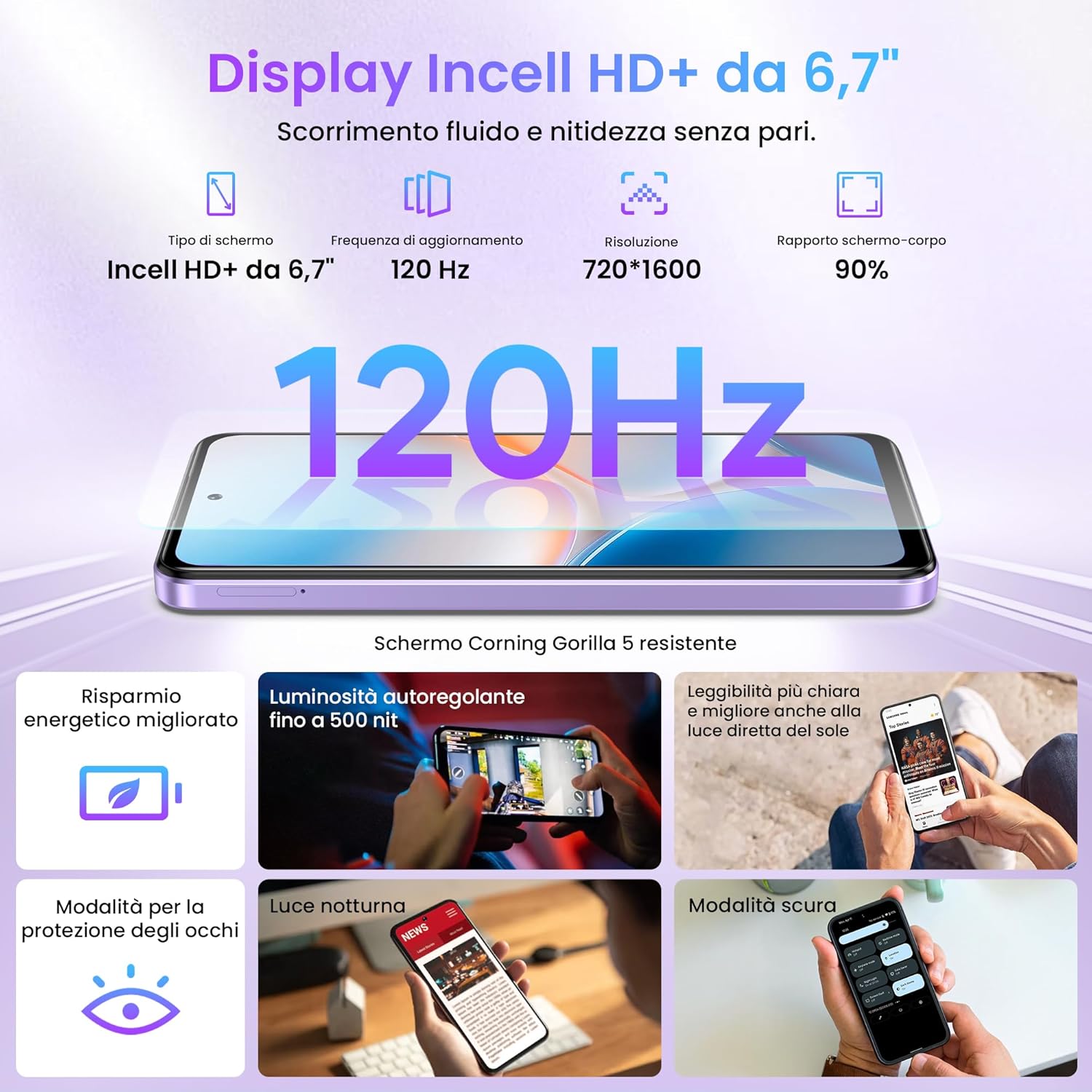
Figure 3.2: The 6.7-inch HD+ 120Hz Incell display.
3.3 Biometric Security
Unlock your device securely and quickly using either the side-mounted fingerprint sensor or facial recognition. To set up:
- Navega a Settings > Security & location.
- Seleccioneu empremta digital or Desbloqueig facial and follow the on-screen instructions to register your biometric data.

Figure 3.3: Fingerprint and Face ID security features.
4. Característiques de la càmera
Capture life's moments with the LAGENIO A11's camera system. The rear camera features a 13MP sensor with AI enhancements and Portrait mode, allowing for vivid and detailed photos. The 8MP front camera is ideal for clear selfies.

Figura 4.1: Mésview of the LAGENIO A11 camera system.
4.1 Suport Widevine L1
The LAGENIO A11 supports Widevine L1, enabling you to stream high-definition content from popular platforms with excellent image quality and detail.
5. Bateria i càrrega
The device is equipped with a robust 5150mAh battery, providing extended usage times. It supports OTG (On-The-Go) functionality, allowing you to connect external devices or even charge other small gadgets.

Figure 5.1: LAGENIO A11 battery and charging capabilities.
6. Connectivitat i navegació
6.1 Dual SIM 4G
The LAGENIO A11 supports Dual SIM 4G, allowing you to use two different network providers simultaneously. This feature is convenient for managing personal and work contacts or for international travel.
6.2 Global Navigation Systems
Benefit from reliable and precise positioning with support for multiple satellite navigation systems: GPS, GLONASS, GALILEO, and BEIDOU.
6.3 Altres connectivitats
The device also includes Bluetooth 5.0 for seamless wireless accessory connections and a 3.5mm headphone jack for traditional audio devices.

Figure 6.1: Various connectivity options of the LAGENIO A11.
7. Especificacions
| Característica | Especificació |
|---|---|
| Marca | LAGENIO |
| Nom del model | A11 |
| Sistema operatiu | Android 15 |
| Mida de la memòria RAM | 12 GB (4 GB físic + 8 GB virtual) |
| Capacitat d'emmagatzematge | 128 GB |
| Max Supported Flash Memory Size | 1 TB |
| Mida de la pantalla | 6.7 polzades |
| Tipus de pantalla | LCD |
| Resolució de pantalla màxima | 720 x 1600 |
| Freqüència d'actualització | 120 Hz |
| Resolució de la càmera posterior | 13 MP |
| Resolució de la càmera frontal | 8 MP |
| Capacitat de la bateria | 5150 mAh |
| Tecnologia cel·lular | 4G |
| Number of SIM Card Slots | Doble SIM |
| Identificació biomètrica | Fingerprint Recognition, Facial Recognition |
| Conector d'auriculars | 3.5 mm |
| Port USB | USB-C |
| Nivell de resistència a l'aigua | No resistent a l'aigua |
| Average Battery Life (in use) | 33 hores |
| País d'origen | Xina |
Table 7.1: Technical specifications of the LAGENIO A11 Smartphone.
For more detailed product information, including energy efficiency ratings, please refer to the official EU EPREL database: https://eprel.ec.europa.eu/qr/2415291
8. Manteniment
To ensure the longevity and optimal performance of your LAGENIO A11, follow these maintenance guidelines:
- Neteja: Feu servir un drap suau i sense borrissol per netejar la pantalla i la carcassa. Eviteu materials abrasius o productes químics agressius.
- Actualitzacions de programari: Regularly check for and install system updates to benefit from the latest security patches and feature enhancements. Go to Configuració > Sistema > Actualització del sistema.
- Cura de la bateria: Avoid extreme temperatures. Do not let the battery drain completely frequently, and avoid overcharging for extended periods.
- Gestió d'emmagatzematge: Netegeu periòdicament els innecessaris fileAplicacions i aplicacions per alliberar espai d'emmagatzematge i mantenir la velocitat del dispositiu.
9. Solució De Problemes
If you encounter issues with your LAGENIO A11, try these common troubleshooting steps:
- El dispositiu no respon: If the device is frozen, press and hold the Power button for about 10-15 seconds to force a restart.
- Esgotament ràpid de la bateria: Comprova l'ús de l'aplicació en segon pla a Configuració > Bateria. Reduce screen brightness and disable unnecessary features like Wi-Fi, Bluetooth, or GPS when not in use.
- Problemes de connectivitat de xarxa: Ensure your SIM card is correctly inserted. Try toggling Airplane Mode on and off. If the issue persists, contact your network provider.
- Bloqueig de l'aplicació: Esborra la memòria cau i les dades de l'aplicació (Configuració > Aplicacions > [Nom de l'aplicació] > Emmagatzematge > Esborra la memòria cau/Esborra les dades) o reinstal·leu l'aplicació.
- Rendiment lent: Close unused apps, clear cache, and ensure sufficient storage space. A factory reset (Configuració > Sistema > Opcions de restabliment > Esborra totes les dades (restabliment de fàbrica)) can resolve persistent performance issues, but back up your data first.
10. Garantia i Suport
LAGENIO is committed to providing excellent customer service for your A11 Smartphone:
- Política de devolució de 30 dies: Enjoy a 30-day no-reason return period.
- 2 any de garantia: Your device comes with a 2-year free warranty covering manufacturing defects.
- Suport tècnic: Long-term technical support is available.
- Atenció al client: Contact our 24-hour online customer service for any concerns or problems during use. We aim to respond within 24 hours.
For support, please refer to the contact information provided in your product packaging or visit the official LAGENIO weblloc.