
1. Introducció
This manual provides essential instructions for setting up, operating, maintaining, and troubleshooting your FUNYET 2-in-1 Laptop, Model FUN01-05. This device features a 14.1-inch Full HD touchscreen, an Intel Core i7-1265U processor, 16GB RAM, and a 512GB SSD, running Windows 11 Pro. Its 360-degree reversible screen allows for versatile usage modes.
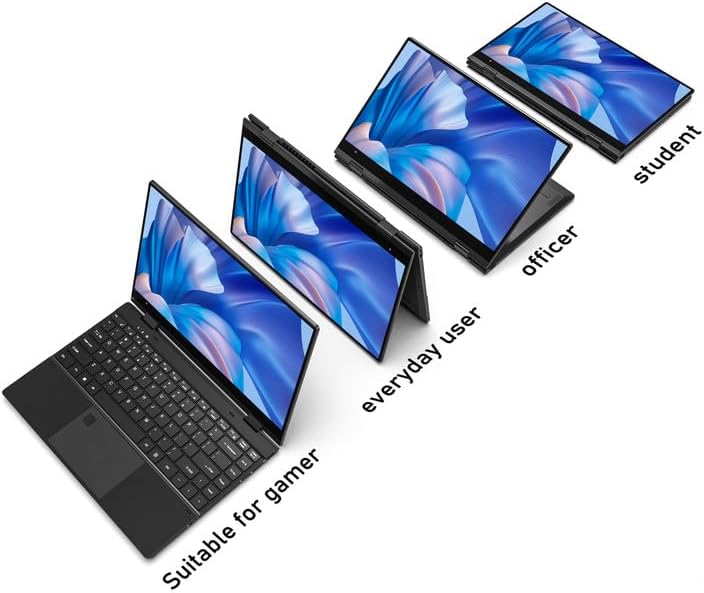
Figure 1: FUNYET 2-in-1 Laptop showcasing its versatile modes.
2. Contingut del paquet
Verifiqueu que tots els elements siguin presents al paquet:
- FUNYET 2-in-1 Touch Screen Laptop
- Adaptador de CA
- Targeta de garantia
- Instruccions (aquest manual)
3. Configuració
3.1 Càrrega inicial i engegada
- Connect the AC adapter to the DC-IN port on the laptop and plug it into a power outlet.
- Deixeu que el portàtil es carregui durant almenys 30 minuts abans del primer ús.
- Press and hold the Power Button (located on the side) until the screen illuminates.
3.2 Configuració del Windows 11 Pro
Follow the on-screen prompts to complete the Windows 11 Pro initial setup. This includes selecting your region, language, connecting to a Wi-Fi network, and creating a user account.
3.3 Configuració del lector d'empremtes dactilars
For enhanced security and quick access, set up the fingerprint reader:
- Navegueu a Configuració de Windows > Comptes > Opcions d'inici de sessió.
- Under "Windows Hello Fingerprint," click "Set up" and follow the instructions to register your fingerprint.

Figure 2: Backlit keyboard and integrated fingerprint reader.
4. Instruccions de funcionament
4.1 Gestió de l'energia
- Encès: Premeu el botó d'engegada.
- Mode de repòs: Briefly press the Power Button or close the lid.
- Apagar: Aneu al menú Inici > Energia > Apagar.
- Reinicia: Aneu al menú Inici > Energia > Reiniciar.
4.2 Modes 2 en 1
The laptop's 360-degree hinge allows for four primary modes:
- Notebook Mode: Configuració estàndard d'ordinador portàtil per a la mecanografia i la productivitat.
- Mode de peu: Fold the keyboard back to prop up the screen for viewing contingut.
- Mode tenda: Position the laptop in an inverted 'V' shape, ideal for touch interaction or presentations in confined spaces.
- Mode tauleta: Fold the screen completely back against the base for a tablet experience.

Figure 3: Different operational modes of the 2-in-1 laptop.
4.3 Touchscreen and Keyboard
- Pantalla tàctil: Use gestures similar to a smartphone or tablet for navigation and interaction.
- Teclat retroil·luminat: The keyboard features a backlight for use in low-light conditions. The backlight can typically be toggled or adjusted using function keys (e.g., Fn + F5).
4.4 Connectivitat
Your laptop supports various connectivity options:
- Wi-Fi 6: For high-speed wireless internet access. Connect via Windows Settings > Network & Internet > Wi-Fi.
- Bluetooth 5.2: For connecting wireless peripherals like headphones, mice, or keyboards. Pair devices via Windows Settings > Bluetooth & devices.
- Ports: The laptop includes various ports for external devices.

Figure 4: Laptop ports and their functions.
Ports disponibles:
- DC-IN (entrada d'alimentació)
- USB 3.1 Type-C (Video Output, Data Transfer, Charging)
- Audio Port (Headphones/Microphone)
- Botó d'engegada
- TF Card Slot (for storage expansion up to 1TB)
- USB 3.1 tipus A
5. Manteniment
5.1 Neteja
- Feu servir un drap suau i sense borrissol per netejar la pantalla i l'exterior.
- For stubborn smudges, dampen the cloth slightly with water or a screen-safe cleaner.
- Eviteu productes químics agressius, abrasius o humitat excessiva.
5.2 Cura de la bateria
- Per maximitzar la vida útil de la bateria, eviteu descarregar-la completament amb freqüència.
- Guardeu el portàtil en un lloc fresc i sec quan no el feu servir durant períodes prolongats.
- The laptop features a 38 Watt-hour Lithium-Ion battery, providing up to 8 hours of usage.
5.3 Gestió tèrmica
The laptop is designed with an improved thermal system to maintain optimal operating temperatures. Ensure proper airflow by not blocking the ventilation openings, especially during intensive tasks.

Figure 5: Laptop thermal design for efficient cooling.
6. Solució De Problemes
Si teniu problemes, proveu els passos bàsics següents per resoldre problemes:
- Sense energia: Assegureu-vos que l'adaptador de CA estigui connectat correctament tant al portàtil com a una presa de corrent que funcioni. Proveu una altra presa de corrent.
- La pantalla no es mostra: Connecteu un monitor extern per comprovar si el problema és a la pantalla del portàtil. Reinicieu el portàtil.
- Rendiment lent: Tanqueu les aplicacions innecessàries. Comproveu si hi ha actualitzacions de Windows. Assegureu-vos que hi hagi prou espai d'emmagatzematge lliure.
- Problemes amb el Wi-Fi/Bluetooth: Toggle Wi-Fi/Bluetooth off and on in Windows Settings. Restart the laptop. Check router/device connections.
- Errors de visualització: Ensure your Windows operating system and graphics drivers are up to date. This can often resolve display anomalies.
- La pantalla tàctil no respon: Restart the laptop. Ensure the screen is clean and free of debris.
Per a problemes persistents, consulteu la secció d'assistència o poseu-vos en contacte amb el servei d'atenció al client.
7. Especificacions
| Característica | Detall |
|---|---|
| Marca | FUNYET |
| Nom del model | Magbook |
| Número de model | FUN01-05 |
| Mida de la pantalla | 14.1 polzades |
| Resolució de visualització | 1920 x 1080 píxels (FHD) |
| Tipus de visualització | LCD, Touchscreen, Glossy Finish |
| Processador | Intel Core i7-1265U (fins a 4.8 GHz, 8 nuclis, 12 fils de treball) |
| RAM | 16 GB de DDR4 (3733 MHz) |
| Emmagatzematge | 512 GB SSD (PCIE x 4), expandable up to 1TB with TF card |
| Sistema operatiu | Windows 11 Pro |
| Gràfics | Gràfics Intel Iris Xe integrats |
| Connectivitat sense fil | Wi-Fi 6, Bluetooth 5.2 |
| Ports | USB 3.1 Type-A, USB 3.1 Type-C, DC-IN, Audio Jack, TF Card Slot |
| Càmera | Front 2 MP |
| Seguretat | Reconeixement d'empremtes digitals |
| Bateria | 38 Watt Hours Lithium Ion (up to 8 hours) |
| Pes | 3 lliures |
| Dimensions (L x A x A) | 12.7" x 8.6" x 0.6" |
8. Garantia i Suport
8.1 Informació de la garantia
Your FUNYET 2-in-1 Laptop comes with a Garantia limitada d'2 anyAquesta garantia cobreix defectes de fabricació i avaries de maquinari en condicions d'ús normal. Si us plau, conserveu el comprovant de compra per a reclamacions de garantia.
Addicionalment, a Política de devolució gratuïta de 180 dies is offered from the date of purchase.
8.2 Atenció al client
For technical assistance, warranty claims, or any product-related inquiries, please contact FUNYET customer support:
- Suport telefònic: +1 800-986-9631 (English phone support available)
- Assistència en línia: 24/7 instant online support is available. Please visit the official FUNYET weblloc per obtenir dades de contacte.