1. Producte acabatview
The TRIGKEY Key i13 Mini PC is a compact and powerful computing solution designed for various applications, from gaming and content creation to business and educational use. It features a 13th Gen Intel Core i9-13900HK processor, high-speed DDR5 RAM, and PCIe 4.0 SSD storage, offering robust performance in a small form factor.

Figure 1: The TRIGKEY Key i13 Mini PC, showcasing its compact design and various ports on the front and rear.
Característiques principals:
- Processador: 13th Gen Intel Core i9-13900HK (14 Cores/20 Threads, up to 5.4 GHz)
- Memòria: 32 GB de RAM DDR5 (ampliable)
- Emmagatzematge: 1TB PCIe 4.0 SSD (expandable with dual M.2 2280 slots)
- Gràfics: Intel Iris Xe Graphics (96EU)
- Sortida de visualització: Triple display support via HDMI (4K 60Hz), DisplayPort 1.4 (4K 144Hz), and Thunderbolt 4 (40Gbps/DP1.4)
- Connectivitat: WiFi 6 (Intel AX200), Bluetooth 5.2, 2.5G LAN
- Ports: Thunderbolt 4, USB-C 3.2, USB-A 3.2, DP1.4, HDMI, 2.5G LAN, 3.5mm audio jacks
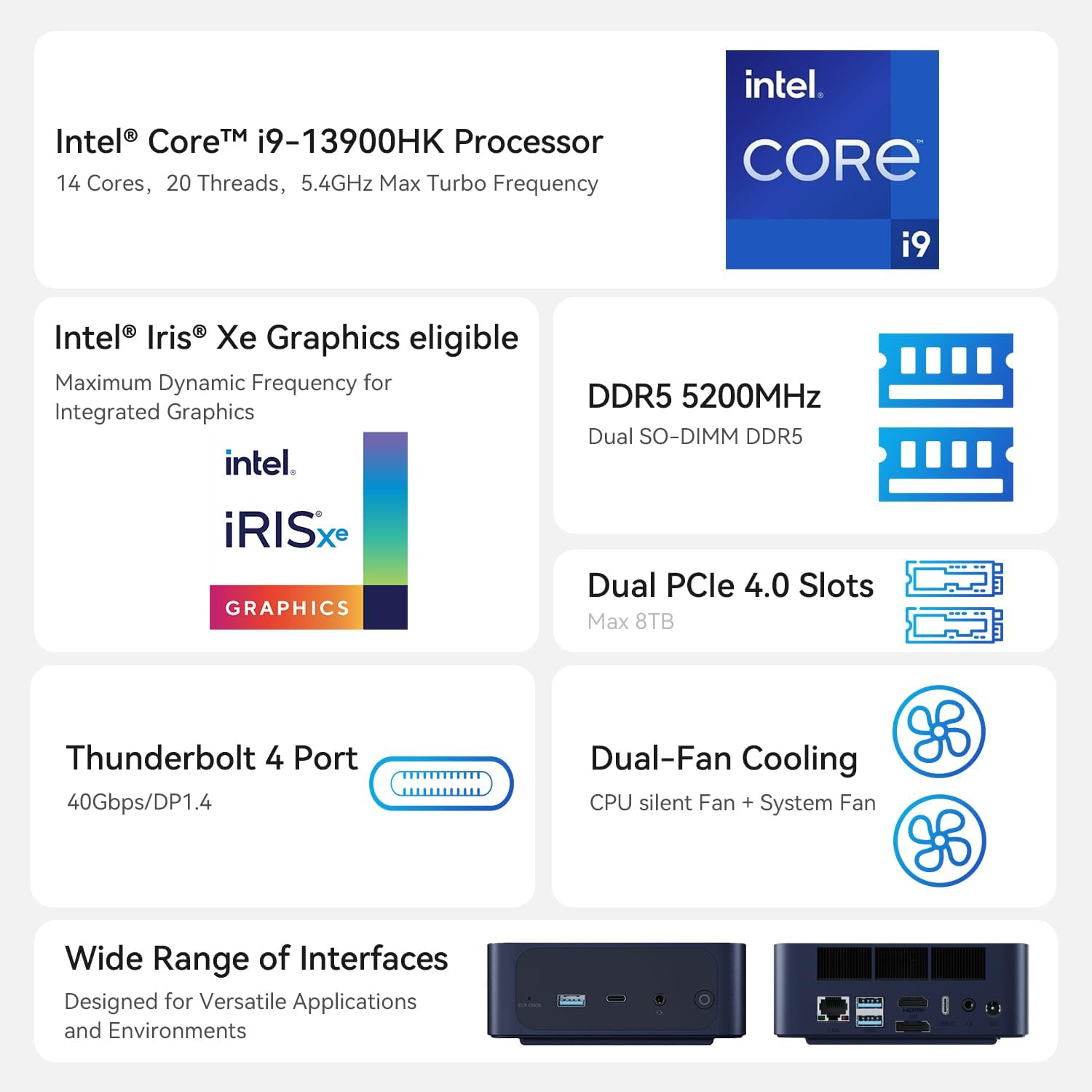
Figure 2: An illustration of the Intel Core i9-13900HK processor, emphasizing its core count, threads, and turbo frequency.
2. Guia de configuració
2.1 Què hi ha a la caixa
Before proceeding with the setup, please ensure all components are present:
- 1 x TRIGKEY Key i13 Mini PC
- 1 x HDMI Cable (100CM)
- 1 x Manual d'usuari
- 1 x adaptador d'alimentació (19V/5.26A)
2.2 Connexió del mini PC
Follow these steps to connect your TRIGKEY Key i13 Mini PC:
- Connecta la pantalla: Use the provided HDMI cable or a DisplayPort/Thunderbolt cable to connect your monitor(s) to the corresponding ports on the mini PC. The device supports up to three independent displays.
- Connecteu els perifèrics: Plug in your USB keyboard, mouse, and any other USB devices into the available USB-A or USB-C ports.
- Connectar la xarxa: For a wired connection, connect an Ethernet cable from your router or modem to the 2.5G LAN port on the mini PC. For wireless, ensure the WiFi antennas are properly positioned (if external) or that the internal antenna has clear signal access.
- Connectar l'alimentació: Insert the power adapter into the DC IN port on the mini PC, then plug the adapter into a power outlet.
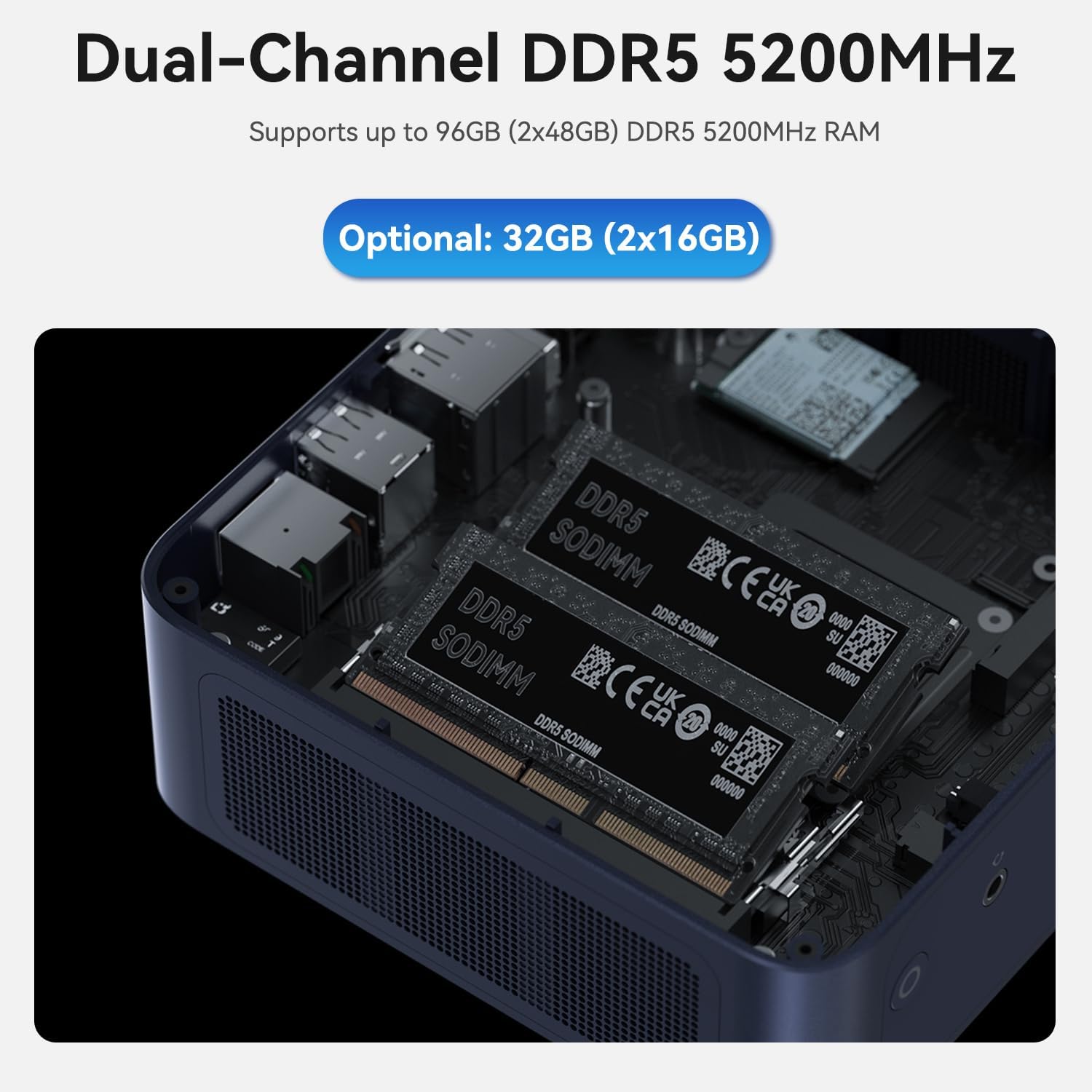
Figure 3: A diagram illustrating the various ports on the TRIGKEY Key i13 Mini PC, including Thunderbolt 4, USB-C, USB-A, DP1.4, HDMI, LAN, and audio jacks.
2.3 Encès inicial
After connecting all necessary cables, press the power button located on the front of the mini PC. The system will boot up, and you should see the operating system loading on your connected display.
3. Instruccions de funcionament
3.1 Gestió de l'energia
- Encès: Premeu el botó d'encesa una vegada.
- Apagar: Access the operating system's power options to perform a proper shutdown.
- Reinicia: Access the operating system's power options to restart the system.
- Mode de repòs: Access the operating system's power options to put the system into sleep mode.
3.2 Configuració de la pantalla
The TRIGKEY Key i13 supports up to three independent displays. To configure multiple displays:
- Connect your monitors to the HDMI, DisplayPort, and Thunderbolt 4 ports.
- Once connected, the operating system (e.g., Windows) should automatically detect the displays.
- Navigate to your display settings (e.g., right-click on desktop > Display settings) to arrange, extend, or duplicate your displays as needed.
3.3 Network and Wireless Connectivity
The mini PC offers advanced connectivity options:
- Wired Network (2.5G LAN): For optimal speed and stability, use the 2.5G Ethernet port. Ensure your router and network infrastructure support 2.5G speeds for full performance.
- Wireless Network (WiFi 6): The integrated WiFi 6 (Intel AX200) module provides high-speed wireless connectivity. To connect, open your operating system's network settings, select your desired WiFi network, and enter the password.
- Bluetooth (BT 5.2): Use Bluetooth 5.2 to connect wireless peripherals such as keyboards, mice, headphones, or speakers. Access your operating system's Bluetooth settings to pair devices.

Figura 4: Un excésview of the mini PC's connectivity options, including WiFi 6, Bluetooth 5.2, and 2.5G LAN.
3.4 Expansió d'emmagatzematge i memòria
The TRIGKEY Key i13 Mini PC is designed for easy upgrades:
- RAM: The device comes with 32GB DDR5 RAM (2x16GB) and supports up to 96GB (2x48GB) DDR5 5200MHz SO-DIMM memory. To upgrade, carefully open the chassis and replace the existing SO-DIMM modules.
- SSD: It includes a 1TB PCIe 4.0 SSD. The mini PC features dual M.2 2280 PCIe 4.0 slots, each supporting up to 4TB, for a total of 8TB storage. To add or upgrade SSDs, open the chassis and install M.2 2280 NVMe SSDs into the available slots.

Figura 5: Un intern view of the mini PC, displaying the dual DDR5 SO-DIMM slots for memory installation.

Figura 6: Un intern view of the mini PC, illustrating the dual M.2 2280 PCIe 4.0 slots for storage expansion.
4. Manteniment
4.1 Neteja
To ensure optimal performance and longevity, regularly clean your mini PC:
- Utilitzeu un drap suau i sec per netejar l'exterior del dispositiu.
- For dust accumulation in vents, use compressed air. Ensure the device is powered off and unplugged before cleaning.
- Eviteu utilitzar netejadors líquids directament sobre el dispositiu.
4.2 Actualitzacions de programari
Keep your operating system and drivers updated to ensure system stability, security, and performance. Regularly check for updates through your operating system's settings.
4.3 Sistema de refrigeració
The TRIGKEY Key i13 features a dual-fan cooling system to manage internal temperatures. Ensure the vents are not obstructed to allow for proper airflow. If you notice excessive fan noise or overheating, ensure the device is in a well-ventilated area.

Figure 7: A diagram demonstrating the airflow and cooling mechanism within the TRIGKEY Key i13 Mini PC, highlighting the system fan and SSD heatsink.
5. Solució De Problemes
This section addresses common issues you might encounter with your TRIGKEY Key i13 Mini PC.
5.1 Sense poder
- Ensure the power adapter is securely connected to both the mini PC and a working power outlet.
- Verifiqueu que la presa de corrent funciona connectant-hi un altre dispositiu.
- Comproveu si l'adaptador de corrent presenta algun dany visible.
5.2 Sense sortida de pantalla
- Confirm that the display cable (HDMI, DP, Thunderbolt) is securely connected to both the mini PC and the monitor.
- Assegureu-vos que el monitor estigui encès i configurat a la font d'entrada correcta.
- Try connecting to a different display or using a different cable to rule out display or cable issues.
5.3 Problemes de connectivitat de xarxa
- Amb cable: Check if the Ethernet cable is properly connected. Verify your router/modem is working correctly.
- Sense fil: Ensure WiFi is enabled in your operating system settings. Confirm you are connected to the correct network and have entered the password accurately. Restart your router/modem if necessary.
- Update network drivers if issues persist.
5.4 Problemes de rendiment del sistema
- Tanca les aplicacions innecessàries que s'executen en segon pla.
- Check for and install any pending operating system or driver updates.
- Ensure the mini PC has adequate ventilation and is not overheating.
- Run a system diagnostic or antivirus scan to check for software conflicts or malware.
If you encounter issues not covered here or require further assistance, please contact TRIGKEY customer support.
6. Especificacions
| Característica | Especificació |
|---|---|
| Processador | Intel Core i9-13900HK (14C/20T, up to 5.4 GHz) |
| RAM | 32GB DDR5 5200MHz (2x16GB), Max 96GB |
| Emmagatzematge | 1TB PCIe 4.0 SSD (Dual M.2 2280 slots, Max 8TB) |
| Gràfics | Intel Iris Xe Graphics (96EU) |
| Resolució de pantalla màxima | 3840x2160 (4K) |
| Sistema operatiu | OS (Pre-installed, typically Windows 11 Pro) |
| Connectivitat sense fil | WiFi 6 (Intel AX200), Bluetooth 5.2 |
| Xarxa per cable | LAN de 2.5 G |
| Ports | 1x Thunderbolt 4 (40Gbps/DP1.4), 1x USB-C 3.2 (10Gbps), 3x USB-A 3.2 (10Gbps), 1x DP1.4 (4K 144Hz), 1x HDMI (4K 60Hz), 1x 2.5G LAN, 2x 3.5mm audio jack, 1x DC IN |
| Pes de l'article | 2.38 lliures |
| Dimensions del paquet | 5.67 x 5.51 x 4.29 polzades |
| Tipus de disseny | Mini PC |
7. Garantia i Suport
7.1 Informació de la garantia
The TRIGKEY Key i13 Mini PC comes with a one-year warranty from the date of purchase. This warranty covers manufacturing defects and hardware malfunctions under normal use conditions. Please retain your proof of purchase for warranty claims.
7.2 Atenció al client
TRIGKEY is committed to providing excellent customer service. For any technical assistance, troubleshooting, or warranty inquiries, please utilize the following support options:
- Assistència en línia: Visit the official TRIGKEY store on Amazon for FAQs and product information: TRIGKEY Amazon Store
- Suport tècnic: We offer 24/7 one-to-one customer service and lifelong technical support. Refer to the contact information provided with your product packaging or on the official TRIGKEY website for direct support channels.