1. Introducció
This manual provides detailed instructions for the installation, operation, maintenance, and troubleshooting of your SOYO Geforce GT 740 Low Profile Graphics Card. Please read this manual thoroughly before installation and use to ensure proper functionality and longevity of your product.

Image 1.1: The SOYO Geforce GT 740 Low Profile Graphics Card and its packaging.
2. Informació de seguretat
Observeu les següents precaucions de seguretat durant la instal·lació i el funcionament:
- Desconnecteu sempre la font d'alimentació de l'ordinador abans d'instal·lar o treure qualsevol component de maquinari.
- Porteu una corretja antiestàtica al canell o toqueu sovint un objecte metàl·lic connectat a terra per descarregar l'electricitat estàtica, que pot danyar els components electrònics.
- Handle the graphics card by its edges to avoid touching the gold-plated connectors or components on the circuit board.
- Assegureu-vos de ventilar adequadament la carcassa de l'ordinador per evitar que s'escalfi.
- Keep the graphics card away from moisture, dust, and extreme temperatures.
3. Contingut del paquet
Verifiqueu que tots els elements siguin presents al vostre paquet:
- SOYO Geforce GT 740 Graphics Card
- Pro baixfile bracket(s)
4. Producte acabatview i Característiques
The SOYO Geforce GT 740 is a low-profile graphics card designed for compact systems, offering reliable performance for everyday tasks, HD video playback, and light gaming. It features 4GB DDR3 memory and a 128-bit memory interface for efficient data transfer.
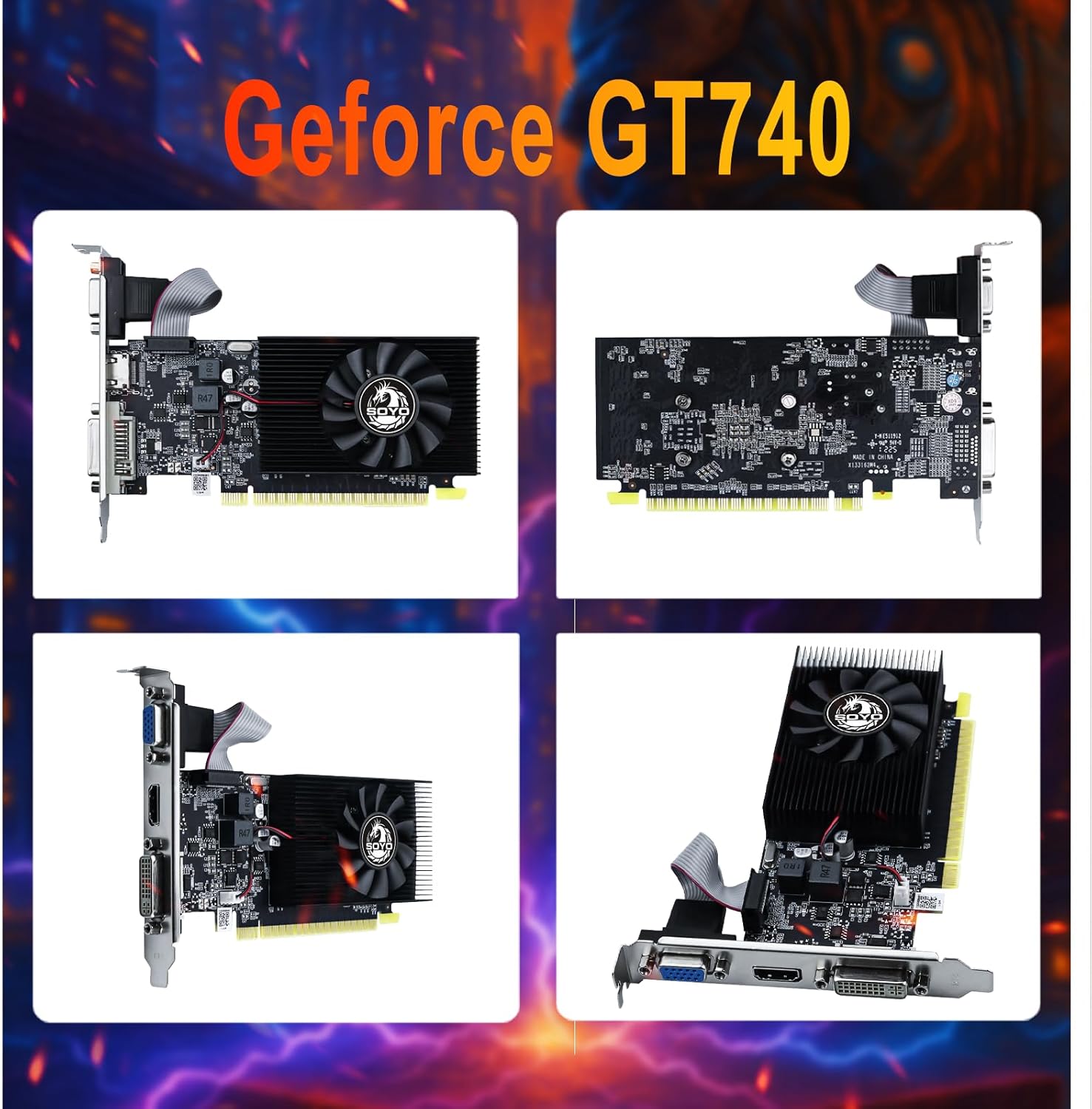
Image 4.1: Multiple views of the GT 740 graphics card.
Característiques principals:
- Superior Memory and Bandwidth: Equipped with 4GB DDR3 memory and a 128-bit memory interface for fast data transfer.
- Eficaç i fiable: Built with a 28nm process, balancing power and efficiency.
- Versatile Display Options: Includes HDMI, DVI, and VGA connectors for broad compatibility.
- PCI Express X16 3.0: Ensures fast and stable data transfer with the motherboard.
- Sistema de refrigeració avançat: Features a single fan for optimal temperature management.
- Graphics Technology Support: Supports DirectX 12, OpenGL 4.6, and Vulkan.
- Low-Profile Disseny: Ideal for small form factor (SFF) PCs and slim desktop cases.

Image 4.2: Illustration of 4GB DDR3 Graphics RAM.
5. Configuració i instal·lació
5.1 Instal·lació física
- Prepareu el vostre sistema: Turn off your computer and disconnect all power cables. Open the computer case.
- Localitza la ranura PCIe: Identifica una ranura PCI Express x16 disponible a la placa base.
- Treure la coberta de la ranura: Remove the metal slot cover from the back of your computer case corresponding to the chosen PCIe slot. If installing in a low-profile case, you may need to replace the standard bracket on the graphics card with the included low-profile mènsula.
- Inseriu la targeta gràfica: Carefully align the graphics card with the PCIe slot and press down firmly until it is securely seated. Ensure the retention clip (if present) locks into place.
- Targeta segura: Fasten the graphics card to the computer case with a screw.
- Close Case and Connect: Close your computer case, reconnect all power cables, and connect your monitor to one of the graphics card's output ports (HDMI, DVI, or VGA).
5.2 Instal·lació del controlador
After physical installation, you will need to install the appropriate drivers for the graphics card. Drivers can typically be downloaded from the official NVIDIA weblloc. Cerca 'NVIDIA GeForce GT 740 drivers' and select the correct operating system.
5.3 BIOS Settings (If Issues Occur)
If the device does not display or work properly after installation, consider adjusting BIOS settings:
- Set Video to Legacy Mode: Enter your computer's BIOS settings (common keys: Del, F2 during startup). Find options related to display, locate 'Video Mode' or similar, and set it to 'Legacy' mode.
- Enable 4G Decoding: In BIOS, navigate to 'Advanced' options. Look for 'Above 4G Decoding' or '4G Memory Decoding' and set it to 'Enabled'.

Image 5.1: Broad compatibility and plug-and-play design.
6. Funcionament de la targeta gràfica
6.1 Funcionament bàsic
Once installed and drivers are in place, your operating system should automatically detect and utilize the graphics card. You can adjust display settings through your operating system's display configuration panel or the NVIDIA Control Panel (if installed).
6.2 Configuració de diversos monitors
The SOYO GT 740 supports up to three monitors simultaneously using its HDMI, DVI, and VGA ports. Connect your monitors to the desired ports on the graphics card. Your operating system's display settings will allow you to configure extended desktop, duplicate displays, or other multi-monitor arrangements.

Image 6.1: Support for three monitors.

Image 6.2: Enhanced viewing with triple monitor support.
Nota important:

Image 6.3: Warning regarding signal adapters.
It is recommended to use direct HDMI, DVI, or VGA connections. Avoid using signal adapters (e.g., HDMI-DVI, HDMI-VGA, DP-VGA) as this may result in display artifacts, black screens, or no image output, affecting compatibility and stability.
7. Manteniment
To ensure optimal performance and longevity of your graphics card, follow these maintenance guidelines:
- Neteja regular: Periodically clean the graphics card and its fan to remove dust buildup. Use compressed air to gently blow dust away from the heatsink and fan blades.
- Check Fan Operation: Ensure the fan is spinning freely and quietly. Unusual noises or a non-spinning fan may indicate a problem.
- Mantenir el flux d'aire: Ensure your computer case has good airflow. Keep the area around your computer clear to prevent obstruction of vents.
- Actualitzacions de controladors: Mantingueu els controladors gràfics actualitzats per aprofitar les millores de rendiment i les correccions d'errors.

Image 7.1: Illustration of the advanced cooling system.
8. Solució De Problemes
Aquesta secció tracta problemes comuns que podeu trobar amb la vostra targeta gràfica.
8.1 General Display Issues
- Sense pantalla o pantalla negra:
- Comproveu la potència: Confirm if the card requires an external power connection (though GT740 typically does not). If it does, ensure it is connected.
- Comprova la connexió: Ensure the monitor cable is connected to the HDMI, DVI, or VGA port on the graphics card, not the motherboard's integrated video output.
- Reinstal·leu la targeta: Remove the card from the PCI-E slot, gently clean the gold contacts with an eraser, and firmly reinsert it.
- Mode de compatibilitat: For some older motherboards, try changing the boot mode in BIOS from UEFI to Legacy (refer to Section 5.3).
8.2 Problemes de rendiment
- Low and Unstable Frame Rate (FPS) in Games:
- This card is entry-level. First, try setting all in-game graphics settings to 'Low' or 'Off' and lower the resolution (e.g., from 1920x1080 to 1600x900).
- Ensure your computer has sufficient RAM (at least 8GB is recommended) and that not too many background applications are running.
- Graphics Card Runs Hot:
- High temperatures during use can be related to cooling. First, check if your computer case has good airflow and regularly clean dust from the graphics card fan and heatsink.
- If the card is several years old, the thermal paste may have dried out; replacing it can significantly improve cooling performance (this requires technical skill).
8.3 Problemes amb el controlador
- Where to Download Latest Drivers: Download drivers from the official NVIDIA website. As these are older card models, the latest Game Ready drivers may no longer support them. Visit the NVIDIA Driver Download page, manually search for your graphics card model (GeForce GT 740) and operating system, and choose the 'Standard' version driver for best stability.

Image 8.1: NVIDIA GT 740 FAQ Part 1.

Image 8.2: NVIDIA GT 740 FAQ Part 2.
9. Especificacions
Detailed technical specifications for the SOYO Geforce GT 740 Graphics Card:

Image 9.1: Key parameters of the GT740.
| Característica | Especificació |
|---|---|
| Model | GT740 |
| Coprocessador gràfic | NVIDIA GeForce GT 740 |
| Mida de la RAM gràfica | 4 GB |
| Tipus de RAM gràfica | DDR3 |
| Velocitat de rellotge de la GPU | 993 MHz |
| Interfície de memòria | 128 bits |
| Interfície de bus | PCI Express x16 3.0 |
| Interfície de sortida de vídeo | DVI, HDMI, VGA |
| Mètode de refrigeració | Single Fan Cooling |
| Dimensions del paquet | 8.43 x 6.26 x 1.73 polzades |
| Pes de l'article | 10.5 unces |

Image 9.2: Physical dimensions of the GT740.

Image 9.3: GPU-Z information for the GT 740.
10. Garantia i Suport
Per obtenir informació sobre la garantia i assistència tècnica, consulteu la documentació que s'inclou amb la compra o visiteu el lloc web oficial de SOYO. weblloc web. Conserveu el comprovant de compra per a reclamacions de garantia.