
EKO 9100-10L-MBS
EKO Astro Slim Sensor Trash Can
Model: 9100-10L-MBS
Marca: EKO
Introducció
The EKO Astro Slim Sensor Trash Can is designed for modern living, offering a touchless and hygienic waste disposal solution. Its slim profile and advanced motion sensor technology make it ideal for various spaces, including bathrooms, kitchens, and offices. This manual provides essential information for the proper setup, operation, and maintenance of your new trash can.

Image: The EKO Astro Slim Sensor Trash Can in matte black, featuring its sleek design and touchless lid.
Configuració
Follow these steps to set up your EKO Astro Slim Sensor Trash Can:
- Instal·lació de la bateria:
Locate the battery compartment on the underside of the lid. Open the compartment and insert two (2) AA batteries, ensuring correct polarity. Close the compartment securely. Note: Do not use rechargeable batteries.

Image: The underside of the trash can lid, clearly showing the battery compartment for two AA batteries and the non-slip pads on the base.
- Instal·lació del revestiment:
Remove the lid from the trash can body. Lift the removable liner ring. Place a 2.6-gallon (10L) trash bag around the liner ring, tucking any excess bag material into the designated tucking corners for a neat appearance. Lower the liner ring with the bag into the trash can body. Replace the lid securely.

Imatge: Un primer pla view of the removable liner ring, demonstrating how it secures the trash bag and conceals it from view.
- Encesa inicial:
Once batteries are installed and the lid is in place, press and hold the power button on the sensor panel for approximately 3 seconds to turn the unit on. The sensor will activate, and the lid is ready for use.
Instruccions de funcionament
Your EKO Astro Slim Sensor Trash Can offers convenient touchless operation:
- Funcionament del sensor de moviment:
Simply wave your hand or approach the sensor within 30 cm (approximately 12 inches) to activate the lid. The lid will open automatically in 0.2 seconds. It will remain open for 5 seconds before closing softly and quietly.

Image: A hand waving over the advanced motion sensor, illustrating the quick and touch-free lid opening.

Image: Depiction of both knee-gesture and wave-to-open methods for activating the motion sensor.
- Stay-Open Mode (Manual Operation):
For continuous use, such as during cooking or cleaning, press the manual open/close button on the sensor panel once. The lid will open and remain open for 20 minutes, or until you press the button again to close it manually. This mode is useful when you need the lid to stay open for an extended period without re-triggering the sensor.

Image: A finger pressing the touch switch to activate the stay-open mode for continuous use.
- Lid Closing:
In motion sensor mode, the lid will close automatically after 5 seconds of inactivity. In stay-open mode, the lid will close automatically after 20 minutes or when the manual open/close button is pressed again.
Manteniment
- Neteja:
The trash can is crafted from durable stainless steel with a fingerprint-resistant finish and an IPX4 waterproof rating, making it suitable for damp spaces. To clean, wipe the exterior with a soft, damp cloth and mild detergent. Avoid abrasive cleaners or scouring pads that could damage the finish. Ensure the sensor area is kept clean and free from obstructions for optimal performance.

Image: The trash can positioned in a bathroom, emphasizing its waterproof design suitable for moist environments.
- Substitució del folre:
When the trash bag is full, remove the lid, lift the liner ring, and carefully remove the full bag. Dispose of the bag properly and install a new liner as described in the Setup section.
Resolució de problemes
If you encounter any issues with your EKO Astro Slim Sensor Trash Can, refer to the following common problems and solutions:
- Lid not opening or closing:
- Check if the batteries are correctly installed and have sufficient power. Replace if necessary.
- Ensure there are no obstructions blocking the sensor or the lid's path.
- Clean the sensor window with a soft, dry cloth to remove any dust or smudges.
- Verify the unit is powered on (press and hold the power button for 3 seconds).
- Lid closing too quickly or slowly:
- The lid is designed to close after 5 seconds in motion sensor mode. If you need it to stay open longer, use the manual stay-open mode.
- Ensure the sensor is clean and not being continuously triggered by movement in its vicinity.
- Unresponsive sensor:
- Try turning the unit off and then on again by holding the power button.
- Ensure the environment is not excessively bright, as direct sunlight can sometimes interfere with infrared sensors.
Especificacions
- Model: 9100-10L-MBS
- Capacitat: 10 litres / 2.6 galons
- Dimensions (L x A x A): 10.94" x 5.91" x 13.5"
- Material: Acer inoxidable
- Mecanisme d'obertura: Sensor de moviment
- Característiques especials: Motion Sensor, Quiet Close, Smudge Resistant, IPX4 Waterproof
- Potència: 2 piles AA (no incloses)
- Pes de l'article: 4.4 lliures (2 quilograms)
- Tipus d'habitació: Bany, dormitori, despatx a casa
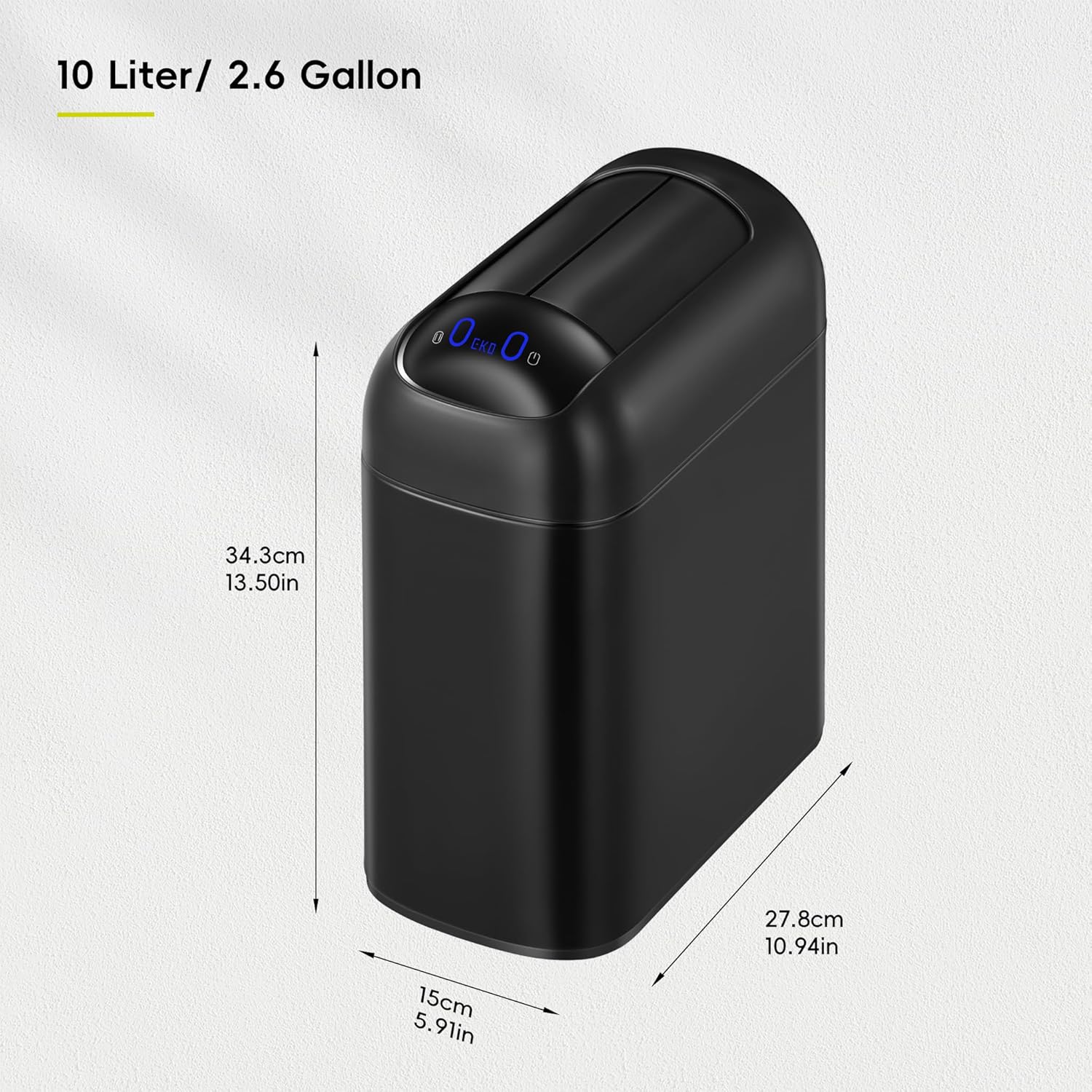
Image: The EKO Astro Slim Sensor Trash Can with its dimensions (10L / 2.6 Gallon) clearly indicated.
Garantia i Suport
EKO products are manufactured to the highest quality standards. For warranty information or technical support, please refer to the warranty card included with your product or visit the official EKO weblloc web. Conserveu el rebut de compra com a comprovant de compra per a qualsevol reclamació de garantia.
For further assistance, please contact EKO customer service through their official channels.
Ask a question about this manual
Ask about setup, troubleshooting, compatibility, parts, safety, or missing instructions. Manuals+ will review the question and use this page’s manual context to help answer it.