
OMOTON B0FCMD15TF
OMOTON Foldable Bluetooth Keyboard with Touchpad (QWERTZ Layout)
Model: B0FCMD15TF
Marca: OMOTON
1. Introducció
Thank you for choosing the OMOTON Foldable Bluetooth Keyboard with Touchpad. This portable QWERTZ keyboard is designed for convenience and efficiency, offering multi-device connectivity and an integrated touchpad. This manual provides detailed instructions for setup, operation, and maintenance to ensure optimal performance.
2. Contingut del paquet
Si us plau, comproveu el paquet per veure si hi ha els elements següents:
- OMOTON Foldable Bluetooth Keyboard
- Suport mòbil
- Cable de càrrega tipus C.
- Maleta de transport
- Manual d'usuari
3. Producte acabatview
The OMOTON Foldable Bluetooth Keyboard features a compact QWERTZ layout with 78 full-size keys and a multi-touch touchpad. It supports connection to up to three devices simultaneously across iOS, Android, and Windows operating systems. Its magnetic folding design makes it highly portable.
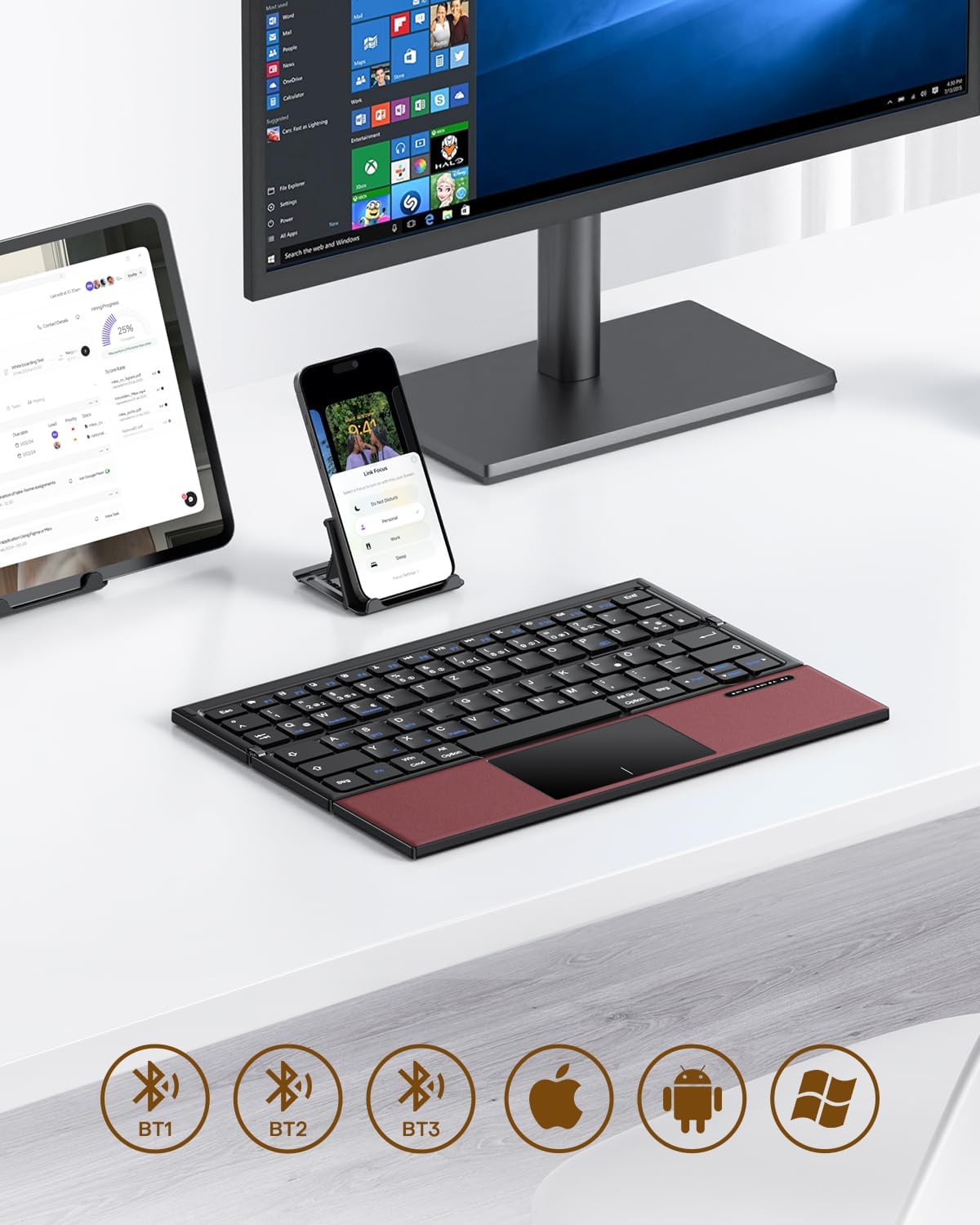
Image 3.1: The OMOTON Foldable Bluetooth Keyboard in use with a tablet, smartphone, and monitor, demonstrating multi-device connectivity via BT1, BT2, and BT3 channels.
Característiques principals:
- Disseny de tres plecs: Compact and portable for travel.
- Panell tàctil integrat: Multi-touch functionality for navigation without an external mouse.
- Connectivitat multidispositiu: Connects to up to three Bluetooth-enabled devices (BT1, BT2, BT3).
- QWERTZ Layout: Standard German keyboard layout with 78 full-size keys.
- Bateria recarregable: Bateria integrada de 180 mAh amb càrrega tipus C.

Image 3.2: Close-up details of the keyboard, highlighting its magnetic closure, indicator lights, silent scissor keys, elegant PU leather finish, and durable metal hinge.
Portabilitat:
The keyboard's compact, tri-fold design makes it ideal for travel and on-the-go use. It easily fits into bags and pockets, making it a convenient companion for various environments.

Image 3.3: The keyboard in use in a cafe, on an airplane, and in a meeting room, demonstrating its versatility for different work and travel scenarios.

Image 3.4: The folded keyboard being placed into a carrying case inside a bag and slipped into a jacket pocket, illustrating its compact size and ease of transport.
4. Configuració
4.1 Càrrega del teclat
Before first use, fully charge the keyboard. Use the included Type-C charging cable to connect the keyboard to a power source (e.g., computer USB port, USB wall adapter).
- The power indicator light will show charging status.
- Normalment, una càrrega completa triga entre 2 i 3 hores.
- The keyboard offers up to 60 hours of operating time and 90 days of standby time on a full charge.

Image 4.1: The keyboard connected via its Type-C port for charging, with icons indicating charging time, working time, and standby time.
4.2 Vinculació amb un dispositiu
The keyboard supports up to three Bluetooth connections (BT1, BT2, BT3). Follow these steps to pair your keyboard with a device:
- Encès: Unfold the keyboard to automatically power it on. The indicator light will flash.
- Seleccioneu el canal: Premeu el botó Fn + BT1, Fn + BT2, o Fn + BT3 keys simultaneously to select a Bluetooth channel. The corresponding indicator light will flash slowly.
- Introduïu el mode de vinculació: Premeu Fn + C (or the Bluetooth icon key) to enter pairing mode. The selected channel indicator light will flash rapidly.
- Activa el Bluetooth al dispositiu: Al dispositiu (telèfon intel·ligent, tauleta, ordinador portàtil), aneu a la configuració de Bluetooth i activeu el Bluetooth.
- Selecciona el teclat: Cerca "OMOTON Keyboard" (or similar) in the list of available devices and select it to connect.
- Confirmeu la connexió: Once connected, the indicator light on the keyboard will stop flashing and remain solid for a few seconds before turning off.
Note: The Type-C cable is for charging only and does not support wired connectivity.
4.3 Canvi entre dispositius
Per canviar entre dispositius emparellats, només cal que premeu Fn + BT1, Fn + BT2, o Fn + BT3 to select the desired channel. The keyboard will automatically connect to the last paired device on that channel.
5. Instruccions de funcionament
5.1 Keyboard Layout and Special Keys
The keyboard features a QWERTZ layout with 78 standard keys and 12 multimedia shortcuts. Familiarize yourself with the layout for efficient typing.

Image 5.1: The keyboard displaying its full-size keys and integrated multi-touch touchpad, designed for a laptop-like typing experience.
5.2 Ús del ratolí tàctil
The multi-touch touchpad supports various gestures for navigation. This eliminates the need for an external mouse.
- Toc amb un sol dit: Feu clic amb el botó esquerre.
- Toc amb dos dits: Right-click (context menu).
- Desplaçament amb dos dits: Desplaça't amunt/avall o esquerra/dreta.
- Pessiga per fer zoom: Zoom in/out (supported on some devices/apps).
- Gestos de lliscament: Specific gestures may vary by operating system (Windows, Android, iOS).
Note for iPad users: You may need to enable "AssistiveTouch" in your iPad settings for full touchpad functionality. Some gestures may vary between applications. Scrolling direction can be adjusted in your device settings.
5.3 Mode d'estalvi d'energia
To conserve battery, the keyboard will automatically enter sleep mode after 30 minutes of inactivity. To wake it up, press any key.
5.4 Ús ergonòmic
For comfortable and ergonomic typing, ensure your screen is positioned correctly to maintain a healthy posture.

Image 5.2: A visual guide showing the recommended ergonomic posture for using the keyboard with a screen, emphasizing proper neck and back alignment.
6. Manteniment
- Neteja: Feu servir un drap suau i sec per netejar la superfície del teclat. Per a la brutícia persistent, netegeu lleugeramentampNetegeu el drap amb aigua o una solució de neteja suau. Eviteu l'excés d'humitat.
- Emmagatzematge: When not in use, fold the keyboard and store it in the provided carrying case to protect it from dust and scratches.
- Cura de la bateria: Avoid fully discharging the battery frequently. Charge the keyboard regularly, especially if it will be stored for an extended period.
- Eviteu condicions extremes: No exposeu el teclat a temperatures extremes, llum solar directa ni humitat elevada.
7. Solució De Problemes
7.1 El teclat no es connecta
- Assegureu-vos que el teclat estigui encès (desplegat).
- Assegureu-vos que el Bluetooth estigui habilitat al vostre dispositiu.
- Check if the keyboard is in pairing mode (indicator light flashing rapidly after pressing Fn+C).
- Ensure you have selected the correct Bluetooth channel (BT1, BT2, or BT3).
- Prova de desvincular i tornar a vincular el teclat des de la configuració de Bluetooth del dispositiu.
- Assegureu-vos que la bateria del teclat estigui carregada.
7.2 Touchpad Not Responding
- Assegureu-vos que el teclat estigui connectat correctament mitjançant Bluetooth.
- For iPad users, verify that "AssistiveTouch" is enabled in your iPad settings.
- Reinicieu el teclat i el dispositiu.
- Clean the touchpad surface to remove any dirt or debris.
7.3 Incorrect Key Output (QWERTZ vs. QWERTY)
- This keyboard has a QWERTZ layout. Ensure your device's software keyboard setting is also set to QWERTZ (German layout) for correct character output.
- If your device is set to QWERTY, some keys (e.g., Y/Z, special characters) will not match the physical keyboard. Adjust your device's input language/keyboard layout settings.
7.4 Durada curta de la bateria
- Assegureu-vos que el teclat estigui completament carregat abans d'utilitzar-lo.
- The keyboard automatically enters sleep mode after 30 minutes of inactivity to save power.
- Avoid leaving the keyboard unfolded and powered on when not in use for extended periods.
8. Especificacions
| Marca | OMOTON |
| Model | B0FCMD15TF |
| Tecnologia de connectivitat | Bluetooth |
| Dispositius compatibles | iPadOS, iOS, Android, Windows (Laptops, PCs, Tablets, Smartphones) |
| Disposició del teclat | QWERTZ (German Layout) |
| Nombre de claus | 78 |
| Característiques especials | Foldable, Portable, Rechargeable, Integrated Multi-touch Touchpad |
| Material | Plàstic, Poliuretà (PU) |
| Capacitat de la bateria | 180 mAh Li-ion |
| Port de càrrega | Tipus-C |
| Temps de càrrega | Aprox. 2-3 hores |
| Temps de funcionament | Fins a 60 hores |
| Temps d'espera | Fins a 90 dies |
| Mides plegades | 25.3 x 6 x 2.1 cm |

Image 8.1: Visual representation of the keyboard's dimensions when unfolded and folded, alongside a tablet and smartphone for scale.
9. Garantia i assistència
OMOTON products come with a standard warranty. For detailed warranty information, please refer to the warranty card included in your package or visit the official OMOTON weblloc.
If you encounter any issues or have questions regarding your OMOTON Foldable Bluetooth Keyboard, please contact OMOTON Customer Support:
- Weblloc: OMOTON Official Store on Amazon
Please have your model number (B0FCMD15TF) and purchase details ready when contacting support.
Ask a question about this manual
Ask about setup, troubleshooting, compatibility, parts, safety, or missing instructions. Manuals+ will review the question and use this page’s manual context to help answer it.