
1. Introducció
This manual provides essential instructions for setting up, operating, and maintaining your LEFFOT H618 Plus 4K Ultra HD Streaming Device. Please read this guide thoroughly before use to ensure proper functionality and to maximize your entertainment experience.
2. Informació de seguretat
- Assegureu-vos que el dispositiu estigui col·locat sobre una superfície estable i plana per evitar caigudes accidentals.
- No exposeu el dispositiu a l'aigua, la humitat ni a temperatures extremes.
- Eviteu bloquejar les obertures de ventilació per evitar el sobreescalfament.
- Feu servir només l'adaptador de corrent proporcionat per evitar danys.
- Mantingueu el dispositiu i els accessoris fora de l'abast dels nens.
- No intenteu desmuntar ni reparar el dispositiu vosaltres mateixos. Poseu-vos en contacte amb personal de servei qualificat per obtenir ajuda.
3. Contingut del paquet
Verifiqueu que tots els elements siguin presents al paquet:
- LEFFOT H618 Plus Streaming Device
- Comandament a distància per veu
- Adaptador d'alimentació
- Cable HDMI
- Manual d'usuari

Figura 3.1: Contingut del paquet
4. Instruccions de configuració
4.1 Connexió del dispositiu
- Connectar-se al televisor: Plug one end of the HDMI cable into the HDMI port on the LEFFOT H618 Plus device and the other end into an available HDMI input on your television.
- Connectar l'alimentació: Connect the power adapter to the DC port on the device and then plug the adapter into a wall outlet.
- Encès: El dispositiu s'hauria d'encendre automàticament. Si no, premeu el botó d'engegada del comandament a distància.

Figure 4.1: Connection Overview
4.2 Configuració del control remot
- Insereix les piles: Open the battery compartment on the back of the voice remote control and insert two AAA batteries (included), ensuring correct polarity.
- Maridatge: The remote control should automatically pair with the device upon first use. If not, follow the on-screen instructions or press and hold the pairing button (usually located inside the battery compartment or on the side of the remote) until the indicator light flashes.
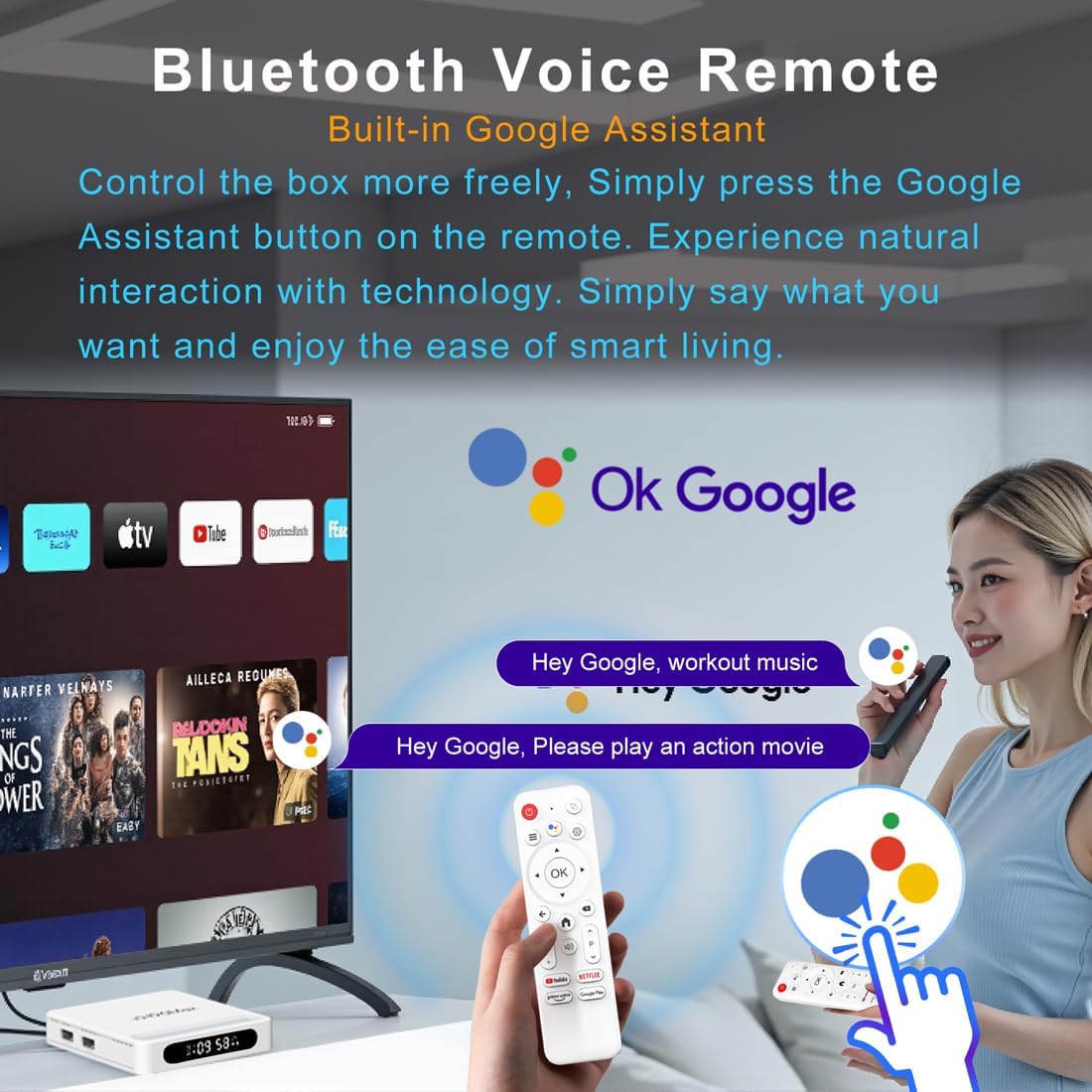
Figure 4.2: Voice Remote Control
4.3 Configuració inicial del dispositiu
Follow the on-screen prompts to complete the initial setup, which typically includes:
- Selecció de la llengua.
- Connecting to a Wi-Fi network or Ethernet.
- Inici de sessió amb el vostre compte de Google.
- Installing essential applications.
5. Instruccions de funcionament
5.1 Navegació i interfície
Use the directional pad (D-pad) on your remote to navigate through the Android TV interface. The 'OK' button confirms selections, 'Back' returns to the previous screen, and 'Home' takes you to the main screen.
5.2 Voice Remote with Google Assistant
Press the Google Assistant button on your remote and speak your commands. You can search for content, open apps, control playback, and more using your voice.
5.3 Accés a les aplicacions
The device comes pre-loaded with Google Play, allowing access to over 5000+ applications. Navigate to the 'Apps' section on the home screen to browse, download, and manage your applications.

Figure 5.1: Accessing Apps via Google Play
5.4 4K UHD Playback and HDR10
The LEFFOT H618 Plus supports 8K@22fps decoding and 4K@60fps playback with HDR10. Ensure your television is 4K HDR compatible and that you are streaming 4K HDR content for the best visual experience.

Figure 5.2: 4K UHD and HDR10 Visuals
5.5 Screen Casting
Utilize the built-in Airplay and Miracast features to cast content from your smartphone or tablet directly to your TV screen.
6. Especificacions
| Característica | Descripció |
|---|---|
| Marca | LEFFOT |
| Nom del model | H618 Plus |
| Sistema operatiu | Android 14 |
| CPU | Allwinner H618 Quad-Core ARM Cortex A53 |
| GPU | Mali-G31 MP2 |
| RAM | 2 GB |
| ROM | 16 GB |
| Descodificació de vídeo | 8K@22fps, 4K@60fps with HDR10 |
| Connectivitat | Dual-band WiFi 6 (2.4G/5G), 100M Ethernet, Bluetooth 5.4 |
| Ports | HDMI 2.0a, USB 2.0 (x2), AV, DC |
| Característiques especials | Voice Remote with Google Assistant, Airplay, Miracast |
| Dimensions | 3.2 x 3.2 x 0.67 polzades |
| Pes | 4.1 unces |

Figura 6.1: Característiques clauview
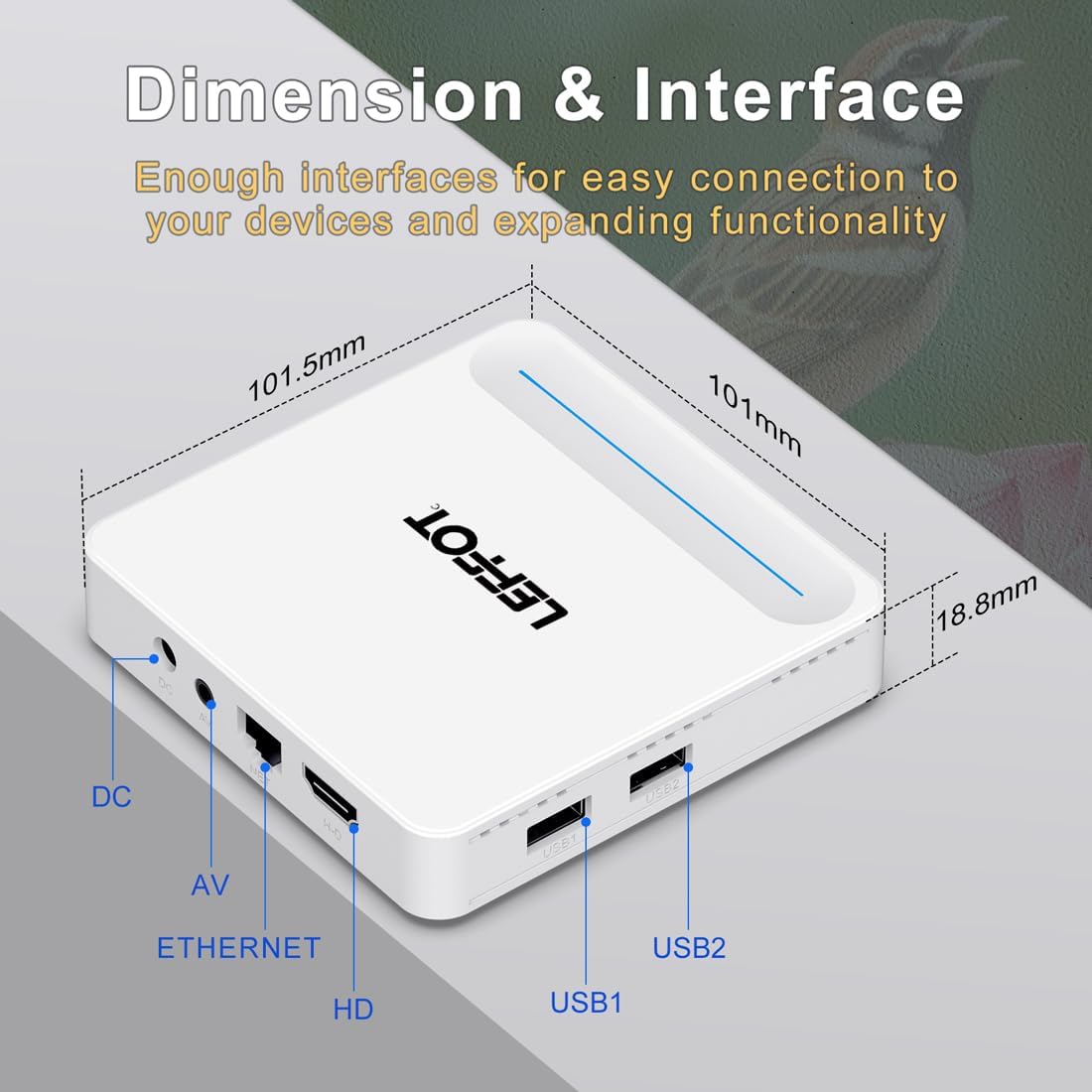
Figure 6.2: Device Dimensions and Interface
7. Solució De Problemes
7.1 Sense alimentació / El dispositiu no s'encén
- Comproveu si l'adaptador de corrent està connectat correctament al dispositiu i a la presa de corrent.
- Ensure the power outlet is functional. Try plugging another device into the same outlet.
- Press the power button on the remote control or the device itself.
7.2 No Signal on TV Screen
- Verify that the HDMI cable is securely connected to both the device and the TV.
- Assegureu-vos que el televisor estigui configurat a la font d'entrada HDMI correcta.
- Try using a different HDMI cable or a different HDMI port on your TV.
- Restart the streaming device and your TV.
7.3 El comandament a distància no respon
- Reviseu i substituïu les piles del comandament a distància.
- Assegureu-vos que no hi hagi obstruccions entre el comandament a distància i el dispositiu.
- Re-pair the remote control with the device by following the instructions in Section 4.2.
7.4 Buffering or Slow Performance
- Check your internet connection speed. A stable and fast connection is crucial for streaming 4K content.
- If using Wi-Fi, try moving the device closer to your router or connecting via an Ethernet cable for a more stable connection.
- Close any unused applications running in the background on the device.
- Clear the cache of streaming applications.
- Restart your router, modem, and the streaming device.
8. Manteniment
- Netegeu el dispositiu regularment amb un drap suau i sec. No utilitzeu netejadors líquids ni aerosols.
- Keep the device free from dust and debris, especially around ventilation areas.
- Guardeu el dispositiu en un lloc fresc i sec quan no el feu servir durant períodes prolongats.
9. Garantia i Suport
For warranty information and technical support, please refer to the documentation included with your purchase or visit the official LEFFOT weblloc web. Conserveu el comprovant de compra per a reclamacions de garantia.

