
1. Introducció
This manual provides detailed instructions for setting up, operating, and maintaining your LEFFOT RK3518 Android 14.0 4K Ultra HD Streaming Device. Please read this manual thoroughly before use to ensure proper functionality and to maximize your entertainment experience.
Contingut del paquet
En desempaquetar, comproveu que hi hagi tots els elements que s'enumeren a continuació:
- LEFFOT RK3518 Android 14.0 4K Ultra HD Streaming Device
- Comandament a distància per veu
- Cable HDMI
- Adaptador d'alimentació (5 V/2 A)
- Manual d'usuari (aquest document)

Image 1.1: Contents of the LEFFOT RK3518 package, including the streaming device, remote, cables, and manual.
2. Producte acabatview
The LEFFOT RK3518 is a high-performance Android 14.0 TV Box designed to deliver a cinematic 4K streaming experience. It features a powerful Rockchip RK3518 Quad-Core A53 processor, 2GB RAM, and 16GB ROM, ensuring smooth operation and ample storage for applications. Advanced connectivity options include dual-band WiFi 6 (2.4G & 5G), Bluetooth 5.4, and USB 3.0.
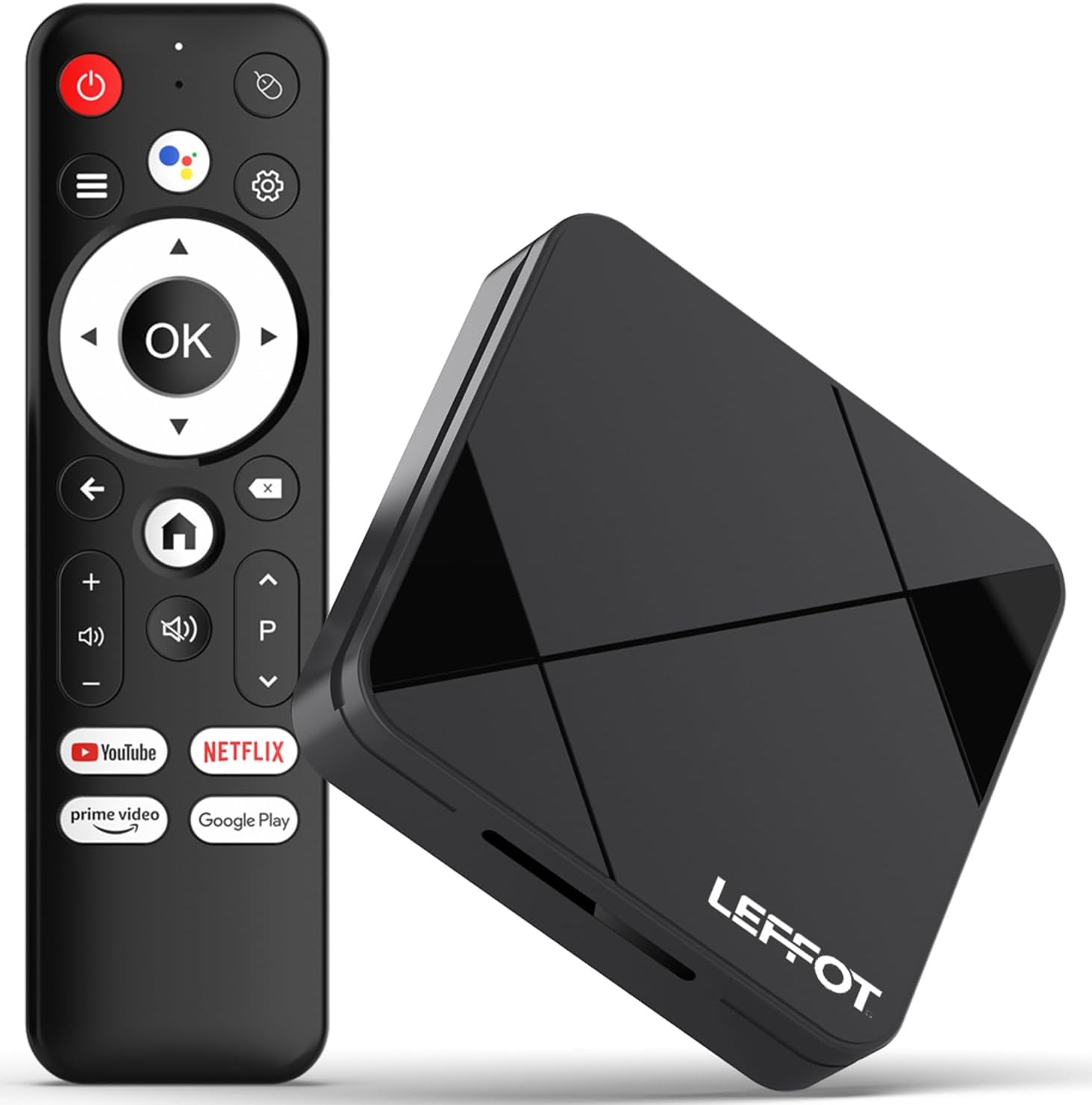
Image 2.1: The LEFFOT RK3518 streaming device and its accompanying voice remote control.
Característiques principals:
- Resolució 4K Ultra HD: Supports 4K@60fps and HDR10 for vibrant colors and sharp details.
- Processador potent: Rockchip RK3518 Quad-Core A53 with Mali-450 GPU for smooth performance.
- Connectivitat avançada: Dual-band WiFi 6 (2.4G & 5G), Bluetooth 5.4, USB 3.0, and Ethernet.
- Control remot per veu: Intuitive navigation and hands-free control with built-in voice assistant.
- Android 14.0 Ecosystem: Access to thousands of apps via Google Play.
- Replica de pantalla: Supports AirPlay, DLNA, and WiFi Display for sharing content from mobile devices.
3. Configuració
3.1 Connexió del dispositiu
- Connectar-se al televisor: Insert one end of the provided HDMI cable into the HDMI port on the LEFFOT RK3518 device and the other end into an available HDMI input on your television.
- Connecteu-vos a l'alimentació: Plug the power adapter into the DC 5V/2A port on the device, then plug the adapter into a wall outlet.
- Connexió a Internet (opcional):
- Connexió per cable: For a stable connection, connect an Ethernet cable from your router to the Ethernet port on the device.
- Connexió sense fil: The device supports 2.4G and 5G WiFi 6. You will configure this after initial power-on.

Image 3.1: Diagram showing the various ports on the LEFFOT RK3518 device, including TF card slot, USB, USB 3.0, AV, HDMI, Ethernet, and DC 5V/2A power input.
3.2 Engegada inicial i assistent de configuració
- Engegueu el televisor i seleccioneu la font d'entrada HDMI correcta.
- The LEFFOT RK3518 device will automatically power on and display the boot-up screen.
- Follow the on-screen instructions of the Android setup wizard to:
- Seleccioneu el vostre idioma.
- Connecteu-vos a una xarxa Wi-Fi (si no feu servir Ethernet).
- Sign in with your Google account to access Google Play Store and other services.
- Accepteu els termes i condicions.
3.3 Emparellament del control remot
The included voice remote control is typically pre-paired. If the remote does not respond, ensure batteries are correctly inserted. If issues persist, follow these steps to re-pair:
- Assegureu-vos que el dispositiu estigui encès.
- Manteniu premut el botó OK botó i el Baixa el volum button simultaneously for a few seconds until a pairing indicator appears on the screen or the remote's LED flashes.
- Release the buttons. The remote should now be paired.
4. Instruccions de funcionament
4.1 Navegació per la interfície
Use the directional pad (up, down, left, right) on the remote control to navigate through menus and select items. The OK el botó confirma les seleccions i el Enrere button returns to the previous screen. The Casa button takes you directly to the main home screen.
4.2 Ús del control per veu
The LEFFOT RK3518 features a voice-enabled remote control for convenient hands-free operation.
- Premeu el botó Assistent de Google button (usually a microphone icon) on your remote.
- Speak clearly into the remote's microphone. You can ask to search for content, open applications, check weather, or control smart home devices.
- The device will process your command and display results or perform the requested action.

Image 4.1: Illustration of using the voice remote control to interact with the LEFFOT RK3518 streaming device.
4.3 Installing and Managing Applications
Your device comes with the Google Play Store pre-installed, allowing access to a vast library of applications.
- Des de la pantalla d'inici, navegueu fins a la Google Play Store icon and select it.
- Browse or search for desired applications.
- Select an app and choose Instal·lar.
- To manage installed apps, go to Configuració > Aplicacions.
4.4 Screen Mirroring (AirPlay, DLNA, WiFi Display)
The device supports various screen mirroring protocols to cast content from your smartphone or tablet to your TV.
- Ensure your mobile device and the LEFFOT RK3518 are connected to the same Wi-Fi network.
- On your mobile device, open the screen mirroring feature (e.g., AirPlay for iOS, Smart View/Screen Cast for Android).
- Select the LEFFOT RK3518 device from the list of available devices.
- Your mobile device's screen will now be mirrored on your TV.
5. Manteniment
5.1 Neteja del dispositiu
To clean the exterior of the device, use a soft, dry, lint-free cloth. Do not use liquid cleaners, aerosols, or abrasive materials, as these can damage the finish or internal components.
5.2 Actualitzacions de programari
The LEFFOT RK3518 may receive periodic software updates to improve performance, add features, or enhance security. It is recommended to keep your device's software up to date.
- Navega a Configuració > Preferències del dispositiu > Quant a > Actualització del sistema.
- If an update is available, follow the on-screen prompts to download and install it. Ensure the device remains powered on during the update process.
5.3 Gestió d'emmagatzematge
Periodically check the device's storage to ensure optimal performance. You can uninstall unused apps or clear cache data to free up space.
- Vés a Configuració > Aplicacions to manage individual applications.
- Vés a Settings > Device Preferences > Storage a view storage usage and manage external storage (TF card).
6. Solució De Problemes
If you encounter issues with your LEFFOT RK3518 device, refer to the following common problems and solutions:
| Problema | Possible causa/solució |
|---|---|
| No hi ha alimentació / El dispositiu no s'encén. | Assegureu-vos que l'adaptador de corrent estigui connectat correctament al dispositiu i a una presa de corrent que funcioni. Proveu una altra presa de corrent. |
| No signal on TV. | Verify the HDMI cable is securely connected to both the device and the TV. Ensure your TV is set to the correct HDMI input source. Try a different HDMI port or cable. |
| El comandament a distància no respon. | Check the batteries in the remote control and replace if necessary. Re-pair the remote control as described in Section 3.3. |
| Problemes de connexió Wi-Fi. | Ensure your Wi-Fi router is on and functioning. Check Wi-Fi settings on the device (Settings > Network & Internet). Try restarting your router and the streaming device. Ensure you are within range of your Wi-Fi network. |
| Les aplicacions són lentes o es bloquegen. | Close unused applications. Clear the cache of problematic apps (Settings > Apps > [App Name] > Clear cache). Ensure sufficient storage space is available. Restart the device. |
| Mala qualitat de vídeo (no és 4K). | Ensure your TV supports 4K resolution. Verify the content being streamed is 4K. Check your internet speed; 4K streaming requires a stable, high-speed connection. Ensure HDMI cable is 4K compatible. |
7. Especificacions
Below are the technical specifications for the LEFFOT RK3518 Android 14.0 4K Ultra HD Streaming Device:
| Característica | Especificació |
|---|---|
| Nom del model | RK3518 |
| Sistema operatiu | Android 14.0 |
| Processador | Rockchip RK3518 Quad-Core A53 |
| GPU | Mali-450 MP2 |
| RAM | 2 GB |
| Emmagatzematge intern (ROM) | 16GB (expandable via TF card) |
| Sortida de vídeo | HDMI 2.0 (4K@60fps, HDR10) |
| Connectivitat | 2.4G & 5G WiFi 6 (802.11 a/b/g/n/ac/ax), Bluetooth 5.4, 100M Ethernet |
| Ports | HDMI, USB 3.0, USB 2.0, LAN, TF Card Slot, AV, DC 5V/2A |
| Serveis d'Internet compatibles | Netflix, Prime Video, YouTube, and more via Google Play |
| Dimensions | 3.2 x 3.2 x 0.67 polzades (aprox. 90 x 90 x 18.8 mm) |
| Pes | 3.25 unces |
8. Garantia i Suport
8.1 Informació de la garantia
Your LEFFOT RK3518 Android 14.0 4K Ultra HD Streaming Device is covered by a manufacturer's warranty against defects in materials and workmanship. The specific terms and duration of the warranty may vary by region and retailer. Please retain your proof of purchase for warranty claims.
8.2 Atenció al client
For technical assistance, troubleshooting beyond this manual, or warranty inquiries, please contact LEFFOT customer support through the retailer where the product was purchased or refer to the official LEFFOT weblloc per obtenir informació de contacte.