
Introducció
This UBeesize Mini Selfie Stick Tripod (Model UB-M50BLK) is a versatile 3-in-1 device designed for mobile photography and videography. It functions as a handgrip, an extendable selfie stick, and a stable tripod, suitable for various uses including vlogging, live streaming, and group photos. Its compact and lightweight design makes it ideal for travel and everyday use, providing enhanced stability and flexible shooting angles.
Què hi ha a la caixa
- UBeesize Mini Selfie Stick Tripod (UB-M50BLK)
- Cable de càrrega USB
Configuració
1. Desembalatge
Carefully remove all components from the packaging. Inspect the device for any visible damage.
2. Charging the Remote Control
The detachable Bluetooth remote control is rechargeable. Locate the Type-C charging port on the remote. Connect the provided USB cable to this port and a standard USB power source (e.g., wall adapter, computer USB port). A full charge ensures extended use.

This image features the UBeesize selfie stick tripod in use with its detachable wireless remote. Insets show the Type-C charging port for the remote and its secure mount point on the stick, emphasizing ease of use and charging.
3. Vinculació del comandament a distància
- Assegureu-vos que el comandament a distància estigui carregat.
- Turn on the remote control by pressing and holding its button until an indicator light flashes (usually blue).
- Activa el Bluetooth al teu telèfon intel·ligent.
- Cerca available devices in your phone's Bluetooth settings.
- Select 'UBeesize Remote' or a similar name from the list to pair. The indicator light on the remote will typically stop flashing or turn solid once paired.
- Once paired, the remote can trigger your phone's camera shutter.
4. Connectar el telèfon intel·ligent
Esteneu el suport del telèfon clamps and securely place your smartphone. Ensure the phone is centered and balanced within the holder to prevent tipping, especially when using tripod mode.

This diagram demonstrates the multi-directional adjustment features of the phone holder, including 360-degree rotation for switching between portrait and landscape modes, 270-degree tilt for various shooting angles, and vertical adjustment for optimal positioning.
Instruccions de funcionament
1. Handgrip Mode
For stable, single-hand shooting, collapse the telescopic pole completely and use the device as a compact handgrip. This mode provides a firm and comfortable hold, similar to a small camera.
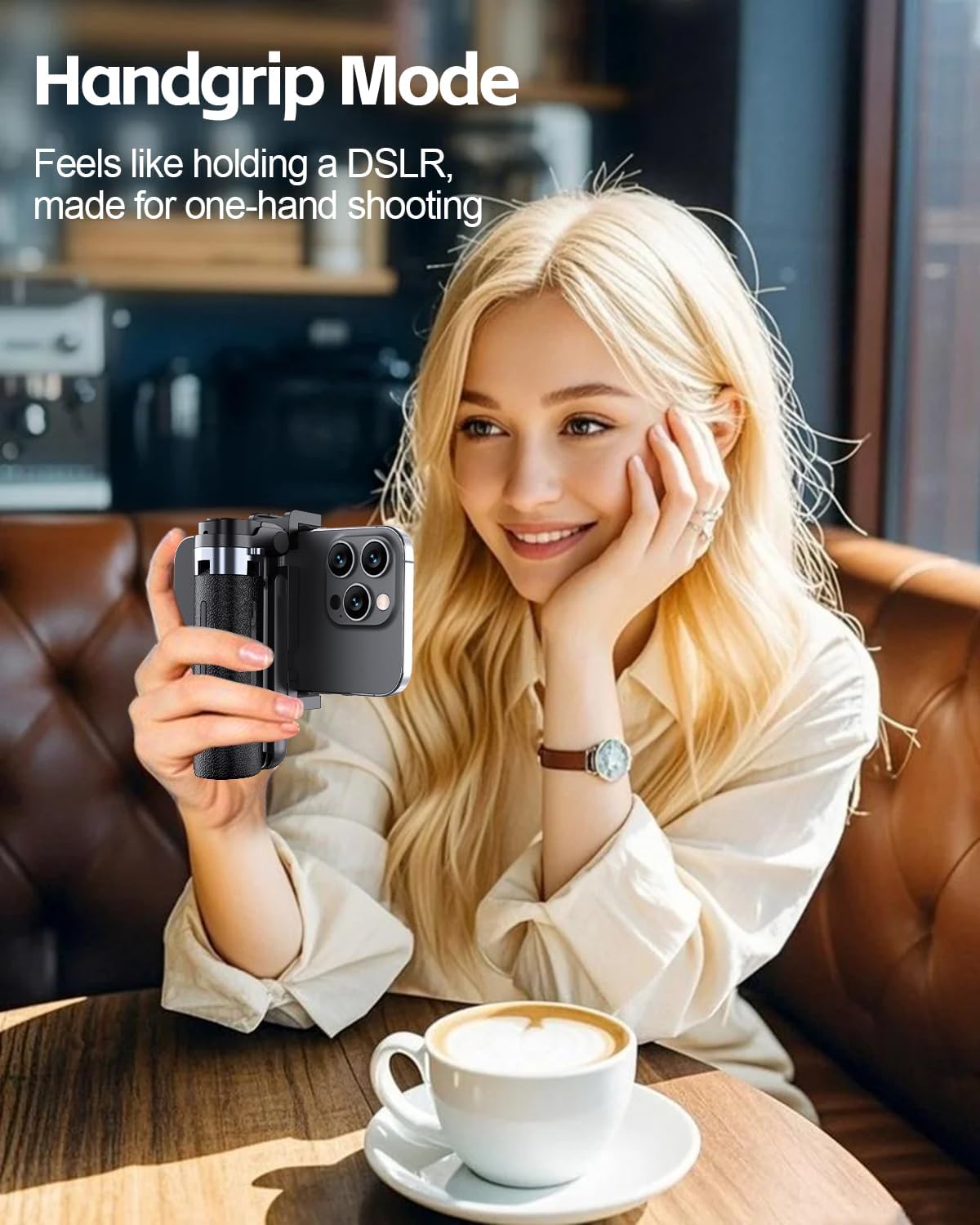
This image shows the UBeesize selfie stick in handgrip mode, providing a stable grip for one-handed shooting. The device is compact and comfortable to hold, similar to a small camera.
2. Mode de pal de selfie
Extend the telescopic pole to the desired length for wider shots, group selfies, or to capture subjects from a distance. The pole extends up to 19 inches (approximately 48 cm).
3. Tripod Mode
To use the device as a stable tripod:
- Locate the 'PUSH' button at the base of the handle.
- Press the button to release and extend the four reinforced anti-slip legs.
- Col·loqueu el trípode sobre una superfície plana i estable.
- Adjust the height of the telescopic pole and the angle of the phone holder as needed.

This image highlights the stable four-leg design of the tripod. It shows the 'PUSH' button at the base, which, when pressed, deploys the reinforced anti-slip legs, ensuring a secure and steady setup for your device.
4. Ajust d'angles
The phone holder offers 360° rotation, allowing you to switch between portrait and landscape orientations. It also provides 270° tilt for various shooting angles (high angle, low angle, front-facing). Use the up and down adjustment mechanism for precise positioning of your smartphone.
5. Ús del comandament a distància
Once paired with your smartphone, open your phone's camera application. Press the button on the remote control to remotely capture photos or start/stop video recording. This is ideal for group shots, long exposures, or vlogging without touching your phone.
Manteniment
- Neteja: Clean the device with a soft, dry cloth. Avoid using harsh chemicals, abrasive materials, or solvents, as these can damage the finish or internal components.
- Emmagatzematge: Store the selfie stick tripod in a cool, dry place away from direct sunlight and extreme temperatures. Ensure it is fully collapsed before storage.
- Exposició a l'aigua: This device is not waterproof. Do not immerse the device or its remote control in water or expose it to heavy rain.
- Cura de la bateria: Recharge the remote control regularly, even if not in frequent use, to maintain battery health.
Resolució de problemes
Remote Control Not Pairing
- Assegureu-vos que el comandament a distància estigui completament carregat.
- Turn off and then turn on both the remote control and your phone's Bluetooth.
- Try deleting the remote from your phone's paired Bluetooth devices list and re-pairing it.
- Ensure the remote is within the effective Bluetooth range (typically 10 meters or 33 feet).
Phone Unstable on Tripod
- Ensure your smartphone is centered and securely clamped within the phone holder.
- Verify that all four tripod legs are fully extended and placed on a flat, stable surface.
- Avoid extending the telescopic pole too far when using tripod mode, especially with heavier smartphones, as this can affect stability.
Remote Control Not Taking Pictures
- Confirm that the remote control is successfully paired with your smartphone.
- Ensure your phone's camera application is open and active.
- Some phone models may require specific camera settings or a third-party camera app for remote shutter functionality. Check your phone's camera settings for remote control options.
Especificacions
| Marca | UBeesize |
| Model | UB-M50BLK |
| Material | Alumini |
| Color | Negre |
| Mida plegada | 11.7 cm |
| Altura màxima | 19 polzades (aprox. 48 cm) |
| Característiques especials | Lleuger, plegable |
| Tipus de bateria (remot) | Metall de liti |
| Dispositius compatibles | iPhone 17Pro Max/17 Pro/17/iPhone 16 Pro Max/16 Plus/16 Pro/16/iPhone 15 Pro Max/15 Plus/15 Pro/15/iPhone 14 Pro Max/14 Pro/14/iPhone 13 Pro Max/13 Pro/13/iPhone SE/iPhone 12/12 Pro/12 Pro max/ 12 Mini/11/11 Pro Max/11 Pro/X/XS max/XR/10, iPhone 8 Plus/iPhone 8/7/7 Plus/6S/6/Samsung Galaxy S24/S23/Z Flip/Note Series/Google Pixel Series/OnePlus 12/Nord/Moto G Power/Stylus/LG, Sony and more. |
Garantia i Suport
For detailed warranty information, product registration, or customer support, please visit the official UBeesize weblloc web o poseu-vos en contacte amb el vostre distribuïdor autoritzat. Conserveu el rebut de compra per a reclamacions de garantia.