
1. Producte acabatview
This manual provides detailed instructions for the installation, operation, and maintenance of your AINAVI 15-inch Android 13 Car Stereo Radio, designed specifically for Toyota FJ Cruiser models from 2007 to 2021. This unit integrates advanced features such as wireless CarPlay, Android Auto, GPS navigation, and a high-resolution QLED touch screen to enhance your driving experience.

Imatge 1.1: acabatview of the AINAVI Car Stereo Radio's key features.
Característiques principals:
- CarPlay sense fil i Android Auto: Stable signal flow for seamless smartphone integration.
- 15-inch HD QLED Touch Screen: 1920x1080 resolution for clear visuals and responsive interaction.
- Navegació GPS avançada: Supports most satellite services with 5G WiFi for accurate real-time mapping.
- Alt rendiment: 8-Core CPU, Dual-Core GPU, 6GB RAM, and 128GB ROM for smooth operation and ampl'emmagatzematge.
- Integrated Audio Processing: 48-band EQ with DSP for customizable sound profiles.
- posterior View Suport de càmera: 1080P AHD input for clear reversing visuals with trajectory display.
- Controls físics: Two large knobs for AC temperature and fan speed, a central knob for volume, and dedicated AC function buttons.
- Funcionalitat de pantalla dividida: Run multiple applications simultaneously on the display.
- USB to RCA Output: Allows independent video playback on multiple screens for rear passengers.
2. Què s'inclou
Verifiqueu que tots els components que s'enumeren a continuació siguin presents al paquet abans de començar la instal·lació.
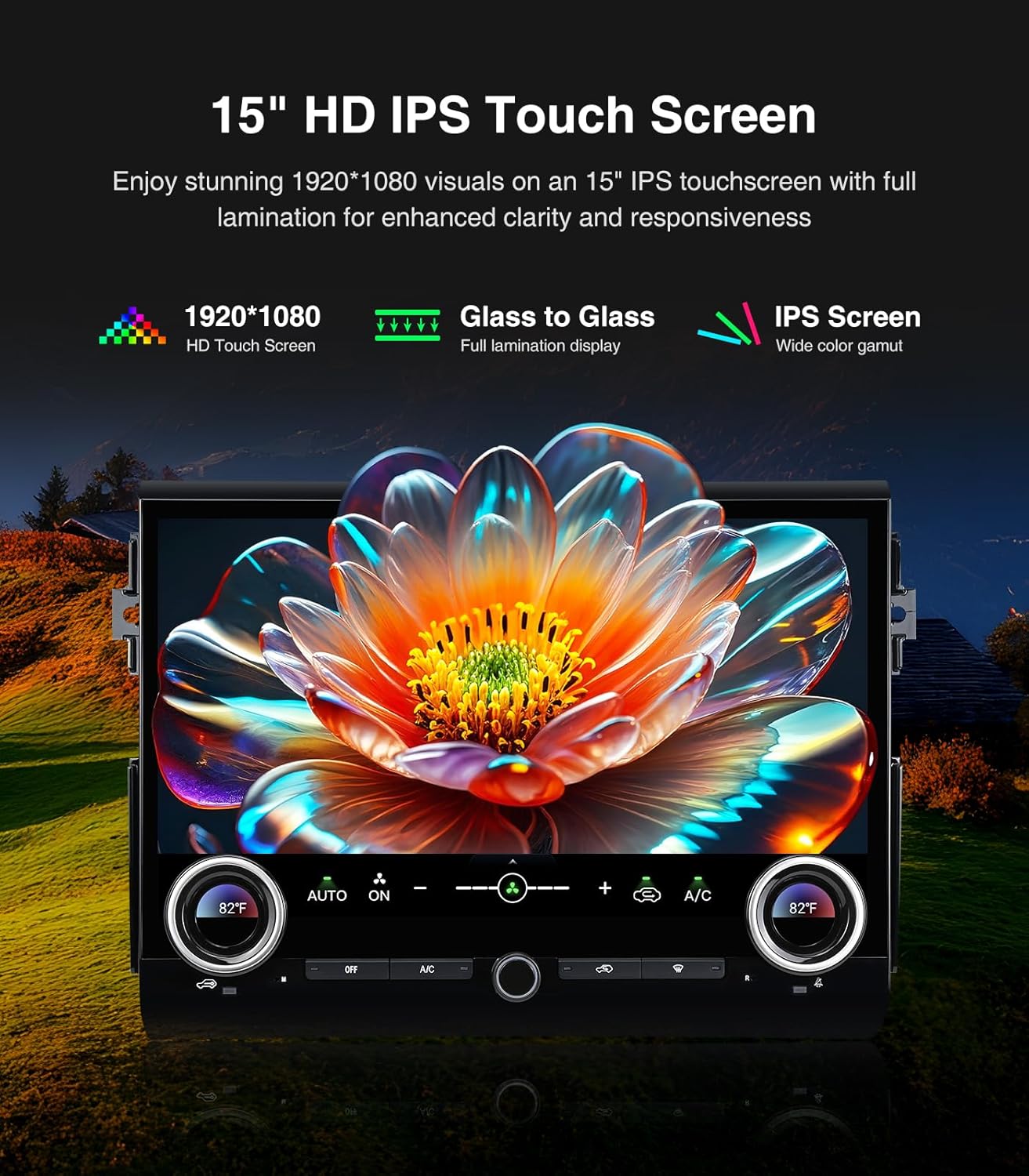
Image 2.1: Contents of the AINAVI Car Stereo Radio package.
- Car Head Unit with Frame for Toyota FJ Cruiser (1 unit)
- AHD 1080P posterior View Camera (1 unit)
- GPS Antenna (1 unit)
- USB 4-Pin Cable (1 unit)
- USB 6-Pin Cable (1 unit)
- Microphone (1 unit)
- Blue Frame Removal Tool (1 unit)
- Manual d'usuari (1 unitat)
- Power Cable (1 unit)
3. Configuració i instal·lació
Professional installation is recommended for this product. Ensure the vehicle's battery is disconnected before starting any electrical work. Refer to the provided wiring diagrams and follow these general steps.
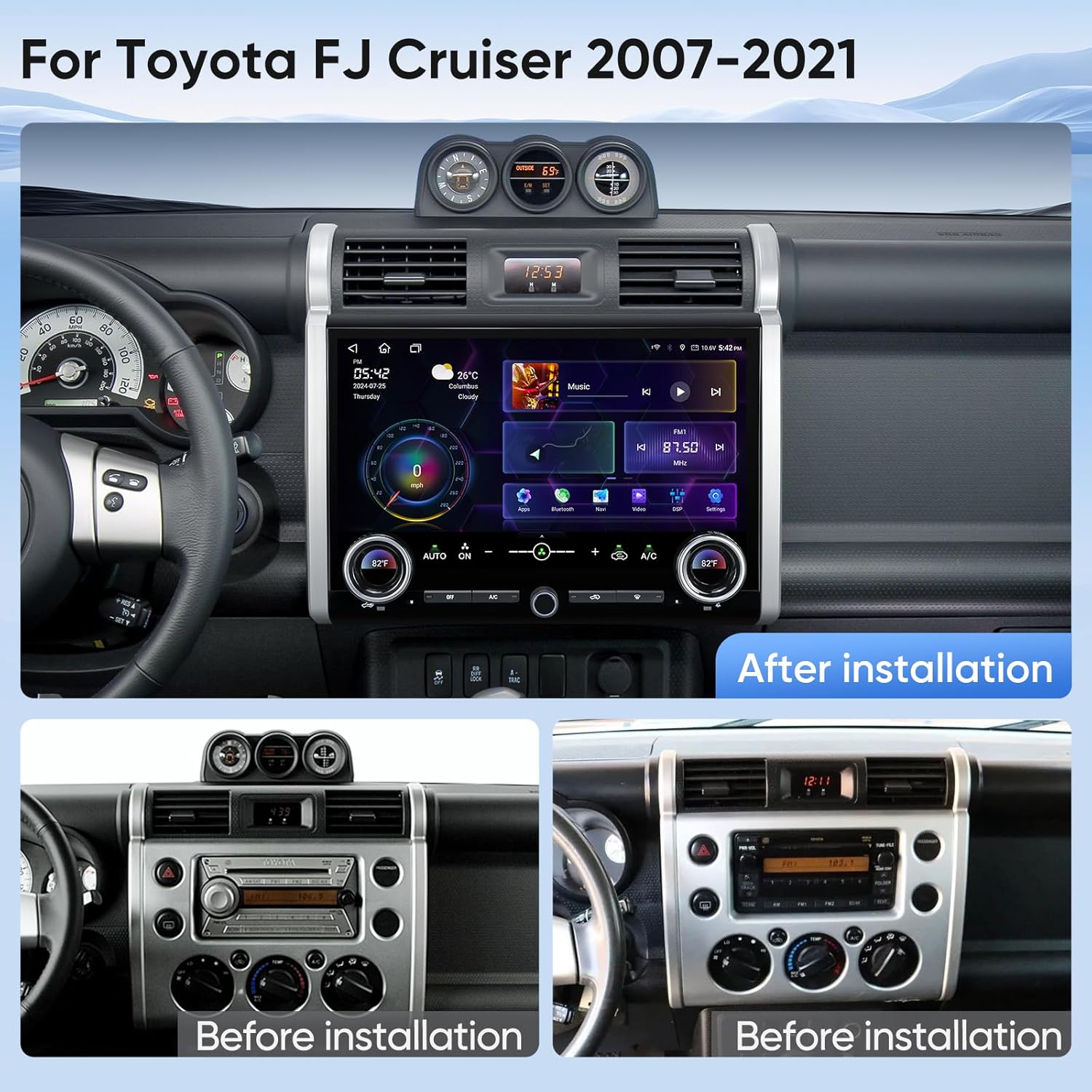
Image 3.1: Visual comparison of the dashboard before and after installing the AINAVI Car Stereo Radio.
3.1 Head Unit Installation
- Carefully remove the original factory radio and dashboard trim using the provided frame removal tool.
- Connect the main power harness from the new head unit to the vehicle's wiring harness. Ensure all connections are secure.
- Connect the GPS antenna and external microphone to the designated ports on the head unit. Position the GPS antenna in a location with a clear view of the sky, and the microphone near the driver for optimal voice pickup.
- If applicable, connect the USB cables for external devices.
- Carefully mount the new head unit and frame into the dashboard opening. Secure it with screws if necessary.
- Reconnect the vehicle's battery and test the unit's basic functions before fully reassembling the dashboard trim.
3.2 Darrera View Instal·lació de la càmera
- Mount the AHD 1080P rear view camera in a suitable location at the rear of your vehicle, typically near the license plate light.
- Route the camera's video cable and power cable through the vehicle's interior to the head unit.
- Connect the camera's video output to the 'CAM IN' or 'REVERSE CAMERA' input on the head unit.
- Connect the camera's power wire to the vehicle's reverse light circuit (12V) so it receives power when the vehicle is in reverse.
- Connect the reverse trigger wire from the head unit's harness to the vehicle's reverse light signal wire. This tells the head unit to switch to the camera view quan s'enganxa la marxa enrere.
Vídeos d'instal·lació:
Video 3.1: Detailed installation manual for the AINAVI Car Stereo Radio in a Toyota FJ Cruiser (2007-2021).
Video 3.2: Instructions for installing a camera with the head unit.
4. Instruccions de funcionament
This section details the various functions and features of your AINAVI Car Stereo Radio.
4.1 General Interface and Navigation
The 15-inch QLED touchscreen provides access to all functions. Swipe left or right to navigate between application pages. Tap icons to launch applications.

Image 4.1: GPS Navigation interface on the AINAVI Car Stereo Radio.
The built-in GPS module and 5G WiFi connectivity ensure accurate and real-time navigation. You can use pre-installed navigation apps or download others from the Google Play Store.
4.2 CarPlay sense fil i Android Auto
Connect your iPhone or Android smartphone wirelessly to access navigation, music, messages, and more directly on the head unit's screen.

Imatge 4.2: Funcionalitat de CarPlay sense fil i Android Auto.
4.3 Audio Controls and DSP
The unit features a professional DSP (Digital Sound Processor) with a 48-band equalizer. Adjust sound settings, including bass boost, surround sound patterns, and individual speaker volume, to customize your audio experience.

Image 4.3: DSP and Equalizer interface for audio customization.
Video 4.1: Demonstration of DSP settings and audio adjustments.
4.4 Air Conditioning Control
The unit integrates with your vehicle's AC system. Use the two large physical knobs to adjust temperature and fan speed. Press the knobs to switch between functions. Additional physical buttons control various AC modes.
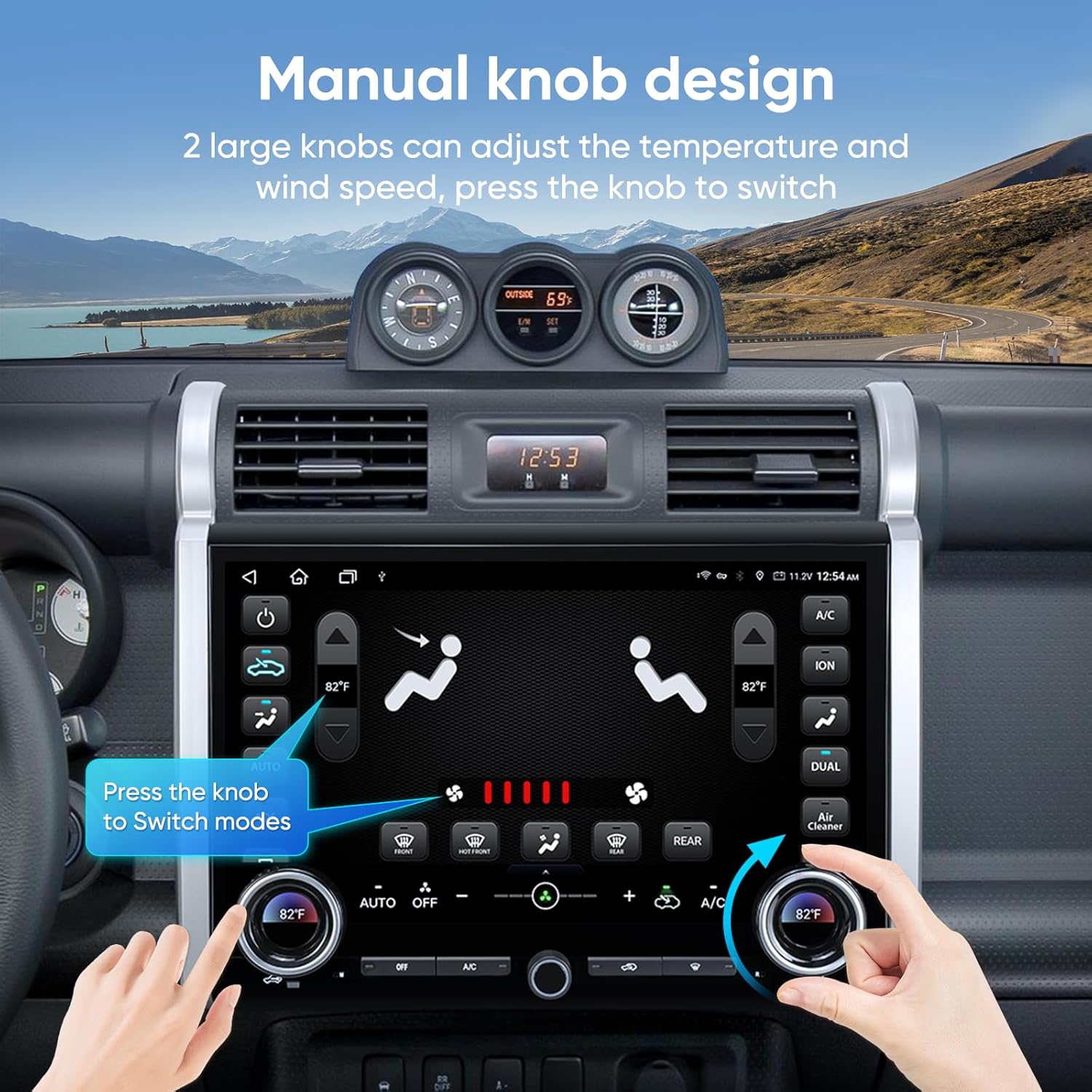
Image 4.4: Manual knob design for integrated AC control.
Video 4.2: Demonstration of AC control functionality on the touchscreen.
4.5 Funcionalitat de pantalla dividida
Utilize the split-screen feature to run two applications simultaneously, such as navigation on one side and music playback on the other.

Image 4.5: Split screen and mirroring capabilities.
4.6 Darrera View Visualització de la càmera
When the vehicle is shifted into reverse, the screen automatically displays the 1080P AHD rear view camera feed, complete with guiding lines for safe maneuvering.

Imatge 4.6: posteriorview pantalla de càmera amb assistència d'aparcament.
4.7 Connectivity (WiFi & Bluetooth)
The unit supports 2.4GHz and 5GHz WiFi for internet access and Bluetooth for hands-free calling and audio streaming.

Image 4.7: WiFi and Bluetooth connection options.
4.8 Vídeo de presentació del producte
Video 4.3: A brief showcase of the 15-inch head unit's features.
5. Manteniment
To ensure the longevity and optimal performance of your AINAVI Car Stereo Radio, follow these maintenance guidelines:
- Neteja de pantalla: Use a soft, lint-free cloth specifically designed for electronics to clean the touchscreen. Do not use abrasive cleaners or harsh chemicals.
- Actualitzacions de programari: Periodically check for and install software updates to ensure the system runs efficiently and has the latest features and security patches.
- Connexions de cable: Assegureu-vos que tots els cables estiguin ben connectats. Les connexions soltes poden provocar problemes intermitents.
- Condicions ambientals: Eviteu exposar la unitat a temperatures extremes, a la llum solar directa durant períodes prolongats o a una humitat excessiva.
6. Solució De Problemes
If you encounter issues with your AINAVI Car Stereo Radio, refer to the following common troubleshooting steps:
- Sense energia: Check all power cable connections. Ensure the vehicle's battery is charged and the ignition is on. Verify the fuse for the stereo is not blown.
- Sense so: Check speaker connections. Ensure the volume is not muted or set too low. Verify audio settings in the DSP/Equalizer.
- Pantalla tàctil que no respon: Try restarting the unit. If the issue persists, a factory reset might be necessary (note: this will erase custom settings).
- El GPS no funciona: Assegureu-vos que l'antena GPS tingui una visió clara view of the sky. Check GPS settings in the system menu. Update navigation maps if available.
- Problemes de connexió amb CarPlay/Android Auto: Ensure Bluetooth and WiFi are enabled on both the head unit and your smartphone. Try forgetting the device and re-pairing. Check for software updates on both devices.
- posterior View La càmera no mostra: Check the camera's video and power connections. Ensure the reverse trigger wire is correctly connected to the vehicle's reverse light circuit.
- AC Control Issues: If you experience problems with air conditioner control, please contact customer support for assistance.
For persistent issues not resolved by these steps, please contact AINAVI customer support.
7. Especificacions
| Marca | AINAVI |
| Tipus de servei del vehicle | Toyota FJ Cruiser 2007-2021 |
| Mida de la pantalla | 15 polzades |
| Tipus de visualització | QLED |
| Tipus de pantalla tàctil | Capacitiva |
| Sistema operatiu | Android |
| Capacitat d'emmagatzematge de memòria | 128 GB |
| Tecnologia de connectivitat | Bluetooth, USB, Wi-Fi, Wired, Wireless |
| Sistema de navegació per satèl·lit compatible | BeiDou, GPS, Galileo |
| Mode de sortida d'àudio | Envoltant estèreo |
| Mètode de control | Aplicació, comandament a distància, tàctil, veu |
| Pes de l'article | 3.01 quilos |
8. Garantia i Suport
8.1 Garantia del fabricant
This AINAVI Car Stereo Radio comes with a Garantia del fabricant de 12 mesos des de la data de compra. Aquesta garantia cobreix els defectes de materials i de fabricació en condicions d'ús normal. Conserveu el comprovant de compra per a reclamacions de garantia.
8.2 Suport tècnic
Our professional technical support team is available to assist you with installation, troubleshooting, and any questions you may have regarding your product. If you encounter any issues, particularly with air conditioner integration, please do not hesitate to contact us.

Image 8.1: Customer Installation Support contact details.
You can reach our customer service team via:
- Telèfon: +1 (833) 858-5016
- Correu electrònic: info@ainavi.com
- Operating Hours (PST):
- Monday - Friday: 9:00 AM - 9:00 PM
- Saturday: 2:00 PM - 10:00 PM
Please have your product model number (B0FCY3Z2D1) and purchase details ready when contacting support.