
1. Introducció
The OWON ADS814A is a high-performance 4-channel 12-bit digital oscilloscope designed for precise signal analysis. Featuring a 100 MHz bandwidth, 1.25 GSa/s real-time sample rate, and a 7-inch multi-touch screen, this instrument offers advanced measurement capabilities for various applications. This manual provides essential information for setting up, operating, maintaining, and troubleshooting your device.
2. Característiques clau
- 12-bit Vertical Resolution: Captures signal details with 4096 levels of vertical resolution, significantly enhancing precision for microvolt-level signal analysis.
- Alt rendiment: Offers 100 MHz bandwidth, 1.25 GSa/s real-time sample rate, 50 Mpts memory depth, and a waveform capture rate of up to 700,000 wfms/s.
- Extensive Trigger Types: Supports Edge, Video, Pulse Width, Slope, Runt, Overtime, Nth Edge, Logic, and serial bus triggers (RS232/UART, I2C, SPI, CAN, LIN).
- Descodificació de maquinari: Provides 2-channel hardware decoding for RS232/UART, I2C, SPI, CAN, and LIN protocols.
- 7-inch Multi-Touch Screen: Intuitive smartphone-like operation with user-customizable shortcut keys. Supports external mouse and keyboard for enhanced efficiency.
- Advanced Measurement Functions: Includes 43 automatic measurements with advanced mathematical functions, measurement gating, and a technical terms dictionary for quick setup.
- Disseny multifuncional: Integrates digital oscilloscope, protocol analyzer, high-precision frequency counter, FFT spectrum analyzer, and voltmeter functionalities.

Figure 2.1: The OWON ADS814A functions as a digital oscilloscope, protocol analyzer, FFT spectrum analyzer, voltmeter, and high-precision frequency counter.
3. Configuració
3.1 Desembalatge i inspecció
Carefully remove the oscilloscope from its packaging. Inspect the device for any signs of damage during transit. Ensure all accessories listed in the packing list are present.
3.2 Connexió d'alimentació
- Connect the provided power adapter to the DC 12V power input port on the rear panel of the oscilloscope.
- Connecteu l'adaptador de corrent a una presa de corrent de CA adequada.
- Premeu el botó d'engegada situat al panell frontal per encendre el dispositiu.
3.3 Connexió de la sonda
Connect the BNC end of the oscilloscope probes to the input channels (CH1, CH2, CH3, CH4) on the front panel. Ensure a secure connection by twisting the BNC connector until it locks. Connect the probe tip and ground clip to the circuit under test.
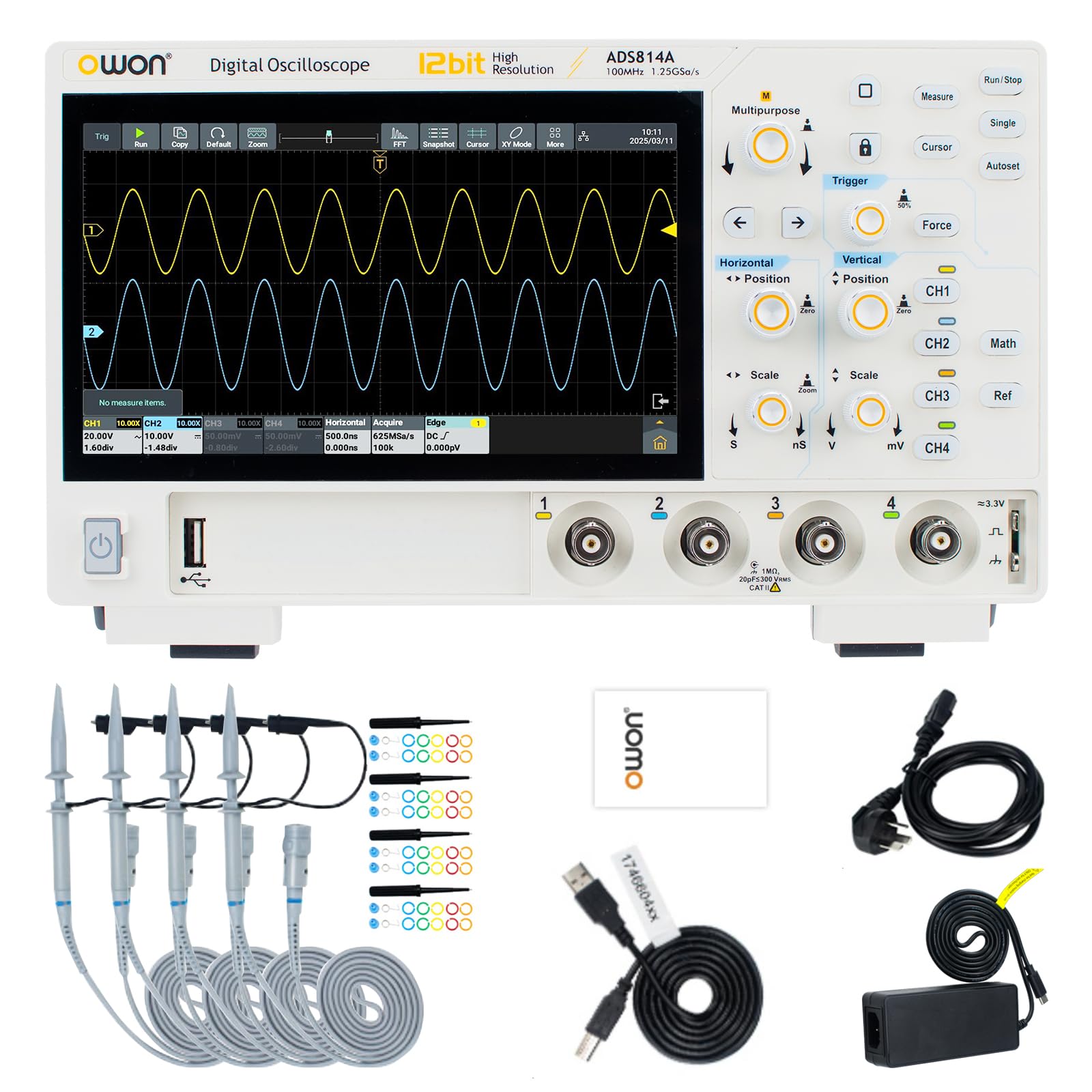
Figure 3.1: Front panel of the OWON ADS814A, showing input channels and controls.

Figure 3.2: Rear panel connections including LAN, USB, HDMI, and power input.
4. Instruccions de funcionament
4.1 Navegació per la interfície d'usuari
The ADS814A features a 7-inch multi-touch screen for intuitive control. You can interact with the device using touch gestures similar to a smartphone. Physical knobs and buttons are also available for precise adjustments of vertical scale, horizontal scale, and position.

Figure 4.1: The 7-inch multi-touch screen interface.
4.2 Mesures bàsiques
- Vertical Scale (Voltage): Use the vertical scale knob (labeled 'Scale' under 'Vertical') to adjust the volts per division.
- Horizontal Scale (Time): Use the horizontal scale knob (labeled 'Scale' under 'Horizontal') to adjust the seconds per division.
- Ajust de posició: Use the vertical and horizontal position knobs to shift the waveform on the screen.
- Configuració automàtica: Press the 'Autoset' button for the oscilloscope to automatically adjust settings to display a stable waveform.
- Mesures automàtiques: Press the 'Measure' button to access a menu of 43 automatic measurements. Select desired parameters like Vavg, Vpp, Frequency, Period, etc.

Figure 4.2: Durable electroplated control knobs for precise adjustments.
4.3 Activació
The trigger system stabilizes repetitive waveforms and captures single-shot events. Use the 'Trigger' section on the front panel to adjust trigger settings.
- Nivell d'activació: Adjust the trigger level knob to set the voltage point at which the trigger occurs.
- Mode de commutació: Select between Auto, Normal, and Single modes. Auto mode triggers even without a signal, Normal mode requires a trigger event, and Single mode captures one event and stops.
- Tipus d'activador: Access the trigger menu on the screen to select advanced trigger types such as Edge, Pulse Width, Video, etc.
5. Manteniment
5.1 Neteja
To maintain the performance and appearance of your oscilloscope, clean the exterior surfaces regularly. Use a soft, damp cloth with a mild detergent. Avoid abrasive cleaners or solvents that could damage the casing or screen. Ensure the device is powered off and disconnected from the power source before cleaning.
5.2 Emmagatzematge
When not in use for extended periods, store the oscilloscope in a dry, dust-free environment, away from direct sunlight and extreme temperatures. Use the original packaging or a protective case to prevent damage.
5.3 Calibració
The oscilloscope is factory calibrated. For optimal accuracy, periodic calibration by qualified personnel is recommended. Refer to the official OWON support resources for calibration services.
6. Solució De Problemes
| Problema | Causa possible | Solució |
|---|---|---|
| Sense pantalla després de l’encesa | Power cable not connected; Power adapter faulty; Device malfunction | Check power cable connection; Try a different power adapter; Contact support |
| No es mostra cap forma d'ona | Probe not connected; Input signal too small/large; Incorrect trigger settings; Channel off | Ensure probe is connected to circuit; Adjust vertical scale; Adjust trigger level/mode; Enable channel |
| Unstable waveform | Incorrect trigger source/level; Auto-set not used | Adjust trigger source/level; Use 'Autoset' function |
| La pantalla tàctil no respon | Temporary software glitch; Screen dirty | Restart the device; Clean the screen with a soft cloth |
If the problem persists after attempting these solutions, please contact OWON customer support for further assistance.
7. Especificacions
| Paràmetre | Valor |
|---|---|
| Marca | OWON |
| Model | ADS814A |
| Ample de banda | 100 MHz |
| Canals | 4 |
| S en temps realampli Rate | 1.25 GSa/s |
| Profunditat de memòria | 50 Mpts |
| Waveform Capture Rate | 700,000 wfms/s |
| Resolució vertical | 12 bits |
| Mostra | 7-inch Multi-Touch Screen |
| Dimensions (L x A x P) | 260 x 160 x 78 mm |
| Pes (unitat principal) | Aprox. 1.5 kg |
| Manufacturer Reference ID | OWON-814A |

Figure 7.1: Physical dimensions of the ADS814A unit.
8. Garantia i Suport
For warranty information, technical support, or service inquiries, please refer to the documentation included with your product or visit the official OWON weblloc web. Conserveu el rebut de compra com a comprovant de compra per a reclamacions de garantia.


