
Earbay BT681CD
Earbay BT681CD Trucker Bluetooth Headset User Manual
Model: BT681CD
Introducció
Thank you for choosing the Earbay BT681CD Trucker Bluetooth Headset. This manual provides detailed instructions for setting up, operating, and maintaining your headset to ensure optimal performance. This headset is designed for clear communication and comfort in various environments, including office, remote work, and travel.
Contingut del paquet
Si us plau, verifiqueu que tots els elements siguin presents al vostre paquet:
- Earbay BT681CD Bluetooth Headset
- Base de càrrega
- Dongle USB
- Cable USB-C
Producte acabatview
Familiarize yourself with the components of your Earbay BT681CD headset.

Descripció de la imatge: The Earbay BT681CD headset is shown in black, resting on its charging dock. A USB dongle is visible in the upper right corner. The headset features an adjustable headband, a single earcup, and a rotatable boom microphone. The charging dock has a USB-C port.
Components dels auriculars:
- Diadema ajustable: Per a un ajust còmode.
- Soft Leatherette Ear Cushion: Dissenyat per a un ús prolongat.
- Rotatable Boom Microphone: Can be positioned for optimal voice pickup and rotated out of the way when not in use.
- Botó principal: Multi-function button for power, pairing, and call control.
- Botons de volum: Ajusta el volum de l'àudio.
- Botó de silenci del micròfon: Dedicated button to mute/unmute the microphone.
- Port de càrrega (USB-C): Per a càrrega directa.

Descripció de la imatge: This image highlights the ergonomic design features of the Earbay headset. It shows a 360-degree flexible rotation of the earcup, soft leatherette cushions, a 270-degree rotatable boom microphone, and an adjustable headband, emphasizing comfort and adaptability.
Base de càrrega:
- Provides a convenient charging and storage solution for the headset.
- Features a USB-C input for power.
Dongle USB:
- Enables wireless connectivity for devices without built-in Bluetooth.
- Funcionalitat plug-and-play.
Configuració
1. Càrrega dels auriculars
Before first use, fully charge the headset. The headset can be charged using the charging dock or directly via the USB-C cable.

Descripció de la imatge: This image illustrates two charging methods for the Earbay headset. On the left, the headset is shown charging on its dedicated dock. On the right, a close-up shows the headset being charged directly via a USB-C cable plugged into the earcup. Text indicates "USB-C Charging" and "Pogo Pin Charger" for the dock.
- Ús de la base de càrrega: Connect the USB-C cable to the charging dock and a power source (e.g., computer USB port, wall adapter). Place the headset onto the dock, ensuring the charging pins align. The indicator light on the headset will show charging status.
- Càrrega directa per USB-C: Connect the USB-C cable directly to the headset's charging port and a power source.
A full charge takes approximately 1.5 hours. The headset provides up to 28 hours of talk time or 400 hours of standby time.
2. Connecting via USB Dongle (for PC/Laptop without Bluetooth)

Descripció de la imatge: The image displays the Earbay headset and a USB dongle. The dongle is shown emitting a wireless signal towards a laptop, indicating a connection. Text highlights "USB DONGLE" and "Support the computer without Bluetooth Function" along with "Easy Plug & Play" and "Support USB 2.0 & USB 3.0 port".
- Inseriu el dongle USB en un port USB disponible de l'ordinador.
- The dongle's indicator light will blink, then turn solid blue when connected to the headset.
- Power on your headset. It will automatically pair with the dongle.
- In your computer's sound settings, select "Earbay BT681CD" as the input and output device.
3. Connecting via Bluetooth (for Bluetooth-enabled devices)

Descripció de la imatge: This image illustrates the dual connection capability of the Earbay headset. The headset is shown wirelessly connected via Bluetooth 5.2 to both a laptop and a smartphone simultaneously. Text indicates "Dual Connection" and "Connect with Computer & Smartphone meanwhile via Bluetooth 5.2". A note at the bottom clarifies that music can only be played from one device, but calls can be managed from both.
- Assegureu-vos que els auriculars estan apagats.
- Press and hold the Main Button on the headset until the indicator light flashes red and blue alternately, indicating pairing mode.
- On your device (phone, tablet, laptop), enable Bluetooth and search for new devices.
- Select "Earbay BT681CD" from the list of available devices.
- Once connected, the headset's indicator light will turn solid blue.
4. Dual Device Pairing
The Earbay BT681CD headset supports simultaneous connection to two Bluetooth devices (e.g., a smartphone and a computer). Follow these steps:
- Pair the headset with the first device (e.g., your phone) as described in step 3.
- Desactiva el Bluetooth al primer dispositiu. Els auriculars tornaran a entrar en mode d'emparellament.
- Pair the headset with the second device (e.g., your computer) as described in step 3.
- Torneu a activar el Bluetooth al primer dispositiu. Els auriculars s'haurien de tornar a connectar automàticament als dos dispositius.
Nota: While connected to two devices, music playback will only function from one device at a time. However, you can receive and make calls from either connected device.
Instruccions de funcionament
Encès/Apagat
- Encès: Press and hold the Main Button for 3 seconds until the indicator light flashes blue.
- Apagar: Press and hold the Main Button for 3 seconds until the indicator light flashes red.
Gestió de trucades

Descripció de la imatge: Un primer pla view of the Earbay headset's earcup and microphone boom, highlighting the control buttons. Labels point to the "Volume Button" (with +/-), "Mic Mute Button", and "Main Button" (multi-function for pairing/Siri/on/off). Text indicates "Smart Control & High efficiency".
- Respondre/Finalitzar la trucada: Press the Main Button once.
- Rebutja la trucada: Press and hold the Main Button for 2 seconds.
- Ajustar el volum: Premeu els botons d'augmentar el volum (+) o de baixar el volum (-).
- Silenciar/activar el micròfon: Press the dedicated Mic Mute Button on the microphone boom. An audible prompt will confirm "Mute On" or "Mute Off".
Reproducció de música
- Reproduir/pausa: Press the Main Button once.
- Pista següent: Premeu i manteniu premut el botó de pujar el volum (+) durant 2 segons.
- Pista anterior: Premeu i manteniu premut el botó per baixar el volum (-) durant 2 segons.
Ús del micròfon

Descripció de la imatge: A woman is shown wearing the Earbay headset while working on a laptop. A speech bubble from her says "Hi, Can you hear me?". Another speech bubble from a person on a video call says "Sure, your voice is very clear." This illustrates the headset's clear communication. Text below highlights "AI Calls Noise Cancellation" and "Noise Canceling Mic & 40mm Audio driver".
- Posicionament: Rotate the boom microphone to position it close to your mouth for optimal voice pickup. The microphone is rotatable by 270 degrees.
- Cancel·lació de soroll: The headset features an Environmental Noise Cancellation (ENC) microphone to reduce background noise during calls.
Escenaris d'ús
The Earbay BT681CD headset is versatile and suitable for various professional and personal environments.
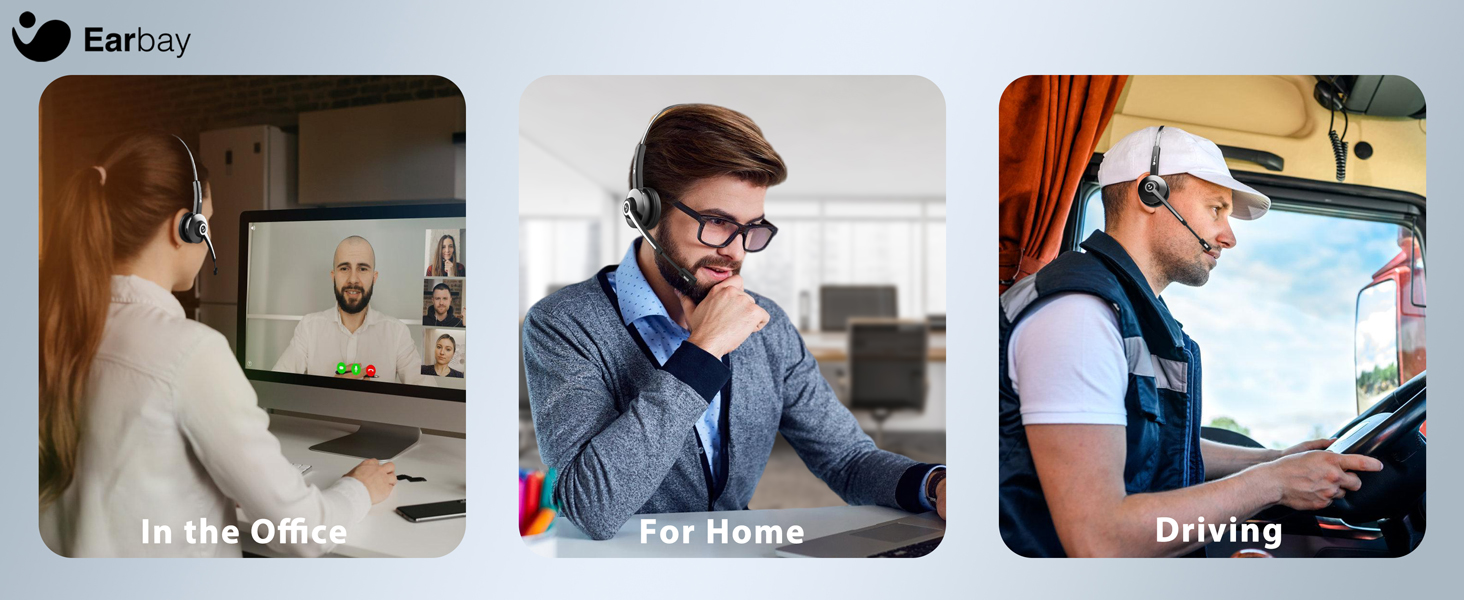
Descripció de la imatge: A composite image showing the Earbay headset in three different usage scenarios: a person working in an office, a person working from home, and a person driving a truck. This illustrates the headset's adaptability for various professional settings.
- In the Office: Ideal for clear communication during calls and virtual meetings.
- For Home/Remote Work: Provides comfort and noise cancellation for focused work.
- Conducció: Designed for truckers and professionals on the go, ensuring clear calls even in noisy environments.
Manteniment
- Neteja: Use a soft, dry cloth to clean the headset and charging dock. Do not use harsh chemicals or abrasive materials.
- Emmagatzematge: When not in use, store the headset on its charging dock or in a cool, dry place away from direct sunlight and extreme temperatures.
- Cura de la bateria: Per allargar la durada de la bateria, eviteu descarregar completament els auriculars amb freqüència. Carregueu-los regularment, fins i tot si no els feu servir constantment.
Resolució de problemes
Els auriculars no s'encén:
- Ensure the headset is fully charged. Connect it to the charging dock or directly via USB-C cable.
- Press and hold the Main Button for 3 seconds to power on.
No es pot connectar mitjançant Bluetooth:
- Assegureu-vos que els auriculars estiguin en mode d'emparellament (el llum indicador parpelleja en vermell i blau).
- Make sure Bluetooth is enabled on your device and it is within the 15 meter (approximately 33 feet) range.
- Forget "Earbay BT681CD" from your device's Bluetooth list and try pairing again.
- Reinicieu els auriculars i el dispositiu.
Sense àudio o mala qualitat d'àudio:
- Comproveu els nivells de volum tant dels auriculars com del dispositiu connectat.
- Ensure "Earbay BT681CD" is selected as the audio output device in your computer's sound settings or your phone's media output settings.
- Si feu servir el dongle USB, assegureu-vos que estigui inserit correctament i que l'ordinador el reconegui.
- Acosteu-vos més al dispositiu connectat per evitar interferències.
Microphone not working or poor voice clarity:
- Ensure the microphone is not muted. Press the Mic Mute Button to unmute.
- Position the microphone boom closer to your mouth.
- Verify that "Earbay BT681CD" is selected as the input device in your communication application (e.g., Zoom, Skype, Teams) and operating system settings.
Especificacions
| Característica | Detall |
|---|---|
| Nom del model | BT681CD |
| Tecnologia de connectivitat | Sense fil (Bluetooth) |
| Tecnologia de comunicació sense fils | Bluetooth 5.2 |
| Interval Bluetooth | 15 metres (aproximadament 33 peus) |
| Control de soroll | Sound Isolation (Environmental Noise Cancellation Mic) |
| Mida del controlador d'àudio | 40 mil·límetres |
| Resposta de freqüència | 20 Hz - 20 kHz |
| Sensibilitat | 113 dB |
| Impedància | 32 ohms |
| Durada de la bateria | Fins a 28 hores (temps de conversa) |
| Temps d'espera | Fins a 400 hores |
| Temps de càrrega | Aproximadament 1.5 hores |
| Port de càrrega | USB-C |
| Dispositius compatibles | Computers, Smartphones, Tablets, Desktop PC |
| Dimensions del producte | 2.17 x 7.32 x 6.02 polzades |
| Pes de l'article | 12.3 unces |
Garantia i Suport
The Earbay BT681CD Trucker Bluetooth Headset comes with a 1 any de garantia des de la data de compra, cobrint defectes de fabricació.
For technical assistance, troubleshooting, or warranty claims, please contact Earbay customer support. Our support team is available 24/7 to assist you.
Informació de contacte: Please refer to the product packaging or the official Earbay weblloc web per obtenir les dades de contacte d'assistència més actualitzades.
Ask a question about this manual
Ask about setup, troubleshooting, compatibility, parts, safety, or missing instructions. Manuals+ will review the question and use this page’s manual context to help answer it.