
VENTION FKGH0
VENTION 27000 mAh Laptop Power Bank User Manual
Model: FKGH0
1. Introducció
Thank you for choosing the VENTION 27000 mAh Laptop Power Bank. This high-performance power bank is designed to provide reliable and fast charging for a wide range of devices, including laptops, smartphones, and other portable electronics. With its large capacity, multiple output ports, and smart TFT display, it is an ideal companion for business travel, commuting, and outdoor activities.
2. Informació de seguretat
Llegiu atentament totes les instruccions de seguretat abans d'utilitzar aquest producte. Si no seguiu aquestes instruccions, podeu patir descàrregues elèctriques, incendis o lesions greus.
- No exposeu el banc d'energia extern a temperatures extremes (superiors a 60 °C/140 °F o inferiors a 0 °C/32 °F).
- No desmunteu, modifiqueu ni repareu el dispositiu vosaltres mateixos.
- Mantenir allunyat de l'aigua, la humitat i els materials inflamables.
- No deixeu caure, no colpegeu ni sotmeteu el banc d'energia a vibracions fortes.
- Desfeu-vos del banc d'energia extern d'acord amb la normativa local. No el llenceu amb les escombraries domèstiques.
- Mantenir fora de l'abast dels nens.
- Assegureu-vos que hi hagi una ventilació adequada durant la càrrega i la descàrrega.
3. Contingut del paquet
Verifiqueu que tots els elements siguin presents al vostre paquet:
- VENTION 27000 mAh Laptop Power Bank (Model: FKGH0)
- USB-C to USB-C Charging Cable (external)
- Manual d'usuari
- Bossa de vellut
4. Producte acabatview
Familiarize yourself with the components of your VENTION Power Bank:

Figure 4.1: VENTION 27000 mAh Laptop Power Bank. Shows the main unit with its digital display, integrated USB-C cable, and an additional USB-C to USB-C cable.
- Cable USB-C integrat: Supports up to 140W output/input. Designed for durability with over 10,000 bend tests, also functions as a lanyard.
- Port USB-C2: Supports up to 100W output/input.
- Port USB-A: Admet una potència de sortida de fins a 60 W.
- Pantalla TFT intel·ligent: Monitorització en temps real del nivell de bateria, voltage, current, temperature, and charging cycles. Features interactive emoji animations.
- Botó d'encesa: Activa la pantalla i inicia la càrrega.
5. Configuració
5.1 Càrrega inicial del banc d'energia extern
Before first use, fully charge your VENTION Power Bank. For optimal charging speed, use a power adapter that supports 100W or higher power delivery.
- Connect the integrated USB-C cable or the provided USB-C to USB-C cable to the power bank's USB-C port.
- Connect the other end of the cable to a compatible wall charger.
- The TFT display will show the charging status, including estimated time to full charge. A full charge with a 100W adapter takes approximately 2 hours.

Figure 5.1: Power Bank charging a MacBook Pro. Illustrates the power bank connected to a laptop, demonstrating its high-speed charging capability of up to 140W via the USB-C1 port.
6. Instruccions de funcionament
6.1 Càrrega dels vostres dispositius
The VENTION Power Bank supports charging up to three devices simultaneously.
- Càrrega d'un sol dispositiu:
- For maximum speed (up to 140W), use the integrated USB-C cable (USB-C1 port) to charge compatible laptops like MacBook Pro 16".
- The USB-C2 port provides up to 100W, suitable for laptops, tablets, and smartphones.
- The USB-A port provides up to 60W, ideal for smartphones and other USB-A compatible devices.
- Càrrega de diversos dispositius:
- Two Devices:
- USB-C1 + USB-C2: Up to 100W + 100W (200W total). Ideal for charging two laptops simultaneously.
- USB-C1 + USB-A: Fins a 100 W + 60 W.
- USB-C2 + USB-A: Up to 24W total.
- Three Devices:
- USB-C1 + (USB-C2 + USB-A): Up to 100W + 24W total.
- Two Devices:
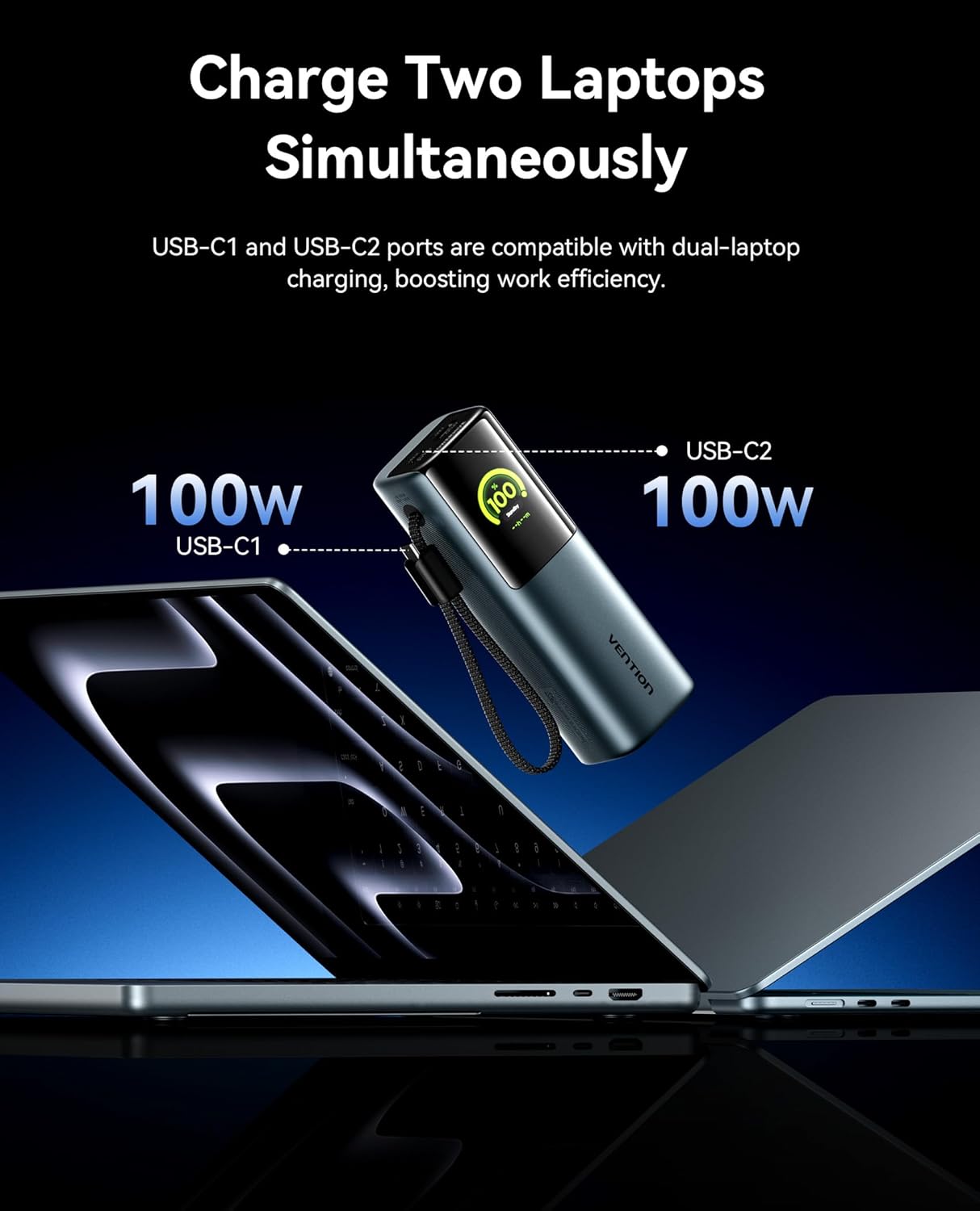
Figure 6.1: Charging two laptops simultaneously. This image demonstrates the power bank's capability to charge two laptops at 100W each using both USB-C ports, maximizing efficiency.

Figure 6.2: Charging three devices at once. The image shows the power bank connected to a laptop, a smartphone, and earbuds, illustrating its multi-device charging capability.
Pantalla TFT intel·ligent 6.2
The integrated TFT display provides comprehensive real-time information about the power bank's status.

Figure 6.3: Smart TFT Display. This image details the various data points shown on the display, including battery percentage, output power, estimated time to full charge, real-time power output, temperature monitoring, and battery cycle count.
- Nivell de bateria: Mostra el percentatge de bateria restanttage.
- Voltage & Ampera: Shows the real-time output voltage i corrent.
- Temperatura: Monitors the internal temperature of the power bank.
- Cicles de càrrega: Tracks the number of charge/discharge cycles, indicating battery health.
- Temps estimat: Provides an estimate of the time remaining for charging or discharging.
6.3 Interactive Emoji Animations
The power bank features unique emoji animations that provide visual cues for different operational states.

Figure 6.4: Interactive Emoji Animations. This image illustrates various emoji expressions displayed on the power bank, corresponding to different battery levels (low, medium, high), standby mode, and high-power charging/discharging.
- Visualització del nivell de bateria: Emojis change based on battery percentage (e.g., sad for low, happy for high).
- Mode de repòs/espera: Indica que el dispositiu està en un estat de baix consum.
- Mode de protecció de la bateria: Alerts to potential issues like overheating or over-discharge.
- High-Power Charging/Discharging: Indicates when the power bank is operating at over 90W.
6.4 Integrated Cable and Lanyard Functionality
The built-in USB-C cable serves a dual purpose as a convenient charging cable and a durable lanyard for easy portability.

Figure 6.5: Integrated Cable as Lanyard. This image shows a person holding the power bank by its integrated USB-C cable, demonstrating its use as a convenient carry strap.
- Pull out the integrated cable for instant fast charging.
- Use the cable as a lanyard to comfortably carry the power bank.
- The high-density braided jacket ensures durability, tested for over 10,000 bends.
7. Manteniment
To ensure the longevity and optimal performance of your VENTION Power Bank, follow these maintenance guidelines:
- Netegeu l'exterior amb un drap suau i sec. No utilitzeu productes químics agressius ni materials abrasius.
- Guardeu el banc d'energia en un lloc fresc i sec, allunyat de la llum solar directa i de temperatures extremes.
- If storing for extended periods, charge the power bank to approximately 50-70% capacity every 3 months to preserve battery health.
- Eviteu descarregar completament la bateria amb freqüència, ja que això pot reduir-ne la vida útil.
- Mantingueu els ports nets de pols i deixalles.
8. Solució De Problemes
If you encounter issues with your VENTION Power Bank, refer to the following common problems and solutions:
| Problema | Causa possible | Solució |
|---|---|---|
| El banc d'energia no es carrega | Charging cable faulty; Wall adapter insufficient; Power bank fully charged. | Try a different USB-C cable and wall adapter. Ensure the adapter meets power requirements. Check the display for charge status. |
| El dispositiu no es carrega des del banc d'energia | Power bank low on battery; Cable faulty; Device incompatible; Power bank in protection mode. | Recharge the power bank. Try a different charging cable. Ensure your device is compatible with the power bank's output. Check the display for error emojis. |
| Velocitat de càrrega lenta | Cable not supporting fast charging; Device not supporting fast charging; Multiple devices connected. | Use the integrated USB-C cable or a high-quality PD-compatible cable. Ensure your device supports fast charging. Disconnect other devices for maximum speed to a single device. |
| La pantalla no s'encén | Power bank fully discharged; Power button not pressed correctly. | Connect the power bank to a charger. Press the power button briefly to activate the display. |
| Power bank feels warm during use | Normal operation during high-power charging/discharging; Overheating. | Slight warmth is normal. If it becomes excessively hot or displays an overheating emoji, disconnect devices and allow it to cool down in a well-ventilated area. |
9. Especificacions
| Característica | Detall |
|---|---|
| Número de model | FKGH0 |
| Capacitat de la bateria | 27000 mAh |
| Tipus de bateria | Ió de liti |
| Potència de sortida màxima | 200 W (total) |
| USB-C1 Output (Integrated Cable) | Fins a 140 W |
| Sortida USB-C2 | Fins a 100 W |
| Sortida USB-A | Fins a 60 W |
| Tipus de visualització | Smart TFT Display with Emoji Animation |
| Dimensions (L x A x A) | 21.8 x 6.2 x 11.2 cm (aprox. 8.58 x 2.44 x 4.41 polzades) |
| Pes | 900 grams (aprox. 1.98 lliures) |
| Característiques especials | Fast Charging, Integrated USB-C Cable/Lanyard, Real-time Display, Emoji Animations |
10. Garantia i Suport
VENTION products are designed and manufactured to the highest quality standards. For information regarding warranty coverage, technical support, or service inquiries, please contact VENTION customer support through the retailer where you purchased the product or visit the official VENTION weblloc.
Conserveu el vostre comprovant de compra per a reclamacions de garantia.
Documents relacionats - FKGH0
 |
Vention 200W Power Bank (Model FKV) User Manual User manual for the Vention 200W Power Bank (Model FKV), including specifications, usage instructions, screen display guide, and safety information. |
 |
Sunco UFO-200DW-BK 200W LED High Bay Light - Specifications and Features Detailed specifications for the Sunco UFO-200DW-BK LED High Bay light, featuring shatter-resistant aluminum housing, IP65 waterproof rating, 200W power, 27000-28000 lumens, and various color temperatures. |
 |
Contractor Select REBL LED Round High Bay Lighting - Lithonia Lighting Detailed specifications for the Contractor Select REBL LED Round High Bay fixture by Lithonia Lighting. Features include patent-pending optics, IK10 polycarbonate lens, 0-10V dimming, and multiple lumen/CCT options. Includes accessories, warranty, and operational data. |
 |
Controlador LED DONE DL-200W-RXG: característiques, especificacions i fitxa tècnica Fitxa tècnica completa del controlador LED DONE DL-200W-RXG. Detalls de les característiques, introducció del producte, llista de models, característiques d'entrada/sortida, funcions de regulació d'intensitat (1-10V, PWM, DALI), protecció, especificacions ambientals, seguretat, compatibilitat electromagnètica (EMC), corbes paramètriques, dimensions mecàniques i embalatge. |
 |
UGREEN 25000 mAh 200W Fast Charging Power Bank PB722 User Manual Detailed user manual for the UGREEN 25000 mAh 200W fast charging power bank (Model: PB722), covering product overview, button operations, power distribution, troubleshooting, specifications, and charging instructions. |
 |
GieL GL-CP3-200W LED Garage & Canopy Light - Specifications and Installation Guide Comprehensive details on the GieL GL-CP3-200W LED Garage & Canopy Light, including product features, specifications, dimensions, and step-by-step installation instructions for various mounting scenarios. |
Ask a question about this manual
Ask about setup, troubleshooting, compatibility, parts, safety, or missing instructions. Manuals+ will review the question and use this page’s manual context to help answer it.