
1. Introducció
The ACEMAGICIAN T8Plus is a compact and efficient Mini PC designed for various applications, including home office, multimedia entertainment, and educational use. It features a 12th Generation Intel Alder Lake N100 processor, 16GB LPDDR5 RAM, and a 512GB M.2 SSD, providing reliable performance in a small form factor. This manual provides essential information for setting up, operating, maintaining, and troubleshooting your Mini PC.
2. Contingut del paquet
Marqueu la casella per als elements següents:
- 1 x ACEMAGICIAN T8Plus Mini PC
- 1 x adaptador de corrent
- 1 x cable HDMI
- 1 x Muntatge VESA
- 1 x Manual d'usuari

Imatge: Contingut del paquet. This image displays all items included in the ACEMAGICIAN T8Plus Mini PC retail box, ensuring users can verify their package is complete.
3. Producte acabatview
3.1. Processador i rendiment
The T8Plus Mini PC is equipped with a 12th Generation Intel Alder Lake N100 processor. This processor features 4 cores and 4 threads, with a maximum frequency of 3.4 GHz and 6MB of L3 Cache, providing efficient processing for daily tasks and multitasking. The design ensures low power consumption (up to 6W TDP) and effective heat dissipation.
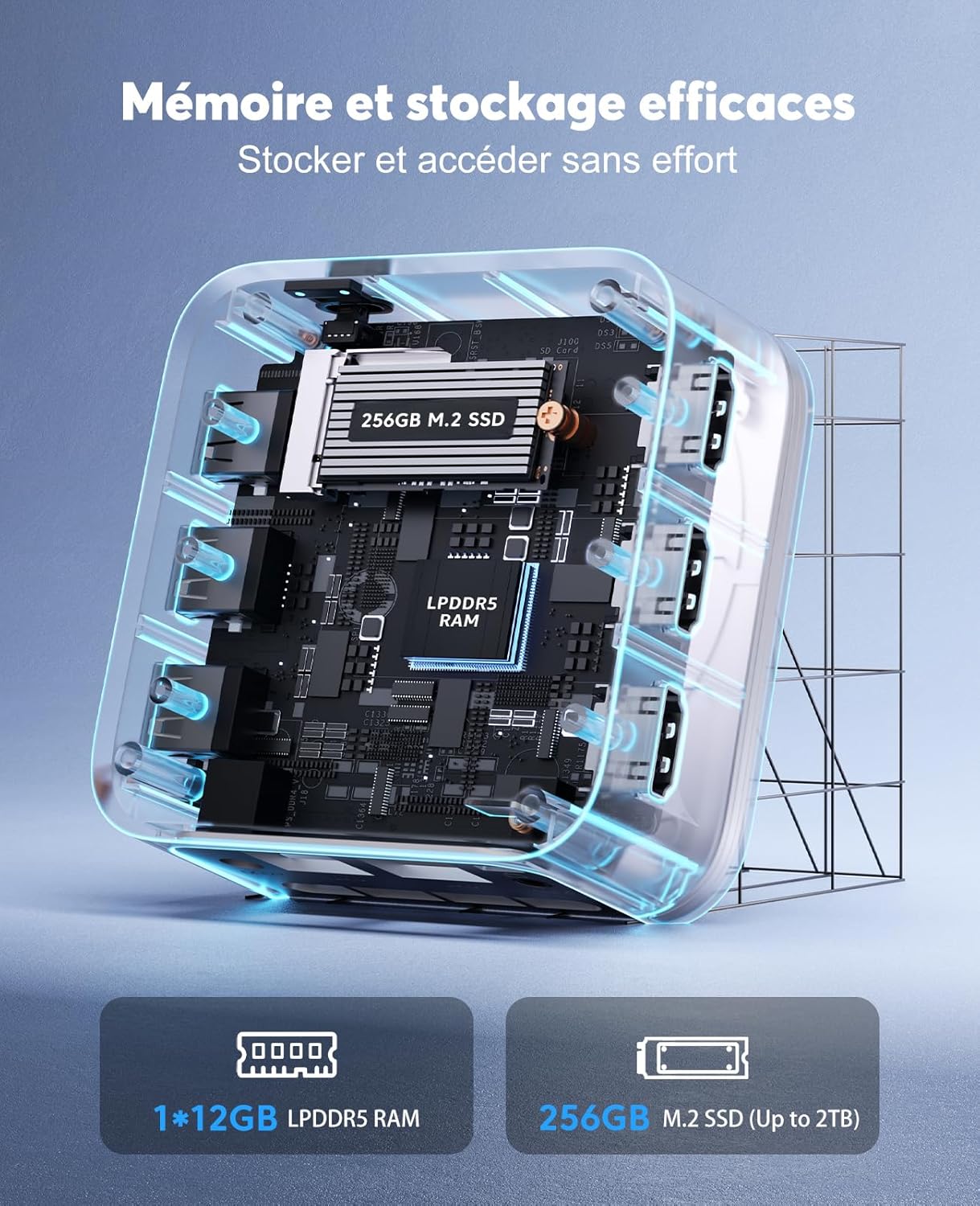
Image: Intel Alder Lake N100 Processor Details. This diagram highlights the key specifications of the Intel Alder Lake N100 processor, including its core count, cache size, maximum frequency, and thermal design power.
3.2. Memòria i emmagatzematge
The Mini PC comes with 16GB of LPDDR5 RAM, providing ample memory for smooth operation. For storage, it includes a 512GB M.2 SSD, which can be expanded up to 2TB. Note that due to the compact size, the RAM is not expandable, and additional hard drive expansion is not supported.
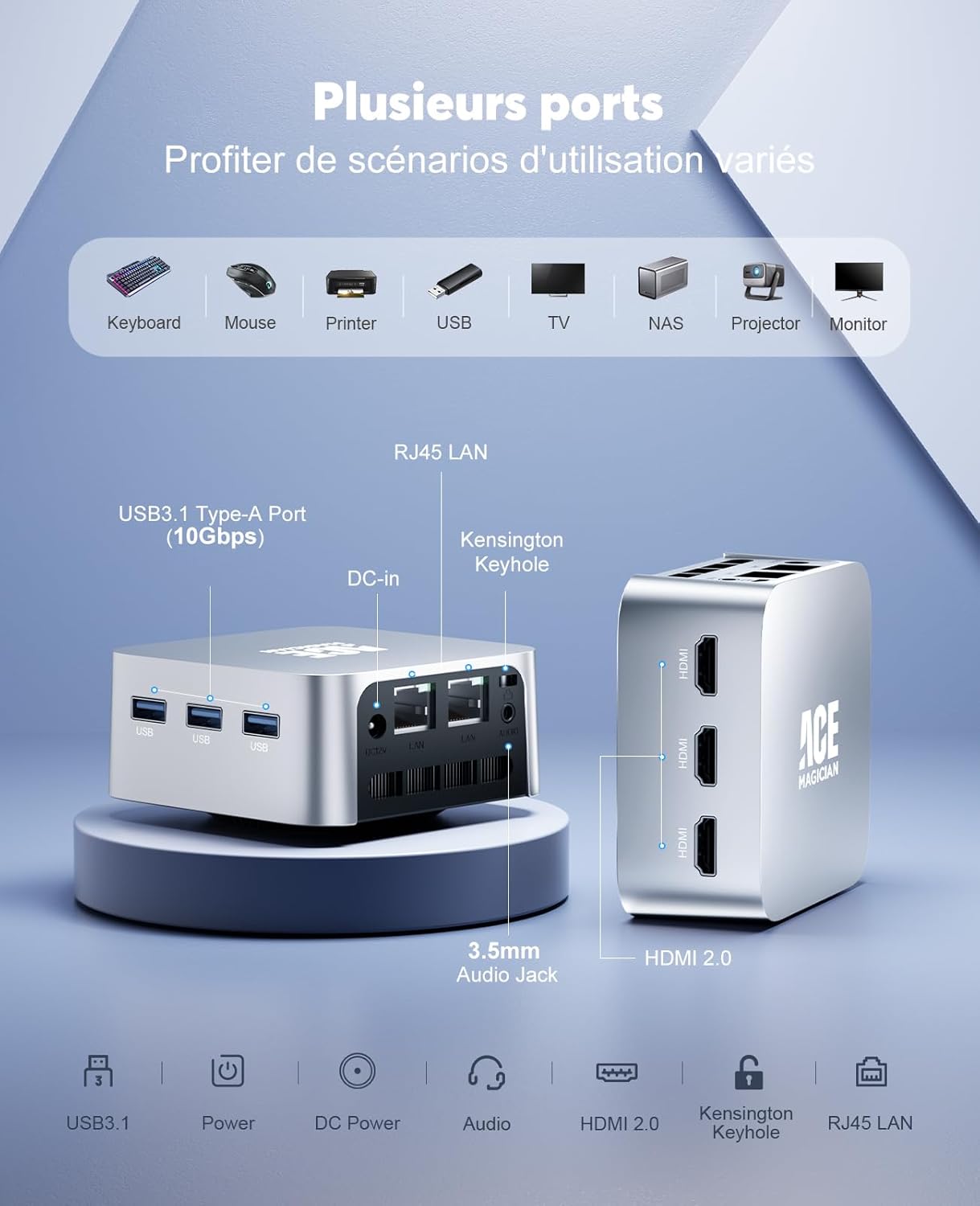
Image: Memory and Storage Configuration. This image illustrates the internal memory and storage components of the Mini PC, specifically the 16GB LPDDR5 RAM and the 512GB M.2 SSD.
3.3. Disseny del port
The T8Plus offers a comprehensive set of ports for connectivity:
- 3 x ports USB 3.1 tipus A
- 3 x HDMI 2.0 ports (supporting 4K @ 60Hz audio/video output)
- 2 x RJ45 Gigabit Ethernet ports (1000 Mbps LAN)
- 1 x 3.5mm Headphone/Microphone Jack (2-in-1)
- 1 x DC-in port
- 1 x Kensington Keyhole
- 1 x interruptor d'alimentació
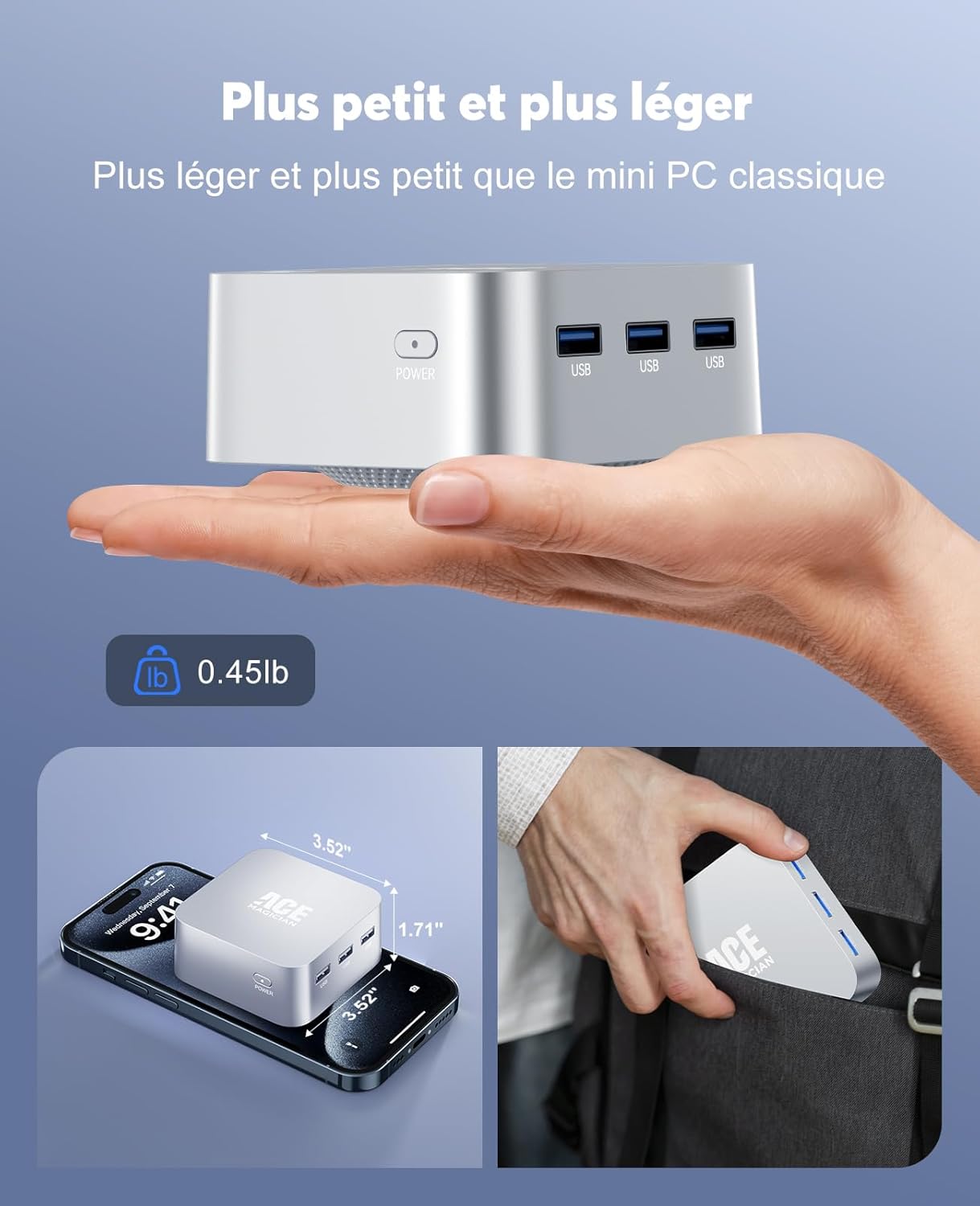
Image: Port Configuration. Aquesta imatge proporciona una clara view of all available ports on the Mini PC, indicating their types and locations for easy identification.
3.4. Connectivitat sense fil
The device supports Wi-Fi 5 (2.4G + 5G) for stable wireless internet connection and Bluetooth 4.2 for connecting wireless peripherals.
Image: Wireless Connectivity. This image highlights the Mini PC's support for Wi-Fi 5 and Bluetooth 4.2, enabling stable and versatile wireless connections.
3.5. Disseny compacte
The T8Plus Mini PC features an ultra-compact design, measuring approximately 8.9 x 8.9 x 4.4 cm and weighing only 204 grams. Its small footprint allows it to be placed discreetly on a desk or mounted behind a monitor using the included VESA mount.
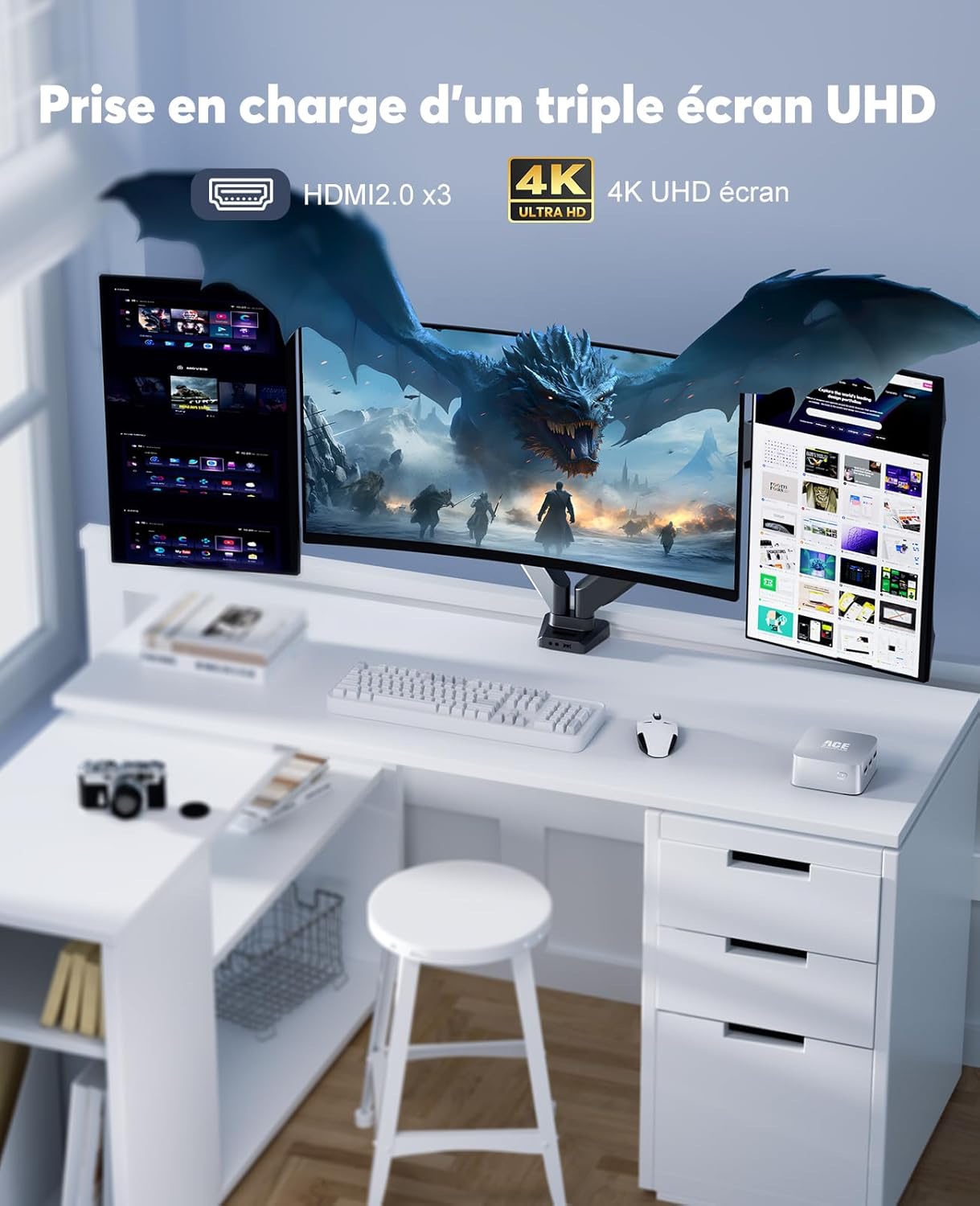
Image: Compact Size and Portability. This image visually demonstrates the remarkably small dimensions of the Mini PC, highlighting its portability and minimal desk space requirement.
4. Instruccions de configuració
4.1. Connexió a l'alimentació
- Connect the power adapter to the DC-in port on the Mini PC.
- Connecteu l'adaptador de corrent a una presa de corrent.
4.2. Connecting to a Display
- Use the provided HDMI cable to connect one of the HDMI ports on the Mini PC to an HDMI input on your monitor or TV.
- For multiple displays, connect additional monitors to the other available HDMI ports. The Mini PC supports up to three 4K UHD displays simultaneously.
4.3. Connexió de perifèrics
- Connect your USB keyboard and mouse to the USB 3.1 Type-A ports.
- For wired network access, connect an Ethernet cable to one of the RJ45 ports.
- For audio output, connect headphones or speakers to the 3.5mm audio jack.
4.4. Initial Boot
- Premeu el botó d'engegada del Mini PC.
- Seguiu les instruccions que apareixen a la pantalla per completar la configuració inicial del Windows 11.
5. Instruccions de funcionament
5.1. Multi-Display Configuration
The ACEMAGICIAN T8Plus supports connecting up to three 4K UHD displays simultaneously via its three HDMI 2.0 ports. This allows for an extended desktop environment, enhancing productivity for tasks such as office work, graphic design, or immersive multimedia experiences.

Image: Triple 4K UHD Display Support. This image illustrates the Mini PC's ability to drive three 4K UHD displays concurrently, ideal for multi-monitor setups.
5.2. Connexió a la xarxa
- Connexió per cable: Connect an Ethernet cable from your router or modem to one of the RJ45 ports on the Mini PC.
- Connexió sense fil: Navigate to the network settings in Windows 11, select your Wi-Fi network, and enter the password to connect.
5.3. Ús de dispositius USB
The three USB 3.1 Type-A ports allow you to connect various USB devices such as external hard drives, USB flash drives, printers, and other peripherals. Ensure devices are properly inserted into the ports.
6. Manteniment
6.1. Neteja
- Regularly clean the exterior of the Mini PC with a soft, dry cloth.
- Avoid using liquid cleaners or sprays directly on the device.
- Ensure ventilation openings are free from dust and obstructions to maintain optimal airflow.
6.2. Emmagatzematge
When not in use for extended periods, store the Mini PC in a cool, dry place away from direct sunlight and extreme temperatures.
6.3. Dissipació de calor
The Mini PC is designed with optimized heat dissipation features, including copper fins and a bottom fan design. To ensure stable performance, avoid blocking the ventilation openings and operate the device in a well-ventilated area.
7. Solució De Problemes
7.1. Sense poder
- Assegureu-vos que l'adaptador de corrent estigui connectat correctament tant al Mini PC com a una presa de corrent que funcioni.
- Verifiqueu que la presa de corrent funciona connectant-hi un altre dispositiu.
7.2. Sense sortida de pantalla
- Check that the HDMI cable is firmly connected to both the Mini PC and the monitor.
- Ensure the monitor is powered on and set to the correct input source (e.g., HDMI 1, HDMI 2).
- Prova un altre cable HDMI o monitor si estàs disponible.
7.3. Operating System Issues
- If the operating system fails to start or reboots unexpectedly, try restarting the device.
- If issues persist, consider performing a system restore or reinstalling the operating system (refer to Windows 11 documentation for detailed steps).
7.4. Problemes de connectivitat de xarxa
- For wired connections, ensure the Ethernet cable is properly connected and the router/modem is working.
- For Wi-Fi, check your network settings, ensure Wi-Fi is enabled, and verify the password. Restart your router if necessary.
8. Especificacions
| Característica | Especificació |
|---|---|
| Marca | ACEMAGICA |
| Nom del model | T8Plus |
| Número de model | ACE-T8PLUS |
| Processador | Intel Alder Lake N100 (4 Cores, 4 Threads, 0.8 GHz - 3.4 GHz) |
| Memòria cau del processador | 6 MB |
| Coprocessador gràfic | Gràfics Intel UHD |
| RAM | 16 GB LPDDR5 (3200 MHz, non-expandable) |
| Emmagatzematge | 512 GB M.2 SSD (expandable up to 2 TB) |
| Sistema operatiu | Windows 11 Pro (64 bits) |
| Connectivitat | Wi-Fi 5 (2.4G + 5G), Bluetooth 4.2, 2 x Gigabit Ethernet (RJ45) |
| Ports | 3 x USB 3.1 Type-A, 3 x HDMI 2.0 (4K@60Hz), 1 x 3.5mm Audio Jack, 2 x RJ45, 1 x DC-in |
| Sortida de vídeo | HDMI (Supports up to 3 displays, 4096 x 2160 @ 60 Hz) |
| Consum d'energia | 6 watts |
| Dimensions (L x A x A) | 89.4 mm x 89.4 mm x 43.5 mm (3.52 x 3.52 x 1.71 polzades) |
| Pes | 204 grams (0.45 lliures) |
| Mètode de refrigeració | Refrigeració per aire |
| Tipus d'endoll elèctric | Type C/EF (European/Hybrid FR-DE) |
9. Garantia i Suport
ACEMAGICIAN is committed to providing reliable products and customer service. The T8Plus Mini PC comes with:
- Suport tècnic de per vida.
- Política de devolució gratuïta d'1 mes.
- 18-month worry-free warranty.
- Servei d'atenció al client les 24 hores.
For any questions or support needs, please do not hesitate to contact ACEMAGICIAN customer service. Contact details can typically be found on the official ACEMAGICIAN weblloc web o a través de la vostra plataforma de compra.