
1. Guia de configuració
1.1 Choosing the Right Ring Size
For optimal performance and accurate data monitoring, selecting the correct ring size is crucial. The COLMI R02 Smart Ring should fit snugly but comfortably around your finger's base. We recommend wearing the ring on your index finger for best results. The middle and ring fingers can also work effectively. Avoid fingers where the base is narrower than the knuckle.
If you have purchased a COLMI Sizing Kit, use it to determine your ideal size. Alternatively, you can use the following methods:
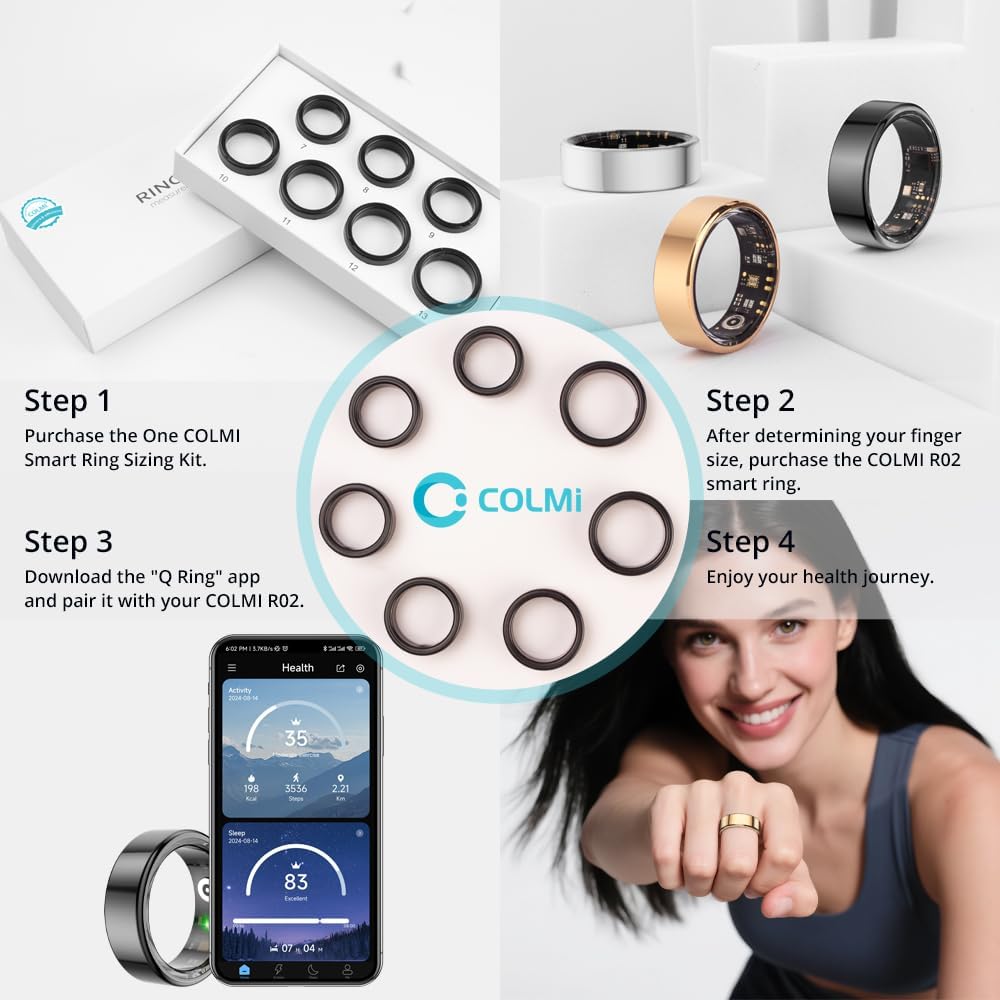
Figura 1: Mésview of the COLMI R02 Smart Ring setup process, starting with sizing and ending with app integration.

Figure 2: Detailed instructions for measuring ring size using both digital and manual methods, including a size chart for reference.
Method 1: Using a Phone App
Many smartphone applications offer a ring sizer feature. Place a standard ID or credit card vertically on your phone screen and adjust the slider until the blue box matches the card's width. If you don't have an existing ring, place your fingers flat on the screen and adjust the distance between them to find your ring size. If you have a ring you wear regularly, place it on the screen and adjust the circle to match the inside of your ring.
Video 1: Demonstrates how to use a smartphone app to measure your ring size, including both finger and existing ring measurement techniques.
Method 2: String Measurement
Wrap a thin, non-elastic string or paper strip around your finger once. Ensure it is not too tight or too loose, as this can lead to inaccurate measurements. Mark the position where the string overlaps with a pen. Straighten the string and measure its length with a ruler. Compare this measurement to the provided size chart to find your corresponding ring size.
Video 2: Illustrates the string measurement method for determining ring size, showing how to wrap, mark, and measure the string.
Important: The ring size refers to the inner diameter. Do not measure the outer diameter. If the ring is too loose, it will affect the accuracy of monitoring data.
After selecting a size, try wearing a sizing ring (if available) for at least 24 hours to confirm the best fit, as fingers can naturally expand and contract.
Video 3: Demonstrates how to test the fit of the ring and the importance of a snug fit for accurate data.
1.2 Charging the Smart Ring
The COLMI R02 Smart Ring comes with a portable charging box. Before initial use, ensure the ring is fully charged. Place the ring into the charging compartment. The indicator light will show charging status (red for charging, green for full charge).
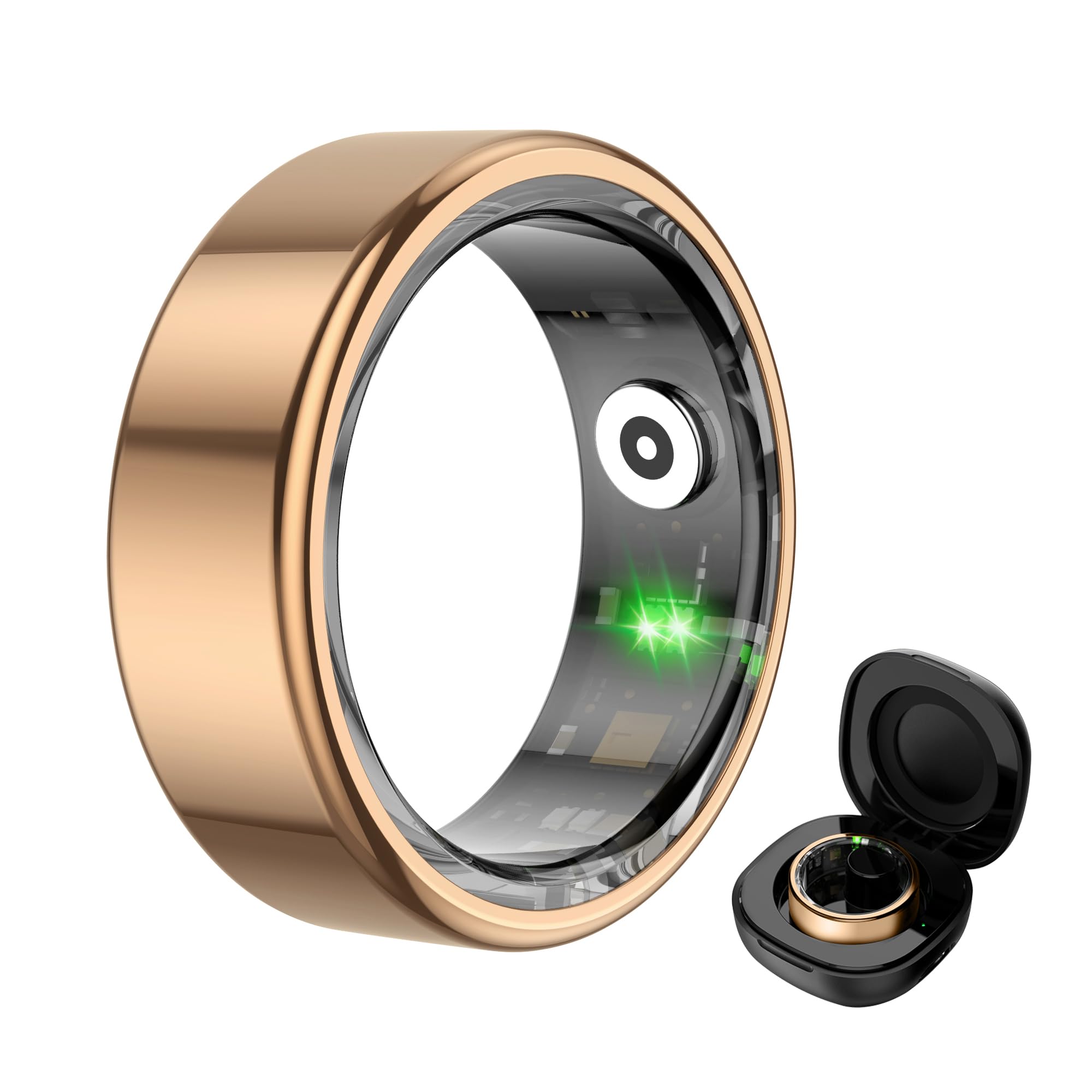
Figure 3: The COLMI R02 Smart Ring and its charging case. The image also illustrates the charging process and full charge indication.
Video 4: Shows the process of charging the COLMI R02 Smart Ring using its charging case and connecting it to the app.
1.3 Connexió a l'aplicació
Download the "Q Ring" application on your smartphone (compatible with iOS and Android devices). Enable Bluetooth on your phone. Open the "Q Ring" app and follow the on-screen instructions to search for and bind your COLMI R02 Smart Ring. Once connected, you will be able to view your health and activity data.
Video 5: Demonstrates how to connect the COLMI R02 Smart Ring to the "Q Ring" app via Bluetooth and view initial data.
2. Funcionament
2.1 Vigilància de la salut
The COLMI R02 Smart Ring continuously monitors various health metrics throughout the day and night. Access the "Health Monitoring" section in the "Q Ring" app to view les teves dades.
- Monitorització de la freqüència cardíaca: Supports 24-hour heart rate monitoring. You can adjust the monitoring frequency in the app settings.
- Monitorització d'oxigen en sang: Records blood oxygen data, providing insights into your respiratory health.
- Monitorització del son: Analyzes your sleep patterns, including light sleep, deep sleep, and REM duration, to help you understand and improve your sleep quality.

Figure 4: The smart ring actively tracking heart rate, displayed on a graph within the companion app.
Video 6: Guide on how to adjust heart rate measurement settings within the app for optimal data collection and battery life.

Figure 5: The smart ring monitoring blood oxygen levels, with data visualized on a graph in the app.

Figure 6: Detailed sleep analysis provided by the smart ring, showing different sleep stages and overall sleep quality.
2.2 Modes esportius i seguiment d'activitat
The COLMI R02 Smart Ring supports multiple sports modes, such as running, to track your physical activity. It records exercise time, steps taken, calories burned, and distance covered, helping you monitor your fitness progress.

Figure 7: The smart ring tracking various sports activities and displaying real-time data in the app.
2.3 Control remot de la càmera
After connecting the ring to your mobile phone via the "Q Ring" app, you can use the smart ring to remotely control your phone's camera. This allows you to take photos by simply waving your finger, making it convenient for group shots or selfies.
3. Manteniment
To ensure the longevity and optimal performance of your COLMI R02 Smart Ring, follow these maintenance guidelines:
- Neteja: Regularly wipe the ring with a soft, dry cloth to remove any dirt or sweat. Avoid using harsh chemicals or abrasive materials that could damage the finish or sensors.
- Càrrega: Charge the ring using the provided charging compartment and cable. Avoid using third-party chargers that may not be compatible.
- Resistència a l'aigua: The ring is water-resistant, but it is not recommended for prolonged submersion or high-pressure water activities. Avoid wearing it while swimming or showering to prevent potential damage.
- Emmagatzematge: When not in use, store the ring in its charging compartment or a safe, dry place away from extreme temperatures and direct sunlight.
- Actualitzacions de programari: Keep the "Q Ring" app updated to the latest version to ensure compatibility and access to new features or performance improvements.
4. Solució De Problemes
If you encounter any issues with your COLMI R02 Smart Ring, please refer to the following common troubleshooting steps:
- Ring Not Connecting to App:
- Assegureu-vos que el Bluetooth estigui habilitat al vostre telèfon intel·ligent.
- Make sure the ring is charged.
- Restart both your phone and the ring (by placing it in the charger and removing it).
- Ensure the "Q Ring" app is updated to the latest version.
- Try unbinding and re-binding the device in the app settings.
- Lectures de dades inexactes:
- Verify that the ring is worn correctly and snugly on your finger, preferably the index finger.
- Ensure the sensor inside the ring is on the palm side of your finger.
- Netegeu els sensors de l'interior de l'anell.
- Ensure the ring is fully charged.
- Durada de la bateria curta:
- Check the app settings for health monitoring frequency. More frequent monitoring (e.g., 5-minute heart rate intervals) will consume more battery. Adjust to a longer interval (e.g., 30 or 60 minutes) for extended battery life.
- Assegureu-vos que l'anell estigui completament carregat abans d'utilitzar-lo.
Si aquests passos no resolen el problema, poseu-vos en contacte amb l'atenció al client per obtenir més ajuda.
5. Especificacions
| Característica | Detall |
|---|---|
| Nom del model | COLMI R02 |
| Compatibilitat de sistemes operatius | Android, iOS |
| Capacitat d'emmagatzematge de memòria | 1 MB |
| Característiques especials | Exercise data, Heart rate measurement, Sleep measurements, Sport mode |
| Capacitat de la bateria | 15 milionsamp Hores |
| Tecnologia de connectivitat | Bluetooth |
| Comunicació sense fils estàndard | Bluetooth |
| Composició de les cèl·lules de la bateria | Polímer de liti |
| GPS | Sense GPS |
| Forma | Ronda |
| Tipus de material de la banda | Metall |
| Nivell de resistència a l'aigua | Resistent a l'aigua |
| Entrada de la interfície humana | Gest |
| Aplicació compatible | Camera, Fitness Tracker, Heart Rate Monitor, Sleep Monitor |
| Mètriques mesurades | Heart Rate Monitor, Blood Oxygen Monitor, Sleep Duration |
| Tipus de tancament | Diapositiva |
| Nom d'estil | Minimalista |
| Descripció del rang d'edat | Adult |
| Mitjans integrats | Charging Cable, Charging Case, User Manual |
| Fabricant | Shenzhen COLMi Technology Co., Ltd. |
6. Garantia i assistència
The COLMI R02 Smart Ring comes with a 1 any de garantia. For any usage or quality problems, please contact customer support. The manufacturer, Shenzhen COLMl Technology Co., Ltd, is committed to providing professional after-sales service.
Contacte amb l'assistència: Refer to the contact information provided with your product packaging or visit the official COLMI weblloc de recursos de suport.