
LFF TV-GKXMC-Q41-4MP/3W-1.8MM
LFF Hummingbird Feeder with Camera User Manual
Model: TV-GKXMC-Q41-4MP/3W-1.8MM
1. Producte acabatview
The LFF Hummingbird Feeder with Camera offers an innovative way to observe hummingbirds up close. Featuring a 2.5K HD camera with AI bird recognition, solar power, and a durable, weather-resistant design, it provides a unique birdwatching experience.
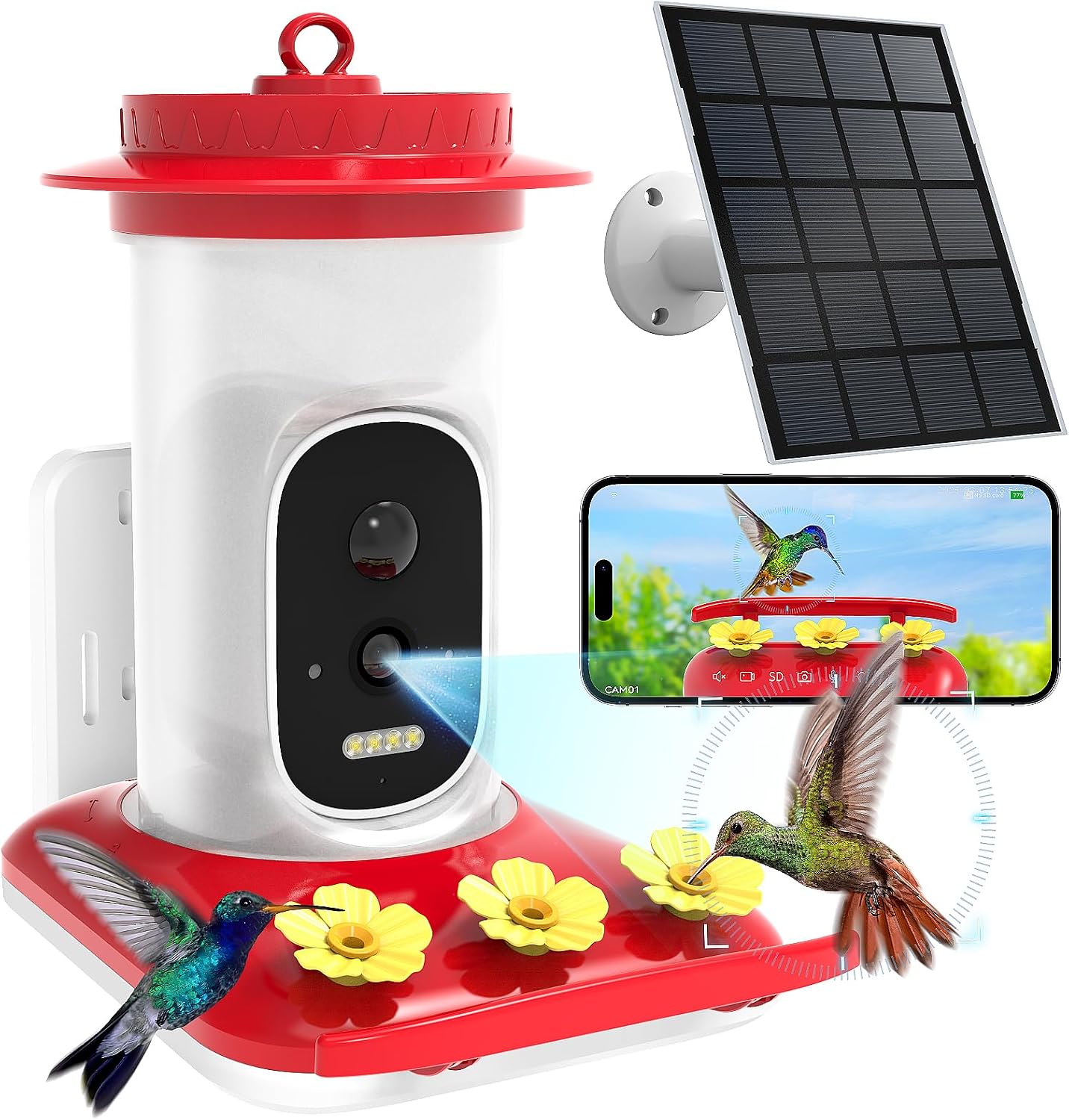
Figure 1: LFF Hummingbird Feeder with Camera, showing the main unit, solar panel, and smartphone app interface.
2. Què s'inclou
Carefully unbox your LFF Hummingbird Feeder and ensure all components are present:
- Hummingbird Feeder Unit (Camera/Water Barrel and Waterfeeder Base)
- Solar Panel with Bracket
- Suport de muntatge a la paret
- Antena externa
- Hummingbird Drinking Plugs (Yellow flowers)
- Cargols del xassís
- Cargols de muntatge i ancoratges de paret
- Binding Ties
- Manual d'usuari (aquest document)

Figure 2: All included parts of the Hummingbird Feeder system.
3. Configuració i instal·lació
Follow these steps to set up your hummingbird feeder:
3.1. Prepare the Feeder Base
- Remove the camera module from the hummingbird water feeder slot.
- Carefully insert the yellow hummingbird drinking plugs firmly into the spouts on the feeder base. Ensure they are securely seated to prevent leaks.

Figura 3: Detallada view of the feeder base, highlighting the bee-proof design and anti-ant moat.
3.2. Fill the Nectar Reservoir
- Important: Do not open the top cover of the water barrel.
- Invert the water barrel and pour water or hummingbird nectar into the opening at the bottom. Fill to the recommended level as indicated on the barrel.
- Align the latch on the water barrel with the unlock mark on the waterfeeder base. Gently twist clockwise to assemble and fix it securely.

Figure 4: Instructions for filling the nectar reservoir. Note: If water leaks from the flower ports, reverse the pouring orientation during setup.
3.3. Camera Preparation and Installation
- Snap open the silicone cover on the back of the camera to access the power switch and charging port.
- Turn the power switch from "OFF" to "ON" to power on the camera. The indicator light will turn blue.
- Open the silicone cover on top of the camera to access the TF card slot and reset button.
- If needed, press and hold the reset button to reset the device. The camera will announce "Restore factory settings, please don't power off."
- Snap the camera back into the hummingbird feeder slot.
- Align the external antenna with the fixing hole and secure it to the camera.
Video 1: Step-by-step guide on assembling the LFF Hummingbird Feeder, including camera installation and initial power-up.
3.4. Opcions de muntatge
The feeder offers multiple mounting options to suit your outdoor space:
- Muntatge en paret: Use the provided wall mount bracket and screws to attach the feeder to a wall.
- Penjant: Utilize the integrated hook to hang the feeder from a branch or shepherd's hook.
- Enquadernació: Secure the feeder to a tree trunk or post using the binding ties.

Figure 5: Different ways to mount your hummingbird feeder.
Consell de col·locació: It is advisable to avoid feeding hummingbirds alongside larger birds. Place the feeder at least 10 feet away from areas frequented by larger birds to ensure a safer environment for hummingbirds.

Figure 6: Recommended placement to avoid larger birds.
4. Instruccions de funcionament
4.1. Connectivitat i funcions de l'aplicació
Connect the smart hummingbird feeder to your smartphone or tablet via 2.4 GHz Wi-Fi (Not compatible with 5 GHz). Download the Tris Home APP to access the following features:
- 2.5K HD Camera & Night Vision: View optimal color images, even in darkness, with a 160° panoramic lens. The camera supports voice monitoring, two-way audio, photo capture, and video recording.
- AI Recognition & Instant Notification: The system uses sophisticated AI algorithms to accurately identify hummingbird species. Receive instant notifications when a hummingbird arrives. (A free one-month trial for AI Recognition service is included.)
- Àudio bidireccional: Use the 2-way audio feature to deter larger birds and ensure hummingbirds can feed safely.
- Auto-Capture: The feeder automatically captures moments when hummingbirds visit.
- Emmagatzematge: Securely save photos and videos using either cloud storage or a TF card (not included).
- Compartint: Share your smart hummingbird feeder with friends and family through the Tris Home APP and upload captured moments to social media.

Figure 7: Key features of the smart hummingbird feeder.

Figure 8: AI bird recognition feature identifying a hummingbird species.

Figure 9: Night vision capabilities, providing clear views even after dark.

Figure 10: Instant motion detection notifications to your smartphone.

Figure 11: Options for storing captured photos and videos.

Figure 12: Sharing captured hummingbird moments with friends and family.
4.2. Gestió d'energia
The feeder is equipped with a built-in 4000mAh rechargeable battery and an external 3W solar panel for continuous power supply. This dual charging mode ensures uninterrupted operation.

Figure 13: Solar panel and rechargeable battery for continuous power.
5. Manteniment
Regular maintenance ensures the longevity and optimal performance of your feeder:
- Neteja: The feeder's wide-mouth design and tool-free assembly allow for easy disassembly and thorough cleaning. Regularly clean the feeder to prevent mold and bacteria growth, which can harm hummingbirds. Use warm water and a brush. Avoid harsh detergents.
- Ompliment: Refill the nectar reservoir as needed. The transparent design allows for easy monitoring of nectar levels.
- Protecció meteorològica: The IP66 waterproof rating ensures the feeder is protected against rain and harsh weather conditions. However, during extreme weather, consider bringing the feeder indoors if possible.

Figure 14: The feeder's IP66 waterproof design.
6. Solució De Problemes
| Problema | Causa possible | Solució |
|---|---|---|
| Water/Nectar leaks from flower ports. | Incorrect assembly of water barrel to base. | Ensure the water barrel is inverted correctly during filling and that the base is twisted firmly clockwise to lock. |
| La càmera no s'encén. | Power switch is OFF or battery is drained. | Ensure the power switch is set to "ON". Charge the camera using the provided solar panel or a USB-C cable. |
| No es pot connectar a la Wi-Fi. | Incorrect Wi-Fi band (5GHz) or weak signal. | Ensure you are connecting to a 2.4 GHz Wi-Fi network. Move the feeder closer to your Wi-Fi router or use a Wi-Fi extender. |
| AI Recognition not working. | Trial period expired or service not activated. | Check your Tris Home APP for AI Recognition service status. Activate or subscribe if the trial has ended. |
| No s'han rebut notificacions. | App notification settings are off or camera is offline. | Check notification settings in the Tris Home APP and on your smartphone. Ensure the camera is connected to Wi-Fi and online. |
7. Especificacions
- Marca: Extensió LFF
- Número de model: TV-GKXMC-Q41-4MP/3W-1.8MM
- Espècie objectiu: Colibrí
- Característiques especials: Bee Resistant, Built-In Ant Moat, Built-In Camera, Leakproof, Portable
- Tipus de muntatge: Muntatge penjant
- Dimensions del producte: 7.2 cm de llargada x 5.2 cm d'amplada x 8.3 cm d'alçada
- Font d'alimentació: Energia solar
- Components inclosos: Manual, kit de muntatge
- Color: Vermell
- Pes de l'article: 2.3 lliures
- Fabricant: Shenzhen TRlS VISlON Technology Co.Ltd.
8. Garantia i Suport
For warranty information and technical support, please refer to the contact details provided with your product packaging or visit the official LFF weblloc. Conserveu el rebut de compra per a reclamacions de garantia.
Ask a question about this manual
Ask about setup, troubleshooting, compatibility, parts, safety, or missing instructions. Manuals+ will review the question and use this page’s manual context to help answer it.