
Introducció
This manual provides detailed instructions for the setup, operation, and maintenance of your XMSJSIY AV RCA Switch 4-in-1 Out. Please read this manual thoroughly before using the device to ensure proper functionality and to prevent damage.
Característiques del producte
- 4-Input, 1-Output Design: Connects up to four RCA audio/video sources to a single display or audio system.
- Plug and Play: Requires no external power supply or software installation.
- Connexió simultània: All input devices can remain connected, with easy switching between them.
- High-Quality Signal Transmission: Ensures clear video images and pure audio without lagging or noise.
- Construcció duradora: Features a metal shell with a frosted finish for enhanced durability and heat dissipation.
- Àmplia compatibilitat: Works with most devices equipped with RCA L/R interfaces, including DVD/DVR/VCR players, gaming consoles (PS2, PS3), cameras, HDTVs, and monitors.

Instruccions de configuració
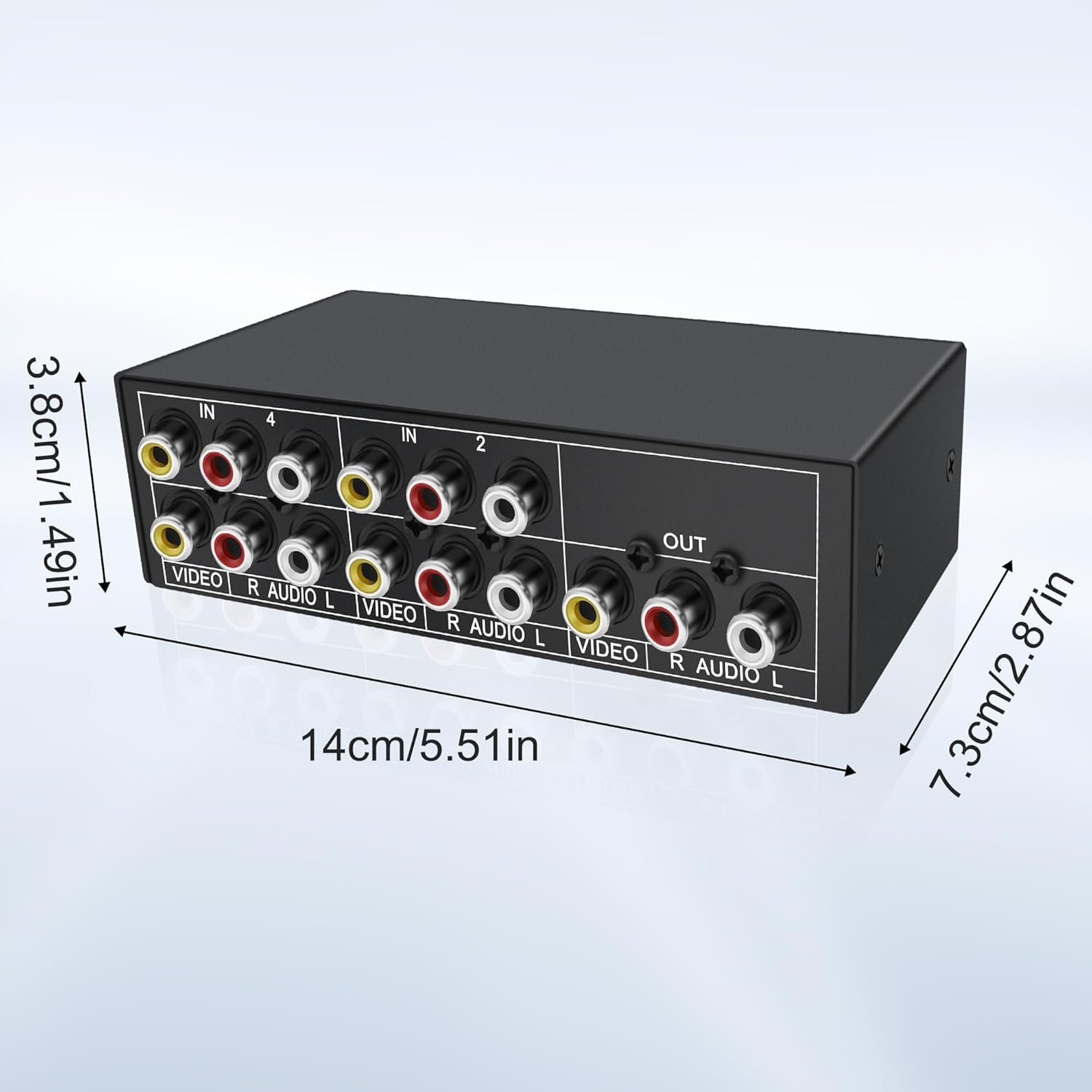
- Identifica els ports: Locate the "IN" ports (1-4) and the "OUT" port on the AV RCA Switch. Each port consists of three RCA jacks: yellow for video, white for left audio, and red for right audio.
- Connecteu els dispositius d'entrada: Connect your audio/video source devices (e.g., DVD player, PS2/PS3, camera) to the "IN" ports (1, 2, 3, or 4) on the switch using RCA cables. Ensure that the yellow, white, and red cables are connected to their corresponding colored jacks.
- Connect Output Device: Connect the "OUT" port of the AV RCA Switch to your display device (e.g., TV, monitor, projector) using another set of RCA cables. Match the yellow, white, and red cables to the corresponding input jacks on your display.
- Dispositius d'encesa: Ensure all connected devices (source devices and display) are powered on.


Instruccions de funcionament
- Seleccioneu l'entrada: Once all devices are connected and powered on, press the corresponding numbered button (1, 2, 3, or 4) on the front panel of the AV RCA Switch to select the desired input source.
- Verifica el senyal: Check your display device to ensure the audio and video signal from the selected source is being received correctly.
- Canvi de fonts: To switch to a different input source, simply press the button corresponding to that source on the switch. The switch operates mechanically, providing instant signal transfer.

Manteniment
- Neteja: Use a soft, dry cloth to clean the exterior of the switch. Avoid using liquid cleaners or solvents, as they may damage the finish or internal components.
- Emmagatzematge: Guardeu el dispositiu en un lloc fresc i sec, allunyat de la llum solar directa i de temperatures extremes quan no l'utilitzeu durant períodes prolongats.
- Gestió de cables: Ensure RCA cables are not excessively bent or strained to prevent damage to the cables and the switch's ports.
Resolució de problemes
| Problema | Causa possible | Solució |
|---|---|---|
| Sense sortida de vídeo ni àudio. |
|
|
| Poor video quality or distorted audio. |
|
|
| Input button not responding. |
|
|
Especificacions
| Característica | Detall |
|---|---|
| Model | AV RCA Switch 4-in-1 Out |
| Marca | XMSJSIY |
| Ports d'entrada | 4 x RCA (Video, Audio L/R) |
| Ports de sortida | 1 x RCA (Video, Audio L/R) |
| Tipus de connector | RCA |
| Color | Negre |
| Requisit d'energia | No external power required (Passive) |
| Dispositius compatibles | Camera, DVD Player, Gaming Console (PS2, PS3), Monitor, Television, VCR, DVR, STB |
| Dimensions (aprox.) | 14cm (L) x 7.3cm (W) x 3.8cm (H) / 5.51in (L) x 2.87in (W) x 1.49in (H) |
Garantia i Suport
For warranty information or technical support, please refer to the product packaging or contact XMSJSIY customer service directly. Contact details are typically available on the manufacturer's official weblloc web o a través del vostre distribuïdor.