
1. Introducció
Thank you for choosing the Mistral MTF1697DR 16-inch DC Table Fan. This manual provides essential information for the safe and efficient operation, maintenance, and troubleshooting of your new fan. Please read these instructions thoroughly before use and retain them for future reference.
2. Producte acabatview
The Mistral MTF1697DR is a 16-inch DC table fan designed for optimal air circulation. It features a durable construction and advanced functionalities for enhanced user comfort.
Característiques principals:
- 9 Speed Settings with 3 Mode Selection
- Energy-efficient BLDC Motor
- Up to 9 Hours Timer Function
- Subministrament d'aire fort
- Front & Rear Durable Plastic Fan Guard
- Operació de control remot
Components:
Familiarize yourself with the main components of your fan:
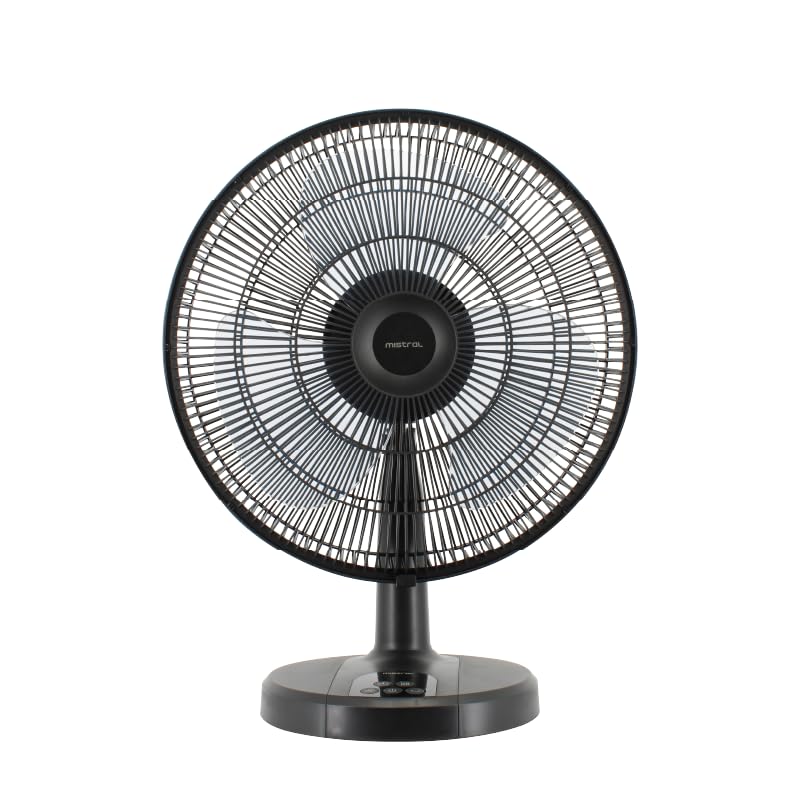
Figura 1: Frontal view of the Mistral MTF1697DR fan, showing the fan head, guard, stand, and base with control panel.

Figura 2: lateral view of the Mistral MTF1697DR fan, illustrating the fan head's tilt mechanism and the fan's profile.
3. Configuració
Follow these steps to set up your fan:
- Desembalatge: Traieu amb cura tots els materials d'embalatge. Assegureu-vos que tots els components siguin presents i no estiguin danyats.
- Muntatge: The fan typically comes partially assembled. If the fan guard or base requires attachment, follow the diagrams provided in the separate assembly guide (if applicable) or ensure the fan head is securely fastened to the stand and the stand to the base. Ensure the front and rear fan guards are properly aligned and secured.
- Col·locació: Place the fan on a stable, flat surface. Ensure there is adequate space around the fan for proper air circulation and to prevent obstruction of the air intake/outlet. Keep the fan away from curtains, drapes, or any objects that could be drawn into the fan blades.
- Connexió d'alimentació: Plug the power cord into a standard electrical outlet (220-240V ~ 50/60Hz).
4. Instruccions de funcionament
Your Mistral MTF1697DR fan can be operated using the control panel on the base or the included remote control.
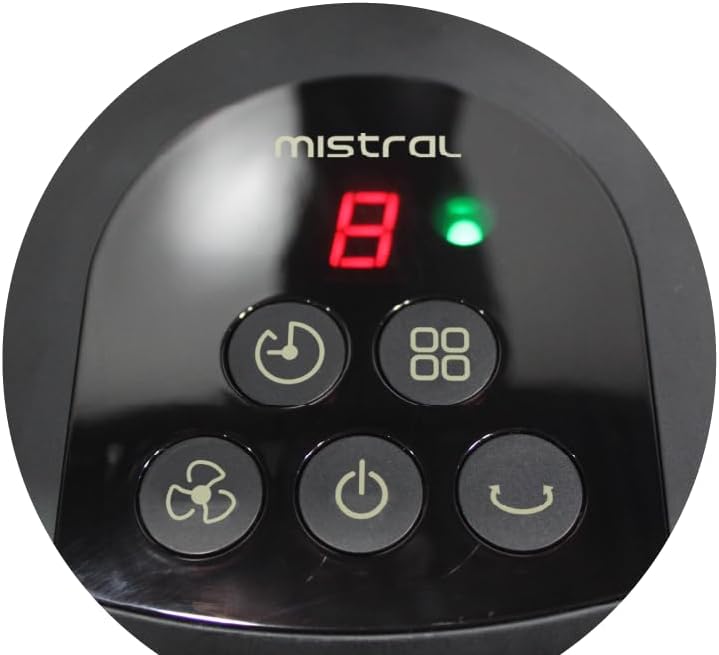
Figure 3: Close-up of the fan's control panel on the base, showing buttons for power, speed, mode, timer, and oscillation.
Funcions del tauler de control:
- Botó d'encendre (U): Premeu per encendre o apagar el ventilador.
- Botó de velocitat (Icona de ventilador): Press repeatedly to cycle through 9 speed settings. The current speed will be displayed on the LED screen.
- Botó de mode (Squares Icon): Press to select from 3 operating modes (e.g., Normal, Natural, Sleep). Each press changes the mode.
- Botó del temporitzador (Icona de rellotge): Press to set the fan to turn off automatically after a set period, up to 9 hours. Each press increases the timer duration.
- Botó d'oscil·lació (Curved Arrow Icon): Press to start or stop the fan's oscillation function, which sweeps the airflow from side to side.
Comandament a distància:
The remote control duplicates all functions available on the fan's control panel, allowing for convenient operation from a distance. Ensure the remote control has working batteries and is pointed towards the fan's receiver.
5. Manteniment
Regular cleaning and proper care will ensure the longevity and optimal performance of your fan.
Neteja:
- Desconnecta sempre el ventilador de la presa de corrent abans de netejar-la.
- Exterior: Netegeu les superfícies exteriors del ventilador amb un drap suau iamp drap. No utilitzeu netejadors abrasius, dissolvents ni productes químics agressius, ja que poden danyar l'acabat.
- Fan Guards and Blades: To clean the fan blades, you may need to carefully remove the front fan guard. Refer to the assembly instructions for guard removal. Use a soft cloth or a vacuum cleaner with a brush attachment to remove dust from the blades and guards. Ensure all parts are completely dry before reassembling and operating the fan.
- Do not immerse the fan in water or allow water to drip into the motor housing.
Emmagatzematge:
Quan no l'utilitzeu durant períodes prolongats, guardeu el ventilador en un lloc fresc i sec, preferiblement en el seu embalatge original, per protegir-lo de la pols i els danys.
6. Solució De Problemes
Si teniu problemes amb el ventilador, consulteu els següents problemes i solucions habituals:
- El ventilador no s'encén:
- Assegureu-vos que el cable d'alimentació estigui ben connectat a una presa de corrent que funcioni.
- Comproveu si s'ha premut el botó d'engegada.
- Verify that the household circuit breaker has not tripped.
- Flux d'aire feble o nul:
- Check for obstructions around the fan guards.
- Clean any dust or debris from the fan blades and guards (refer to Maintenance section).
- Augmenta la configuració de la velocitat del ventilador.
- El comandament a distància no funciona:
- Assegureu-vos que no hi hagi obstacles entre el comandament a distància i el receptor del ventilador.
- Substituïu les piles del comandament a distància.
- Assegureu-vos que esteu dins de l'abast efectiu del comandament a distància.
Si el problema persisteix després d'intentar aquestes solucions, poseu-vos en contacte amb l'atenció al client.
7. Especificacions
| Especificació | Detall |
|---|---|
| Model | MTF1697DR |
| Voltage | 220-240V ~ 50/60Hz |
| Wattage | 36 W |
| Volum d'aire | 3600 m³/h |
| Flux d'aire màxim | 4.73 m/s |
| Dimensions del producte (L*W*H) | 455 * 280 * 600 mm (45.5D x 28W x 60H cm) |
| Pes net | 2.6 KGS |
| Pes brut | 3.8 KGS |
| Marca de seguretat | 250177-11 |
| Color | Negre |
| Disseny de ventilador elèctric | Ventilador de taula |
| Font d'alimentació | Elèctric amb cable |
| Nombre de velocitats | 9 |
| Mètode de control | Remot |
| Tipus de motor | Brushless (BLDC) |
| Material | Plàstic |
| Components inclosos | Remot |
8. Garantia i Suport
Informació de la garantia:
This Mistral MTF1697DR fan comes with a 2 any de garantia on the product, and an extended 8 any de garantia specifically for the motor. Please retain your proof of purchase for warranty claims.
Atenció al client:
For technical assistance, warranty claims, or any questions not covered in this manual, please contact your retailer or the Mistral customer service department. Contact details can typically be found on the product packaging or the official Mistral weblloc.