
1. Introducció
This manual provides detailed instructions for the installation, operation, and maintenance of your WALI Quad Monitor Mount, model M004S-P. This mount is designed to support one ultrawide monitor (up to 49 inches) on the top bracket and three standard monitors (up to 27 inches) on the lower arm brackets. It features a robust design for enhanced stability and ergonomic adjustability.

Image 1.1: WALI Quad Monitor Mount M004S-P in a multi-monitor setup.
2. Característiques del producte
- Compatibilitat del monitor: Supports one ultrawide monitor up to 49 inches (max 44 lbs) on the top bracket and three standard monitors up to 27 inches (max 19.8 lbs each) on the lower brackets. Compatible with VESA 75x75mm and 100x100mm mounting patterns.
- Ajust flexible:
- Top bracket: +20° to -20° tilt, 180° swivel, 360° rotation.
- Side brackets: +45° to -45° tilt, 180° swivel, 360° rotation.
- Height adjustable along the central pole.
- Construcció duradora: Constructed from steel for strength, scratch resistance, and long-term stability.
- Fàcil instal·lació: Offers C-clamp mounting for desks 0.39" to 3.15" thick, and grommet mounting for desks 0.39" to 1.57" thick. All necessary tools and hardware are included.
- Gestió de cables: Integrated cable management system helps organize and conceal monitor cables for a tidy workspace.

Image 2.1: Monitor compatibility and VESA patterns.

Image 2.2: Adjustment ranges for tilt, swivel, and rotation.
3. Contingut del paquet
Si us plau, comproveu que hi hagi tots els components abans de començar la instal·lació:
- 1 x WALI Quad Monitor Desk Mount (Black)
- 1 x Mounting Hardware Kit (includes screws, spacers, and Allen keys)
- 1 x Manual d'usuari
4. Informació de seguretat
Read all instructions carefully before installation. If you do not understand these instructions or have doubts about the safety of the installation, please contact a qualified installer or customer support.
- Capacitat de pes: Do not exceed the maximum weight capacity of 44 lbs for the top bracket and 19.8 lbs per lower bracket. Exceeding this limit may result in serious injury or product damage.
- Mida del monitor: Ensure your monitors fit within the specified size ranges (up to 49" ultrawide for top, up to 27" for lower).
- Compatibilitat VESA: Confirm your monitors have VESA 75x75mm or 100x100mm mounting holes.
- Estabilitat de l'escriptori: Ensure your desk surface is stable and strong enough to support the combined weight of the mount and all attached monitors.
- Instal·lació correcta: Install the mount strictly according to the instructions provided. Improper installation can lead to equipment damage or personal injury.
- Parts mòbils: Be cautious of pinch points when adjusting the monitor arms.
5. Configuració i instal·lació
The WALI Quad Monitor Mount offers two installation options: C-clamp and Grommet mount. Choose the method suitable for your desk.
5.1 C-Clamp Instal·lació
This method is suitable for desks with a thickness between 0.39 inches and 3.15 inches.
- Enganxeu el C-clamp la base fins a la vora de l'escriptori. Assegureu-vos que el cleamp is securely tightened to prevent movement.
- Inseriu el pol principal al C-clamp base and secure it with the provided screws.
- Slide the monitor arm assemblies onto the main pole at your desired heights. Tighten the adjustment screws to hold them in place.
- Attach the VESA plates to the back of your monitors using the appropriate screws and spacers from the hardware kit.
- Slide the monitors (with VESA plates attached) onto the monitor arms. Secure them with the locking mechanisms.
5.2 Instal·lació del muntatge amb passador
This method is suitable for desks with a grommet hole and a thickness between 0.39 inches and 1.57 inches.
- If your desk has an existing grommet hole, remove the plastic cover.
- Place the grommet base plate over the hole.
- Insert the main pole through the grommet base plate and the desk hole.
- From underneath the desk, attach the grommet mounting plate and tighten the bolt to secure the pole firmly to the desk.
- Follow steps 3-5 from the C-clamp installation to attach the monitor arms and monitors.
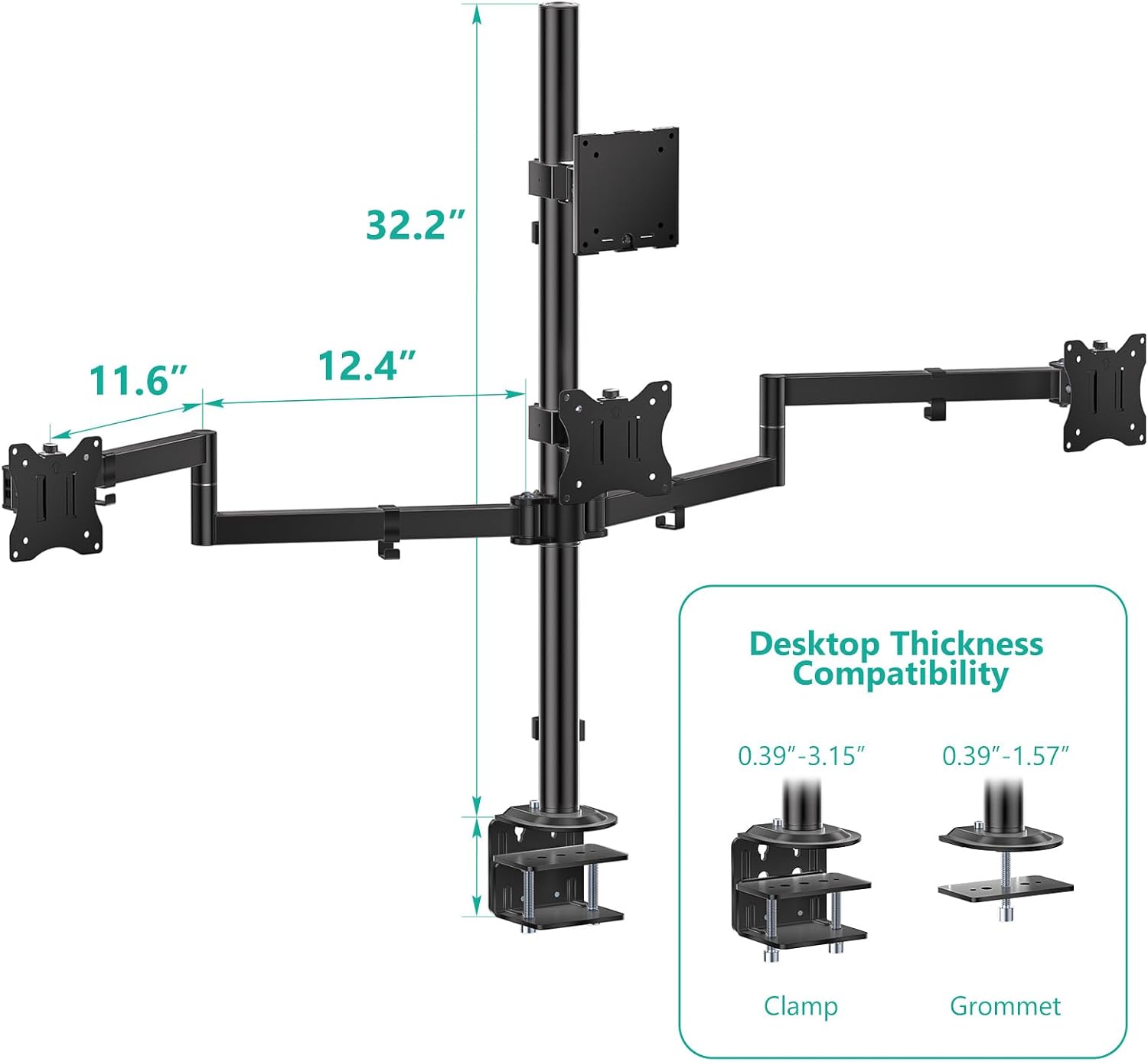
Image 5.1: C-clamp and Grommet mount installation details.

Imatge 5.2: Detallada view of mounting options.
5.3 Gestió de cables
Utilize the integrated cable clips along the main pole and monitor arms to route and organize your monitor cables. This helps maintain a clean and organized workspace.

Image 5.3: Cable management system.
6. Instruccions de funcionament
The WALI Quad Monitor Mount allows for various adjustments to achieve an optimal ergonomic viewexperiència.
- Ajust d'alçada: Loosen the collar on the main pole to slide the monitor arm assemblies up or down. Retighten the collar once the desired height is reached.
- Ajust d'inclinació: The top bracket can tilt +20° to -20°, and side brackets can tilt +45° to -45°. Use the provided Allen key to adjust the tilt tension if monitors are too loose or too stiff.
- Ajust de gir: All brackets offer 180° swivel. Gently rotate the monitor to the desired angle.
- Ajust de rotació: All brackets allow for full 360° rotation, enabling portrait or landscape orientation.
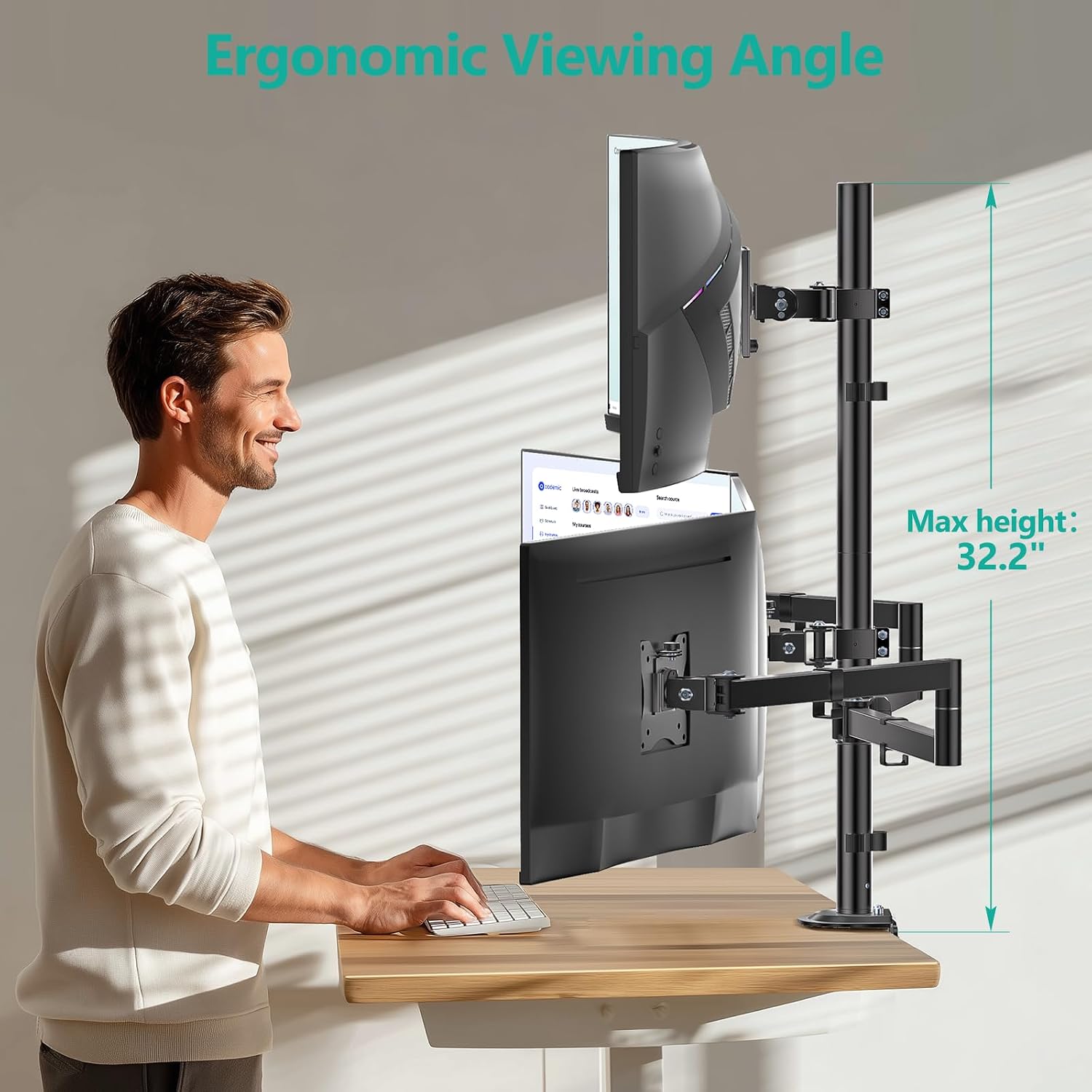
Image 6.1: Ergonomic height adjustment.

Image 6.2: Monitor mount used in sitting and standing positions.
7. Manteniment
Un manteniment regular garanteix la longevitat i el funcionament segur del suport del monitor.
- Neteja: Netegeu la muntura amb un drap suauamp drap. Eviteu productes de neteja o dissolvents abrasius.
- Inspecció periòdica: Reviseu periòdicament tots els cargols i connexions per assegurar-vos que romanen ajustats. Torneu a apretar-los si cal.
- Ajust de tensió: If monitors begin to sag or become difficult to adjust, use the provided Allen keys to adjust the tension screws on the tilt and swivel mechanisms.
8. Solució De Problemes
| Problema | Causa possible | Solució |
|---|---|---|
| Monitor sags or tilts downward. | Tilt mechanism tension is too loose. | Tighten the tilt adjustment screw on the back of the VESA plate using the appropriate Allen key. |
| Monitors are difficult to move or adjust. | Els cargols d'ajust estan massa ajustats. | Slightly loosen the tension screws on the relevant joints (tilt, swivel) until movement is smooth. |
| La muntura sembla inestable o trontolla. | C-clamp or grommet mount is not securely tightened; desk surface is not stable. | Assegureu-vos que el C-clamp or grommet bolt is fully tightened. Verify your desk is stable and can support the weight. |
| Monitors do not align perfectly. | Individual arm adjustments needed. | Utilize the tilt, swivel, and height adjustments on each arm to fine-tune monitor alignment. |
9. Especificacions
- Model: M004S-P
- Marca: WALI
- Tipus de muntatge: Suport de taula (C-cl)amp o Ullera)
- Material: Metall
- Color: Negre
- Dispositius compatibles: Monitors
- Maximum Supported Screen Size (Top Bracket): 49 inches (Ultrawide)
- Maximum Supported Screen Size (Lower Brackets): 27 inches (Standard)
- Minimum Supported Screen Size: 13 polzades
- Max Weight Capacity (Top Bracket): 44 lliures
- Max Weight Capacity (Lower Brackets): 19.8 lbs per arm
- Compatibilitat VESA: 75x75mm, 100x100mm
- Tipus de moviment: Tilt, Swivel, Rotate
- Tilt Angle (Top Bracket): +20° a -20°
- Tilt Angle (Side Brackets): +45° a -45°
- Angle de gir: 180°
- Rotació: 360°
- C-Clamp Gruix de l'escriptori: 0.39" a 3.15"
- Grommet Mount Desk Thickness: 0.39" a 1.57"
- UPC: 811278027374

Image 9.1: VESA compatibility and weight limits.
10. Garantia i Suport
Garantia: This WALI product is covered by a 1-Year Manufacturer Warranty.
Atenció al client: For any questions, assistance with installation, or troubleshooting, please contact WALI customer support. Experienced and friendly US-based customer support is available to assist 7 days a week. Refer to the product packaging or the official WALI weblloc per obtenir dades de contacte.