
1. Introducció
Thank you for choosing the PUTORSEN Triple Monitor Mount EMPT09-C036P-35B. This heavy-duty monitor mount is designed to provide a stable and adjustable solution for multi-screen workstations, supporting up to three monitors, each up to 35 inches in size and weighing up to 12 kg (26.4 lbs). It features fully articulating gas spring arms for precise positioning and includes options for both desk clamp i muntatge de grommet.
2. Informació de seguretat
- Llegiu atentament totes les instruccions: Ensure you understand all assembly and installation steps before proceeding.
- Capacitat de pes: Do not exceed the maximum weight capacity of 12 kg (26.4 lbs) per arm. Exceeding this limit may result in instability and potential damage.
- Mida del monitor: This mount is designed for monitors between 17 and 35 inches.
- Gruix de l'escriptori: Ensure your desk meets the required thickness for the chosen mounting method (Clamp: 10-45mm; Grommet: 10-40mm).
- Compatibilitat VESA: Verify your monitors have VESA mounting patterns of 75x75mm or 100x100mm.
- Muntatge: Munteu el producte sobre una superfície suau i neta per evitar ratllades.
- Ajust de la molla de gas: Adjust the gas spring tension only after the monitor is mounted to prevent the arm from springing up or down unexpectedly.
- Nens: Mantingueu les peces petites allunyades dels nens.
3. Contingut del paquet
Please verify that all components are present before beginning assembly. Refer to the parts list in your physical manual for detailed identification.

Figura 3.1: All components included in the package. This diagram illustrates the various parts such as the main pole, gas spring arms, VESA plates, desk clamp, grommet base, and hardware.
4. Especificacions
| Marca | PUTORS |
| Número de model | EMPT09-C036P-35B |
| Tipus de muntatge | Suport de taula (Cl)amp o Ullera) |
| Tipus de moviment | Articulating, Swivel, Tilt, Rotation |
| Material | Acrilonitril butadiè estirè (ABS), acer d'aliatge |
| Color | Negre |
| Minimum Supported Screen Size | 17 polzades |
| Maximum Supported Screen Size | 35 polzades (cadascun) |
| Capacitat de pes | 12 kg (26.4 lbs) per arm |
| Compatibilitat VESA | 75x75mm, 100x100mm |
| Escriptori Clamp Gruix | 0.39"-1.77" (10mm-45mm) |
| Gruix del muntatge del grommet | 0.39"-1.57" (10mm-40mm) |
| Diàmetre del forat del grommet | 0.39"-2.36" (10mm-60mm) |
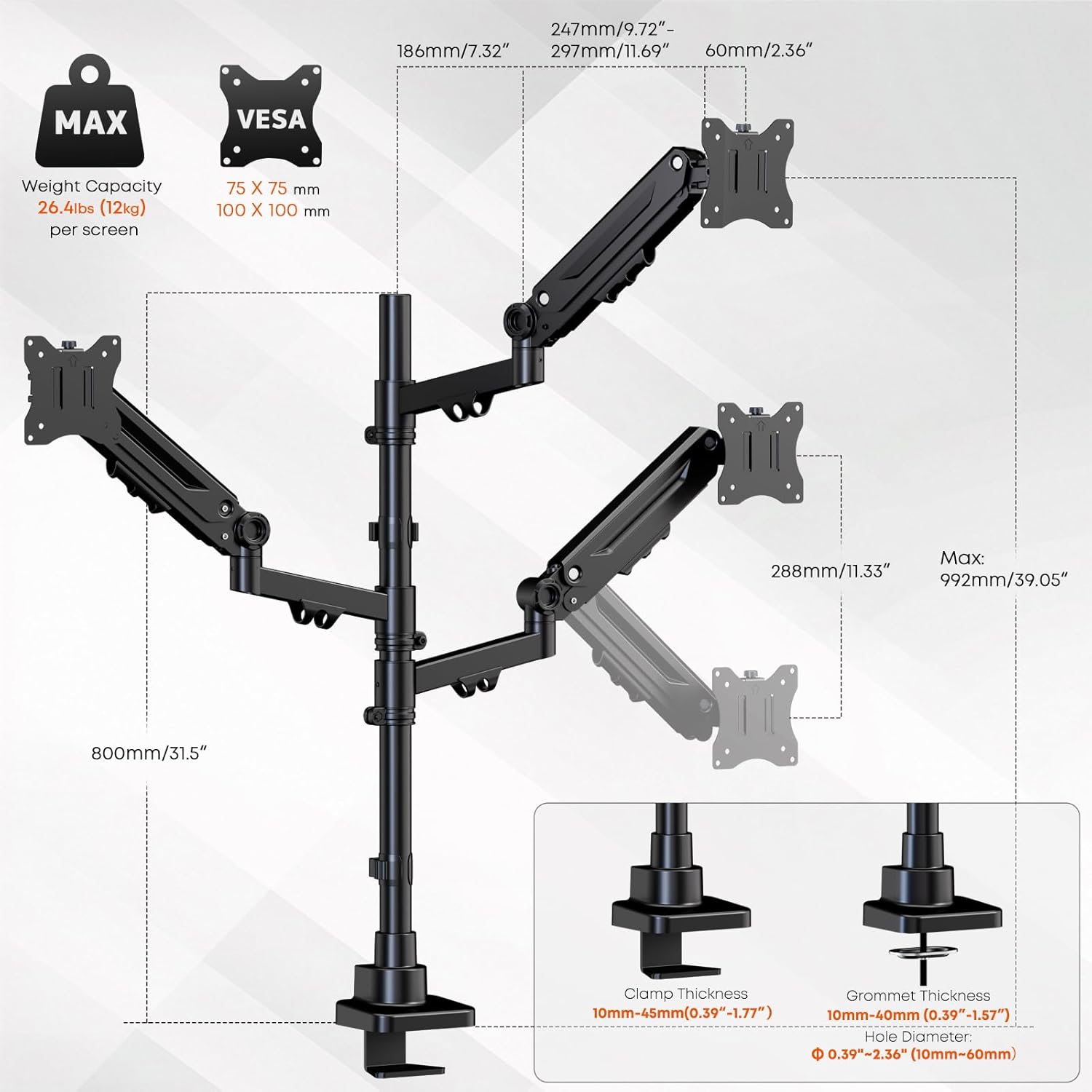
Figura 4.1: Detailed specifications and dimensions of the monitor mount, including VESA patterns, weight capacity, and desk compatibility for clamp i muntatge de grommet.
5. Configuració i instal·lació
Follow these steps to properly install your PUTORSEN Triple Monitor Mount.
5.1 Trieu el vostre mètode de muntatge
The mount supports two installation methods: C-clamp or grommet mount. Select the method suitable for your desk.
- C-Clamp Instal·lació: Enganxeu el C-clamp to the edge of your desk. Ensure the desk thickness is between 10mm and 45mm. Tighten the clamp de manera segura per evitar moviments.
- Instal·lació de l'oxell: If your desk has a grommet hole (10mm-60mm diameter) and a thickness between 10mm and 40mm, use the grommet base. Secure the base through the hole using the provided hardware.
5.2 Assemble the Pole and Arms
- Attach the main pole to your chosen desk base (C-clamp o ojal).
- Slide the gas spring arms onto the main pole. The arms can be positioned at desired heights. Secure them using the provided collars and screws.
5.3 Attach Monitors
- Attach the VESA plates to the back of each monitor using the appropriate screws (M4x12, M4x30, M5x12, M5x30). Ensure the screws are tightened securely but do not overtighten.
- Carefully slide the monitors (with VESA plates attached) onto the gas spring arms. Ensure they click into place or are secured with the locking mechanism.

Figura 5.1: The triple monitor mount with monitors installed, demonstrating the gas spring arms and support for up to 35-inch screens.
6. Funcionament i ajustos
The PUTORSEN Triple Monitor Mount offers extensive adjustability for optimal viewcomoditat.
6.1 Ajust de la tensió de la molla de gas
After mounting your monitors, you may need to adjust the gas spring tension to ensure the arms hold the monitors in place without sagging or floating. Use the included Allen key to turn the adjustment screw on each arm:
- Gira sentit horari (-) per disminuir la tensió en monitors més lleugers.
- Gira en sentit antihorari (+) to increase tension for heavier monitors.
Adjust gradually until the monitor stays at the desired height when released.
6.2 Posicionament del monitor
Each arm allows for independent adjustment:
- Ajust d'alçada: Move the arms up or down along the main pole, or use the gas spring mechanism for vertical movement.
- Inclinació: Adjust the monitor screen vertically by tilting it up or down (±35°).
- Girar: Rotate the monitor horizontally left or right (±90°).
- Rotació: Gireu el monitor 360° per a l'orientació vertical o horitzontal.

Figura 6.1: Demonstrating the full range of motion including tilt, swivel, and 360-degree rotation for optimal monitor positioning.
6.3 Gestió de cables
Utilize the integrated cable management clips along the arms and pole to route and organize your monitor cables. This helps maintain a clean and clutter-free workspace.

Figura 6.2: Integrated cable management system for a tidy setup.
7. Manteniment
Un manteniment regular garanteix la longevitat i el funcionament segur del suport del monitor.
- Neteja: Netegeu la muntura amb un drap suauamp drap. Eviteu productes de neteja o dissolvents abrasius.
- Inspecció periòdica: Reviseu periòdicament tots els cargols i connexions per assegurar-vos que romanen ajustats. Torneu a apretar-los si cal.
- Gas Spring Check: If monitors begin to sag or drift over time, re-adjust the gas spring tension as described in Section 6.1.
8. Solució De Problemes
If you encounter issues with your monitor mount, refer to the following common problems and solutions:
| Problema | Causa possible | Solució |
|---|---|---|
| El monitor baixa o baixa | La tensió de la molla de gas és massa baixa per al pes del monitor. | Increase gas spring tension by turning the adjustment screw counter-clockwise (+). |
| El monitor sura cap amunt o és difícil de prémer cap avall | La tensió de la molla de gas és massa alta per al pes del monitor. | Decrease gas spring tension by turning the adjustment screw clockwise (-). |
| Mount feels unstable or wobbles | Escriptori clamp o la base de l'unell no està ben ajustada. | Assegureu-vos que l'escriptori clamp or grommet base is fully tightened to the desk. Check all arm connections. |
| Monitors are not level | Minor variations in arm height or VESA plate alignment. | Adjust individual monitor tilt and rotation. Ensure arms are at the same height on the pole. |
| Cables do not fit into management clips | Massa cables o els cables són massa gruixuts. | Reduce the number of cables or use thinner cables if possible. Use external cable ties if clips are insufficient. |
9. Garantia i Suport
9.1 Informació de la garantia
This PUTORSEN Triple Monitor Mount is covered by a 10 any de garantia from the date of purchase. This warranty covers manufacturing defects and material flaws under normal use. It does not cover damage caused by improper installation, misuse, accidents, or unauthorized modifications.
9.2 Atenció al client
For technical assistance, warranty claims, or any questions regarding your PUTORSEN product, please contact our customer support team. Refer to the contact information provided in your product packaging or visit the official PUTORSEN weblloc per obtenir detalls de suport.
Recursos en línia: For additional information, FAQs, and video tutorials, please visit the PUTORSEN Store on Amazon.
