
1. Introducció
Gràcies per la compraasing the Audio Array SB-01 Bluetooth Soundbar. This manual provides essential information for setting up, operating, and maintaining your device. Please read it thoroughly before use to ensure proper functionality and to maximize your audio experience.
2. Contingut del paquet
Verifiqueu que tots els elements que s'enumeren a continuació s'inclouen al vostre paquet:
- Audio Array SB-01 Sound Bar
- Cable de càrrega
- Manual d'usuari
3. Producte acabatview
The Audio Array SB-01 is a versatile Bluetooth soundbar designed to enhance your audio experience across various devices. It features multiple connectivity options, dynamic RGB lighting, and a portable design.

Imatge: Més deview of the Audio Array SB-01 Soundbar, highlighting its LED lights synced with music, wide connectivity options, stylish portable design, and full-range drivers for immersive sound.
Característiques principals:
- 25W RMS Stereo Sound: Ofereix un àudio potent i clar.
- 2.0 Channel Setup: Provides an enhanced audio experience.
- Dual Open Radiators: Produces clear surround sound and heightened bass.
- 8 hores de reproducció: Equipped with a 2000mAh battery for extended use (at 60% volume).
- Connectivitat múltiple: Supports Bluetooth, AUX, FM, and TF Card.
- Ergonomic & Portable Design: Easy to carry and suitable for various settings.
- Max Loudness 90dB: Ensures crystal clear clarity at high volumes.
- Llums RGB dinàmiques: LED lights sync with music for visual enhancement.
- Micròfon integrat: Enables hands-free calls.
- Funció TWS: Allows pairing with another SB-01 for True Wireless Stereo sound.

Image: Detailed diagram of the Audio Array SB-01 Soundbar's control buttons (Play Backward, Play/Pause, Play Forward, Mute) and connection ports (Power On/Off, AUX, TF Card, USB, Type-C charging).
4. Configuració
4.1 Càrrega de la barra de so
Before initial use, fully charge the soundbar using the provided Type-C charging cable. Connect the cable to the Type-C port on the soundbar and a compatible USB power adapter (not included).

Image: The Audio Array SB-01 Soundbar displaying its dimensions (36cm length, 9cm depth, 8cm height) and illustrating the Type-C charging cable connection.
4.2 Engegada/apagada
- To power on, long press the Power On/Off button located on the back panel.
- To power off, long press the Power On/Off button again.
5. Instruccions de funcionament
5.1 Selecció del mode
Single tap the 'M' button on the control panel to cycle through available modes: Bluetooth, AUX, USB, TF Card, and FM Radio.
5.2 Mode Bluetooth
The soundbar will automatically enter Bluetooth pairing mode when powered on or when Bluetooth mode is selected. The LED lights will indicate pairing status.
- Ensure the soundbar is in Bluetooth mode.
- Al dispositiu (telèfon intel·ligent, tauleta, ordinador portàtil), activeu el Bluetooth i cerqueu els dispositius disponibles.
- Select "Audio Array" from the list of devices.
- Once connected, the soundbar will indicate successful pairing, and you can begin playing audio.
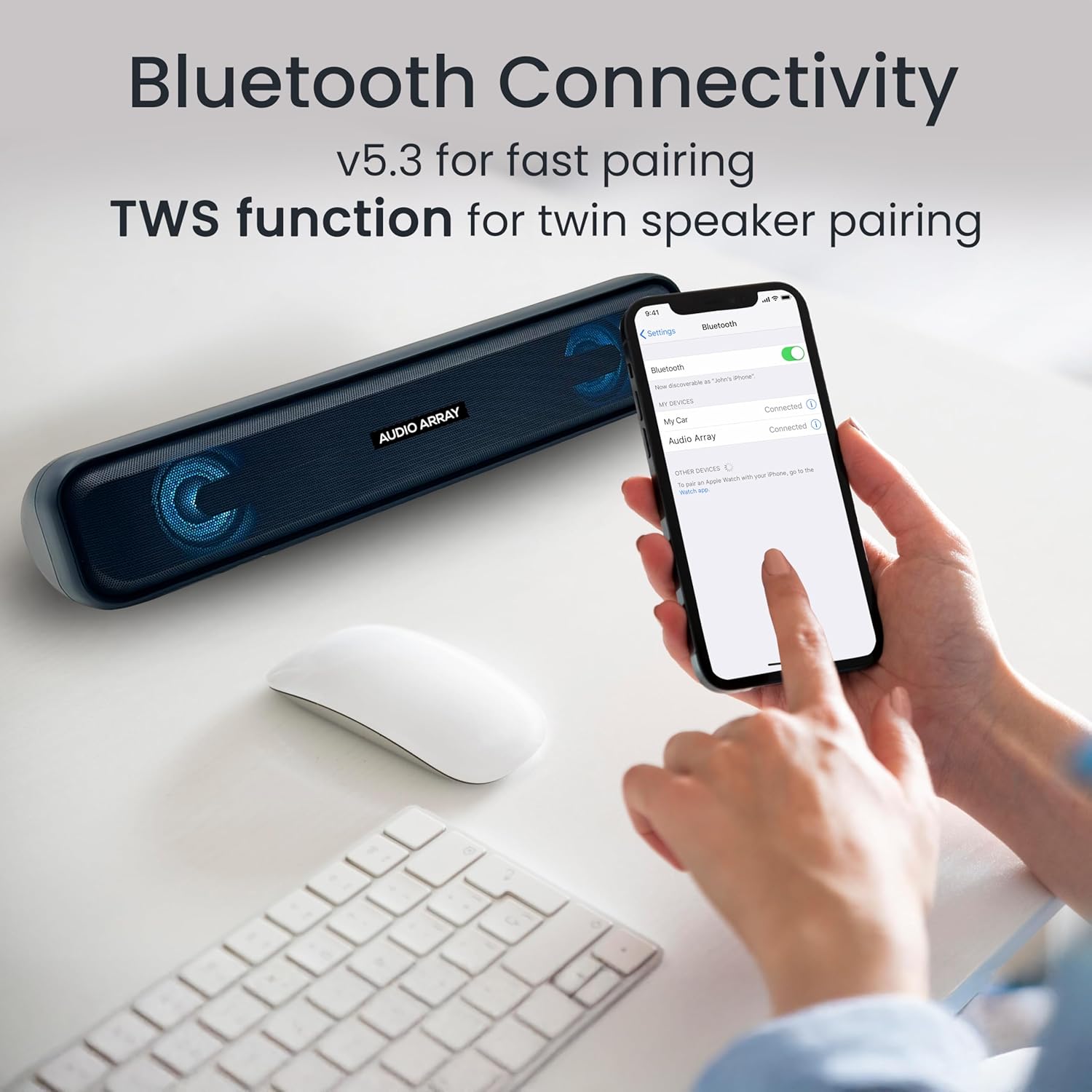
Image: A smartphone screen displaying the successful Bluetooth connection to the "Audio Array" soundbar, illustrating the pairing process.
Funció 5.3 TWS (True Wireless Stereo)
To achieve a wider stereo sound, you can pair two Audio Array SB-01 soundbars together.
- Ensure both SB-01 soundbars are powered on and in Bluetooth mode.
- On one soundbar, long press the Play/Pause button until you hear a pairing tone.
- The two soundbars will automatically connect to each other.
- Once paired, connect your device to one of the soundbars via Bluetooth as described in section 5.2. Audio will now play through both soundbars in stereo.

Image: Two Audio Array SB-01 soundbars connected wirelessly, demonstrating the TWS (True Wireless Stereo) feature for enhanced audio output.
5.4 Mode AUX
Connect an external audio device using a 3.5mm AUX cable (not included).
- Connect one end of the 3.5mm AUX cable to the AUX port on the soundbar.
- Connecteu l'altre extrem a la presa de sortida d'àudio del vostre dispositiu.
- Select AUX mode on the soundbar by single tapping the 'M' button.
Reproducció USB 5.5
Inseriu una unitat flash USB que contingui àudio files al port USB. La barra de so canviarà automàticament al mode USB i començarà la reproducció.
Reproducció de targetes TF 5.6
Insert a TF (MicroSD) card containing audio files into the TF Card slot. The soundbar will automatically switch to TF Card mode and begin playback.
5.7 Mode de ràdio FM
To use the FM radio function, follow these steps:
- Connect an AUX cable to the soundbar before turning on FM Radio mode. This cable acts as an antenna to improve radio frequency reception.
- Single tap the 'M' button to select FM Mode.
- Long press the Play & Pause button to initiate an automatic scan for FM radio channels.
- Once scanning is complete, single tap the Play & Pause button to select a scanned radio channel.
- Use the Previous or Next buttons to navigate between channels.

Image: A detailed guide on connecting and operating the FM Radio feature of the Audio Array SB-01 Soundbar, showing button functions and the need for an AUX cable as an antenna.
5.8 Controls
- Reproduir/pausa: Single tap the Play/Pause button to play or pause audio.
- Pujar el volum: Long press the Play Forward button to increase volume.
- Baixar el volum: Long press the Play Backward button to decrease volume.
- Pista/canal següent: Single tap the Play Forward button.
- Pista/canal anterior: Single tap the Play Backward button.
- Silenciar: Single tap the Mute button.
5.9 Trucades de mans lliures
When connected via Bluetooth to a smartphone, the built-in microphone allows for hands-free calling.
- Respon a la trucada: Single tap the Play/Pause button.
- Finalitzar la trucada: Single tap the Play/Pause button during a call.
- Rebutja la trucada: Premeu llargament el botó Reproduir/Pausa.

Image: A woman using the Audio Array SB-01 Soundbar for hands-free communication, highlighting the functionality of its built-in microphone for clear conversations.
6. Manteniment
- Netegeu la barra de so amb un drap suau i sec. No utilitzeu productes de neteja abrasius ni dissolvents.
- Eviteu exposar el dispositiu a temperatures extremes, llum solar directa o humitat elevada.
- Do not disassemble the soundbar. This will void the warranty.
- Keep the device away from water and other liquids. The soundbar is moisture resistant, but not waterproof.
7. Solució De Problemes
| Problema | Causa possible | Solució |
|---|---|---|
| Sense poder | La bateria està esgotada; el cable d'alimentació no està connectat. | Charge the soundbar; Ensure power cable is securely connected. |
| Sense so | Volum massa baix; Mode incorrecte seleccionat; Dispositiu no connectat. | Increase volume; Select correct input mode (Bluetooth, AUX, etc.); Reconnect device. |
| S'ha produït un error en l'aparellament de Bluetooth | La barra de so no està en mode d'emparellament; Dispositiu massa lluny; Interferències. | Ensure soundbar is in Bluetooth pairing mode; Move device closer; Turn off other Bluetooth devices. |
| La recepció de ràdio FM és deficient | No AUX cable connected; Weak signal. | Connect an AUX cable to act as an antenna; Try repositioning the soundbar. |
8. Especificacions
| Característica | Detall |
|---|---|
| Marca | Audio Array |
| Número de model | SB-01 |
| Potència de sortida màxima dels altaveus | 25 watts |
| Resposta de freqüència | 20000 Hz |
| Tecnologia de connectivitat | Bluetooth |
| Mode de sortida d'àudio | estèreo |
| Tipus de muntatge | Muntatge de prestatge |
| Material de tancament | Acrilonitril butadiè estirè (ABS), metall |
| Tipus d'altaveu | Barra de so |
| Característiques del producte | Built In Microphone, LED Light, Portable, USB Port |
| Color | Blau |
| Interval màxim | 10 metres |
| Mètode de control | Toca |
| Nivell de resistència a l'aigua | Resistent a la humitat |
| Interval Bluetooth | 10 metres |
| Nombre de canals d'àudio | 2.0 |
| Protocol de connectivitat | AUX, Bluetooth, USB |
| Tipus de controlador d'àudio | Conductor dinàmic |
| Dimensions de l'article P x W x H | 9P x 36A x 8H centímetres |
| Pes de l'article | 700 grams |
| Dispositius compatibles | Ordinador de sobretaula, portàtil, telèfon intel·ligent, tauleta, televisió |
9. Garantia i Suport
9.1 Informació de la garantia
The Audio Array SB-01 Bluetooth Soundbar comes with a 1 any de garantia del fabricant from the date of purchase. Please retain your proof of purchase for warranty claims. The warranty covers manufacturing defects and does not cover damage caused by misuse, accidents, or unauthorized modifications.
9.2 Atenció al client
For any support, feedback, or warranty-related inquiries, please contact Audio Array customer service:
- Correu electrònic: support@audioarray.in
- Telèfon: +91 93721 46440
- Fabricant: Cambium Retail Pvt Ltd
- Adreça: 109, Hubtown Solaris, N S, B 203, Professor NS Phadke Rd, Andheri East, Mumbai, Maharashtra 400069, India