
1. Introducció
The Qubo NEONW-BK 4G mobile phone is specifically designed for seniors, prioritizing simplicity, functionality, and safety. Its flip design protects the screen and prevents accidental calls. Key features include a clear menu, large buttons, FM radio, a basic camera, and an essential SOS button for emergencies. This manual will guide you through the phone's features and operations to ensure a comfortable and easy user experience.
2. Producte acabatview
2.1. Contingut del paquet
- Qubo NEONW-BK 4G Mobile Phone
- Bateria
- Cable de càrrega USB-C
- Adaptador d'alimentació
- Manual d'usuari (aquest document)
2.2. Phone Components
The Qubo NEONW-BK 4G features a classic flip design with an external display for notifications and an internal main screen. It includes large, easy-to-press buttons for dialing and navigation, a dedicated SOS button, and a camera.
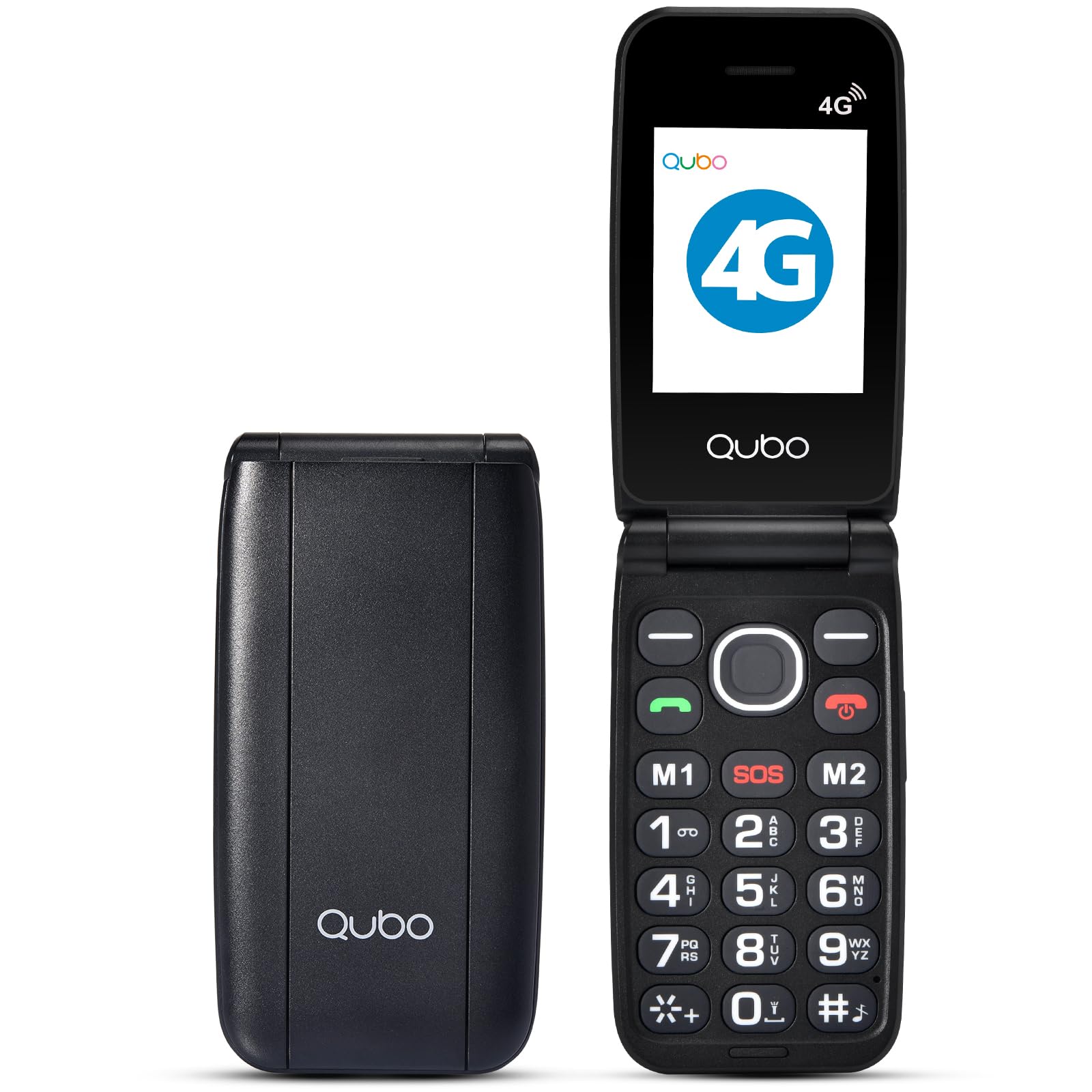
The image above shows the Qubo NEONW-BK 4G mobile phone in its open, ready-to-use state, highlighting its large keypad and clear display, designed for user convenience.
2.3. Accessories Overview
This video demonstrates the various accessories included with the phone, such as the charging cable and power adapter, ensuring you have everything needed for initial setup and daily use.
3. Configuració
3.1. Instal·lació de la bateria
- Traieu suaument la tapa posterior del telèfon.
- Alineeu els contactes de la bateria amb els terminals del telèfon.
- Premeu la bateria fermament fins que encaixi al seu lloc.
- Torneu a col·locar la tapa posterior.
3.2. Instal·lació de la targeta SIM i la targeta de memòria
The Qubo NEONW-BK 4G supports Dual SIM (Standard SIM size) and a T-Flash memory card up to 32MB.
- With the back cover and battery removed, locate the SIM card slots (SIM1, SIM2) and the memory card slot.
- Carefully insert your Standard SIM card(s) into the designated slots, ensuring the gold contacts face downwards and the cut corner aligns correctly.
- Insert the T-Flash memory card into its slot until it is securely in place.
- Torneu a instal·lar la bateria i la coberta posterior.
This video provides a visual guide on how to quickly and correctly install the SIM card(s) into your Qubo NEONW-BK 4G phone.
3.3. Carregant el telèfon
Before first use, fully charge the phone's battery. Use the provided USB-C cable and power adapter.
- Connect the USB-C cable to the charging port on the phone.
- Connecteu l'adaptador de corrent a una presa de corrent.
- L'indicador de càrrega a la pantalla mostrarà l'estat de càrrega.
- Un cop carregada completament (aproximadament 3 hores), desconnecteu el carregador.
3.4. Encendre/apagar
- To power on: Press and hold the Power/End Call button (red button) until the screen lights up.
- To power off: Press and hold the Power/End Call button until the power-off options appear, then select 'Power off'.
4. Instruccions de funcionament
4.1. Fer i rebre trucades
- Fer una trucada: Open the flip, dial the number using the large keypad, and press the Call button (green button).
- Recepció d'una trucada: Open the flip to answer, or press the Call button. Close the flip or press the End Call button (red button) to end a call.
- Direct Memory Keys (M1, M2, M3): Press and hold M1, M2, or M3 to quickly dial pre-set contacts.
4.2. Missatgeria
To send or read text messages, navigate to the 'Messages' menu using the navigation keys and the 'OK' button.
4.3. Funció SOS
The dedicated SOS button is located on the back of the phone for emergencies. When activated, it automatically calls pre-configured emergency contacts.
- Setting up SOS Contacts: Access the 'SOS Settings' in the phone's menu to add up to 5 emergency numbers.
- Using the SOS Button: In an emergency, press and hold the SOS button for a few seconds. The phone will automatically call the pre-set contacts in sequence until one answers.
4.4. Ràdio FM
The phone includes an FM radio. Navigate to the 'FM Radio' option in the menu to listen to your favorite stations without needing an internet connection.
4.5. Càmera
The 0.3 MP camera allows you to capture simple photos. Access the 'Camera' option from the main menu to take pictures.
This video highlights various features of a senior-friendly mobile phone, including its ease of use, large buttons, and practical functionalities.
5. Manteniment
- Mantingueu el telèfon sec. La humitat pot danyar els circuits electrònics.
- Do not use or store the phone in dusty, dirty areas.
- Do not store the phone in hot or cold temperatures.
- Do not drop, knock, or shake the phone. Rough handling can break internal circuit boards.
- Clean the phone with a soft, damp drap. No utilitzeu productes químics agressius ni dissolvents de neteja.
- Only use original or approved accessories.
6. Solució De Problemes
6.1. Phone Does Not Turn On
- Comproveu si la bateria està instal·lada correctament.
- Assegureu-vos que la bateria estigui carregada. Connecteu el carregador i torneu-ho a provar.
6.2. Cannot Make/Receive Calls
- Comproveu si la targeta SIM està correctament inserida i activada.
- Ensure you have network signal.
- Verify that the phone is not in airplane mode.
6.3. Poca qualitat del so
- Adjust the call volume using the side buttons.
- Ensure the speaker and microphone are not obstructed.
- Traslladeu-vos a una zona amb millor cobertura de xarxa.
6.4. La bateria es descarrega ràpidament
- Redueix la brillantor de la pantalla.
- Tanca les aplicacions que no fas servir.
- Limit background data usage.
- Si el problema persisteix, és possible que la bateria hagi de ser substituïda.
7. Especificacions
| Característica | Especificació |
|---|---|
| Número de model | NEONWBK 4G |
| Mostra | TFT LCD 2.4" QVGA |
| Chipset | SCT107 |
| CPU | ARM7, 260 MHz |
| Memòria (RAM + ROM) | 48 MB de RAM + 128 MB de ROM |
| Bluetooth | 5.0 |
| Capacitat de la bateria | 800 mAh (Ions de liti) |
| Connectivitat | 2G GSM 850/900/1800/1900 (GSM/GPRS), 4G B1/3/7/8/20 |
| Càmera | 0.3 MP |
| Ràdio | FM |
| Tipus de SIM | Dual SIM (Standard) |
| Suport per a targetes de memòria | T-Flash up to 32MB |
| Durada en espera | 100 hours (Dual SIM), 140 hours (Single SIM) |
| Temps de conversa | 3.5 hores |
| Funcions | Calendar, Calculator, Multimedia Player (audio/video), Video Recorder, SOS Button |
| Connexions | USB-C, connector de 3.5 mm |
| Dimensions | 10.5 x 5.3 x 1.7 cm |
| Pes | 200 g |
8. Garantia i Suport
For warranty information, please refer to the warranty card included in your product packaging or contact your retailer. For technical support or further assistance, please reach out to Qubo customer service through their official weblloc web o les dades de contacte proporcionades amb la compra.