
1. Introducció
The UNIWA Electronic Air Bear Horn is designed as a safety device for outdoor enthusiasts. It produces a loud sound to deter wild animals, such as bears, and can also serve as an emergency signal. This manual provides essential information for the proper setup, operation, and maintenance of your device.

Image: A person using the electronic bear horn to deter a bear in a natural environment.
2. Informació de seguretat
- Protecció auditiva: The horn emits a sound of 120dB ± 5. Do not activate the horn close to your ears or the ears of others per evitar danys auditius.
- Seguretat ocular: The device includes an LED light. Do not shine the LED light directly into eyes to avoid temporary vision impairment.
- Ús previst: This device is a deterrent and an emergency signal. It is not a substitute for proper outdoor safety practices, awareness, or other protective measures when encountering wildlife.
- Nens: Mantenir fora de l'abast dels nens.
- Exposició a l'aigua: Avoid submerging the device in water. While designed for outdoor use, it is not fully waterproof.
3. Producte acabatview
Components:
- Electronic Air Bear Horn Unit
- Lanyard with Retractable Hook and Compass
- USB-C Charging Cable (not explicitly listed in 'whats_in_the_box' but implied by 'USB charging port' and 'Type-C' label on images)
Característiques principals:
- Alarma forta: Emits a sound of 120dB ± 5, audible up to 0.5 miles (805 meters).
- Múltiples tons: Three adjustable sound modes (125dB±5, 110dB±5, 95dB±5, 80dB±5).
- Bateria recarregable: Built-in 2000mAh Lithium battery, providing up to 4 hours of continuous sound.
- Il·luminació LED: Integrated flashlight for illumination in dark environments.
- Brúixola integrada: For basic directional guidance.
- Retractable Lanyard: For secure and quick access.
- Disseny compacte: Lleuger i fàcil de transportar.

Imatge: Més deview of the Electronic Air Bear Horn's features.
4. Configuració
4.1 Càrrega inicial
- Locate the USB-C charging port on the side of the device.
- Connect the provided USB-C cable to the device and a compatible USB power source (e.g., wall adapter, power bank, computer USB port).
- The charging indicator light will illuminate. Charge the device fully before first use. Charging time is typically under 1 hour.
- Un cop estigui completament carregat, desconnecteu el cable.
4.2 Fixació del cordó
- Thread the small loop of the lanyard through the eyelet at the end of the horn unit.
- Pass the larger end of the lanyard (with the retractable hook and compass) through the small loop and pull tight to secure.
- Attach the retractable hook to your backpack, belt loop, or other gear for quick access.

Image: The electronic bear horn with its retractable hook and compass.
5. Instruccions de funcionament
5.1 Activating the Horn
- Hold the horn firmly, pointing it away from yourself and others.
- Premeu el gran Botó d'un sol toc to activate the loud alarm. Release the button to stop the sound.
5.2 Adjusting Sound Modes
- The device features a slider switch labeled TONE3, TONE2, TONE1, OFF.
- Slide the switch to select the desired sound mode:
- TONE3: 125dB ± 5 (Loudest)
- TONE2: 110 dB ± 5
- TONE1: 95 dB ± 5
- DESACTIVAT: 80dB ± 5 (Lowest, or off depending on model interpretation)
- The sound level will correspond to the selected mode when the One Touch Button is pressed.

Image: Controls for activating the horn and adjusting sound modes.
5.3 Ús de la llum LED
- Locate the small button on the side of the horn, typically near the USB-C port.
- Press this button to turn the LED light on. Press again to turn it off.

Image: The electronic bear horn's integrated LED light in use.
5.4 Using the Compass
- The compass is integrated into the retractable lanyard attachment.
- Hold the compass level and allow the needle to settle to indicate magnetic north.
- Nota: The integrated compass is intended for basic directional reference. For precise navigation, always rely on a dedicated, high-quality compass or GPS device.
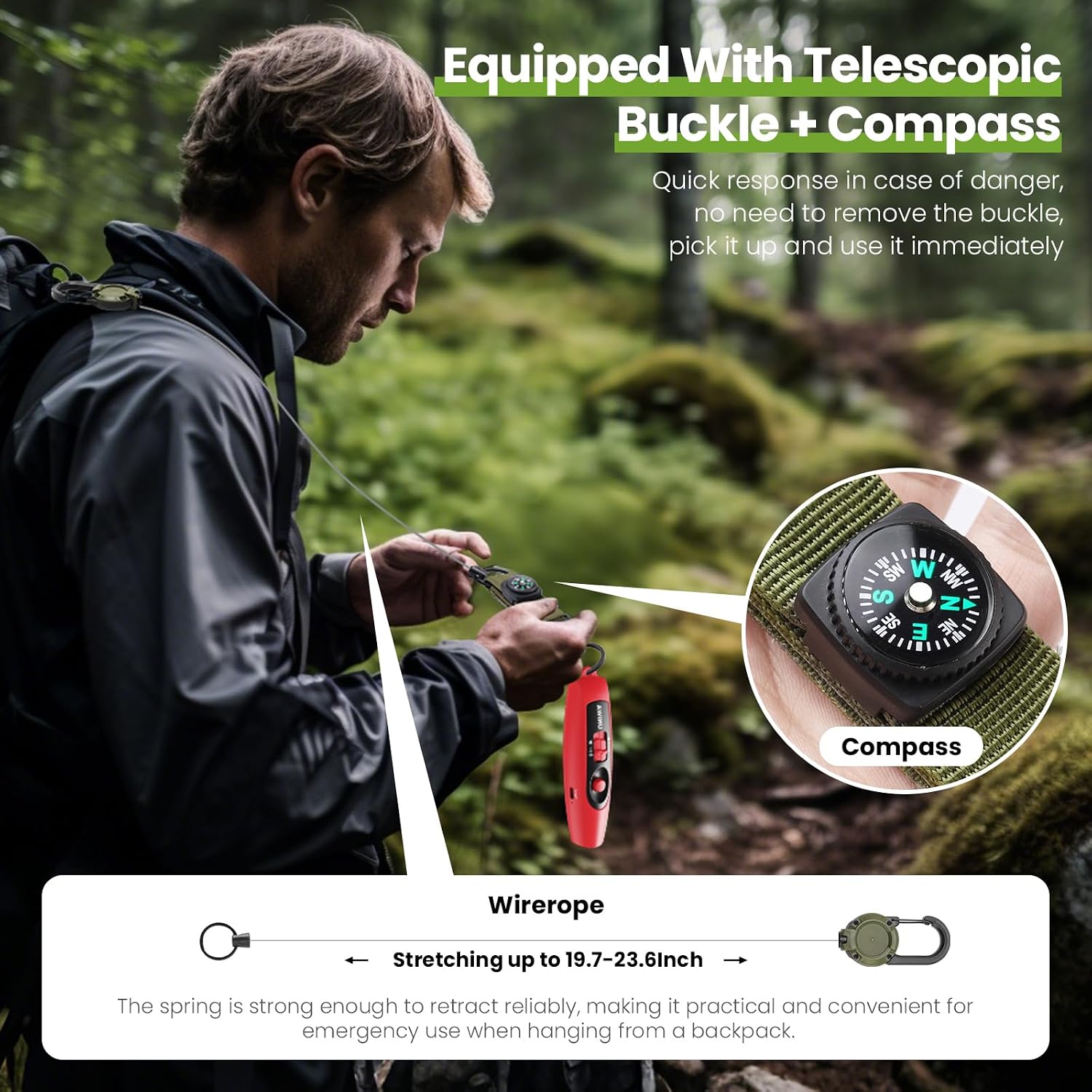
Image: The compass feature integrated with the lanyard.
5.5 Demostració en vídeo
Video: A demonstration of the UNIWA Electronic Bear Horn's features and operation.
6. Càrrega
The UNIWA Electronic Air Bear Horn is equipped with a rechargeable 2000mAh Lithium battery. To charge the device:
- Connecteu el cable de càrrega USB-C al port de càrrega del dispositiu.
- Plug the other end of the cable into a standard USB power adapter (5V/1A recommended).
- A charging indicator light will show the charging status.
- Charging typically takes less than 1 hour for a full charge.
- A full charge provides approximately 4 hours of continuous sound operation.
7. Manteniment
- Neteja: Netegeu el dispositiu amb un drap suau i sec. No utilitzeu productes de neteja abrasius ni el submergiu en aigua.
- Emmagatzematge: Store the horn in a cool, dry place away from direct sunlight and extreme temperatures.
- Cura de la bateria: For optimal battery life, avoid fully discharging the battery frequently. Recharge the device periodically if not used for extended periods.
8. Solució De Problemes
- Device not turning on/making sound: Ensure the device is fully charged. Check the tone selection slider is not in the 'OFF' position.
- El llum LED no funciona: Ensure the device is charged. Press the LED button firmly.
- Sound not loud enough: Verify the tone selection slider is set to a higher decibel mode (e.g., TONE3). Note that environmental factors and distance can affect perceived loudness.
- Compass inaccuracy: The integrated compass is for basic guidance. Magnetic interference from electronic devices or metal objects can affect its accuracy. For critical navigation, use a dedicated navigation tool.
- Problemes de càrrega: Try a different USB-C cable or power adapter. Ensure the charging port is clean and free of debris.
9. Especificacions
| Característica | Detall |
|---|---|
| Model | EBH-Red |
| Nivell de so | 120dB ± 5 (Adjustable modes: 125dB±5, 110dB±5, 95dB±5, 80dB±5) |
| Bateria | 2000 mAh de liti |
| Port de càrrega | USB-C |
| Continuous Sound Time | Fins a 4 hores |
| Dimensions (L x A x A) | 5.51" x 1.49" x 1.51" (140 mm x 38 mm x 38.4 mm) |
| Pes | 3.17 unces (aproximadament 90 grams) |
| Components inclosos | Lanyard with retractable hook and compass |

Image: Dimensions and sound level indicators of the electronic bear horn.
10. Garantia i Suport
Informació de la garantia:
Specific warranty details are not provided in the product information. Please refer to your purchase documentation or contact the retailer for warranty terms and conditions.
Atenció al client:
For any questions, concerns, or technical assistance regarding your UNIWA Electronic Air Bear Horn, please contact the seller directly through the Amazon messaging service or refer to the UNIWA brand store for contact information.
UNIWA Store Link: Visit the UNIWA Store on Amazon