
1. Introducció
Welcome to the user manual for your MEIZE D116 Android 14 Tablet. This guide provides essential information to help you set up, operate, maintain, and troubleshoot your device. Please read this manual thoroughly to ensure optimal performance and longevity of your tablet.
2. Contingut del paquet
Abans de començar, comproveu que tots els elements estiguin presents al paquet:
- MEIZE D116 Android 14 Tablet
- Teclat
- Ratolí
- Toca Pen
- Funda protectora
- Adaptador de càrrega
- Cable USB-C
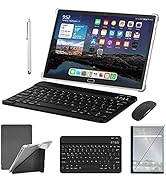
Image: The MEIZE D116 Tablet displayed with its complete set of accessories, including the keyboard, mouse, touch pen, protective case, charging adapter, and USB-C cable.
3. Disseny del dispositiu
Familiarize yourself with the physical components of your MEIZE D116 tablet:

Image: A detailed diagram illustrating the location of the front camera, flash, rear camera, headphone jack, Micro SD slot, Type-C charging port, volume up/down buttons, and power button on the MEIZE D116 Tablet.
- Càmera frontal: Per a videotrucades i selfies.
- Rear Camera & Flash: Per a fotos i vídeos d'alta resolució.
- Presa d'auriculars (3.5 mm): Connecteu els auriculars amb cable.
- Ranura Micro SD: Insert a Micro SD card for expandable storage.
- Port de tipus C: Per a càrrega i transferència de dades.
- Botons de volum: Ajusta el volum de l'àudio.
- Botó d'encesa: Press and hold to power on/off or restart; short press to sleep/wake.
- Ponents: Located on the bottom edge for audio output.
4. Configuració
4.1 Càrrega de la tauleta
Before first use, fully charge your tablet. Connect the USB-C cable to the tablet's Type-C port and the other end to the charging adapter. Plug the adapter into a power outlet. The battery indicator on the screen will show charging status.
4.2 Engegada/apagada
- Per encendre: Press and hold the Power Button until the MEIZE logo appears.
- Per apagar: Press and hold the Power Button until the power options appear on screen, then select "Power Off."
- Per reiniciar: Press and hold the Power Button until the power options appear, then select "Restart."
4.3 Assistent de configuració inicial
Upon first power-on, the tablet will guide you through an initial setup process:
- Seleccioneu el vostre idioma preferit.
- Connect to a Wi-Fi network. This is crucial for downloading updates and setting up your Google account.
- Sign in with your Google account or create a new one. This is required to access the Google Play Store and other Google services.
- Follow the on-screen prompts to set up security features (PIN, pattern, or password) and other preferences.
4.4 Connexió d'accessoris
Your MEIZE D116 tablet supports various accessories for enhanced productivity.
4.4.1 Bluetooth Keyboard and Mouse
To connect the included Bluetooth keyboard and mouse:
- Assegureu-vos que el teclat i el ratolí estiguin carregats i encesos.
- A la tauleta, vés a Configuració > Dispositius connectats > Bluetooth.
- Commuta el Bluetooth On.
- The tablet will scan for available devices. Select the keyboard and mouse from the list to pair them. Follow any on-screen pairing instructions.

Image: A user operating the MEIZE D116 Tablet with an external Bluetooth keyboard and mouse, demonstrating its laptop-like functionality.
4.4.2 Touch Pen
The touch pen can be used for precise input, drawing, and navigation. No pairing is required for basic touch pen functionality.
5. Funcionament bàsic
5.1 Gestos de pantalla tàctil
- Toca: Selecciona un element o obre una aplicació.
- Toca i mantén premut: Accedir a menús contextuals o moure icones.
- Llisca: Navega per les pantalles o desplaça't pel contingut.
- Pessiga per fer zoom: Apropar o allunyar les imatges i web pàgines.
5.2 Navegació per la pantalla d'inici
The home screen is your central hub for apps and widgets. You can customize it by adding or removing app icons and widgets.
5.3 Gestió d'aplicacions
- Instal·leu aplicacions: Baixeu aplicacions de Google Play Store.
- Desinstal·lar aplicacions: Tap and hold an app icon, then drag it to the "Uninstall" option, or go to Configuració > Aplicacions.
- Tanca les aplicacions: Swipe up from the bottom of the screen and swipe away the app card to close it.
5.4 Funcionalitat de pantalla dividida
The Android 14 operating system allows for split-screen multitasking. To use this feature:
- Obre la primera aplicació que vulguis utilitzar.
- Swipe up from the bottom of the screen to access the recent apps view.
- Tap the app icon at the top of the first app's card.
- Select "Split top" or "Split screen."
- Choose a second app from your recent apps or app drawer to fill the other half of the screen.
Imatge: Examples of the MEIZE D116 Tablet in various usage scenarios, including video conferencing, reading, and professional work tasks.
6. Connectivitat
6.1 Connexió Wi-Fi
Your tablet supports 5G/2.4G dual-band Wi-Fi for stable and fast internet access.
- Vés a Configuració > Xarxa i Internet > Wi-Fi.
- Activa/desactiva el Wi-Fi On.
- Seleccioneu la xarxa desitjada de la llista i introduïu la contrasenya si se us demana.

Image: The MEIZE D116 Tablet screen prominently displaying the 5G Wi-Fi symbol, indicating its capability for high-speed wireless connectivity.
6.2 Bluetooth 5.0
Bluetooth 5.0 allows you to connect wireless headphones, speakers, keyboards, mice, and other compatible devices.
- Vés a Configuració > Dispositius connectats > Bluetooth.
- Commuta el Bluetooth On.
- Select the device you wish to pair from the list.
6.3 presa d'auriculars de 3.5 mm
For wired audio, connect your headphones to the 3.5mm headphone jack located on the tablet's side.
7. Ús de la càmera
The MEIZE D116 tablet features a 13MP rear camera and an 8MP front camera for capturing photos and videos.
- Obre l'aplicació Càmera des de la pantalla d'inici o des del calaix d'aplicacions.
- Canvia entre la càmera frontal i la posterior amb la icona de commutació de la càmera.
- Toqueu el botó de l'obturador per fer una foto o premeu el botó de gravació per iniciar/aturar la gravació de vídeo.
- Access various camera modes and settings within the app for different effects and adjustments.

Imatge: Examples demonstrating the clarity and detail captured by the 13MP rear camera and 8MP front camera of the MEIZE D116 Tablet.
8. Emmagatzematge i memòria
Your tablet comes with 128GB of internal storage and 8GB of RAM (expandable to 16GB virtually). You can further expand storage up to 512GB using a Micro SD card.

Image: The MEIZE D116 Tablet showcasing its large memory capacity, including 128GB internal storage, 16GB (8+8) running memory, and support for up to 512GB additional expansion.
8.1 Expandable Storage
To insert a Micro SD card:
- Locate the Micro SD slot on the side of the tablet.
- Introduïu suaument la targeta Micro SD a la ranura fins que encaixi al seu lloc.
- The tablet will detect the new storage. You may be prompted to format it for use as portable or internal storage.
9. Gestió de la bateria
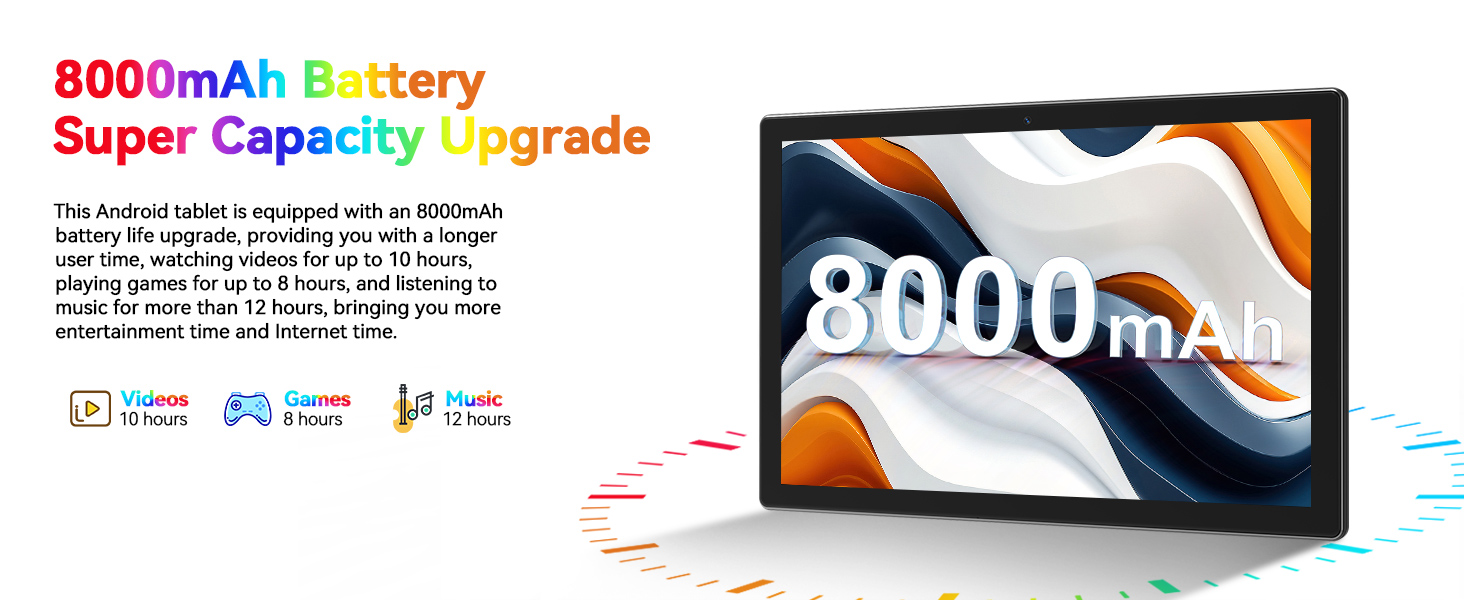
The MEIZE D116 tablet is equipped with an 8000mAh battery, providing extended usage times.

Image: The MEIZE D116 Tablet with a visual representation of its 8000mAh battery, along with icons indicating approximate usage durations: 10 hours for videos, 8 hours for games, and 12 hours for music.
9.1 Optimització de la durada de la bateria
- Redueix la brillantor de la pantalla.
- Desactiva el Wi-Fi i el Bluetooth quan no els utilitzis.
- Tanca les aplicacions en segon pla.
- Enable battery saver mode in Configuració > Bateria.
10. Manteniment
10.1 Neteja del dispositiu
Feu servir un drap suau i sense borrissol per netejar la pantalla i el cos de la tauleta. Eviteu utilitzar productes químics agressius o materials abrasius.
10.2 Actualitzacions de programari
Comproveu i instal·leu regularment si hi ha actualitzacions de programari per assegurar-vos que la tauleta tingui les funcions i els pegats de seguretat més recents. Aneu a Configuració > Sistema > Actualització del sistema.
11. Solució De Problemes
Si teniu problemes amb la tauleta, consulteu les solucions habituals següents:
- El dispositiu no s'encén: Ensure the tablet is charged. Connect it to the charger and try powering on again.
- Problemes de connexió Wi-Fi: Reinicia la tauleta i l'encaminador Wi-Fi. Oblida't de la xarxa a la configuració i torna a connectar-te.
- Rendiment lent: Close unnecessary background apps. Clear cache for frequently used apps. Consider performing a factory reset if performance does not improve (see below).
- Les aplicacions es bloquegen: Ensure apps are updated. Clear the app's cache and data in Configuració > Aplicacions.
11.1 Restabliment de fàbrica
A factory reset will erase all data from your tablet and restore it to its original factory settings. Back up any important data before proceeding.
- Vés a Configuració > Sistema > Opcions de restabliment.
- Seleccioneu Esborra totes les dades (restabliment de fàbrica).
- Confirma la teva decisió i segueix les instruccions que apareixen a la pantalla.
12. Especificacions
Detailed technical specifications for the MEIZE D116 Android 14 Tablet:
| Característica | Especificació |
|---|---|
| Marca | MEIZE |
| Nom del model | D116 |
| Sistema operatiu | Android 14 |
| Mida de la pantalla | 10.1 polzades |
| Resolució de pantalla | 1280 x 800 píxels |
| Processador | Octa-nucli, 2 GHz (MediaTek) |
| RAM | 8GB (16GB Expandable) |
| Emmagatzematge intern | 128 GB |
| Emmagatzematge ampliable | Fins a 512 GB (Micro SD) |
| Càmera posterior | 13 MP |
| Càmera frontal | 8 MP |
| Capacitat de la bateria | 8000 mAh |
| Durada mitjana de la bateria | 10 hores |
| Connectivitat sense fil | 802.11ac, 802.11b, 802.11g, 802.11n (5G/2.4G Dual Band Wi-Fi), Bluetooth 5.0 |
| Dimensions del producte | 10 x 7 x 0.3 polzades |
| Pes de l'article | 2.99 lliures |
13. Garantia i Suport
13.1 Garantia limitada
Your MEIZE D116 tablet is covered by a limited manufacturer's warranty against defects in materials and workmanship under normal use. Please refer to the warranty card included in your package for specific terms and conditions, including warranty period and coverage details.
13.2 Atenció al client
For any questions, technical assistance, or warranty claims, please contact the MEIZE professional customer service team. They are dedicated to providing support and have extensive experience in assisting customers. Contact information can typically be found on the MEIZE official weblloc web o en els materials d'embalatge.