
AZZUNO MIG-145L
AZZUNO MIG-145L Welder Instruction Manual
Model: MIG-145L | Brand: AZZUNO
1. Introducció
Thank you for choosing the AZZUNO MIG-145L Welder. This versatile 4-in-1 welding machine is designed for various welding applications, offering Gas MIG, Gasless Flux Core MIG, Lift TIG, and Stick welding capabilities. It operates on both 110V and 220V input power, providing flexibility for different work environments. This manual provides essential information for safe and effective operation, setup, and maintenance of your new welder.

Figure 1.1: The AZZUNO MIG-145L Welder, showcasing its compact design and the included solid MIG welding wire spool.
2. Informació de seguretat
ADVERTÈNCIA: La soldadura pot ser perillosa. Seguiu sempre les precaucions de seguretat per evitar lesions greus o la mort.
- Una descàrrega elèctrica pot matar: No toqueu les parts elèctriques actives. Porteu guants aïllants secs i roba protectora. Aïlleu-vos de la feina i de la presa de terra.
- Els fums i els gasos poden ser perillosos: Mantingueu el cap allunyat dels fums. Utilitzeu la ventilació o l'extracció per eliminar els fums de la zona de respiració.
- Els raigs d'arc poden cremar els ulls i la pell: Wear a welding helmet with a proper shade of filter to protect your face and eyes when welding or watching. Wear appropriate eye protection with side shields when not welding. Wear protective clothing made from durable, flame-resistant material.
- Perill d'incendi i explosió: Protect yourself and others from flying sparks and hot metal. Remove all flammables within 35 feet (10.7 m) of the welding arc. Have a fire extinguisher nearby.
- Llegiu tot el manual: Before operating the welder, read and understand all instructions and safety warnings in this manual.
3. Contingut del paquet
Upon unpacking, please verify that all items listed below are present and undamaged. If any items are missing or damaged, contact AZZUNO customer support immediately.
- AZZUNO MIG-145L Welder Unit
- 0.030" x 1 Flux Cored Wire (2LBS)
- 0.030" x 2 Solid Wire (2LBS each)
- 14AK MIG Torch x 1
- Electrode Holder x 1
- Terra Clamp x 1
- Gas Hose x 1
- Hose Band x 2
- Contact Tips x 2
- V-groove Drive Roller x 1
- Brush & Hammer x 1
- 110V~220V Adapter x 1
- Manual d'usuari x 1 (aquest document)
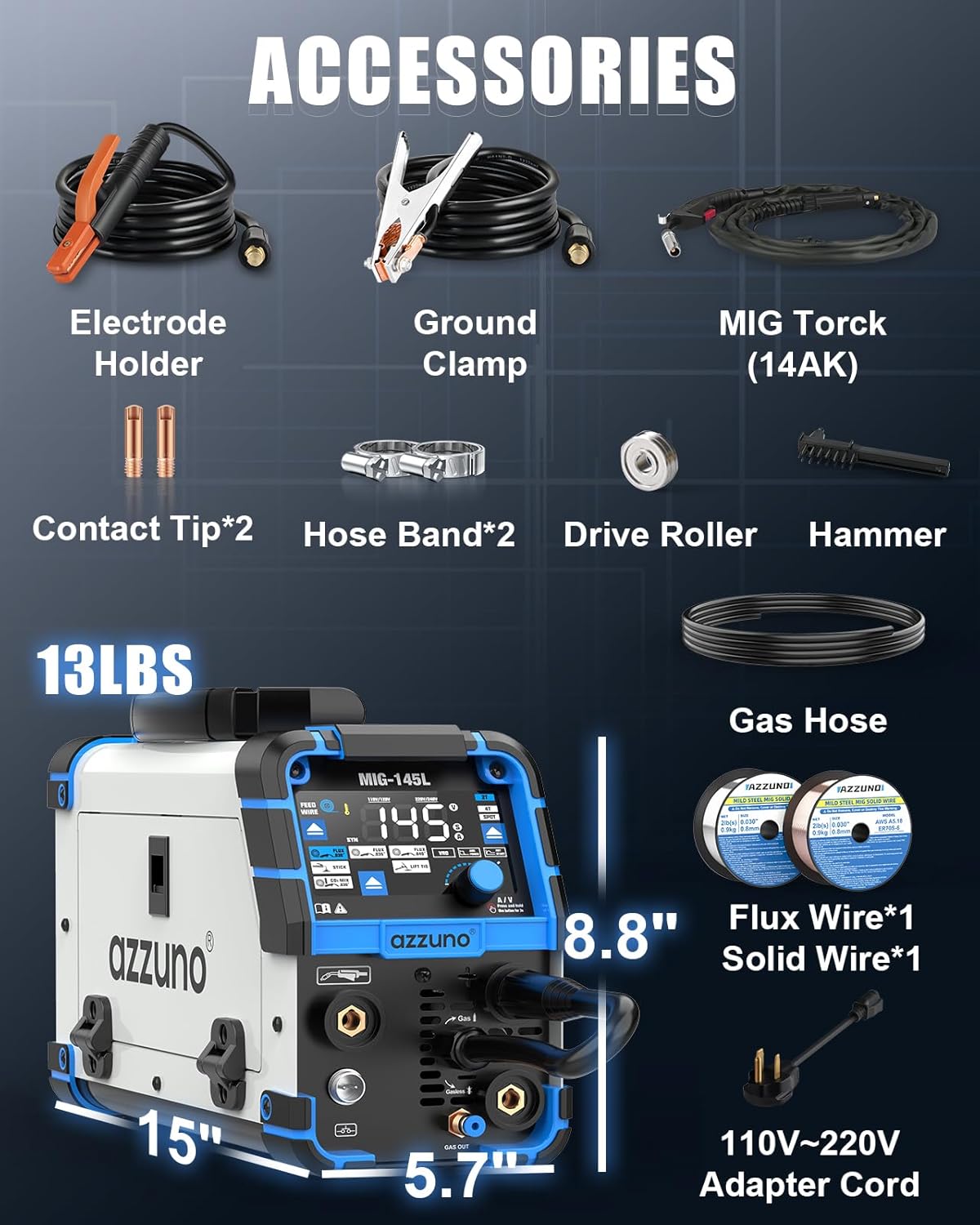
Figure 3.1: A visual representation of the accessories included in the AZZUNO MIG-145L Welder package, such as the MIG torch, electrode holder, ground clamp, and various wires.
4. Característiques del producte
The AZZUNO MIG-145L Welder is equipped with advanced features to enhance your welding experience:
- Modes de soldadura 4 en 1: Supports Gas MIG, Gasless Flux Core MIG, Lift TIG, and Stick welding.
- Dual Voltage Entrada: Compatible with both 110V and 220V power supplies.
- Large Clear LED Display: An oversized screen provides crystal-clear visibility for intuitive operation and quick setting adjustments.
- Synergic Control (SYN): Automatically adjusts welding parameters for optimal performance, simplifying setup for various materials and thicknesses.
- Welding Modes (2T/4T/SPOT): Offers manual (2T), continuous (4T), and timed (SPOT) welding options to cater to diverse requirements.
- Wire Feed Button: A dedicated button for quick and easy wire feeding.
- Disseny portàtil: Compact size (5.7" x 15" x 8.8") and lightweight (13 lbs) for easy transport.

Figure 4.1: The 4-in-1 functionality of the welder, showing Flux MIG, Gas MAG, Stick, and Lift TIG welding processes.

Figure 4.2: A comparison highlighting the AZZUNO MIG-145L's superior features like 4-in-1 multi-functionality, dual voltage supply, large LED display, and 2T/4T/SPOT functions.
5. Configuració
5.1 Connexió d'alimentació
- Assegureu-vos que el soldador estigui apagat abans de connectar-lo a l'alimentació.
- The AZZUNO MIG-145L supports both 110V and 220V input. Use the provided adapter if converting from 220V to 110V.
- Connecteu el cable d'alimentació a una presa de corrent amb connexió a terra adequada.
5.2 Instal·lació de cables (MIG/nucli de flux)
- Obriu la tapa del compartiment d'alimentació del filferro.
- Col·loqueu el carret de filferro al portacarrets, assegurant-vos que giri lliurement.
- Passeu el cable pel tub guia i dins del mecanisme del rodet impulsor.
- Adjust the drive roller tension to prevent slipping or crushing the wire. The V-groove drive roller is included for optimal feeding.
- Tanqueu la tapa del compartiment d'alimentació del filferro.
- Press and hold the WIRE FEED BUTTON to feed the wire through the MIG torch liner until it exits the contact tip.
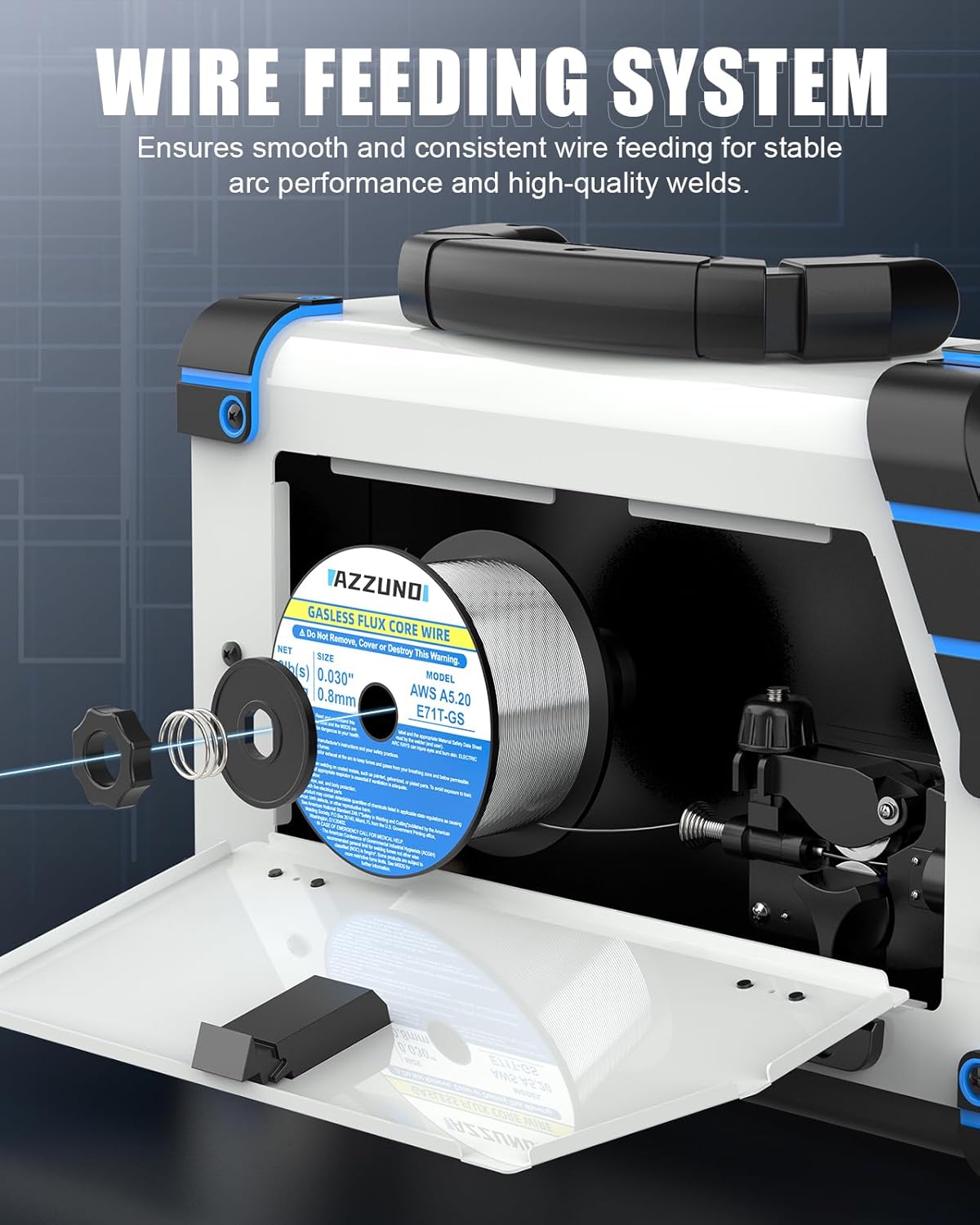
Figure 5.1: The internal wire feeding system, designed for smooth and consistent wire delivery for stable arc performance.
5.3 Connexió de gas (MIG de gas)
- For Gas MIG welding, connect your shielding gas cylinder (e.g., CO2/Argon mix) to the gas inlet on the rear of the welder using the provided gas hose and hose bands.
- Assegureu-vos que totes les connexions estiguin ben ajustades per evitar fuites de gas.
5.4 Connexió d'accessoris
- Connect the MIG torch to the appropriate connector on the front panel for MIG/Flux Core welding.
- Connect the electrode holder for Stick welding or the TIG torch (not included) for Lift TIG welding to their respective terminals.
- Enganxa el terra clamp to the workpiece, ensuring a clean, bare metal connection for proper electrical circuit.
6. Instruccions de funcionament
6.1 Tauler de control acabatview
The large LED display and intuitive controls allow for easy adjustment of welding parameters.

Figure 6.1: The upgraded oversized LED screen, providing clear visibility and intuitive controls for setting adjustments.
- Encès/apagat: Use the main power switch located on the rear of the unit.
- Selecció del mode: Use the buttons on the control panel to select between Flux MIG, Gas MIG, Stick, and Lift TIG modes.
- Synergic Control (SYN): Press and hold button "A" for 3 seconds to activate/deactivate Synergic mode. In SYN mode, the machine automatically sets optimal parameters.
- Ajust de paràmetres: Use the knob "B" to adjust ampera o voltage. Press and hold "A/V" button for 3 seconds to switch between Amp i Voltage ajust.
- 2T/4T/SPOT Settings: Select these modes based on your welding needs.
- 2T (Dos tocs): Press and hold the trigger to weld, release to stop.
- 4T (Quatre tocs): Press trigger to start, release, press again to stop. Ideal for long welds.
- TACA: For timed spot welds. Spot time can be adjusted.

Figure 6.2: Explanation of 2T, 4T, and SPOT settings, which cater to diverse welding requirements.
6.2 Procés de soldadura (general)
- Ensure proper safety gear is worn (welding helmet, gloves, protective clothing).
- Prepare the workpiece by cleaning off any rust, paint, or contaminants.
- Select the appropriate welding mode and adjust parameters (amperage, voltage, wire speed) based on material thickness and type. Use Synergic mode for simplified settings.
- Posicionar el sòl clamp securely on the workpiece.
- Begin welding, maintaining a consistent arc length and travel speed.
- After welding, allow the workpiece to cool before handling.

Figura 6.3: Examples of all-position welding capabilities, including Flat, Vertical, Up, and Corner welding.
7. Manteniment
Regular maintenance ensures the longevity and optimal performance of your AZZUNO MIG-145L Welder.
- Neteja: Keep the welder clean and free from dust, metal particles, and moisture. Use compressed air to blow out internal components periodically.
- Inspecció de torxes i cables: Inspeccioneu regularment la torxa MIG, el portaelèctrode i la pinça de terra.amp, and all cables for signs of wear, damage, or loose connections. Replace worn parts immediately.
- Contact Tip and Nozzle: For MIG welding, regularly clean or replace the contact tip and nozzle as they are consumable parts and affect arc stability.
- Rodets d'accionament: Check the drive rollers for wear and ensure they are clean and free of debris to maintain consistent wire feeding.
- Emmagatzematge: Guardeu el soldador en un entorn sec i net quan no l'utilitzeu.
8. Solució De Problemes
This section provides solutions to common issues you might encounter. For problems not listed here, please contact AZZUNO customer support.
- Sense energia:
- Comproveu si el cable d'alimentació està ben connectat a una presa de corrent.
- Verify the main power switch on the welder is in the 'ON' position.
- Check the circuit breaker or fuse in your electrical panel.
- Sense arc:
- Assegureu-vos que el sòl clamp is securely attached to bare metal on the workpiece.
- Check all cable connections (torch, electrode holder, ground clamp) for tightness.
- Verifiqueu que s'ha seleccionat el mode de soldadura correcte.
- Poor Wire Feeding (MIG/Flux Core):
- Check drive roller tension; it should be firm enough to feed wire without slipping but not too tight to deform the wire.
- Inspect the contact tip for blockage or wear; replace if necessary.
- Ensure the wire spool is installed correctly and rotates freely.
- Check the MIG torch liner for kinks or debris.
- Inconsistent Weld:
- Adjust welding parameters (amperage, voltage, wire speed) to match the material and thickness.
- Ensure proper shielding gas flow (for Gas MIG).
- Maintain a consistent travel speed and arc length.
9. Especificacions
| Característica | Especificació |
|---|---|
| Model | MIG-145L |
| Entrada Voltage | 110V/220V Dual Voltage |
| Processos de soldadura | Gas MIG, Gasless Flux Core MIG, Lift TIG, Stick |
| Compatible Wire Sizes | 0.030" / 0.035" / 0.040" Flux Core Wire, 0.030" Solid Wire |
| Compatible Electrodes | E6013 (for Stick welding) |
| Dimensions (L x A x A) | 15" x 5.7" x 8.8" |
| Pes | 13 lliures |
| Synergic Control | Sí |
| Modes de soldadura | 2T, 4T, SPOT |
9.1 Included Solid Welding Wire Specification

Figure 9.1: Specifications for the included AZZUNO AWS ER70S-6 0.030" MIG solid welding wire, detailing its size, net weight, and polarity.
| Característica | Especificació |
|---|---|
| Model de filferro | ER70S-6 |
| Diàmetre del filferro | 0.030" (0.8 mm) |
| Pes net | 2 lliures (0.9 kg) |
| Polaritat | DCEP |
10. Garantia i Suport
AZZUNO stands behind the quality of its products. For warranty information, technical support, or service inquiries, please refer to the warranty card included with your product or visit the official AZZUNO website. Please have your product model number (MIG-145L) and purchase date ready when contacting support.
AZZUNO Official Store: Visit AZZUNO Store on Amazon
Ask a question about this manual
Ask about setup, troubleshooting, compatibility, parts, safety, or missing instructions. Manuals+ will review the question and use this page’s manual context to help answer it.