
Introducció
The RAPOO E9050L is a versatile wireless keyboard designed for seamless connectivity across multiple devices and operating systems. Its ultra-slim profile, quiet keys, and long-lasting rechargeable battery make it ideal for various environments, from office to travel. This manual provides detailed instructions for setup, operation, maintenance, and troubleshooting to ensure optimal use of your keyboard.
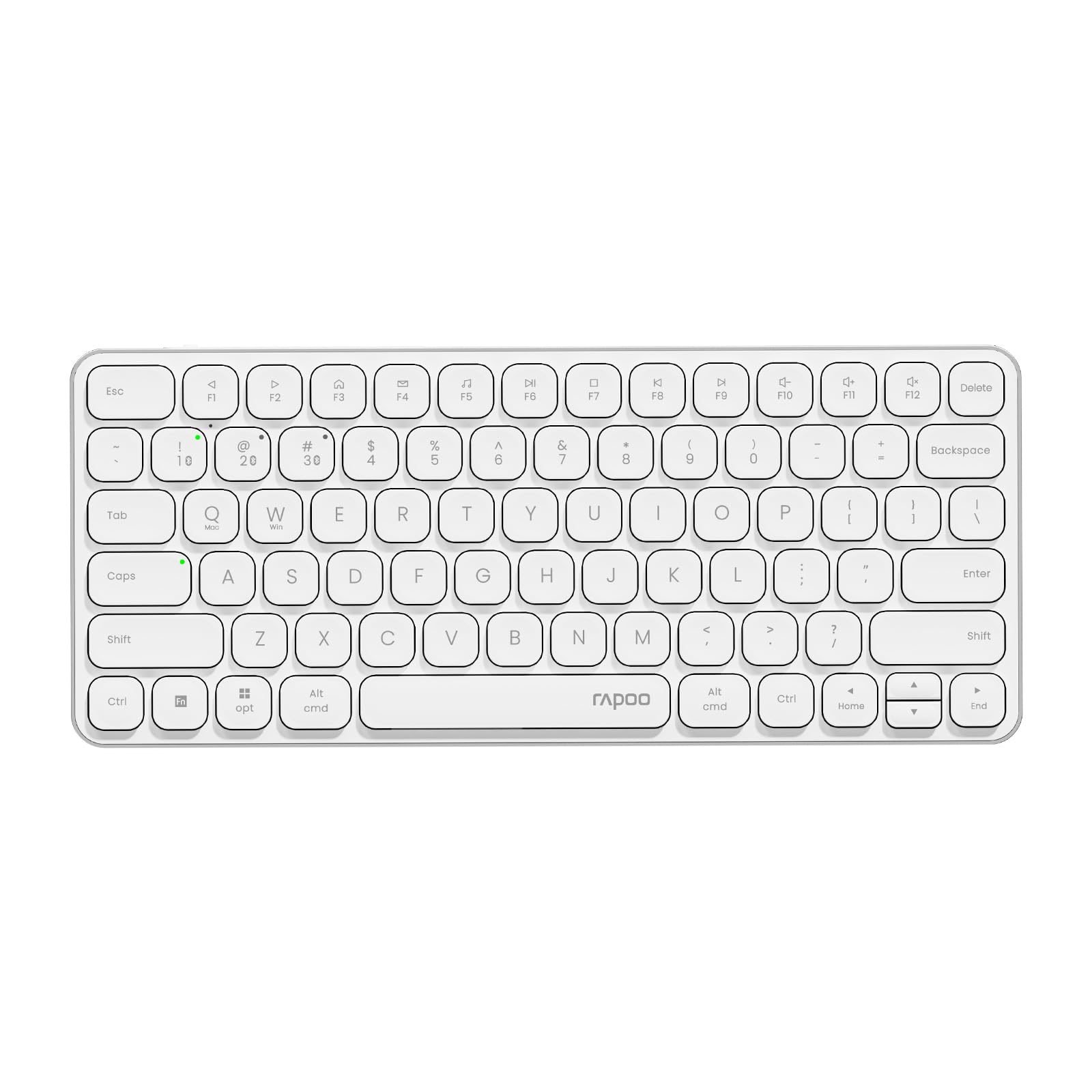
Image: The RAPOO E9050L Wireless Keyboard, showcasing el seu disseny elegant.
Configuració
Contingut del paquet
- RAPOO E9050L Wireless Keyboard
- Cable de càrrega USB-C
- Manual d'usuari
Carregant el teclat
The E9050L features a built-in rechargeable battery. Before first use, fully charge the keyboard using the provided USB-C cable. A full charge can provide up to 90 days of continuous use. A quick 10-minute charge can provide enough power for one day of use.

Image: Diagram illustrating the rechargeable battery and charging indicators.
Connecting to Devices (Multi-Device & Multi-OS)
The keyboard supports wireless connection via 2.4GHz USB receiver or Bluetooth 5.0/4.0, allowing connection to up to 4 devices simultaneously. You can seamlessly switch between a notebook PC, desktop PC, tablet, or smartphone.

Image: Visual representation of multi-device and multi-OS connectivity options.
- Connexió sense fil de 2.4 GHz:
Insert the USB receiver into an available USB port on your computer. The keyboard should connect automatically. - Connexió Bluetooth:
Press and hold the Bluetooth pairing key (usually indicated by a Bluetooth icon or a specific Fn key combination) until the indicator light flashes. On your device (PC, tablet, smartphone), enable Bluetooth and search for "RAPOO E9050L". Select it to pair. - Canvi entre dispositius:
Use the dedicated device switching keys (e.g., Fn + 1, Fn + 2, Fn + 3, Fn + 4) to switch between your paired devices. The corresponding indicator light will show which device is currently active.

Image: Icons representing compatibility with various operating systems including Windows, Mac OS, Linux, iOS, Android, and Chrome OS.
Instruccions de funcionament
Key Functions and Multimedia Hotkeys
The E9050L features a compact 78-key layout with 12 multimedia hotkeys for quick access to common functions like play/pause, volume control, and email. These functions are accessed by pressing the Fn key in combination with the corresponding F-keys (F1-F12).

Image: Diagram showing the multimedia hotkeys and their functions when used with the Fn key.
Canvi de SO
The keyboard supports dual system compatibility. To switch between Windows and Mac OS layouts, use the following key combinations:
- For Windows: Press Fn + W
- For Mac OS: Press Fn + Q
Llums indicadores
The keyboard includes indicator lights for device connection, Caps Lock status, and battery level. These lights provide clear visual feedback on the keyboard's current state, addressing user feedback for improved clarity.

Imatge: Primer pla view of the device indicator lights and Caps Lock indicator.
Experiència de mecanografia
The E9050L utilizes thin chiclet keycaps and a scissor-switch mechanism, providing a quiet and comfortable typing experience. The ultra-thin design (0.2 inches / 0.53 cm) reduces wrist strain, eliminating the need for a separate palm rest.

Imatge: Detallada view of the thin chiclet keycaps and scissor-switch mechanism.
Manteniment
To ensure the longevity and optimal performance of your RAPOO E9050L keyboard, follow these maintenance guidelines:
- Neteja: Utilitzeu un drap suau i sense pelusa lleugerament dampened with water or a mild cleaning solution to wipe the keycaps and surface. Avoid harsh chemicals or abrasive materials.
- Eliminació de pols: Feu servir aire comprimit per eliminar la pols i les restes que hi ha entre les tecles.
- Eviteu líquids: Do not expose the keyboard to excessive moisture or submerge it in liquids. In case of spills, immediately disconnect the keyboard and allow it to dry completely before reuse.
- Emmagatzematge: Guardeu el teclat en un lloc fresc i sec, allunyat de la llum solar directa i de temperatures extremes.
Resolució de problemes
If you encounter issues with your RAPOO E9050L keyboard, refer to the following common solutions:
- El teclat no es connecta:
- Assegureu-vos que el teclat estigui carregat.
- Verify that the 2.4GHz USB receiver is properly inserted or that Bluetooth is enabled and paired on your device.
- Prova de tornar a emparellar la connexió Bluetooth o de tornar a inserir el receptor USB.
- Ensure you are on the correct device channel (Fn + 1/2/3/4).
- Keys Not Responding or Delayed Response:
- Check the battery level; low battery can affect performance.
- Ensure the keyboard is within range of your device (for Bluetooth/2.4GHz).
- Interference from other wireless devices can cause issues; try moving closer to your device or away from other wireless sources.
- Reinicieu l'ordinador o el dispositiu.
- Incorrect Key Output (e.g., @ key types "):
- This often indicates an incorrect keyboard layout setting on your operating system. Ensure your device's keyboard settings match the US layout of the E9050L.
- Verify the correct OS mode is selected on the keyboard (Fn + W for Windows, Fn + Q for Mac).
- Caps Lock / Device Indicator Not Working:
- Assegureu-vos que el teclat estigui encès i connectat.
- If the issue persists, try restarting the keyboard and your device.
Especificacions
| Característica | Detall |
|---|---|
| Marca | RAPOO |
| Número de model | E9050L |
| Dispositius compatibles | Smartphones, Tablets, Notebook PCs, Desktop PCs |
| Tecnologia de connectivitat | Bluetooth, USB (2.4 GHz) |
| Descripció del teclat | Integrat |
| Usos recomanats | Personal, Business, Student, Everyday Use |
| Característiques especials | Ergonomic, Silent |
| Color | Blanc |
| Dimensions del producte (L x A x A) | 28.4 cm x 11.9 cm x 1.3 cm (11.18 polzades x 4.69 polzades x 0.51 polzades) |
| Material | Plastic (with aluminum frame) |
| Font d'alimentació | Funciona amb bateria (recarregable) |
| Tipus de canvi | Mechanical (Scissor-switch) |
| Disposició del teclat | QWERTY (disseny dels EUA) |
| Sistemes operatius suportats | Linux, Windows, Mac OS, iOS, Android, Chrome OS |
| Nombre de claus | 78 |

Image: Diagram showing the precise dimensions of the RAPOO E9050L keyboard.
Garantia i Suport
Informació de la garantia
The RAPOO E9050L Wireless Keyboard comes with a Garantia del fabricant de 1 anys des de la data de compra. Aquesta garantia cobreix els defectes de materials i de fabricació en condicions d'ús normal. Conserveu el comprovant de compra per a reclamacions de garantia.
Atenció al client
For technical assistance, troubleshooting, or warranty inquiries, please contact RAPOO customer support through the official website or your retailer. Detailed contact information can typically be found on the product packaging or the RAPOO official support page.


