
1. Introducció
This manual provides detailed instructions for the installation, operation, and maintenance of your Eonon M3BLX7 Android 14 Car Stereo Receiver. This unit is specifically designed for Mazda 3 models manufactured between 2010 and 2013, offering seamless integration and enhanced in-car entertainment and navigation features. Please read this manual thoroughly before installation and use to ensure proper functionality and safety.

Figure 1.1: Eonon M3BLX7 Car Stereo Receiver
2. Què hi ha a la caixa
Verifiqueu que tots els components siguin presents abans de començar la instal·lació:
- A0125 Reversing camera *1
- Cable d'alimentació * 1
- Antena GPS *1
- Cable adaptador USB *2
- Audio/video adapter cable *2
- Reverse video input cable *1
- Fusible de 15 A * 1
- Micròfon extern *1
- CANBUS *1
- Manual *1
- Double-sided adhesive sticker *1
- AUX adapter cable *1
Figura 2.1: Components inclosos
3. Configuració i instal·lació
The M3BLX7 head unit is designed for plug-and-play installation in Mazda 3 models from 2010-2013. No additional frame or cable modifications are typically required. The included CANBUS supports most original vehicle functions, including steering wheel controls (SWC) and the factory LCD screen.
3.1 Comprovacions prèvies a la instal·lació
- Assegureu-vos que el contacte del vehicle estigui apagat i que la bateria estigui desconnectada.
- Confirm compatibility with your Mazda 3 (2010-2013).
- Verifiqueu que hi hagi tots els components enumerats a la secció 2.
3.2 Removal of Factory Unit
Carefully pry off the air vent housing from the top to access the OEM stereo. Remove any securing screws and unclip the electrical connectors from the back of the factory unit. Gently slide out the old stereo.
3.3 Connexions de cablejat
Connect the provided wiring harness to the M3BLX7 unit and the vehicle's existing connectors. Ensure all connections are secure. Refer to the wiring diagram for specific connections.

Figura 3.1: Diagrama de cablejat
Instal·lació de 3.4 unitats
Slide the M3BLX7 unit into the dashboard opening. Ensure it fits securely. Reattach any removed trim pieces. Reconnect the vehicle battery.
3.5 Instal·lació d'accessoris opcionals
- Backup Camera (A0125 included): Connect the backup camera to the dedicated input. The unit supports HD 720P/1080P backup camera input.
- Front Camera (not included): Connect a front camera to the designated input if desired.
- OBD Scanner (V0056 not included): Connect an OBD scanner for vehicle diagnostics and real-time data.
Video 3.1: Installation Guide for Eonon Car Stereo in Mazda 3 (2010)
This video demonstrates the installation process of an Eonon car stereo in a 2010 Mazda 3, including removal of the old unit and connection of the new one.
4. Instruccions de funcionament
4.1 Encès/Apagat
The unit powers on automatically with the vehicle ignition. To manually power off or restart, use the designated power button on the unit or within the system settings.
4.2 Interfície d'usuari i navegació
The M3BLX7 runs on the Android 14 operating system, providing a responsive and intuitive touchscreen experience. It features a 9-inch IPS display with 1280x720 resolution and a 178° viewangle d'inclinació per a una visibilitat clara.

Figure 4.1: 9-inch IPS Display Features
4.2.1 Funcionalitat de pantalla dividida
The unit supports split-screen mode, allowing you to run two applications simultaneously, such as navigation and media playback. Windows are adjustable for size.
4.2.2 Customizable Themes
Choose from multiple UI themes to personalize the appearance of your stereo. Day and Night modes are supported for optimal visibility.

Figura 4.2: Temes d'IU personalitzables
Video 4.1: New UI Features and Split-Screen Functionality
This video demonstrates the new user interface, split-screen media and navigation, adjustable windows, vertical volume control, and the fixed bottom shortcut bar.
4.3 CarPlay sense fil i Android Auto
The M3BLX7 supports both wireless and wired Apple CarPlay and Android Auto. This allows for hands-free control of music, navigation, phone calls, and messages via voice commands (Siri or Google Assistant).

Figure 4.3: Wireless Apple CarPlay & Android Auto
4.3.1 Connexió sense fil d'Apple CarPlay
- Click the Zlink5 app on the car stereo.
- Turn on Wi-Fi and Bluetooth on your iPhone.
- Find 'EONON' in your phone's Bluetooth device list and pair it. Once connected, tap 'Use CarPlay'.
- Espereu uns segons per completar la connexió.

Figure 4.4: Wireless Apple CarPlay Connection Steps
4.3.2 Connexió sense fil d'Android Auto
- Click the Zlink5 app on the car stereo.
- Turn on Wi-Fi and Bluetooth on your Android phone.
- Find 'EONON' in your phone's Bluetooth device list and pair it.
- Espereu uns segons per completar la connexió.

Figure 4.5: Wireless Android Auto Connection Steps
4.4 Mirall de pantalla
Mirror apps from your smartphone onto the car stereo display.
4.4.1 Screen Mirroring for iOS
- Click the Zlink5 app on the car stereo, set the car stereo to iPhone wireless screen mirroring mode.
- Turn on the iPhone hotspot, and connect to the car stereo.
- Turn on the iPhone screen mirroring function and select "zj-airplay".

Figure 4.6: iOS Screen Mirroring Steps
4.4.2 Screen Mirroring for Android
- Click the Zlink5 app on the car stereo, set the car stereo to Android wireless screen mirroring mode.
- Turn on the phone's hotspot, and connect to the car stereo.
- Install the Zplus app on your phone. Turn on the app and select "wireless connection".

Figure 4.7: Android Screen Mirroring Steps
4.5 Funcions d'àudio
The unit includes a built-in amplifier (4x45W output) and a 36-band equalizer for sound customization. It supports Bluetooth audio, FM/AM radio, and AUX audio input.
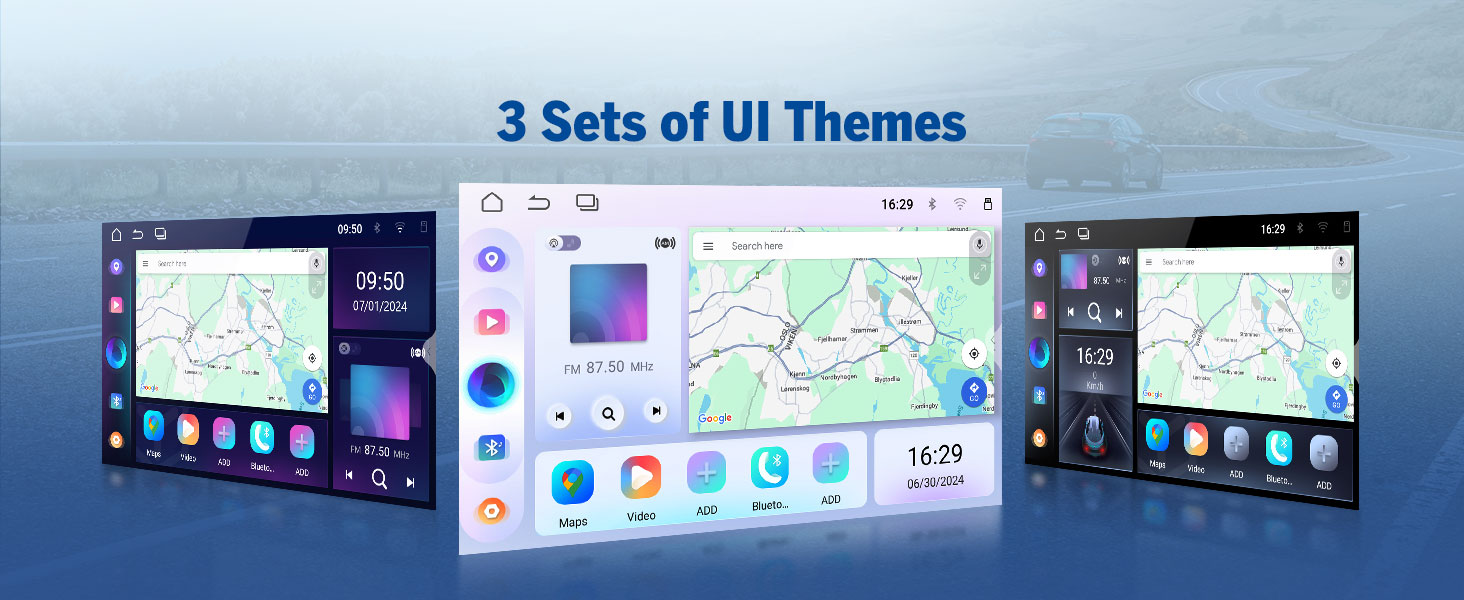
Figure 4.8: 36-Band Graphic Equalizer
5. Manteniment
5.1 Neteja
Feu servir un drap suau i sec per netejar la pantalla i l'exterior de la unitat. Eviteu productes de neteja abrasius o dissolvents que puguin danyar la superfície.
5.2 actualitzacions de microprogramari
The unit supports over-the-air (OTA) firmware updates to fix software issues and enhance security. Access the 'Updater' app on the unit to check for and install updates. Note that Android system upgrades are not supported via OTA.

Figure 5.1: Over-the-Air Firmware Update
6. Solució De Problemes
If you encounter issues with your M3BLX7 unit, refer to the following common solutions:
- Sense energia: Check all power connections and the 15A fuse. Ensure the vehicle battery is properly connected.
- Sense so: Verifiqueu les connexions dels altaveus. Comproveu els nivells de volum i la configuració de l'equalitzador. Assegureu-vos que s'ha seleccionat la font d'àudio correcta.
- Problemes de connexió amb CarPlay/Android Auto: Ensure Wi-Fi and Bluetooth are enabled on your phone and the stereo. Restart both devices and attempt to reconnect. Confirm the Zlink5 app is running.
- Steering Wheel Controls Unresponsive: Ensure the CANBUS is correctly connected. Some steering wheel buttons may require a longer press to register input.
- Càmera de marxa enrere no es mostra: Check the reverse video input cable connection. Ensure the camera is receiving power.
- Retard/Falta de resposta del sistema: Close unused applications. Perform a system restart. Check for and install any available firmware updates.
For persistent issues, contact Eonon customer support for assistance.
7. Especificacions
| Característica | Especificació |
|---|---|
| Dimensions del producte | 8.67 x 5.12 x 1.34 polzades |
| Pes de l'article | 4.4 lliures |
| Número de model de l'article | M3BLX7 |
| Sistema operatiu | Android 14 |
| Mida de la pantalla | 9 polzades |
| Resolució de pantalla | IPS de 1280 * 720 |
| Viewangle ing | 178° |
| Processador | Rockchip (8-core) |
| Capacitat d'emmagatzematge de memòria | 32 GB |
| Tecnologia de connectivitat | Bluetooth 5.4, Wi-Fi, USB |
| Característiques especials | Wireless CarPlay, Android Auto, DSP, Touchscreen, AM/FM, SWC Support |
| Mode de sortida d'àudio | Stereo (4x45W) |
| Tipus de mapa | Road (GPS Navigation) |
8. Garantia i Suport
Eonon offers the following support for your M3BLX7 car stereo:
- Política de devolució: 30-day hassle-free return policy.
- Maintenance Coverage: 2-year maintenance coverage.
- Suport tècnic: Suport tècnic de per vida.
For warranty claims, technical assistance, or product inquiries, please visit the official Eonon weblloc o poseu-vos en contacte amb el seu departament d'atenció al client.