
1. Informació important de seguretat
Read this manual thoroughly before operating your ANCHEER Electric Tricycle. Failure to follow instructions can result in serious injury or product damage. Always wear a helmet and appropriate safety gear.
- Comprovació prèvia a la conducció: Before each ride, inspect brakes, tire pressure, battery charge, and ensure all quick releases and fasteners are secure.
- Lleis de trànsit: Compliu totes les lleis i regulacions de trànsit locals.
- Visibilitat: Use lights and reflectors, especially during low-light conditions.
- Límits de pes: Do not exceed the maximum weight capacity of 265 lbs for the seat and 220 lbs for the rear basket.
- Condicions meteorològiques: Exercise caution when riding in wet or slippery conditions.
- Seguretat de la bateria: Do not attempt to open or modify the battery pack. Charge the battery in a well-ventilated area away from flammable materials.
2. Configuració i muntatge inicial
Your ANCHEER Electric Tricycle arrives approximately 80% pre-assembled. Basic assembly is required before first use. A step-by-step assembly video is typically available on the product page for visual guidance.
2.1 Desembalatge
Traieu amb cura tots els components de l'embalatge. Conserveu els materials d'embalatge per a futurs transports o emmagatzematge.
2.2 Eines necessàries
Standard bicycle assembly tools are generally sufficient, including wrenches and hex keys. These are often included with the tricycle.
2.3 Passos de muntatge (generals)
- Attach the handlebars and secure them.
- Instal·leu la roda davantera.
- Attach the pedals.
- Install the seat post and saddle.
- Mount the rear basket.
- Connect any remaining electrical cables, ensuring they are securely fastened and not pinched.
2.4 Càrrega inicial de la bateria
Fully charge the 48V 499Wh lithium battery before the first ride. Charging typically takes 4-5 hours. The battery can be charged while installed on the tricycle or removed for convenience.
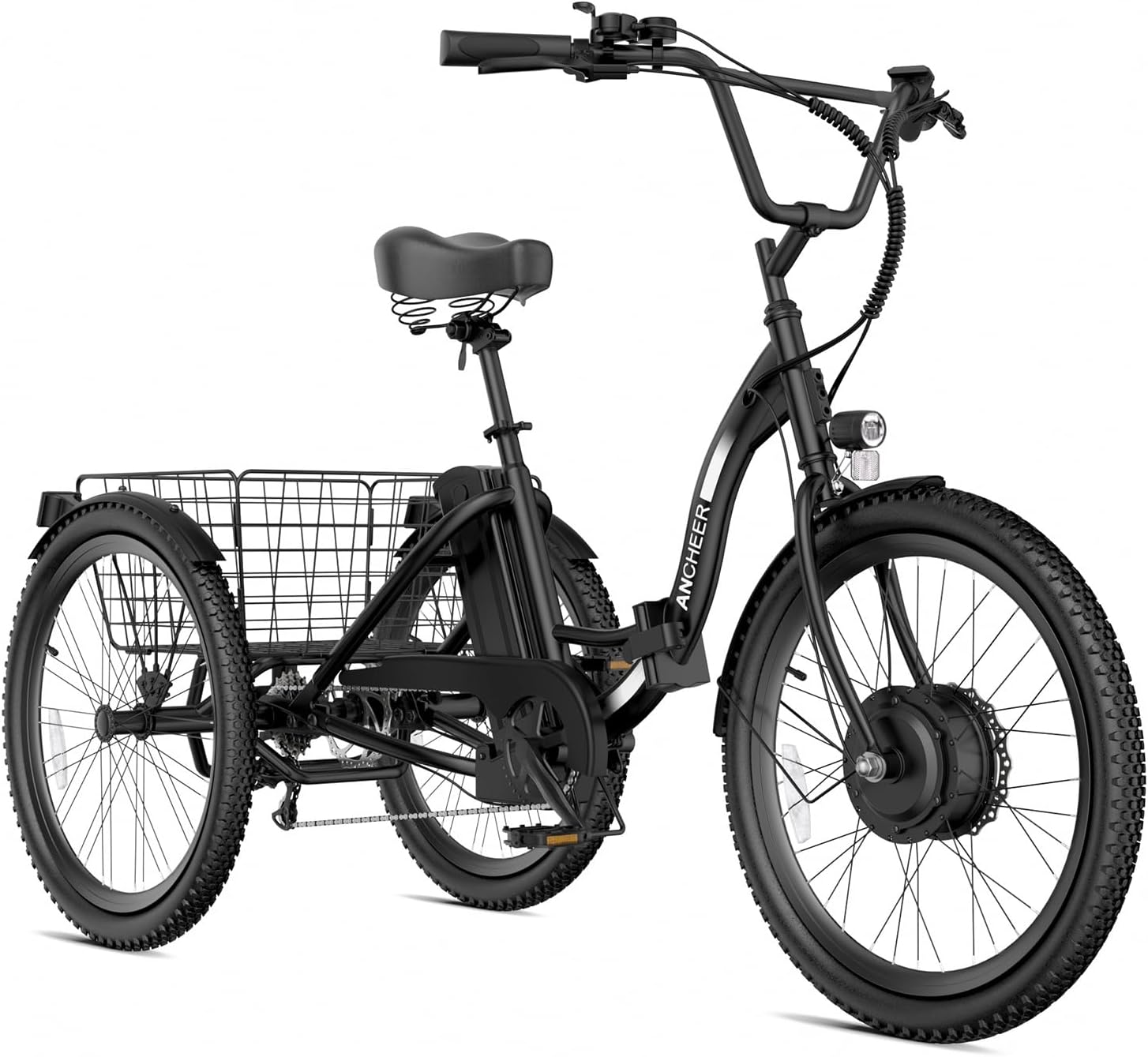
Image: The ANCHEER Electric Tricycle in black, showcasing its overall design and rear basket.
3. Instruccions de funcionament
3.1 Engegada/apagada
Locate the power button on the control panel, typically near the handlebar. Press and hold to turn the tricycle on or off.
3.2 Digital LCD Display
The digital LCD display provides essential riding information:
- Nivell de bateria: Indica la càrrega restant de la bateria.
- Nivell d'assistència: Mostra el nivell actual d'assistència al pedaleig (0-5).
- Velocitat: Velocitat actual de conducció.
- Kilometratge: Distància recorreguda i comptaquilòmetres total.
- Voltage: Bateria voltage.
- Fault Alert: Displays error codes for troubleshooting.

Image: Close-up of the digital LCD display on the handlebar, showing various ride metrics.
3.3 Modes de conducció i assistència al pedal
The tricycle features 6 riding modes:
- Nivell 0: Manual pedaling only, no electric assistance.
- Nivells 1-5: Pedal assist modes, providing increasing levels of motor assistance as you pedal.
- Full Electric Mode: Engage the throttle for motor-only propulsion without pedaling.
Adjust the assist level using the '+' and '-' buttons on the control panel.
3.4 Cruise and Boost Functions
- Control de creuer: Activates when riding above 6 MPH. Press the '-' button to engage.
- Mode boost: Engages at 1.9 MPH with a long press of the '-' button, providing an initial boost for easy starts.
3.5 7-Speed Gear System
The 7-speed gear system allows you to adjust pedaling resistance for various terrains. Use the twist grip shifter on the handlebar to change gears.

Image: Illustration of the 7-speed gear system and twist shifter.
3.6 Sistema de frenada
The tricycle is equipped with front and rear mechanical disc brakes. Both brakes have a parking function to secure the tricycle when stationary, especially on uneven ground or inclines.

Image: Visual representation of the dual disc brake system for efficient stopping power.
3.7 Rear Speed Differential System
The rear speed differential system adjusts the speed difference between the two rear wheels, enhancing control and stability, particularly during turns. This design helps prevent rollovers common with tricycles lacking this feature.
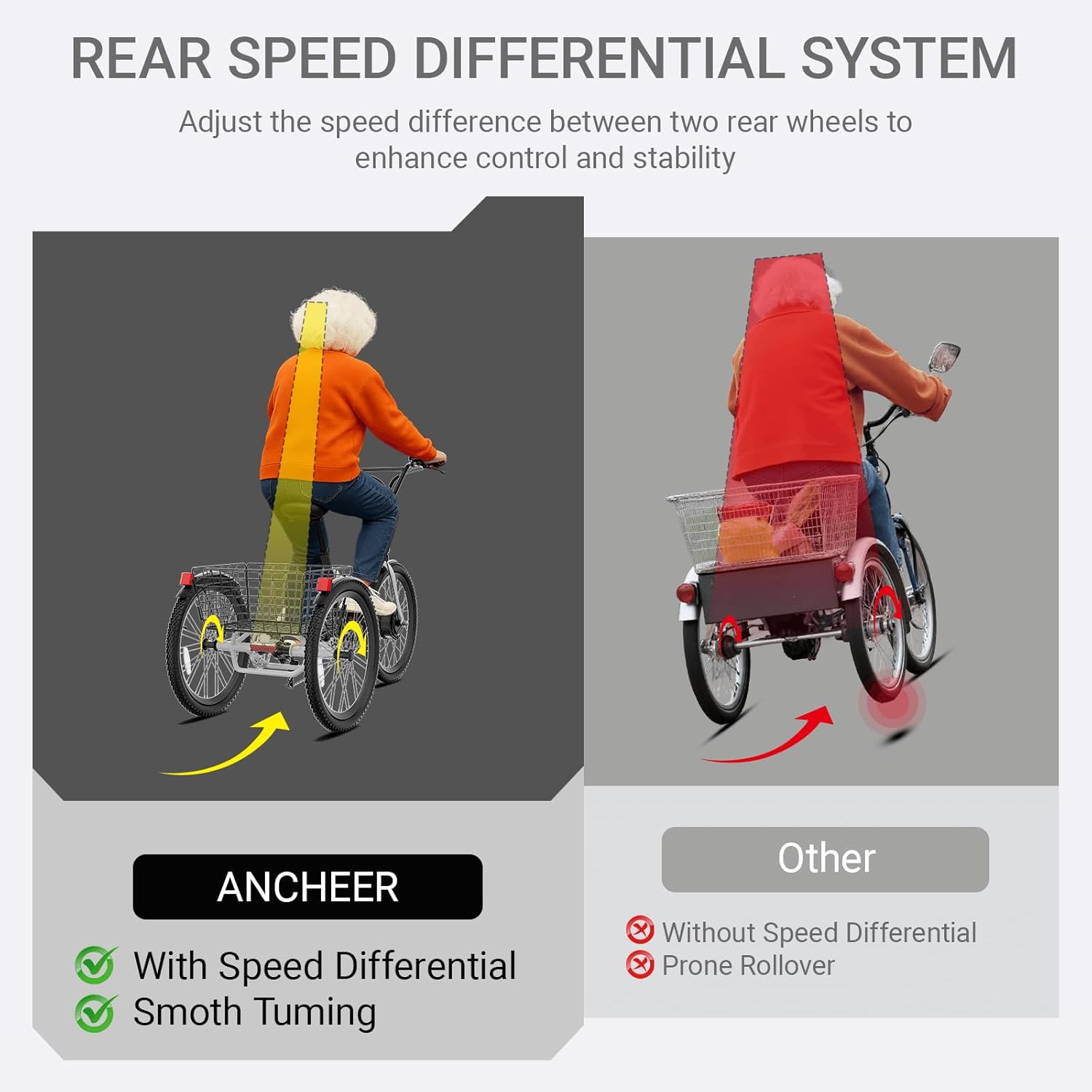
Image: Diagram illustrating the stability benefits of the rear speed differential system compared to a standard tricycle.
4. Manteniment
Regular maintenance ensures the longevity and safe operation of your electric tricycle.
- Cura de la bateria: Charge the battery regularly, even if not in use, to maintain its health. Store the battery in a cool, dry place. The 499Wh battery is IP65 waterproof rated, but avoid submerging it.
- Inspecció de frens: Check brake pads and cables regularly for wear and proper function. Adjust as needed.
- Pressió dels pneumàtics: Mantingueu la pressió recomanada dels pneumàtics per a un rendiment i una seguretat òptims.
- Lubricació de la cadena: Keep the chain clean and lubricated to prevent rust and ensure smooth gear changes.
- Neteja general: Netegeu el tricicle amb un damp drap. Eviteu rentar directament els components elèctrics a alta pressió.
- Comprovació de fixació: Comproveu periòdicament tots els cargols, femelles i tancaments ràpids per assegurar-vos que estiguin ben ajustats.
5. Solució De Problemes
If you encounter issues, refer to the following common problems and solutions. For complex issues, contact ANCHEER customer support.
- Tricycle Does Not Power On:
- Check if the battery is properly installed and charged.
- Ensure the power button is pressed and held correctly. - El motor no ajuda:
- Verify the pedal assist level is set above 0.
- Check battery charge level.
- Ensure all motor connections are secure.
- Look for error codes on the LCD display. - Frens ineficaços:
- Inspect brake pads for wear.
- Check brake cable tension and adjust if necessary.
- Ensure disc rotors are clean and free of oil. - Sorolls inusuals:
- Inspeccioneu la cadena per verificar que estigui lubricada i tensada correctament.
- Check for loose components or rubbing parts.
The digital LCD display can show error codes. Consult the ANCHEER support resources for a detailed list of error codes and their corresponding solutions.
6. Especificacions
| Nom del model | AMAK00045 |
| Marca | ANCHEER |
| Tipus de bicicleta | Tricicle elèctric |
| Franja d'edat | Adult |
| Motor | 350W Brushless (Peak 650W), 45 N·m Torque |
| Bateria | 48V 499Wh Removable Lithium Battery |
| Temps de càrrega | 4-5 hores |
| Velocitat màxima | 15.5 MPH |
| Abast màxim (PAS) | 50-55 milles |
| Mida de la roda | 24 polzades |
| Nombre de velocitats | 7 |
| Estil de fre | Mechanical Disc (Front & Rear with Parking Function) |
| Material del marc | Ferro |
| Tipus de suspensió | Rigid (Dual Shock Absorbers) |
| Max Load Capacity (Seat) | 265 lliures |
| Max Load Capacity (Rear Basket) | 220 lliures |
| Grau impermeable | IP65 |
| Certificació | SGS certified to UL2849 standard |
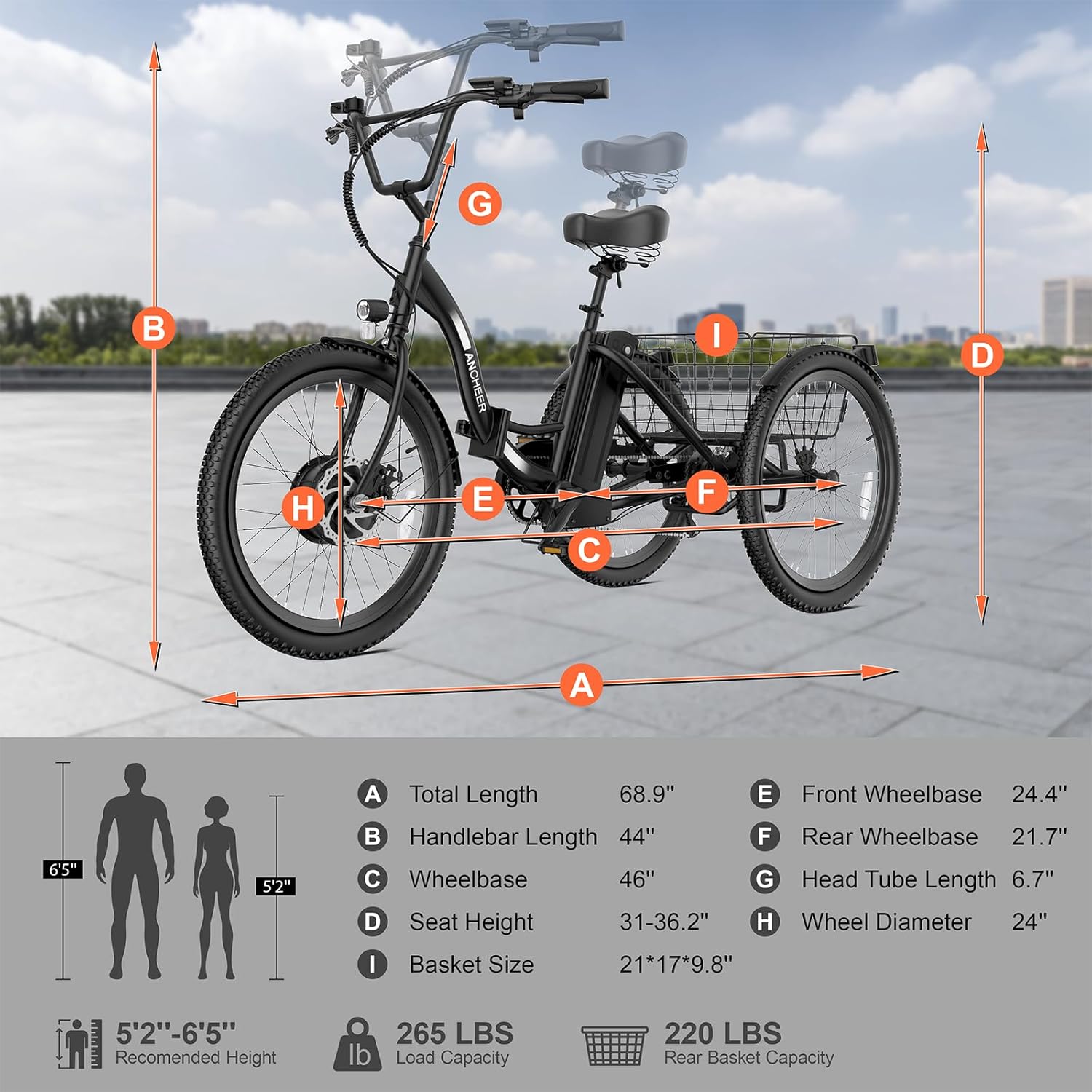
Image: Detailed dimensions and load capacities of the tricycle.
7. Garantia i Suport
ANCHEER provides the following support for your electric tricycle:
- Garantia: 1-year warranty on the motor, battery, and other key components.
- Suport tècnic: Lifetime technical support is available from ANCHEER.
- Certificació: The tricycle is SGS certified to the UL2849 standard, ensuring compliance with safety requirements for electric bicycles.
For warranty claims, technical assistance, or any product-related inquiries, please contact ANCHEER customer support through their official channels or the retailer where the product was purchased.
Visita el ANCHEER Store per obtenir més informació i recursos de suport.