
PHILIPS T7315
Manual d'usuari de la tauleta PHILIPS Android 15 T7315
Model: T7315
1. Introducció
This manual provides essential information for the safe and efficient use of your PHILIPS Android 15 Tablet T7315. Please read this manual thoroughly before operating the device and keep it for future reference.
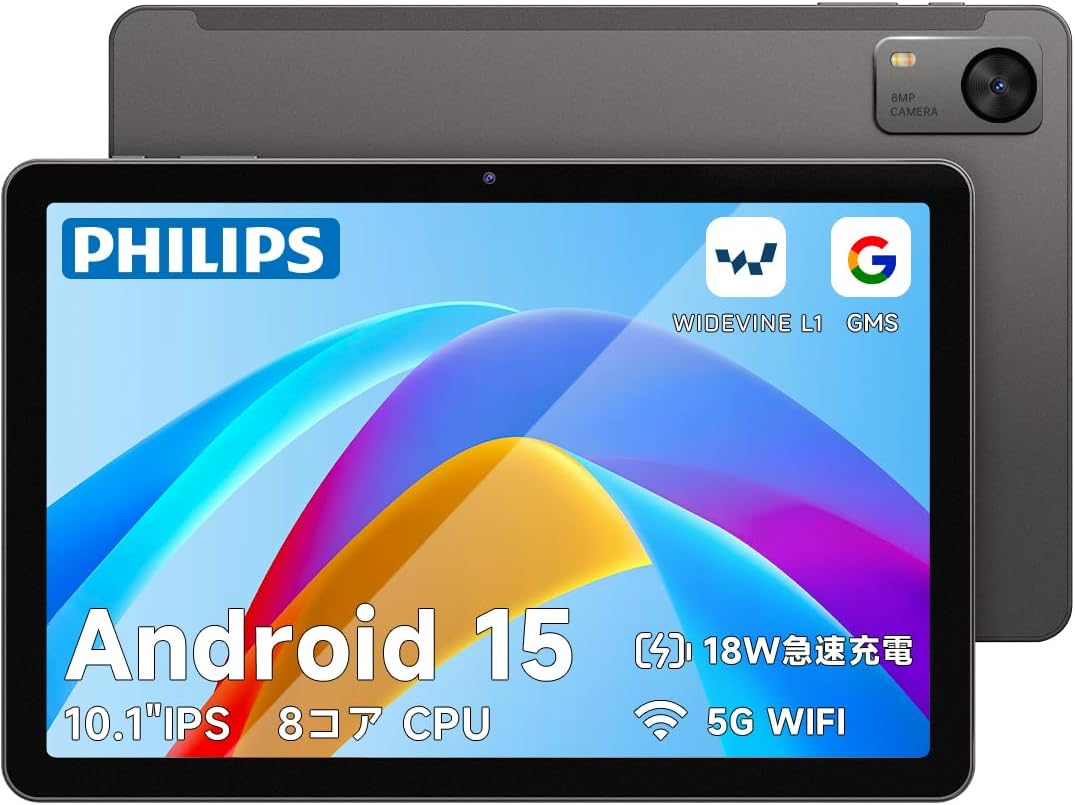
Imatge 1: Davant i darrere view of the PHILIPS Android 15 Tablet T7315.
2. Contingut del paquet
Upon opening the package, ensure all items listed below are present. If any items are missing or damaged, please contact customer support.
- PHILIPS Android 15 Tablet T7315
- Cable USB-Type C
- Adaptador de càrrega (5V/2A)
- Memory Card Slot Pin
- Manual d'instruccions (japonès)

Image 2: The PHILIPS T7315 Tablet package contents, including the tablet, charger, Type-C cable, and instruction manual.
3. Configuració
3.1. Càrrega inicial
Before first use, fully charge your tablet using the provided Type-C cable and charging adapter. The tablet supports PD18W fast charging, though the included adapter is 5V/2A (10W). For faster charging, a compatible 18W charger (sold separately) can be used.
3.2. Encendre/apagar
- Per encendre: Press and hold the power button located on the right side of the tablet until the PHILIPS logo appears.
- Per apagar: Press and hold the power button until the power options appear on the screen, then select "Power Off."
- Per reiniciar: Press and hold the power button until the power options appear on the screen, then select "Restart."
3.3. Inserció d'una targeta MicroSD
Locate the memory card slot on the top edge of the tablet. Use the provided memory card slot pin to open the tray. Insert your MicroSD card (up to 1TB) into the tray and gently push it back into the slot until it clicks into place.
4. Característiques clau
4.1. Visualització i elements visuals
- Pantalla IPS de 10.1 polzades: Enjoy vibrant colors and clear images with a 1280x800 resolution and a 16:10 aspect ratio. The 178-degree wide viewing angle and 330-nit brightness ensure visibility even outdoors.
- Freqüència de refresc de 90 Hz: Experience smoother scrolling, gaming, and video playback with the high 90Hz refresh rate.
- Suport Widevine L1: Stream high-definition content from platforms like Disney+, Amazon Prime Video, and Hulu.
- Mode de cura dels ulls: Reduces blue light emission to minimize eye strain during prolonged use, making it comfortable for reading and online learning.

Image 3: The 10.1-inch IPS display with 90Hz refresh rate and 1280x800 resolution.

Image 4: Eye Care Mode for reduced blue light and comfortable viewing.
4.2. Rendiment
- Sistema operatiu Android 15: The latest Android 15 operating system offers improved battery consumption and up to 30% faster app launch speeds through AI optimization. It also includes enhanced security features.
- Unisoc T615 Octa-core CPU: Equipped with a power-efficient Unisoc T615 processor (2x1.8GHz Cortex-A75 + 6x1.6GHz Cortex-A55), ensuring smooth operation for video editing, YouTube, gaming, online learning, web browsing, and office tasks.

Image 5: The Unisoc T615 Octa-core CPU for efficient performance.
4.3. Memòria i emmagatzematge
- 12 GB de RAM: Features 4GB physical RAM and 8GB virtual RAM for seamless multitasking, allowing multiple applications and games to run smoothly.
- 128GB Internal Storage + 1TB Expandable: Comes with 128GB of built-in storage, expandable up to 1TB via a MicroSD card. This provides ample space for comics, music libraries, videos, photos, and important work or study files.

Image 6: 12GB RAM and 1TB expandable storage capacity.
4.4. Bateria i càrrega
- Bateria de gran capacitat de 6000 mAh: Provides long-lasting power for daily use, outdoor activities, and travel. Enjoy approximately 9-12 hours of video playback, 10-12 hours of web browsing, up to 70 hours of music playback, and about 9 hours of gaming.
- Càrrega ràpida PD18W: Supports 18W fast charging (charger sold separately) for quick power recovery, ensuring you can use the tablet for extended periods after a short charge.

Image 7: 6000mAh battery and 18W fast charging capabilities.
4.5. Cameras and Security
- 8MP Main Camera & 5MP Front Camera: Capture clear photos and videos. The front camera is ideal for video calls and online meetings.
- Reconeixement facial: Unlock your tablet quickly and securely with face recognition, eliminating the need for passwords.

Image 8: Face recognition and dual cameras (8MP rear, 5MP front).
4.6. Connectivitat i navegació
- Bluetooth 5.0: Provides stable and power-efficient connections for accessories like headphones and keyboards.
- Wi-Fi de doble banda (2.4G i 5G): Supports 5GHz (up to 433Mbps) and 2.4GHz Wi-Fi for stable, high-speed communication, ideal for online meetings and 4K video streaming.
- GPS/Beidou/QZSS/GLONASS/Galileo Support: Accurate satellite positioning for reliable navigation during travel or in-car use.
4.7. User-Friendly Features
- Funció de pantalla dividida: Efficiently multitask by displaying two applications simultaneously on the screen.
- Projecció sense fil: Easily connect your tablet to a TV or projector for a larger display without cumbersome cables.
- Espai privat: Protect confidential files with an additional authentication layer.
- Control parental: Manage usage time and content filters for children.
5. Instruccions de funcionament
5.1. Navegació bàsica
The tablet uses a touch-sensitive screen. Tap to select, swipe to scroll, and pinch to zoom. Familiarize yourself with the Android interface for optimal use.
5.2. Using Split Screen
To activate split screen mode, open an application, then swipe up from the bottom of the screen to reveal the recent apps. Drag one app to the top or side of the screen, then select another app to fill the remaining space. You can adjust the division ratio between the two apps.
Video 1: This video demonstrates various functions of a PHILIPS tablet, including split-screen multitasking with Google Maps and YouTube, smooth web browsing, and camera functionality. While the video mentions model T8015, the features shown are generally applicable to the PHILIPS T7315 tablet.
5.3. Projecció sense fil
To project your tablet's screen wirelessly to a compatible TV or projector, navigate to Settings > Connected devices > Connection preferences > Cast. Select your desired display device from the list to begin mirroring.
5.4. Ús de la càmera
Open the Camera app from your home screen or app drawer. Tap the shutter button to take a photo. Switch between front and rear cameras using the camera icon. Tap and hold to record a video.
5.5. Navegació GPS
Utilize pre-installed map applications or download your preferred navigation app from the Google Play Store. The tablet's multi-satellite GPS support ensures accurate positioning for reliable navigation.
6. Manteniment
- Protecció de pantalla: The tablet comes with a pre-applied protective film. For enhanced protection, a stronger glass film (e.g., B0FG7Z433J) can be purchased and applied.
- Neteja: Feu servir un drap suau i sense borrissol per netejar la pantalla i el cos de la tauleta. Eviteu utilitzar productes químics agressius o materials abrasius.
- Cura de la bateria: Per allargar la durada de la bateria, eviteu exposar la tauleta a temperatures extremes.
7. Solució De Problemes
7.1. Power Does Not Turn On
If the tablet does not power on, try the following steps:
- Ensure the tablet is fully charged. Connect it to the charger for at least 30 minutes.
- If still unresponsive, disconnect the charger, leave the tablet untouched for approximately one week (to allow for full discharge), then reconnect the charger and immediately press and hold the power button.
- Si el problema persisteix, poseu-vos en contacte amb l'atenció al client.
7.2. Screen Refresh Rate Update
As of October 14, 2025, the tablet's refresh rate has been upgraded from 60Hz to 90Hz via an OTA update. To ensure your tablet has the latest update:
- Go to "Settings" (システム).
- Select "System" (システム).
- Select "System Update" (システムアップデート).
- Execute the update. (New system: Philips_T7315_2539_V10_JP)
8. Especificacions
| Característica | Especificació |
|---|---|
| Marca | PHILIPS |
| Nom del model | T7315 |
| Sistema operatiu | Android 15 |
| Marca de la CPU | Unisoc T615 Octa-core (1.8 GHz) |
| Mida de la pantalla | 10.1 polzades |
| Resolució | 1280 x 800 píxels |
| Freqüència d'actualització | 90 Hz |
| RAM | 12 GB (4 GB físic + 8 GB virtual) |
| Emmagatzematge | 128 GB (ampliable fins a 1 TB amb MicroSD) |
| Capacitat de la bateria | 6000 mAh |
| Carregant | Type-C, PD18W Fast Charging support |
| Càmera posterior | 8MP |
| Càmera frontal | 5MP |
| Connectivitat | Wi-Fi (802.11a/b/g/n/ac, 2.4G & 5G), Bluetooth 5.0 |
| Navegació | GPS/Beidou/QZSS/GLONASS/Galileo |
| Pes | 470 g |
9. Garantia i Suport
Your PHILIPS T7315 Tablet comes with a 1-year product warranty. PHILIPS offers 24-hour customer support in Japanese to assist with any inquiries or issues.
9.1. Contactar amb l'assistència al client
If you encounter any problems or have questions regarding your product, please contact us through Amazon:
- Go to your Amazon account.
- Navigate to "Order History."
- Select the relevant order for this product.
- Click on "Contact Seller" (出品者に連絡).
We are committed to ensuring customer satisfaction.
Ask a question about this manual
Ask about setup, troubleshooting, compatibility, parts, safety, or missing instructions. Manuals+ will review the question and use this page’s manual context to help answer it.