
1. Introducció
This manual provides detailed instructions for the LG Magic Remote, model MR25JP.AJL. The Magic Remote offers an intuitive way to control your LG Smart TV with motion sensing, voice commands, and a convenient scroll wheel. Please read this manual thoroughly before using the product to ensure proper operation and to maximize your viewexperiència.
2. Producte acabatview
The LG Magic Remote MR25JP.AJL is designed for ease of use and advanced control. Below is an image of the remote control with a description of its key buttons and functions.
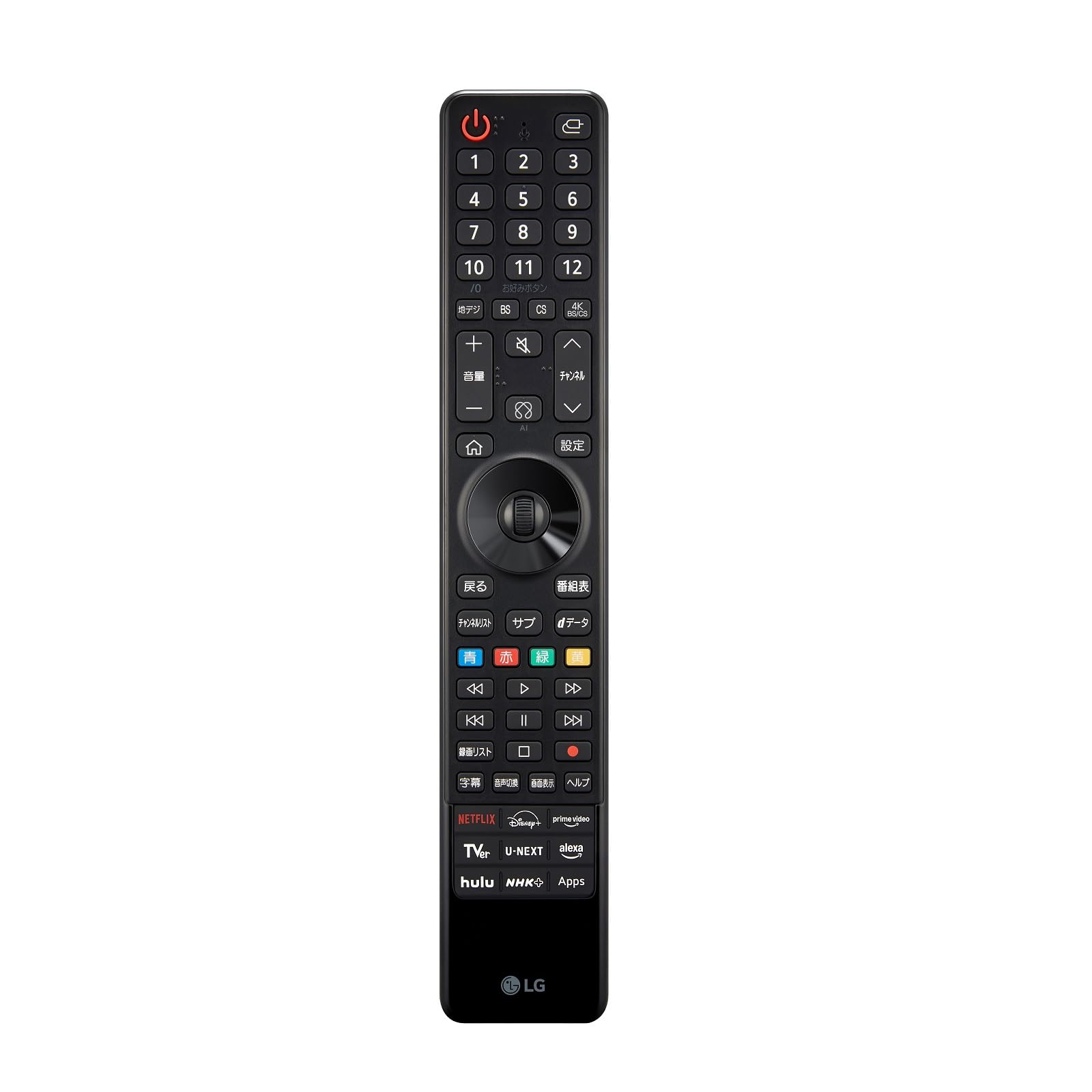
Image: LG Magic Remote MR25JP.AJL, a black remote control with various buttons for TV operation, including a numeric keypad, navigation buttons, and dedicated app buttons.
Funcions del botó:
- Botó d'encendre (U): Encén o apaga el televisor.
- Botó d'entrada/font (⎌): Canvia la font d'entrada.
- Botó del micròfon: Activates voice recognition for commands and searches.
- Teclat numèric (0-12): Enters channel numbers or other numerical inputs.
- Terrestrial Digital (地デジ): Selects terrestrial digital broadcasting.
- BS / CS / 4K BS/CS: Selects satellite broadcasting channels.
- Favorite Button (お好みボタン): Accesses favorite channels or functions.
- Volume Up/Down (+ / -): Ajusta el nivell de volum.
- Botó Silenciar (🔇): Silencia o activa el so.
- Canal amunt/avall (⌃ / ⌄): Changes the TV channel.
- Botó d'inici (⌂): Accesses the Home menu.
- Settings Button (設定): Opens the TV settings menu.
- Back Button (戻る): Torna a la pantalla anterior.
- Program Guide Button (番組表): Mostra la guia electrònica de programes.
- Scroll Wheel / Directional Pad: Navigates menus and selects items. The wheel also allows scrolling.
- Color Buttons (Blue, Red, Green, Yellow): Used for specific functions within certain applications or menus.
- Media Control Buttons (<<, >, >>, |<, ||, >|, Stop, Record): Controls playback of media content (rewind, play, fast forward, previous, pause, next, stop, record).
- Recording List (録画リスト): Accesses recorded content.
- Subtitle (字幕): Toggles subtitles on or off.
- Audio Switch (音声切換): Changes audio tracks or languages.
- Screen Display (画面表示): Adjusts screen display options.
- Help (ヘルプ): Accesses the TV's help menu.
- Quick Access App Buttons (NETFLIX, Disney+, prime video, TVer, U-NEXT, alexa, hulu, NHK+, Apps): Provides direct access to popular streaming services and the TV's app store.
3. Configuració
3.1. Introducció de piles
- Obriu la tapa de la bateria a la part posterior del comandament a distància.
- Insert two AA batteries, ensuring the positive (+) and negative (-) terminals are correctly aligned.
- Tanqueu la tapa de la bateria amb seguretat.
3.2. Pairing the Magic Remote with Your TV
The Magic Remote typically pairs automatically when you turn on the TV and point the remote at it. If the remote does not pair automatically, follow these steps:
- Engega el teu televisor intel·ligent LG.
- Point the Magic Remote at the TV and press the ⌂ Botó (Inici).
- If pairing is successful, a message will appear on the TV screen.
- Si l'emparellament falla, proveu de prémer i mantenir premut el botó ⌂ (Inici) i ⌄ (Back) buttons simultaneously for 5 seconds to unpair, then repeat step 2 to re-pair.
4. Instruccions de funcionament
4.1. Using the Pointer and Scroll Wheel
- Apuntador: Point the remote at the TV screen. A pointer will appear, allowing you to select items by moving your hand. Press the scroll wheel to click.
- Roda de desplaçament: Rotate the wheel to scroll through lists or web pages. Press the wheel to confirm a selection.
4.2. Voice Recognition
- Manteniu premut el botó 🎤 (Microphone) button.
- Speak your command clearly into the remote's microphone.
- Deixa anar el botó quan hagis acabat de parlar.
4.3. Accessing Smart TV Features
- Premeu el botó ⌂ (Home) button to open the Smart TV launcher bar.
- Use the pointer or directional pad to navigate and select apps or functions.
- Use the dedicated app buttons (NETFLIX, Disney+, etc.) for direct access to those services.
5. Característiques
- Control de moviment: Control your TV by simply pointing and clicking, similar to a computer mouse.
- Reconeixement de veu: Use voice commands to search for content, change settings, or control smart home devices (if integrated).
- Roda de desplaçament: Provides quick and easy scrolling through menus and web pàgines.
- Botons d'accés ràpid: Instant access to popular streaming services and the TV's app store.
- Universal Remote Functionality: Can control compatible set-top boxes, Blu-ray players, and soundbars.
6. Solució De Problemes
6.1. El comandament a distància no respon
- Comproveu si les piles estan inserides correctament i tenen prou càrrega. Substituïu-les si cal.
- Assegureu-vos que no hi hagi obstacles entre el comandament a distància i el televisor.
- Proveu de tornar a emparellar el comandament a distància amb el televisor (consulteu la secció 3.2).
6.2. Pointer Not Appearing on Screen
- Sacseja suaument el comandament a distància per activar el punter.
- Ensure the remote is paired correctly.
- If the pointer is still not visible, try resetting the remote by removing and reinserting the batteries.
6.3. Voice Recognition Issues
- Ensure you are holding down the Microphone button while speaking.
- Parla clar i a un volum normal.
- Comproveu la connexió de xarxa del televisor, ja que el reconeixement de veu sovint requereix accés a Internet.
7. Especificacions
| Atribut | Valor |
|---|---|
| Marca | LG |
| Nom del model | MR25JP.AJL |
| Color | Negre |
| Característiques especials | Motion Control, Voice Recognition |
| Dispositius compatibles | LG Smart TVs (2025 models and compatible older models) |
8. Garantia i Suport
For warranty information and technical support, please refer to the documentation included with your LG TV or visit the official LG Electronics website for your region. You can also contact LG customer service directly for assistance with your Magic Remote.
Atenció al client de LG: www.lg.com/support