
1. Producte acabatview
The PAPIFEED Automatic Pet Feeder is designed to provide a convenient and reliable feeding solution for your pets. With its smart app control via Bluetooth, you can easily manage meal schedules, portion sizes, and monitor feeding records from your smartphone. The feeder features a 3.5L capacity, an anti-clogging mechanism, and a dual power supply system to ensure your pet is fed consistently, even during power outages. Its food-grade stainless steel bowl promotes hygiene and is easy to clean.
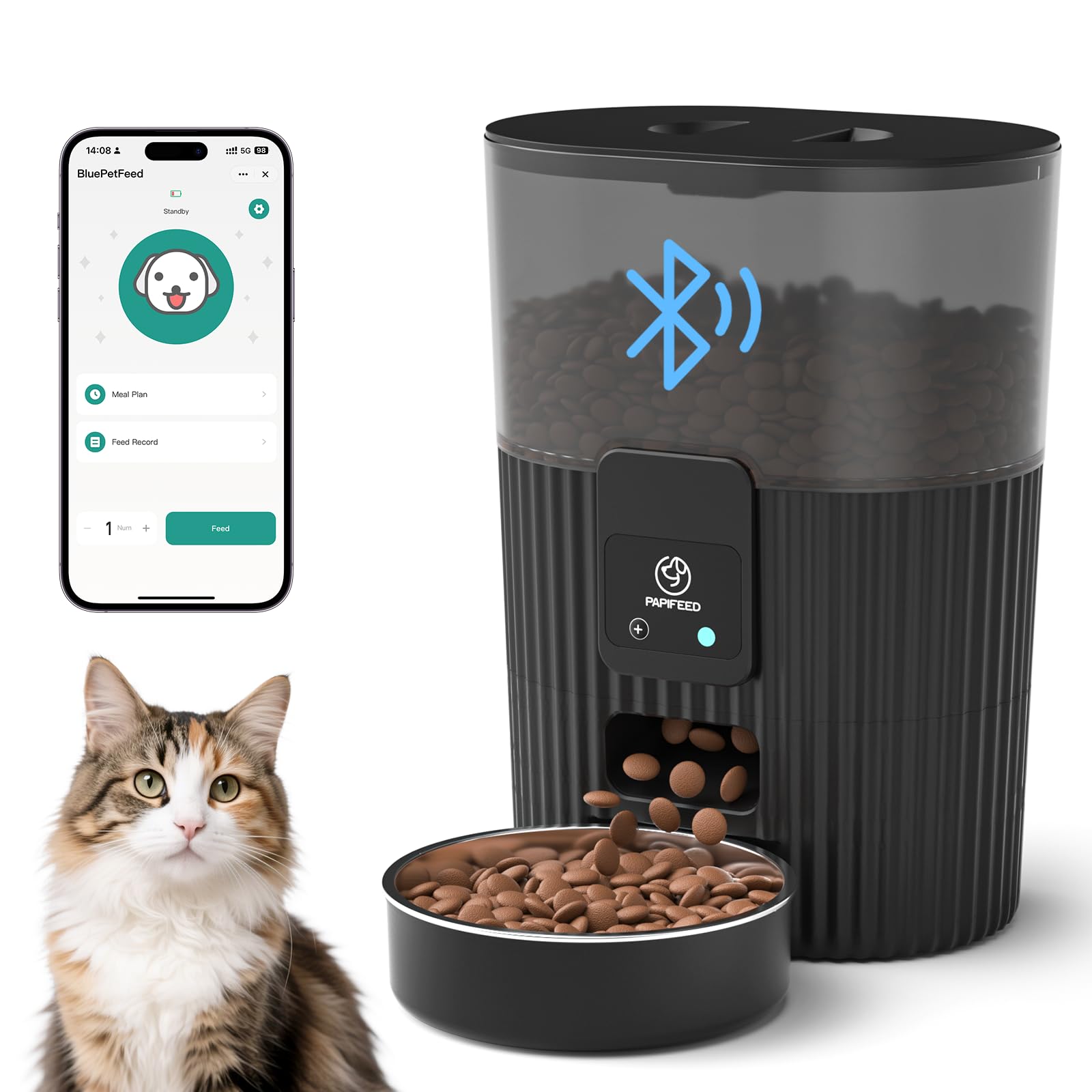
Image: The PAPIFEED Automatic Pet Feeder in use, showing a cat eating from the bowl.
2. Informació important de seguretat
- For indoor use only. Do not expose the feeder to direct sunlight or rain.
- Use only dry pet food with a diameter between 2-15mm. Larger or smaller food may cause blockages.
- Keep the feeder out of reach of children and pets to prevent tampurinària o lesió.
- Ensure the power adapter is securely connected. Use the original adapter to avoid device abnormalities.
- If using battery backup, ensure 4 AA batteries are installed correctly. Batteries are not included.
- Do not immerse the main unit in water. Only the stainless steel bowl and outer bowl are washable.
Image: Illustration of the dual power supply feature, highlighting the use of AA batteries (not included) and a 5V power adapter.
3. Contingut del paquet
Si us plau, comproveu el contingut del paquet per assegurar-vos que hi hagi tots els elements:
- PAPIFEED Automatic Pet Feeder Main Unit
- Bol d'alimentació d'acer inoxidable
- Bol exterior
- Tapa d'alimentació
- Bossa dessecant
- Adaptador d'alimentació DC 5V
- Manual d'instruccions

Image: An exploded diagram showing the main components of the PAPIFEED Automatic Pet Feeder, including the feeder lid, desiccant, storage bin, control panel, stainless steel feeding bowl, and outer bowl.
4. Configuració
4.1 Muntatge
- Place the outer bowl onto the feeder base.
- Insert the stainless steel bowl into the outer bowl.
- Open the feeder lid and insert the desiccant bag into its designated slot to keep food fresh.
- Close the feeder lid securely.
4.2 Connexió d'alimentació
- Connecteu l'adaptador de corrent CC de 5 V a l'alimentador i endolleu-lo a una presa de corrent.
- For backup power, install 4 AA batteries (not included) into the battery compartment at the bottom of the feeder.
4.3 App Installation & Device Pairing
- Download the "Smart Life" app from your smartphone's app store or scan the QR code provided in the manual. You can also find the app at https://smartapp.tuya.com/smartlife.
- Assegureu-vos que els permisos de Bluetooth i d'ubicació estiguin activats al vostre telèfon mòbil.
- After powering on the feeder, long-press the "+" button on the control panel until the blue LED light blinks, indicating network configuration in progress.
- Open the Smart Life app, tap the "+" icon in the upper right corner to add a device. Follow the in-app prompts to complete the pairing process. The blue light will remain constantly on once connected.
4.4 Omplir el dipòsit d'aliments
- Obriu la tapa de l'alimentació.
- Pour dry pet food into the storage bin. Ensure the food level does not exceed the maximum fill line.
- Tanqueu bé la tapa per mantenir la frescor dels aliments.

Image: Visual guide demonstrating the steps to connect the feeder to the mobile app, including turning on Bluetooth and location, scanning a QR code, and pairing the device.
5. Instruccions de funcionament
5.1 Programació dels àpats
Use the Smart Life app to create a customized feeding schedule for your pet. You can set up to 10 meals per day, with each meal dispensing 1 to 6 servings.
- Open the Smart Life app and select your PAPIFEED device.
- Navigate to the "Timer" or "Meal Plan" section.
- Set desired feeding times and select the number of servings for each meal.
- Desa la teva programació. El menjador dispensarà menjar automàticament a les hores programades.
5.2 Alimentació manual
You can manually dispense food at any time using the app or the physical button on the feeder.
- Mitjançant l'aplicació: On the main device screen in the Smart Life app, tap the "Feed" button. You can adjust the number of servings before confirming.
- Via alimentador: Short press the "+" button on the feeder's control panel to manually dispense one serving of food.
5.3 Viewing Feed Records
The app keeps a record of all dispensed meals, allowing you to track your pet's eating habits.
- In the Smart Life app, go to the "Feed Record" section to view un historial d'àpats dispensats.
5.4 Portion Control
The feeder allows precise portion control to help manage your pet's diet and prevent overeating. Each serving is a measured amount, and you can adjust the number of servings per meal through the app.

Image: A smartphone screen displaying the PAPIFEED app interface, illustrating how to customize feeding schedules with specific times and days.
Video: A demonstration of the PAPIFEED Automatic Cat Feeder, showcasing its features and how to use the app for scheduling and manual feeding.
6. Manteniment
6.1 Cleaning the Bowl
The stainless steel bowl and outer bowl are removable and washable.
- Remove the stainless steel bowl and outer bowl from the feeder base.
- Wash them with mild soap and water.
- Esbandiu bé i assequeu completament abans de tornar a muntar.
6.2 Cleaning the Feeder Body
The main unit of the feeder is not waterproof.
- Wipe the exterior of the feeder with a soft, damp tela.
- No utilitzeu productes de neteja abrasius ni submergiu la unitat principal en aigua.
- Ensure the food outlet is clear of any debris.
6.3 Substitució del dessecant
The desiccant bag helps keep the food fresh. Replace it periodically (e.g., every 1-2 months) for optimal performance.
- Obriu la tapa de l'alimentació.
- Remove the old desiccant bag from its slot.
- Insert a new desiccant bag.
- Tanqueu la tapa amb seguretat.

Image: Detachable components of the PAPIFEED Automatic Pet Feeder, including the stainless steel bowl and outer bowl, being washed in a sink, illustrating easy cleaning.
7. Guia de resolució de problemes
Consulteu la taula següent per veure els problemes habituals i les seves solucions:
| Color de l'indicador | Estat del producte | Acció/Solució |
|---|---|---|
| Green Light Stays On | Estat de la xarxa Wi-Fi desconnectada | Ensure Bluetooth is enabled and follow app pairing instructions. |
| Llum blava intermitent | Network Configuration in Progress | Wait for connection or restart pairing process. |
| La llum blava es manté encesa | Network is Linked | Feeder is connected and ready for use. |
| Llum vermella intermitent | Bateria baixa (només amb bateria) | Replace AA batteries or connect to AC power. |
Problemes comuns:
- El dispensador no dispensa menjar: Check for food blockages, ensure the food tank is not empty, and verify power connection.
- Problemes de connectivitat de l'aplicació: Ensure your phone's Bluetooth is on and within range (approx. 10 meters). Restart the app or re-pair the device if necessary.
- Incorrect portion sizes: Verifica la configuració a l'aplicació Smart Life.

Image: Close-up of the feeder's control panel, detailing the LED indicator descriptions for various product statuses.
8. Especificacions del producte
| Característica | Detall |
|---|---|
| Número de model | PPATFD-XRZ |
| Capacitat | 3.5 litres / 15 tasses |
| Dimensions (L x A x A) | 6.36 x 11.8 x 6.36 polzades (16.15 x 29.97 x 16.15 cm) |
| Pes | 2.87 lliures (1.3 quilograms) |
| Material | Stainless Steel (bowl), BPA-Free Plastic (body) |
| Connectivitat | Bluetooth (2.4G) |
| Font d'alimentació | DC 5V Power Adapter, 4x AA Batteries (backup, not included) |
| Màxim d'àpats/dia | 10 Menjars |
| Servings/Meal | 1-6 porcions |
| Espècie objectiu | Gat i gos |

Image: The PAPIFEED Automatic Pet Feeder with its compact dimensions (height, width, depth) labeled for reference.
9. Garantia i atenció al client
9.1 Informació de la garantia
The PAPIFEED Automatic Pet Feeder comes with a 1-year manufacturer's warranty from the date of purchase. This warranty covers defects in materials and workmanship under normal use. It does not cover damage caused by misuse, accident, unauthorized modification, or improper installation.
9.2 Atenció al client
If you encounter any issues or have questions regarding your PAPIFEED Automatic Pet Feeder, please refer to the troubleshooting section of this manual or contact PAPIFEED customer support. Contact details can typically be found on the product packaging, the official PAPIFEED website, or within the Smart Life application.