
ANYSECU W999
ANYSECU W999 POC Radio User Manual
Model: W999
1. Introducció
Welcome to the user manual for the ANYSECU W999 POC Radio. This device is a rugged smart phone designed for demanding environments, combining the functionality of an Android 13 smartphone with Push-to-Talk (PTT) radio capabilities. It is built to be durable, featuring an IP68 waterproof rating and shock-resistant construction.
This manual provides essential information on setting up, operating, and maintaining your W999 device to ensure optimal performance and longevity.
2. Contingut del paquet
Upon unboxing your ANYSECU W999, please verify that all the following items are included:
- ANYSECU W999 Radio Body
- Antena
- Bateria
- Cable d'alimentació
- Adaptador
- Clip
- Manual d'usuari

Figure 2.1: Included items in the ANYSECU W999 retail package.
3. Característiques del producte
The ANYSECU W999 is equipped with advanced features designed for robust performance and versatile communication:
- Disseny robust: IP68-rated waterproof smartphone built for durability with reinforced corners and shock-resistant construction for demanding environments.
- Latest Android: Runs on Android 13 operating system, providing access to the newest features, enhanced privacy controls, and improved performance.
- Connectivitat: 4G network compatibility ensures reliable high-speed data connection, while NFC support enables convenient contactless payments and quick device pairing.
- Preparat a l'aire lliure: Large display with clear visibility and responsive touch, perfect for outdoor use in various weather conditions.
- POC Radio: Works seamlessly with ZELLO and REAL PTT platforms for Push-to-Talk communication.

Figure 3.1: Front, side, and rear views of the ANYSECU W999 device.

Figure 3.2: Key features of the W999 including 4G, Android 13, IP68, and NFC.
4. Guia de configuració
4.1. Instal·lació de la bateria
- Localitzeu la tapa del compartiment de la bateria a la part posterior del dispositiu.
- Traieu la coberta amb cura.
- Insert the provided 5000mAh battery into the compartment, ensuring the contacts align correctly.
- Replace the battery compartment cover, pressing firmly until it clicks into place.
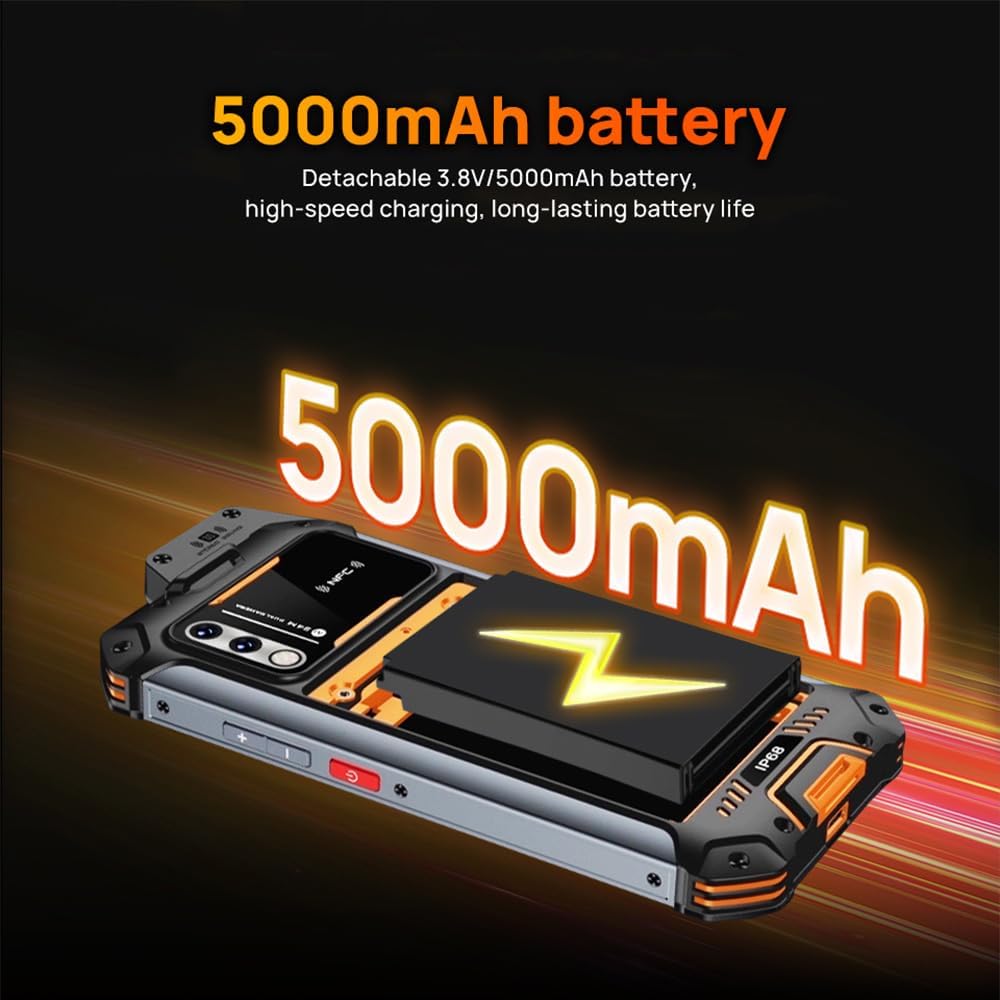
Figure 4.1: Battery compartment and 5000mAh battery.
4.2. Instal·lació de la targeta SIM i la targeta SD
- Localitza la safata de la targeta SIM al lateral del dispositiu.
- Feu servir l'eina d'expulsió de la SIM proporcionada (o un petit clip) per obrir la safata.
- Col·loqueu la targeta (o targetes) nano-SIM i/o la targeta microSD a les ranures designades de la safata. Assegureu-vos que l'orientació sigui correcta.
- Empenyeu suaument la safata cap enrere dins del dispositiu fins que quedi alineada amb el cos.

Figure 4.2: SIM and SD card tray.
4.3. Càrrega inicial
Before first use, fully charge the device. Connect the power cable to the device's charging port and the adapter to a power outlet. The charging indicator will show the charging status.
5. Instruccions de funcionament
5.1. Encendre/apagar
- Per encendre: Press and hold the Power button (located on the side) until the ANYSECU logo appears.
- Per apagar: Mantingueu premut el botó d'engegada fins que aparegui el menú d'opcions d'engegada i, a continuació, seleccioneu "Apagar".
5.2. Navegació bàsica
The W999 operates on Android 13. Navigate using the touch screen: swipe, tap, and pinch-to-zoom. Use the on-screen navigation buttons (Home, Back, Recent Apps) at the bottom of the display.

Figure 5.1: Device in hand, demonstrating screen size and usability.
5.3. Funcionalitat Push-to-Talk (PTT).
The W999 is designed for Push-to-Talk (PTT) communication, compatible with platforms like Zello and Real PTT. Ensure the respective application is installed and configured.
- Botó PTT: Locate the dedicated PTT button on the side of the device.
- Utilitzant PTT: Open your PTT application (e.g., Zello). Select your desired channel or contact. Press and hold the PTT button to transmit your voice. Release the button to listen.
5.4. Funcionalitat NFC
The W999 supports Near Field Communication (NFC) for quick pairing with other devices or contactless payments.
- Activating NFC: Vés a Configuració > Dispositius connectats > Preferències de connexió > NFC and ensure it is toggled on.
- Utilitzant NFC: To make a payment or pair with a device, hold the back of your W999 near the NFC reader or compatible device. Follow on-screen prompts.

Figure 5.2: NFC functionality for convenient payments and pairing.

Figura 5.3: posterior view highlighting the NFC area.
6. Manteniment i cura
To ensure the longevity and optimal performance of your ANYSECU W999, follow these maintenance guidelines:
- Neteja: Use a soft, lint-free cloth to clean the screen and body. For stubborn dirt, slightly dampRenta el drap amb aigua. Evita productes químics agressius o materials abrasius.
- Resistència a l'aigua (IP68): The device is IP68 rated, meaning it is protected against dust ingress and can withstand immersion in water up to 1.5 meters for up to 30 minutes. Ensure all port covers are securely closed before exposure to water. Do not intentionally submerge the device. If the device gets wet, dry it thoroughly before charging.
- Temperatura: Avoid exposing the device to extreme temperatures (hot or cold) as this can affect battery life and internal components.
- Emmagatzematge: Quan no l'utilitzeu durant períodes prolongats, guardeu el dispositiu en un lloc fresc i sec.
7. Solució De Problemes
This section addresses common issues you might encounter with your ANYSECU W999.
| Problema | Causa possible | Solució |
|---|---|---|
| El dispositiu no s'encén. | Bateria baixa; bloqueig del programari. | Carregueu el dispositiu durant almenys 30 minuts. Feu un reinici forçat mantenint premut el botó d'engegada durant 10-15 segons. |
| Senyal de xarxa pobre. | Out of network coverage; SIM card issue. | Move to an area with better coverage. Reinsert the SIM card. Contact your network provider. |
| PTT function not working. | App not configured; no internet connection. | Ensure Zello/Real PTT app is installed and logged in. Check Wi-Fi or mobile data connection. |
| La bateria s'esgota ràpidament. | Background apps; high screen brightness. | Close unused apps. Reduce screen brightness. Disable unnecessary features like GPS, Bluetooth, Wi-Fi when not in use. |
8. Especificacions
Detailed technical specifications for the ANYSECU W999 POC Radio:
| Característica | Especificació |
|---|---|
| Número de model | W999 |
| Sistema operatiu | Android 13.0 |
| Mida instal·lada de la memòria RAM | 8 GB |
| Característiques especials | Long Range, NFC Support, IP68 Waterproof |
| Característiques de visualització | Wireless, 6.3 inch Touch Screen |
| Bandes de xarxa | 2G GSM, 3G WCDMA, 4G FDD-LTE, TDD-LTE (specific bands listed in product description) |
| WiFi | IEEE 802.11 a/b/g/n/ac, 2.4GHz/5GHz dual band |
| Bluetooth | V5.2 |
| GNSS | GPS/GLONASS/Beidou/Galileo |
| Capacitat de la bateria | 5000mAh (Detachable 3.8V) |
| Dimensions | 9.84 x 6.69 x 2.36 polzades (dimensions del paquet) |
9. Garantia i Suport
ANYSECU products are manufactured to high quality standards. For information regarding warranty coverage, please refer to the warranty card included with your product or visit the official ANYSECU weblloc.
For technical support, troubleshooting assistance beyond this manual, or service inquiries, please contact ANYSECU customer support through their official channels. Keep your purchase receipt and product serial number handy when contacting support.
Ask a question about this manual
Ask about setup, troubleshooting, compatibility, parts, safety, or missing instructions. Manuals+ will review the question and use this page’s manual context to help answer it.