
Introducció
Thank you for choosing the Cleyver DECT Office Mono Headset ODHW20V2. This manual provides detailed instructions for the proper setup, operation, and maintenance of your new headset. Please read this manual carefully before using the product to ensure optimal performance and longevity.
Contingut del paquet
Si us plau, comproveu el contingut del paquet per assegurar-vos que hi hagi tots els elements:
- Cleyver DECT Office Mono Headset
- Estació base DECT
- Adaptador d'alimentació per a l'estació base
- Cable de connexió telefònica (RJ11)
- USB Connection Cable (Type-C to Type-A)
- Manual d'usuari (aquest document)
Producte acabatview
Components dels auriculars
The Cleyver DECT Office Mono Headset is designed for comfortable, single-ear communication. Key components include:
- Diadema ajustable: Per a un ajustament segur i còmode.
- Coixí per a les orelles: Soft padding for extended wear.
- Boom del micròfon: Flexible arm with an anti-snore microphone for clear voice transmission.
- Controls de volum: Buttons on the earcup for adjusting listening volume.
- Botó de silenci: To temporarily disable the microphone.
- Botó de control de trucades: Per contestar i finalitzar trucades.
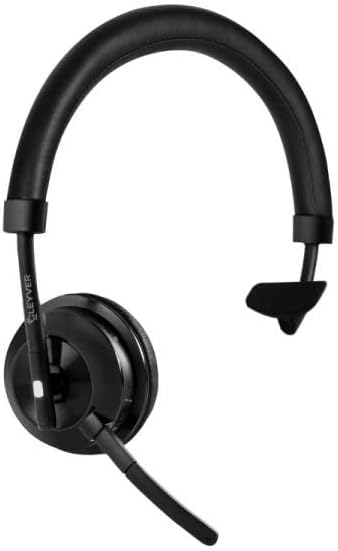
Image 1: Cleyver DECT Office Mono Headset. This image shows the mono headset with an adjustable headband, ear cushion, and a flexible microphone boom.
Components de l'estació base
The DECT Base Station serves as the charging dock and connection hub for your headset.
- Base de càrrega: On reposen els auriculars per carregar-los.
- Port d'alimentació: Per connectar l'adaptador de corrent.
- Telephone Port (RJ11): For connecting to a DECT telephone.
- USB Port (Type-C): For connecting to a computer for softphone applications (if supported).
- Port AUX: Additional connection option (if available).
- Botó de sincronització: To initiate pairing with the headset.
- Indicadors d'estat: LEDs to show power, charging, and connection status.
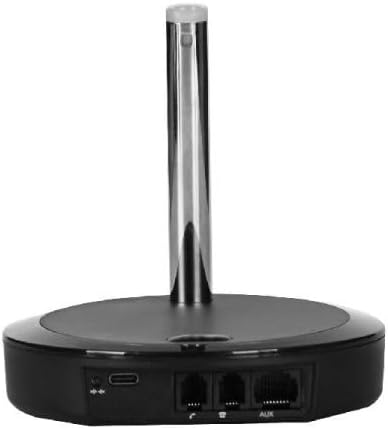
Imatge 2: posterior view of the Cleyver DECT Base Station. This image highlights the various connection ports including USB-C, telephone (RJ11), and AUX ports.
Configuració
1. Connexió de l'estació base
- Connectar l'alimentació: Plug the power adapter into the base station's power port and then into a wall outlet. The power indicator LED on the base station should illuminate.
- Connect to Telephone:
- For DECT Phones: Connect one end of the telephone connection cable (RJ11) to the "TEL" port on the base station and the other end to the headset port on your DECT telephone.
- For USB Connection (Softphone): Connect the USB-C end of the USB cable to the base station's USB port and the USB-A end to an available USB port on your computer.
2. Càrrega dels auriculars
Place the Cleyver DECT Office Mono Headset into the charging cradle on the base station. Ensure it is seated correctly. The charging indicator LED on the base station should light up, indicating that the headset is charging. For first use, charge the headset for at least 2 hours.
3. Pairing the Headset with the Base Station
The headset and base station are usually pre-paired from the factory. If pairing is lost or you are setting up for the first time and the headset does not connect:
- Assegureu-vos que els auriculars estiguin carregats i encesos.
- Press and hold the pairing button on the base station for approximately 3 seconds until the pairing indicator LED starts flashing.
- On the headset, press and hold the call control button for approximately 3 seconds until the headset's indicator light flashes rapidly.
- Once paired, the indicator lights on both the headset and base station will become solid, or flash slowly, indicating a successful connection.
Instruccions de funcionament
Portant els auriculars
Adjust the headband for a comfortable fit. Position the microphone boom approximately 2 cm (0.8 inches) from the corner of your mouth for optimal voice pickup. The microphone boom is flexible and can be adjusted.
Encès/Apagat
- Per encendre: Press and hold the Call Control button on the headset for approximately 2 seconds.
- Per apagar: Press and hold the Call Control button on the headset for approximately 3 seconds.
Fer i rebre trucades
- Respondre una trucada: When an incoming call rings, press the Call Control button on the headset.
- Finalització d'una trucada: During a call, press the Call Control button on the headset.
- Fer una trucada: Dial the number on your connected DECT phone or softphone. The call will automatically route to the headset once connected.
Control de volum
Use the Volume Up (+) and Volume Down (-) buttons located on the earcup of the headset to adjust the listening volume during a call or for media playback (if connected to a computer).
Funció de silenci
Press the Mute button on the headset to temporarily disable the microphone. Press it again to unmute. A tone or indicator light on the headset may confirm the mute status.
Manteniment
- Neteja: Use a soft, dry cloth to clean the headset and base station. Do not use abrasive cleaners or solvents. Avoid getting moisture into any openings.
- Emmagatzematge: When not in use, store the headset on its base station or in a cool, dry place away from direct sunlight and extreme temperatures.
- Cura de la bateria: For optimal battery life, avoid fully discharging the headset frequently. Charge it regularly, especially if it will be stored for an extended period.
Resolució de problemes
| Problema | Possible solució |
|---|---|
| No hi ha so dels auriculars. |
|
| El micròfon no funciona. |
|
| Els auriculars no es carreguen. |
|
| Cannot pair headset. |
|
Especificacions
- Marca: Cleyver
- Número de model: ODHW20V2
- Connectivitat: DECT, Wired (RJ11, USB-C)
- Tipus d'auriculars: Mono, Over-the-head
- Micròfon: Anti-snore, Noise-cancelling
- Compatibilitat: DECT Phones, PCs (via USB for softphones)
- ASIN: B0FGJLNGRM
Garantia i Suport
Cleyver products are designed for reliability and performance. This product is covered by a standard manufacturer's warranty against defects in materials and workmanship. For specific warranty terms and conditions, please refer to the warranty card included with your purchase or visit the official Cleyver weblloc.
For technical support, troubleshooting assistance, or to inquire about replacement parts, please contact Cleyver customer service through their official website or the contact information provided in your product packaging. Please have your model number (ODHW20V2) and proof of purchase ready when contacting support.