
TopMade MF108
TopMade MF108 MagSafe Wallet with Apple Find My User Manual
Model: MF108 | Brand: TopMade
Introducció
Thank you for choosing the TopMade MF108 MagSafe Wallet with Apple Find My integration. This wallet is designed to securely hold your essential cards and cash while providing advanced tracking capabilities through Apple's Find My network. It features strong magnetic attachment, RFID blocking, and convenient wireless charging.
Please read this manual carefully to ensure proper use and to fully utilize all features of your new wallet.
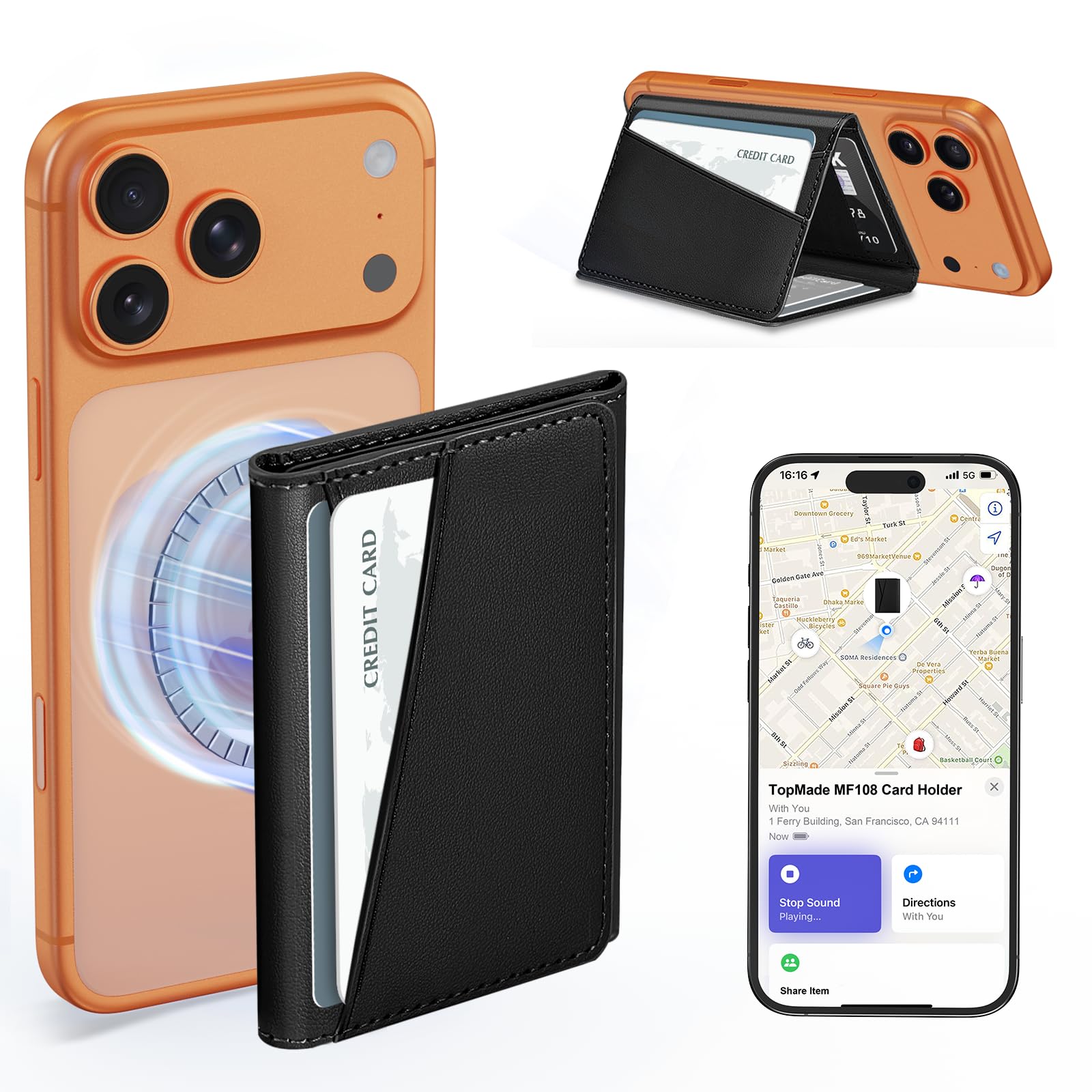
Image: The TopMade MF108 MagSafe Wallet, showcasing el seu disseny elegant.
Contingut del paquet
- TopMade MagSafe Wallet with Find My
- Self-adhesive Metal Ring (for non-MagSafe cases)
- Manual d'usuari
Configuració
1. Attaching to Your iPhone
The TopMade MagSafe Wallet is designed for secure attachment to MagSafe-compatible iPhones (iPhone 12 series and later) or MagSafe-compatible cases. Simply align the wallet with the back of your iPhone or MagSafe case until it snaps into place magnetically.

Image: The wallet magnetically attaching to the back of an iPhone, illustrating the strong magnetic connection.
For Non-MagSafe Cases:
If you are using a non-MagSafe case, use the included self-adhesive metal ring. Attach the ring to the back of your phone case to enable magnetic compatibility with the wallet.

Image: Diagram illustrating compatibility with caseless iPhones, MagSafe cases, and non-magnetic cases using the adhesive ring.
2. Pairing with Apple Find My
The wallet integrates directly with Apple's Find My network. Follow these steps to pair your wallet:
- Ensure Two-Factor Authentication is enabled on your iPhone.
- Press the power button on the wallet once to turn it on.
- Turn on the "Find My" app and Bluetooth on your iPhone.
- In the Find My app, navigate to Elements > Add New Item > Un altre element compatible > Connecta't.

Image: Visual guide showing the 4 steps to pair the TopMade MagSafe Wallet with the Apple Find My application.
Note: Android devices are not supported for Find My functionality.
Instruccions de funcionament
1. Using Apple Find My Features
- Real-time Location: View the wallet's last known location on a map within the Find My app.
- Reproduir so: If the wallet is nearby (within 50m Bluetooth range), use the Find My app to play a loud 100dB sound to help locate it.
- Notificacions de "Observació": Enable this feature in the Find My app to receive alerts if you leave your wallet behind.
- Mode perdut: Mark your wallet as lost in the Find My app. If found by someone, they can view your contact information.
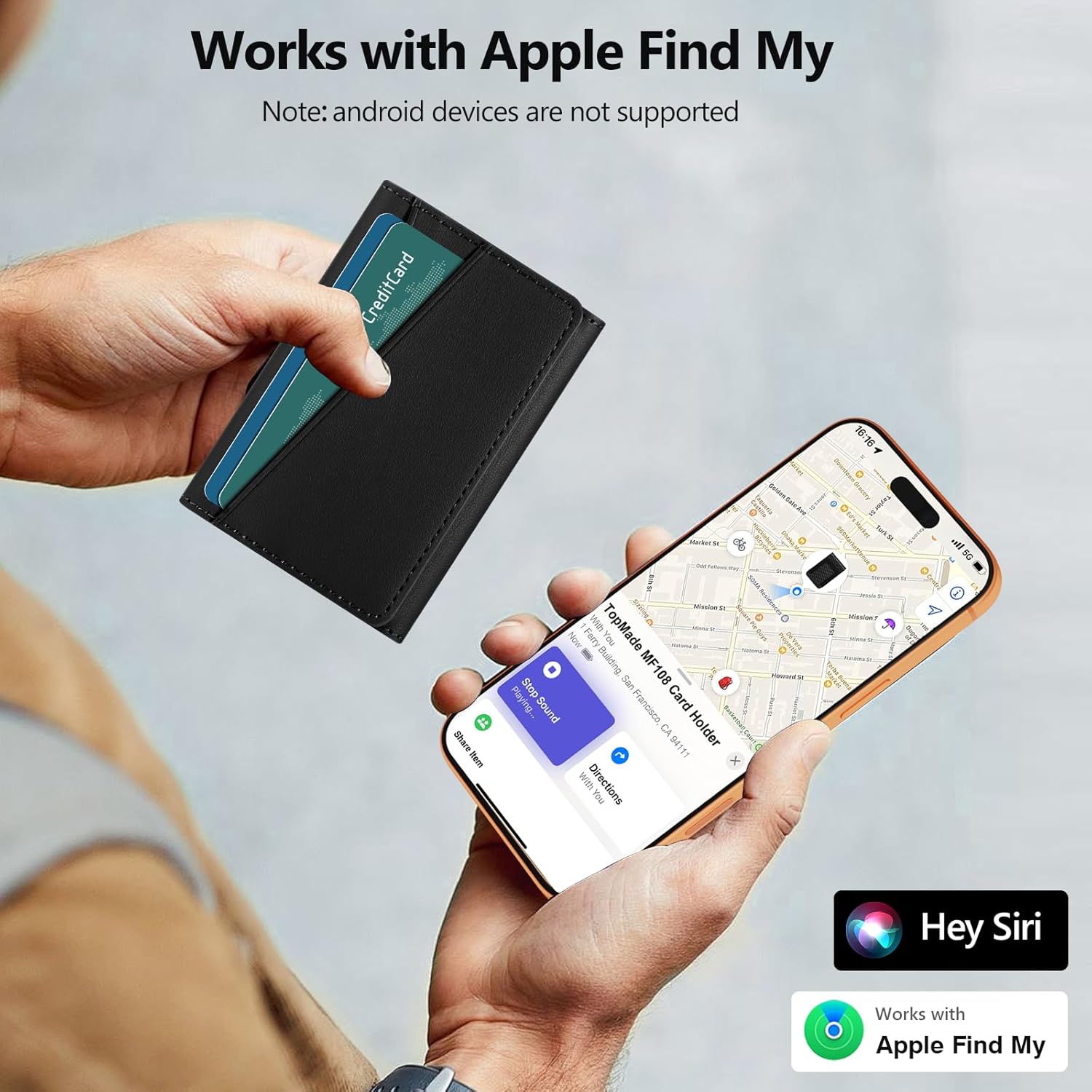
Image: An iPhone screen showing the Find My app interface with the wallet's location on a map and options to play a sound or get directions.

Image: An iPhone displaying a "Left Behind" notification for the wallet, and an illustration of the wallet emitting a sound to be found within a room.
2. Inserting and Accessing Cards
The wallet features 7 individual card slots, capable of holding 1-7 cards and some folded cash. Cards can be inserted into the designated slots. The design allows for quick and easy access to your cards.

Imatge: Una explosió view of the wallet highlighting its 7 card slots and a compartment for folded cash.
3. Using as a Phone Stand
The trifold design allows the wallet to function as a phone stand, supporting your iPhone in both landscape and portrait orientations for hands-free viewing.

Image: An iPhone with the wallet attached, demonstrating its use as a stand for landscape, portrait, and video call viewangles d'ajust.
Característiques
- Apple Find My Integration: Full Apple-Certified Find My functionality, including real-time location, sound alerts (100dB), Left Behind notifications, and Lost Mode. No AirTag requerit.
- Forta fixació magnètica: Equipped with over 20 powerful magnets, providing up to 4200Gs of magnetic force, 5 times stronger than standard magnetic wallets.
- High Card Capacity: Designed to hold up to 7 cards and some cash for daily essentials.
- RFID/NFC Blocking: Advanced RFID shielding technology protects your credit cards from unauthorized scanning and demagnetization.
- Suport de càrrega sense fil: The wallet supports wireless charging for its internal tracker battery. It lasts up to 5 months on a single charge. Note: This wallet does not act as a power bank for your phone.
Charging the Wallet
The TopMade MF108 wallet features an internal battery for its Find My functionality. To charge, place the wallet on a compatible wireless charger. An orange light indicates charging, and a green light indicates a full charge. No special charging cable is required.

Image: The wallet placed on a wireless charging pad, showing the charging indicator light.
Compatibilitat
This wallet is compatible with:
- iPhone 12 Series, 13 Series, 14 Series, 15 Series, 16 Series, 17 Series (Pro Max, Pro, Air, Plus, standard models).
- Official MagSafe cases and other MagSafe-compatible phone cases.
- Non-magnetic cases when used with the included self-adhesive metal ring.
Nota important:
- Not compatible with iPhone 13 mini or iPhone 12 mini.
- Not compatible with Android phones.
Manteniment
To clean your TopMade MagSafe Wallet, use a wet wipe. Gently wipe the surface to remove dirt or smudges. Avoid harsh chemicals or abrasive materials.
Resolució de problemes
| Problema | Possible solució |
|---|---|
| Wallet not attaching securely to iPhone. | Ensure your iPhone or case is MagSafe compatible. If using a non-MagSafe case, apply the included adhesive metal ring correctly. Clean the surfaces of both the wallet and phone/case. |
| Find My functionality not working. |
|
| Cards are difficult to insert or remove. | The wallet is designed for up to 7 cards. Overfilling may cause difficulty. The material may soften slightly with use. |
| La càrrega sense fil no funciona. | Ensure the wallet is correctly placed on a compatible wireless charger. Check the charging indicator light. Ensure the wireless charger is powered on. |
Especificacions
| Característica | Detall |
|---|---|
| Marca | TopMade |
| Nom del model | MF108 |
| Color | Negre |
| Material | Carbon Fiber (Faux Leather lining) |
| Força magnètica | Up to 4200Gs |
| Capacitat de la targeta | Max 7 cards |
| Find My Range | Bluetooth range up to 50m (160ft) |
| Potència de l'alarma | 100 dB |
| Durada de la bateria | Fins a 5 mesos amb una única càrrega |
| Carregant | Compatible amb càrrega sense fil |
| Dimensions (L x A x A) | 3.9 x 3 x 0.47 polzades (10 x 7.7 x 1.2 cm) |
| Característiques especials | Apple Find My, RFID Blocking, Anti-demagnetization, Tri-fold, Phone Stand, Rechargeable |
| Cura del producte | Wet Wipe Clean |
Vídeos oficials de productes
TopMade MF108 MagSafe Wallet Features Overview
Vídeo: Un overview of the TopMade MF108 MagSafe Wallet, demonstrating its features including Find My integration and card capacity.
TopMade MagSafe Wallet Magnetic Strength and Card Capacity
Video: A demonstration of the strong magnetic attachment and the card-holding capabilities of the TopMade MagSafe Wallet.
Garantia i Suport
For warranty information or technical support, please refer to the product packaging or contact TopMade customer service directly. Contact details can typically be found on the manufacturer's official weblloc web o a través de la vostra plataforma de compra.
Si us plau, conserveu el comprovant de compra per a qualsevol reclamació de garantia.
Ask a question about this manual
Ask about setup, troubleshooting, compatibility, parts, safety, or missing instructions. Manuals+ will review the question and use this page’s manual context to help answer it.