
1. Producte acabatview
This JUDAOLE OEM-quality remote control serves as a direct replacement for your original Samsung TV remote. It is designed for seamless compatibility and immediate use with Samsung Q80, Q7F, Q7DR, and Q7C series televisions, providing full functionality without the need for complex programming.
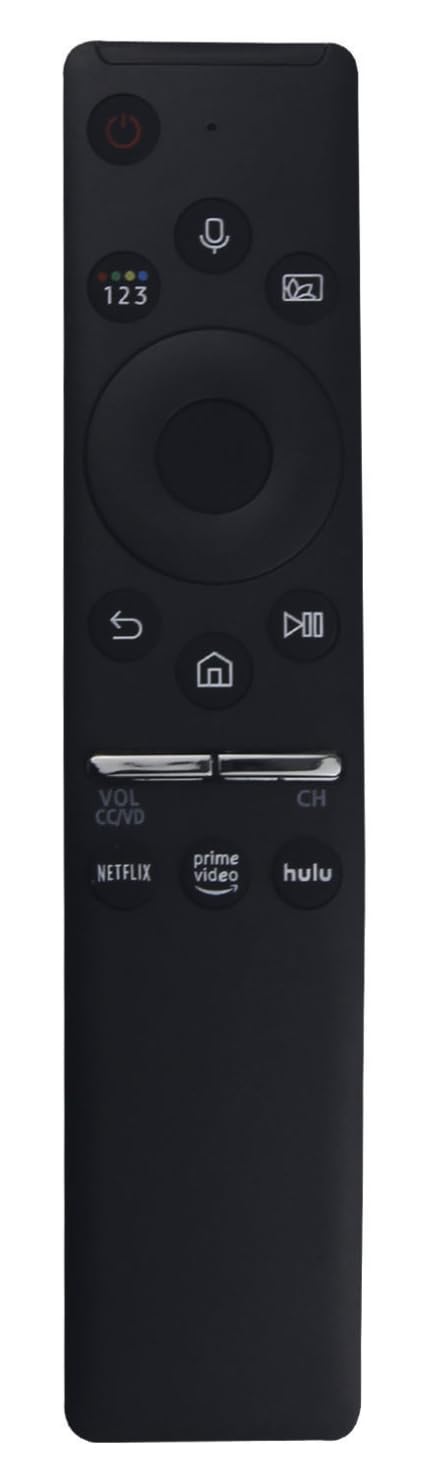
Image 1.1: The JUDAOLE remote control, showing its ergonomic design and button layout.
Característiques principals:
- Alta compatibilitat: Engineered for Samsung Q80, Q7F, Q7DR, Q7C series TVs.
- Plug and Play: No programming or setup required; ready for use after battery insertion.
- Construcció duradora: Constructed from premium ABS material for longevity and a comfortable grip.
- Funcionalitat completa: Access to all standard TV functions, including power, volume, channel, input, and menu navigation.
- Lleuger i ergonòmic: Designed for comfortable daily use with an intuitive button layout.
2. Configuració i instal·lació de la bateria
This remote control is designed for immediate use. No complex pairing or programming steps are required. Simply install the batteries, and the remote will be ready to operate your compatible Samsung TV.
Passos d'instal·lació de la bateria:
- Localitzeu la tapa del compartiment de la bateria a la part posterior del comandament a distància.
- Feu lliscar la tapa cap avall o premeu el pestell (si n'hi ha) per obrir el compartiment.
- Introduïu dues (2) piles AAA (no incloses), assegurant-vos que els terminals positiu (+) i negatiu (-) s'alineïn correctament amb les marques de l'interior del compartiment.
- Torneu a col·locar la tapa del compartiment de la bateria fent-la lliscar fins que faci clic de manera segura.
Nota: Always use new batteries of the same type. Do not mix old and new batteries, or different types of batteries, as this can affect performance and potentially damage the remote.
3. Instruccions de funcionament
Once batteries are installed, point the remote control directly at your Samsung TV. The remote provides access to all standard functions found on your original remote.
Funcions bàsiques:
- Botó d'encesa: Encén o apaga el televisor.
- Pujar/baixar el volum: Ajusta el volum d'àudio.
- Canal amunt/avall: Canvia els canals de televisió.
- Botó de silenci: Silencia l'àudio del televisor.
- Botó d'entrada/font: Passa ciclísticament per les fonts d'entrada disponibles (HDMI, AV, etc.).
- Navigation Pad (Up/Down/Left/Right) and Enter Button: S'utilitza per navegar pels menús i confirmar seleccions.
- Botó de menú: Obre el menú principal del televisor.
- Botó Enrere/Retorn: Torna a la pantalla o menú anterior.
- Smart Hub/Botó d'inici: Accesses the TV's smart features or home screen.
Refer to your Samsung TV's user manual for specific functions and menu navigation details, as button labels and functions may vary slightly depending on your TV model.
4. Manteniment i cura
To ensure the longevity and optimal performance of your JUDAOLE remote control, follow these maintenance guidelines:
- Neteja: Wipe the remote control regularly with a soft, dry cloth. For stubborn dirt, lightly dampNetegeu el drap amb aigua o un netejador suau i no abrasiu. Eviteu utilitzar productes químics agressius o materials abrasius.
- Substitució de la bateria: Canvieu les piles quan la resposta del comandament a distància es torni lenta o deixi de funcionar. Traieu les piles si no fareu servir el comandament a distància durant un període prolongat per evitar fuites.
- Emmagatzematge: Guardeu el comandament a distància en un lloc fresc i sec, allunyat de la llum solar directa, de temperatures extremes i d'alta humitat.
- Eviteu les gotes: While built with durable ABS material, excessive drops or impacts can damage internal components. Handle with care.
- Exposició líquida: Keep the remote away from liquids. If it gets wet, remove batteries immediately and allow it to dry completely before reinserting them.
5. Solució De Problemes
Si teniu problemes amb el comandament a distància, proveu els passos següents per resoldre'ls:
- El comandament a distància no respon:
- Ensure the remote is pointed directly at the TV's IR receiver.
- Check if there are any obstructions between the remote and the TV.
- Replace the batteries with fresh ones. Ensure they are inserted with correct polarity.
- Botons específics que no funcionen:
- Clean the remote's surface, especially around the problematic buttons, to remove any dirt or debris that might be obstructing them.
- If only a few buttons are unresponsive after battery replacement and cleaning, the remote may be damaged and require replacement.
- TV Not Turning On/Off:
- Verifiqueu que el televisor estigui connectat a una presa de corrent que funcioni.
- Try using the power button directly on the TV to confirm the TV itself is functional.
If these steps do not resolve the issue, contact JUDAOLE customer support for further assistance.
6. Especificacions
| Característica | Detall |
|---|---|
| Marca | JUDAOLE |
| Compatibilitat | Samsung Q80, Q7F, Q7DR, Q7C Series TVs |
| Material | ABS de primera qualitat |
| Font d'alimentació | 2 piles AAA (no incloses) |
| ASIN | B0FGVQP6WF |
| Fabricant | JUDAOLE |
| Primera data disponible | 5 de juliol de 2025 |
7. Garantia i Suport
This JUDAOLE remote control is designed for reliable performance. In the event of any issues, please refer to the following information:
- Política de devolució: The product is eligible for a refund or replacement within 30 days of purchase, subject to the retailer's return policy.
- Suport del fabricant: For technical assistance or warranty inquiries beyond the return period, please contact JUDAOLE directly. Contact information can typically be found on the product packaging or the manufacturer's official weblloc.
Please retain your proof of purchase for any warranty or support claims.