
1. Introducció
Thank you for choosing the Hodozzy Android 15 Car Stereo. This advanced 1-DIN car multimedia system features a 7-inch retractable touchscreen, powered by Android 15 with 6GB RAM and 128GB ROM, offering a seamless and intelligent driving experience. It integrates wireless CarPlay, Android Auto, GPS navigation, Bluetooth 5.0, FM/AM/RDS radio, DSP audio processing, and rearview camera support. This manual provides essential information for installation, operation, and maintenance to ensure optimal performance and safety.
2. Informació de seguretat
- Instal·lació professional recomanada: A causa de la complexitat dels sistemes elèctrics dels cotxes, es recomana la instal·lació professional per evitar danys a la unitat o al vehicle.
- Font d'alimentació: Ensure the unit is connected to a 9V-16V DC power supply. Incorrect voltage pot causar danys.
- Cablejat: Follow the wiring diagram precisely. Incorrect wiring can lead to malfunctions or electrical hazards.
- Seguretat de conducció: No feu servir la unitat de manera que us distregui de la conducció. Prioritzeu sempre la seguretat viària.
- Temperatura: Avoid exposing the unit to extreme temperatures outside its operating range (-40°C to +85°C).
- Neteja: Feu servir un drap suau i sec per netejar. Eviteu productes de neteja o dissolvents abrasius.
3. Contingut del paquet
Verifiqueu que tots els elements que s'enumeren a continuació s'inclouen al vostre paquet:
- 1 x Hodozzy Android Car Stereo Main Unit
- 1 x Arnès de cable d'alimentació
- 1 x Antena GPS
- 1 x Manual d'usuari
- 1 x Accessory (Mounting Bracket/Screws)
- 1 x 4G Module
- 1 x antena WiFi
- 1 x posteriorview Càmera
- 1 x micròfon extern
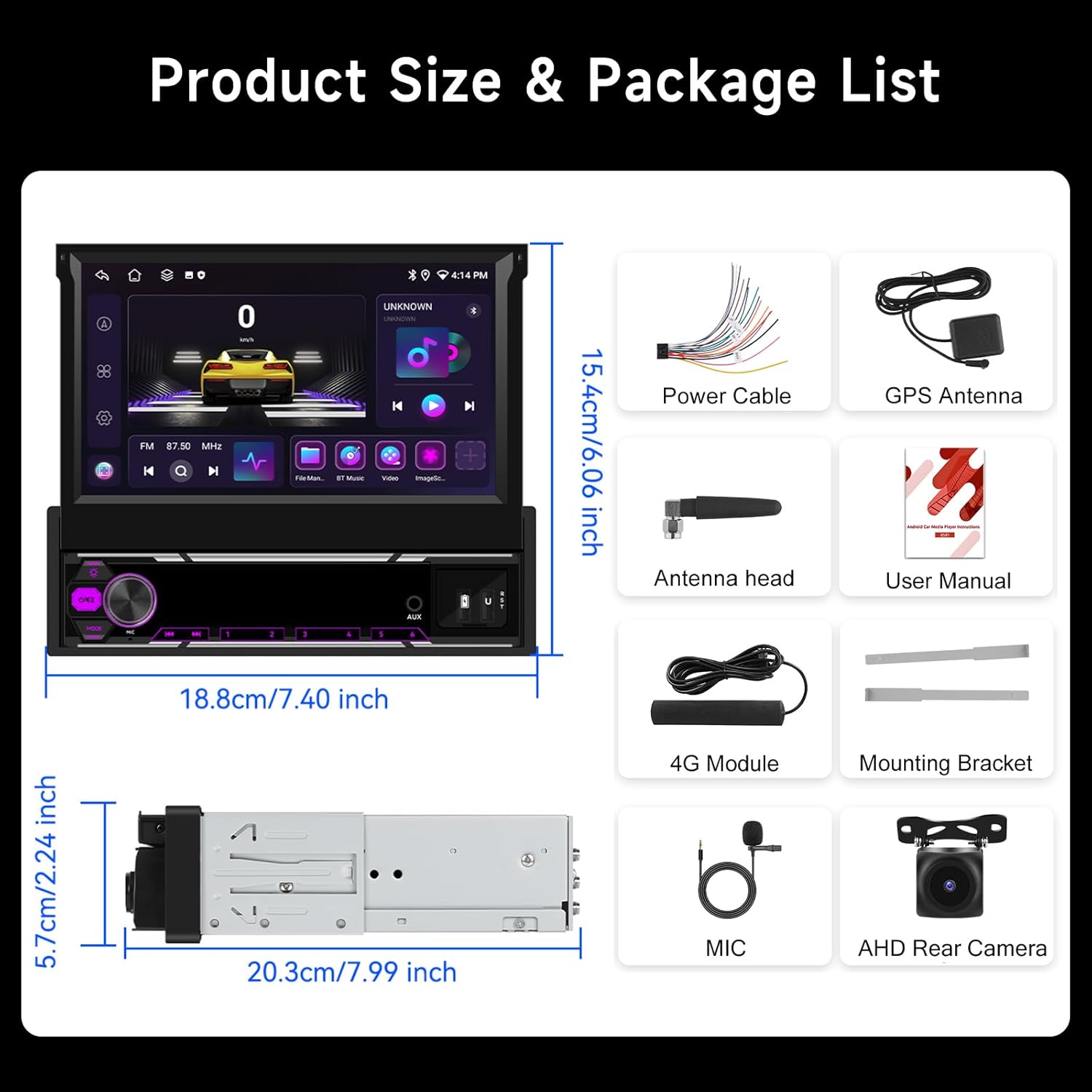
Image: Hodozzy Android 15 Car Stereo dimensions and included accessories.
4. Producte acabatview
The Hodozzy Android 15 Car Stereo is designed to enhance your in-car entertainment and navigation. It features a powerful Android 15 operating system, a responsive 7-inch capacitive touchscreen, and a retractable design for flexible installation in 1-DIN slots.
Característiques principals:
- Sistema operatiu Android 15: Latest operating system for smooth performance.
- Alt rendiment: 6GB RAM + 128GB ROM for fast multitasking and ampl'emmagatzematge.
- 7-inch Retractable Touchscreen: 1024x600 resolution, adjustable for optimal viewing.
- CarPlay sense fil i Android Auto: Seamless smartphone integration.
- Navegació GPS: Supports online and offline maps (GPS/BDS/Glons).
- Built-in WiFi & Bluetooth 5.0: For internet access, hands-free calling, and audio streaming.
- Ràdio FM/AM/RDS: Access to local radio stations with station information.
- DSP Audio Processing: Enhanced sound quality with customizable equalizer settings.
- posteriorview Entrada de la càmera: Automatic display for safer parking.
- Suport al control del volant: Convenient control without taking hands off the wheel.
- Funcionalitat de pantalla dividida: Run two applications simultaneously.

Image: Hodozzy Android 15 Car Stereo main unit.

Image: Android 15 system performance and integrated Wi-Fi/GPS navigation.
5. Configuració
5.1. Instal·lació
The Hodozzy Android 15 Car Stereo is designed for 1-DIN slots. Due to the varying complexity of vehicle wiring, professional installation is strongly recommended.
- Desconnecta la bateria: Abans d'arrencar, desconnecteu el terminal negatiu de la bateria del vehicle per evitar curtcircuits.
- Eliminar la unitat antiga: Traieu amb cura l'estèreo del cotxe existent del tauler de control.
- Connecteu l'arnès de cablejat: Connect the provided power cable harness to the corresponding wires of your vehicle. Ensure correct connections for power (ACC, B+, GND), speaker outputs, and other auxiliary wires (e.g., reverse trigger, steering wheel control).
- Connecteu les antenes: Connect the GPS antenna, WiFi antenna, and 4G module (if applicable) to their respective ports on the main unit. Position the GPS antenna in a location with a clear view del cel.
- Connect Rearview Càmera: Si instal·leu la part posteriorview camera, connect its video cable to the 'CAM IN' port and its power cable to the reverse light circuit.
- Connecta el micròfon: Plug in the external microphone for improved call quality.
- Mount Unit: Slide the main unit into the 1-DIN slot and secure it using the provided mounting brackets.
- Torneu a connectar la bateria: Torneu a connectar el terminal negatiu de la bateria del vehicle.
5.2. Engegada inicial
After installation, turn on your vehicle's ignition. The stereo should power on automatically. Follow any on-screen prompts for initial setup, such as language selection and time zone.
6. Instruccions de funcionament
6.1. Screen Operation and Adjustment
The 7-inch touchscreen is capacitive and supports multi-touch gestures. The screen is manually retractable and adjustable for angle.
- Retract/Extend Screen: Gently push or pull the screen to retract or extend it from the main unit.
- Ajust d'angle: Tilt the screen up or down to achieve the best viewangle de ing.
- Gestos tàctils: Use standard Android touch gestures (tap, swipe, pinch-to-zoom) to navigate the interface.
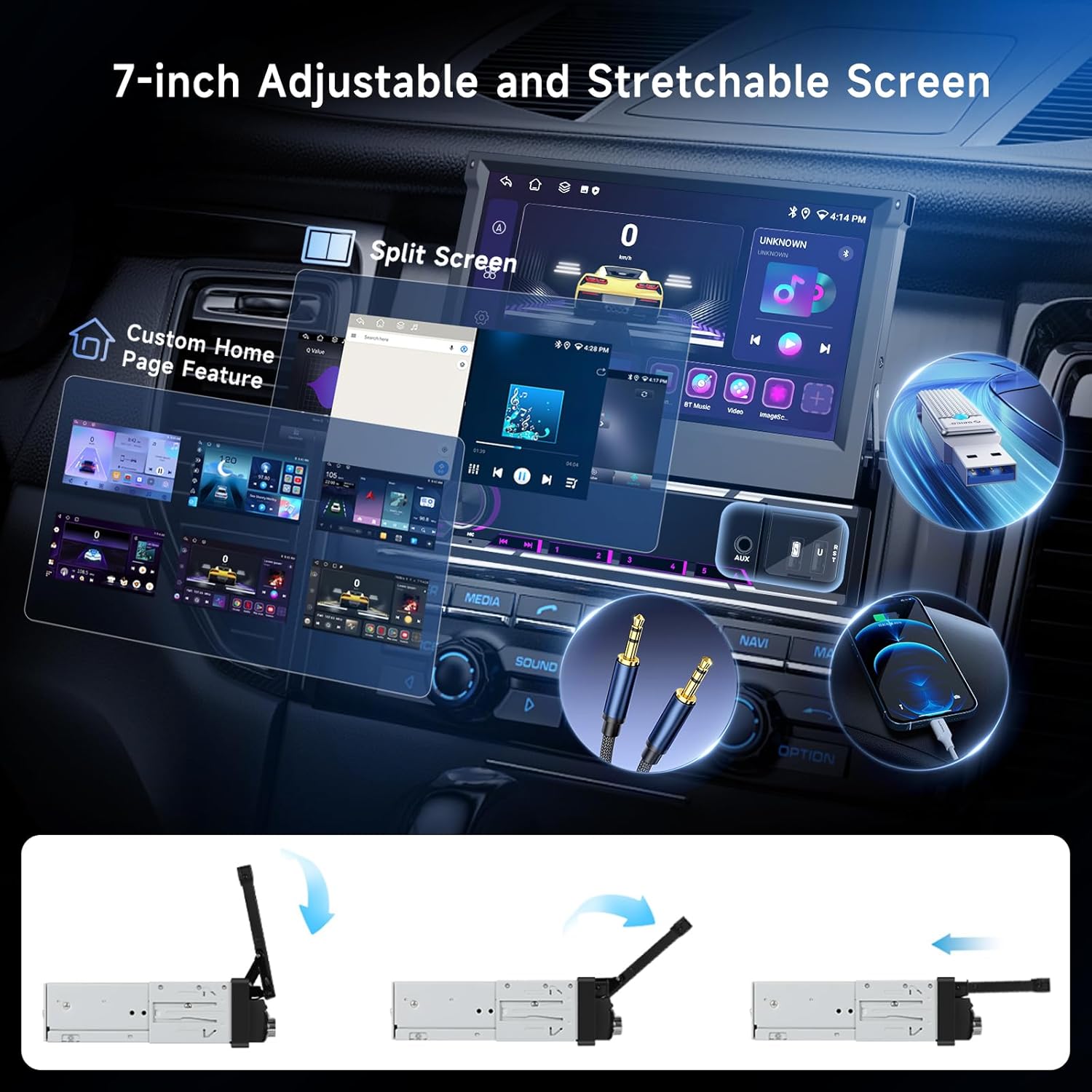
Image: Retractable screen mechanism and interface features.
6.2. CarPlay sense fil i Android Auto
Connect your iPhone or Android smartphone wirelessly for seamless access to navigation, music, calls, and messages.
- Activa Bluetooth i Wi-Fi: Al teu telèfon intel·ligent, assegura't que el Bluetooth i el Wi-Fi estiguin activats.
- Parella el dispositiu: On the car stereo, go to the Bluetooth settings and pair with your smartphone.
- Launch CarPlay/Android Auto: Once paired, the system should prompt you to launch CarPlay or Android Auto. Follow the on-screen instructions on both the stereo and your phone.

Image: Wireless CarPlay, Android Auto, and MirrorLink connection methods.
6.3. Navegació GPS
The unit supports GPS/BDS/Glons navigation with pre-installed offline maps. Online navigation is also available via Wi-Fi.
- Mapes fora de línia: The unit comes with pre-loaded offline maps. For updates or new regions, connect to Wi-Fi and download maps through the navigation app.
- Mapes en línia: Connect the unit to a Wi-Fi hotspot (e.g., from your smartphone) to use online navigation apps like Google Maps, Waze, etc.
- Guia de veu: Enable voice guidance in the navigation app settings for turn-by-turn directions.
6.4. Bluetooth 5.0
Bluetooth 5.0 provides stable connections for hands-free calling and high-quality audio streaming.
- Maridatge: Go to the Bluetooth menu on the stereo, enable Bluetooth, and search for available devices. Select your phone from the list and confirm the pairing code.
- Trucades mans lliures: Once paired, you can make and receive calls directly from the stereo screen. Use the external microphone for clear communication.
- Transmissió d'àudio: Play music from your smartphone via Bluetooth. Control playback (play/pause, skip tracks) from the stereo.

Image: DSP audio settings, FM/AM/RDS radio, and Bluetooth functions.
6.5. FM/AM/RDS Radio
Accedeix a les emissores de ràdio locals amb una recepció clara i informació RDS (Radio Data System).
- Escaneig automàtic: In the Radio app, select 'Auto Scan' to automatically search and save available stations.
- Sintonització manual: Manually tune to specific frequencies using the on-screen controls.
- Presets: Save your favorite stations to preset buttons for quick access.
- RDS: When available, RDS will display station names, program types, and traffic information.
6.6. Configuració d'àudio DSP
The built-in DSP (Digital Sound Processor) allows for advanced audio customization.
- Equalitzador: Adjust frequency bands to tailor the sound to your preference. Choose from preset EQ modes or create custom settings.
- Balanç/Fader: Adjust the sound distribution between front/rear and left/right speakers.
- Loudness/Bass Boost: Enhance low frequencies for a richer sound.
6.7. Reproducció multimèdia USB
Connect USB drives to play audio and video files.
- Connectar USB: Insert a USB flash drive into one of the USB ports.
- Accés Files: Obre el 'File Manager' or 'Music/Video Player' app to browse and play media files.
- Formats admesos: The unit supports various audio (APE/FLAC/WAV/MP3/WMA) and video (MKV/RMVB/AVI/MP4/MDV) formats.
6.8. Darreraview Càmera
When the vehicle is shifted into reverse gear, the stereo automatically displays the rearview alimentació de la càmera.
- Visualització automàtica: The screen will switch to the camera view quan s'enganxa la marxa enrere.
- Pautes d'aparcament: Dynamic parking guidelines may be displayed (if supported by the camera).

Imatge: Part posteriorview camera display and steering wheel control functions.
6.9. Comandaments del volant
The unit supports connection to your vehicle's steering wheel controls for convenient operation.
- Configuració: Access the 'Steering Wheel Control' settings in the system menu. Follow the on-screen instructions to program each button (e.g., volume up/down, track skip, answer/hang up calls).
6.10. Split Screen & Customization
Enhance multitasking and personalize your user interface.
- Pantalla dividida: Long-press an app icon or use the recent apps button to activate split-screen mode, allowing two apps to run side-by-side.
- Home Page Customization: Drag and drop app icons, add widgets, and change wallpapers to personalize your home screen layout.
7. Manteniment
- Neteja de pantalla: Feu servir un drap suau i sense borrissol per netejar la pantalla tàctil. Per a taques difícils, fregueu lleugeramentampNetegeu el drap amb aigua o un netejador de pantalles. No ruixeu el netejador directament sobre la pantalla.
- Actualitzacions de programari: Periodically check for system software updates via the 'Settings' menu. Connecting to Wi-Fi is required for downloads. Updates can improve performance and add new features.
- Atenció general: Avoid placing heavy objects on the unit or exposing it to direct sunlight for extended periods when parked.
8. Solució De Problemes
Consulteu la taula següent per veure els problemes habituals i les seves solucions.
| Problema | Causa possible | Solució |
|---|---|---|
| La unitat no s'encén | Incorrect wiring; Blown fuse; Vehicle battery low | Check power connections (ACC, B+, GND); Inspect vehicle fuses; Check car battery voltage. |
| Sense so | Speaker wires disconnected; Volume too low; Mute activated; DSP settings incorrect | Verify speaker wiring; Increase volume; Check mute status; Reset DSP settings. |
| Senyal GPS perdut o inexacte | GPS antenna obstructed or disconnected; Outdated maps | Assegureu-vos que l'antena GPS tingui una visió clara view of the sky and is securely connected; Update offline maps via Wi-Fi. |
| Connexió Bluetooth inestable | Interference; Device too far; Phone Bluetooth issue | Move phone closer; Restart phone's Bluetooth; Re-pair the device. |
| posteriorview la càmera no mostra | Camera wiring incorrect; Reverse trigger not connected | Check camera video and power connections; Ensure reverse trigger wire is correctly connected to the vehicle's reverse light circuit. |
| La pantalla tàctil no respon | System freeze; Screen calibration issue | Restart the unit (press and hold power button); If issue persists, perform a factory reset (data will be lost). |
9. Especificacions
Detailed technical specifications for the Hodozzy Android 15 Car Stereo:
| Característica | Especificació |
|---|---|
| Model | 6G+128G |
| Sistema operatiu | Android 15.0 |
| Processador | 8581 (8-core, 1.6 GHz) |
| RAM | 6 GB |
| ROM | 128 GB |
| Mida de la pantalla | 7 polzades |
| Resolució de pantalla | 1024 x 600 |
| Material de pantalla | Pantalla tàctil capacitiva |
| Potència de sortida | 4 x 50W |
| Xip de ràdio | SI4755 (FM/AM/RDS) |
| Xip DSP | AK7604 |
| Versió Bluetooth | 5.0 |
| Versió USB | 2.0 |
| Vol. Operatiutage | 9 V - 16 V |
| Temperatura de funcionament | -40 °C a +85 °C |
| Navigation Support | GPS/BDS/Glons (Offline maps built-in, requires network download for updates) |
| posteriorview Entrada de càmera | CVBS/AHD/360 Panorama (Optional) |
| Formats d'àudio compatibles | APE/FLAC/WAV/MP3/WMA, etc. |
| Formats de vídeo compatibles | MKV/RMVB/AVI/MP4/MDV, etc. |
| Formats d'imatge compatibles | PNG/JPEG/JPG/GIF/WBMP/BNP, etc. |
| Idiomes | Multi-language support (e.g., English, French, German, Spanish, Italian) |
| Pes de l'article | 1.83 quilos |
| Dimensions del paquet | 26.9 x 24.4 x 9.7 cm |
10. Suport
For further assistance, technical support, or warranty inquiries, please contact Hodozzy customer service through the platform where you purchased the product. Please have your model number (6G+128G) and purchase details ready when contacting support.
